
1. ഉൽപ്പന്നം കഴിഞ്ഞുview
The ANYSECU TYT MD-UV390 Plus is an upgraded version of the TYT MD-390, offering dual-band VHF/UHF operation with digital (DMR) and analog modes. It features a robust IP67 waterproof and dustproof rating, 5W/1W output power, and supports 1000 channels. This radio is equipped with AES256 encryption for secure communications.
പ്രധാന സവിശേഷതകൾ:
- FCC ID: POD-MDUV390
- Dual Band VHF/UHF Operation
- IP67 Waterproof and Dustproof Rating
- Digital/Analog Dual Mode
- 5W/1W Output Power
- 1000 ചാനലുകൾ
- AES256 എൻക്രിപ്ഷൻ
- ട്രാൻസ്മിറ്റ് തടസ്സം
- Group Call Match (Promiscuous)
- Private Call Match (Promiscuous)
- Dual Band, Dual Wait, Dual Standby

Image: TYT MD-UV390 Plus radio highlighting its AES256 encryption capabilities.

Image: TYT MD-UV390 Plus radio partially submerged in water, demonstrating its IP67 waterproof rating.
2. പാക്കേജ് ഉള്ളടക്കം
താഴെ ലിസ്റ്റ് ചെയ്തിരിക്കുന്ന എല്ലാ ഇനങ്ങളും നിങ്ങളുടെ പാക്കേജിൽ ഉൾപ്പെടുത്തിയിട്ടുണ്ടെന്ന് ഉറപ്പാക്കുക. ഏതെങ്കിലും ഇനങ്ങൾ നഷ്ടപ്പെട്ടിട്ടുണ്ടെങ്കിലോ കേടായിട്ടുണ്ടെങ്കിലോ, ദയവായി നിങ്ങളുടെ വിൽപ്പനക്കാരനെ ബന്ധപ്പെടുക.
- TYT MD-UV390 Plus Radio Body
- 7.4 V 2000mAh Li-ion Battery Pack
- ആൻ്റിന
- ഡെസ്ക്ടോപ്പ് ചാർജർ
- അഡാപ്റ്റർ
- ചാർജർ കേബിൾ
- ബെൽറ്റ് ക്ലിപ്പ്
- ഉപയോക്തൃ മാനുവൽ

Image: All included accessories for the TYT MD-UV390 Plus radio.
3. സജ്ജീകരണം
3.1 ഘടകം തിരിച്ചറിയൽ
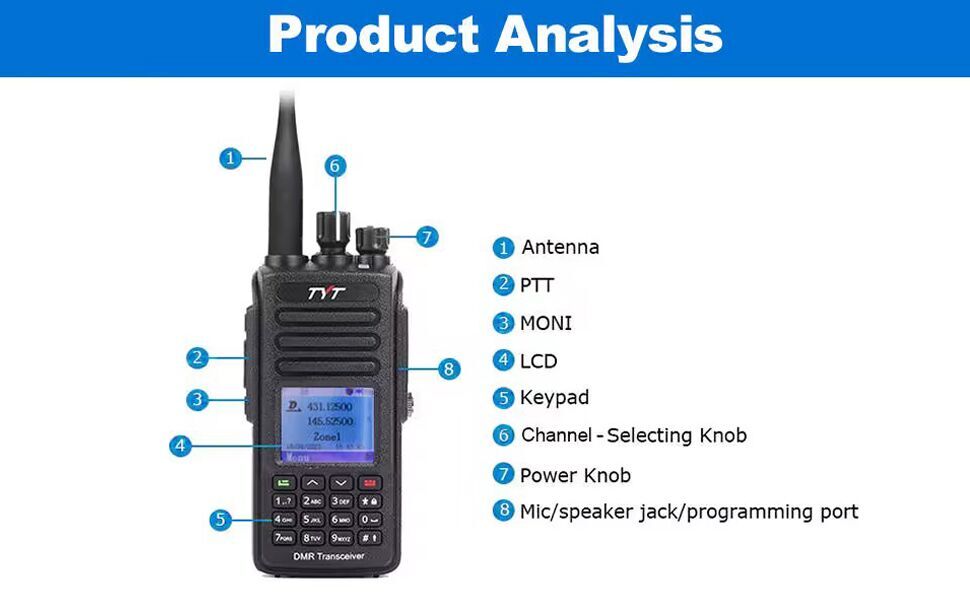
Image: Diagram showing the main components of the TYT MD-UV390 Plus radio.
- ആൻ്റിന
- PTT (പുഷ്-ടു-ടോക്ക്) ബട്ടൺ
- MONI (Monitor) Button
- എൽസിഡി ഡിസ്പ്ലേ
- കീപാഡ്
- Channel-Selecting Knob
- പവർ/വോളിയം നോബ്
- Mic/Speaker Jack / Programming Port
3.2 ബാറ്ററി ഇൻസ്റ്റാളേഷൻ
To install the battery, align the battery pack with the grooves on the back of the radio and slide it upwards until it clicks into place. Ensure the battery release latch is securely engaged. To remove, press the battery release latch and slide the battery downwards.
3.3 ആന്റിന അറ്റാച്ച്മെന്റ്
റേഡിയോയുടെ മുകളിലുള്ള കണക്ടറിലേക്ക് ആന്റിന ഘടികാരദിശയിൽ സ്ക്രൂ ചെയ്ത് വിരൽ കൊണ്ട് മുറുക്കുന്നത് വരെ സ്ക്രൂ ചെയ്യുക. അധികം മുറുക്കരുത്.
3.4 ബാറ്ററി ചാർജ് ചെയ്യുന്നു
Place the radio with the battery installed into the desktop charger. Connect the adapter to the desktop charger and plug it into a power outlet. The charging indicator light on the charger will show the charging status. A full charge typically takes several hours.
4. പ്രവർത്തന നിർദ്ദേശങ്ങൾ
4.1 പവർ ഓൺ/ഓഫ്, വോളിയം ക്രമീകരണം
Rotate the Power/Volume knob (7) clockwise to power on the radio. Continue rotating clockwise to increase the volume. Rotate counter-clockwise to decrease the volume and power off the radio.
4.2 ചാനൽ തിരഞ്ഞെടുക്കൽ
Use the Channel-Selecting knob (6) to cycle through programmed channels. Alternatively, use the keypad (5) to directly input a channel number or navigate through the menu to select a channel.
4.3 Making a Call (PTT)
To transmit, press and hold the PTT (Push-to-Talk) button (2) on the side of the radio. Speak clearly into the microphone. Release the PTT button to receive.
4.4 മെനു നാവിഗേഷൻ
Use the navigation buttons on the keypad to access and scroll through the radio's menu options. The LCD display (4) will show the current menu. Press the 'Confirm' button (usually the green button) to select an option and 'Back' (usually the red button) to return to the previous screen or exit the menu.
4.5 ഡിജിറ്റൽ, അനലോഗ് മോഡുകൾ
The MD-UV390 Plus supports both digital (DMR) and analog communication modes. The radio will automatically detect the mode based on the channel settings. Ensure your channels are programmed correctly for the desired mode of operation.
Video: This video demonstrates the unboxing and basic operational features of the TYT MD-UV390 Plus DMR radio, including powering on, navigating menus, and adjusting channels.
5. പരിപാലനം
5.1 വൃത്തിയാക്കൽ
റേഡിയോയുടെ പുറംഭാഗം പതിവായി മൃദുവായ, ഡി-ക്ലാസ് ഉപയോഗിച്ച് വൃത്തിയാക്കുക.amp cloth. Do not use harsh chemicals or abrasive cleaners. Ensure all ports are dry before use, especially after exposure to water.
5.2 ബാറ്ററി കെയർ
To prolong battery life, avoid overcharging or completely discharging the Li-ion battery. Store the battery in a cool, dry place when not in use. If the radio will not be used for an extended period, remove the battery.
5.3 Water and Dust Protection (IP67)
The MD-UV390 Plus is rated IP67, meaning it is protected against dust ingress and can withstand immersion in water up to 1 meter for 30 minutes. Ensure all port covers are securely closed before exposing the radio to water or dusty environments. Do not intentionally submerge the radio beyond its rated limits.
6. പ്രശ്നപരിഹാരം
6.1 Radio Does Not Power On
- ബാറ്ററി ശരിയായി ഇൻസ്റ്റാൾ ചെയ്തിട്ടുണ്ടോ എന്നും പൂർണ്ണമായും ചാർജ്ജ് ചെയ്തിട്ടുണ്ടോ എന്നും പരിശോധിക്കുക.
- Ensure the Power/Volume knob is rotated clockwise past the 'off' position.
- Verify the battery contacts are clean and free of debris.
6.2 ട്രാൻസ്മിറ്റ് ചെയ്യാനോ സ്വീകരിക്കാനോ കഴിയില്ല
- ആന്റിന സുരക്ഷിതമായി ഘടിപ്പിച്ചിട്ടുണ്ടെന്ന് ഉറപ്പാക്കുക.
- Check if the radio is on the correct channel and frequency.
- Ensure the volume is adjusted to an audible level.
- Verify that the radio is not in a restricted mode or has a low battery.
- For digital mode, ensure correct contact and talk group settings.
6.3 മോശം ഓഡിയോ നിലവാരം
- വോളിയം ക്രമീകരിക്കുക.
- മൈക്രോഫോണിനും സ്പീക്കറിനും ചുറ്റുമുള്ള തടസ്സങ്ങൾ പരിശോധിക്കുക.
- നിങ്ങൾ മറ്റേ റേഡിയോയുടെയോ റിപ്പീറ്ററിന്റെയോ പരിധിയിലാണെന്ന് ഉറപ്പാക്കുക.
- Verify the antenna connection.
7 സ്പെസിഫിക്കേഷനുകൾ
| മോഡൽ നമ്പർ | MD-UV390-5W |
| FCC ഐഡി | POD-MDUV390 |
| ഔട്ട്പുട്ട് പവർ | 5W / 1W |
| ജല പ്രതിരോധ നില | IP67 (ജലപ്രൂഫ്) |
| ചാനലുകളുടെ എണ്ണം | 1000 |
| ഫ്രീക്വൻസി റേഞ്ച് | UHF VHF Dual band |
| ബാറ്ററി | 7.4 V 2000mAh Li-ion Battery Pack |
| ഇനത്തിൻ്റെ ഭാരം | 1.57 പൗണ്ട് |
| പാക്കേജ് അളവുകൾ | 9.65 x 6.97 x 4.25 ഇഞ്ച് |
| പ്രത്യേക ഫീച്ചർ | അലേർട്ട് വിളിക്കുക |
| അനുയോജ്യമായ ഉപകരണങ്ങൾ | Other two-way radios using Motorola's digital mobile radio standards, two-way radios operating on UHF/VHF bands. |
8. വാറൻ്റി വിവരങ്ങൾ
The ANYSECU TYT MD-UV390 Plus radio body is covered by a 1 വർഷത്തെ വാറൻ്റി from the date of purchase. This warranty covers manufacturing defects under normal use. Please retain your proof of purchase for warranty claims. The warranty does not cover damage caused by misuse, accidents, unauthorized modifications, or normal wear and tear.
9. പിന്തുണ
For technical assistance, troubleshooting beyond this manual, or warranty inquiries, please contact your authorized ANYSECU dealer or the manufacturer's customer support. Refer to the contact information provided with your purchase documentation or on the official ANYSECU webസൈറ്റ്.