
1. ആമുഖം
Thank you for choosing the Inwa MZ-622 Outdoor Bluetooth Speakers. This active and passive speaker system delivers 400W peak power for a loud stereo sound experience, suitable for both indoor and outdoor environments. Featuring Bluetooth 5.2 connectivity and an auxiliary input, these speakers offer versatile audio streaming options. Their weatherproof design ensures durability against splashes and light rain, making them ideal for patios, porches, gazebos, and garages. This manual provides detailed instructions for setup, operation, and maintenance to ensure optimal performance and longevity of your speaker system.

ചിത്രം: കഴിഞ്ഞുview of Inwa 400W Outdoor Bluetooth Speakers highlighting key features like Bluetooth 5.2, AUX input, weatherproofing, stereo system, and remote control.
2. ബോക്സിൽ എന്താണുള്ളത്?
എല്ലാ ഇനങ്ങളും ഉണ്ടെന്ന് ഉറപ്പാക്കാൻ പാക്കേജ് ഉള്ളടക്കങ്ങൾ പരിശോധിക്കുക:
- 1 x ആക്ടീവ് സ്പീക്കർ
- 1 x Passive Speaker
- 1 x 12V DC പവർ അഡാപ്റ്റർ
- 1 x റിമോട്ട് കൺട്രോൾ
- 1 x RCA Cable (5m)
- 1 x 3.5mm Auxiliary Input Cable
- Mounting Accessories (4 x Expansion screws, 4 x Fastener screws)
- 1 x ഉപയോക്തൃ മാനുവൽ
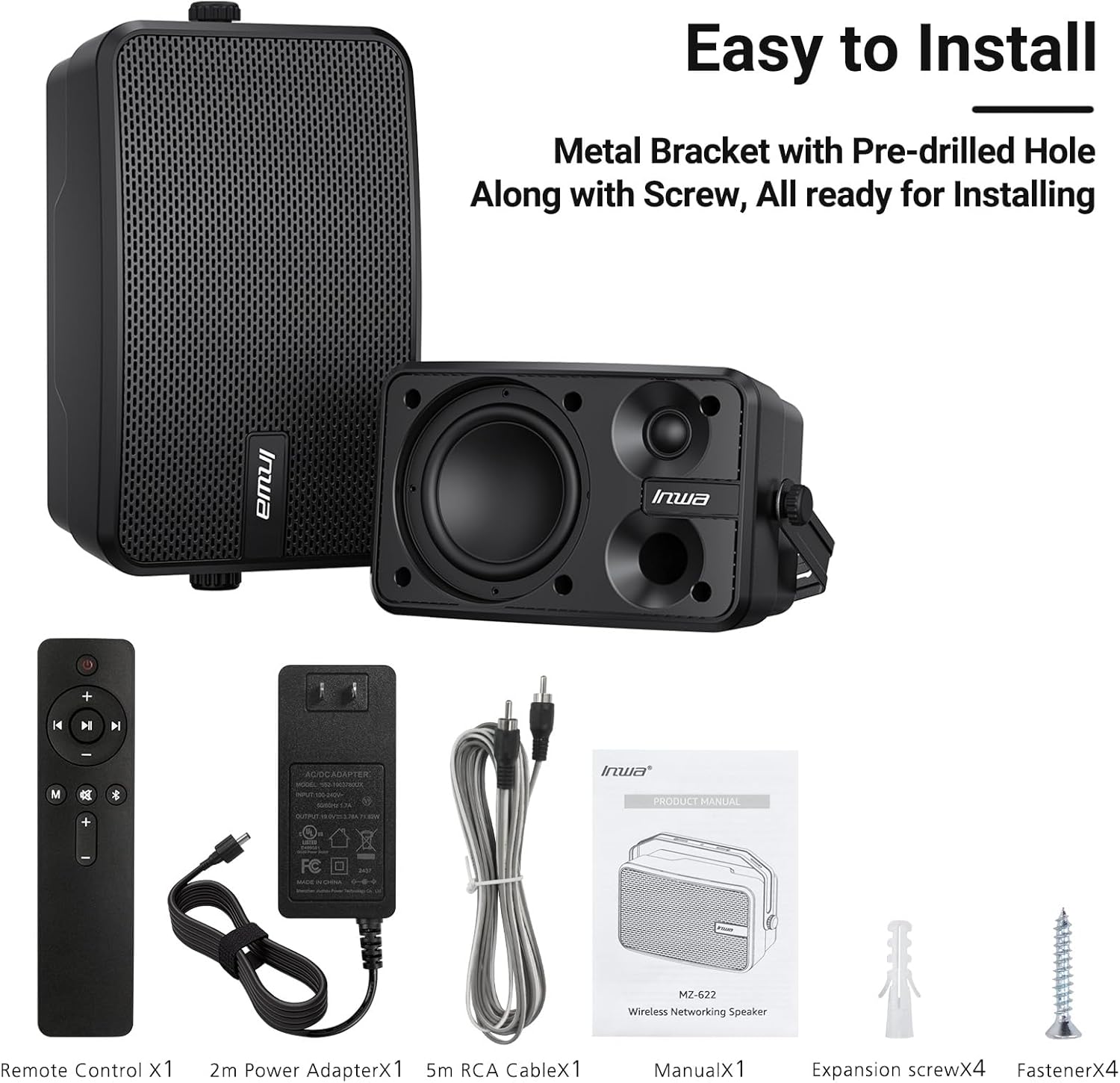
Image: All included components of the Inwa MZ-622 speaker system.
3. സജ്ജീകരണ നിർദ്ദേശങ്ങൾ
3.1 സ്പീക്കറുകൾ ബന്ധിപ്പിക്കുന്നു
The Inwa MZ-622 system consists of one active speaker and one passive speaker. The active speaker contains the amplifier and controls, while the passive speaker connects to the active speaker.
- നിഷ്ക്രിയ സ്പീക്കർ ബന്ധിപ്പിക്കുക: Use the provided RCA cable to connect the passive speaker to the active speaker. Ensure a secure connection.
- പവർ ബന്ധിപ്പിക്കുക: Plug the 12V DC power adapter into the active speaker's power input, then plug the adapter into a power outlet.
- പവർ ഓൺ: After connecting the power, the active speaker will automatically power on and enter Bluetooth mode, indicated by a flashing blue light.

ചിത്രം: വിശദമായത് view of the rear connections for the active and passive speakers.
3.2 ഓഡിയോ സോഴ്സ് കണക്ഷൻ
The speakers support both Bluetooth wireless streaming and wired auxiliary input.
3.2.1 ബ്ലൂടൂത്ത് കണക്ഷൻ
- Ensure the active speaker is powered on and the blue indicator light is flashing, indicating Bluetooth pairing mode.
- On your smartphone, tablet, or PC, enable Bluetooth and search for available devices.
- Select "Inwa MZ-622" (or similar name) from the list to pair. Once paired, the blue light will become solid.

Image: Illustration of Bluetooth 5.2 connectivity with a mobile device.
3.2.2 Auxiliary (AUX) Input Connection
- Connect one end of the provided 3.5mm auxiliary input cable to your external device (e.g., mobile phone, laptop, TV).
- Connect the other end of the 3.5mm auxiliary input cable to the AUX IN port on the active speaker.
- Press the 'M' button on the remote control to switch to AUX input mode. The indicator light on the active speaker will turn red.

Image: Connection diagram for AUX input with various devices.
3.3 Video Guide: Connection Method for MZ-622 Active + Passive Speakers
Video: A step-by-step guide demonstrating how to connect the active and passive Inwa MZ-622 speakers, including power and audio cables.
4. പ്രവർത്തന നിർദ്ദേശങ്ങൾ
The Inwa MZ-622 speakers can be easily operated using the included remote control. The remote control primarily functions with the active speaker.
4.1 വിദൂര നിയന്ത്രണ പ്രവർത്തനങ്ങൾ
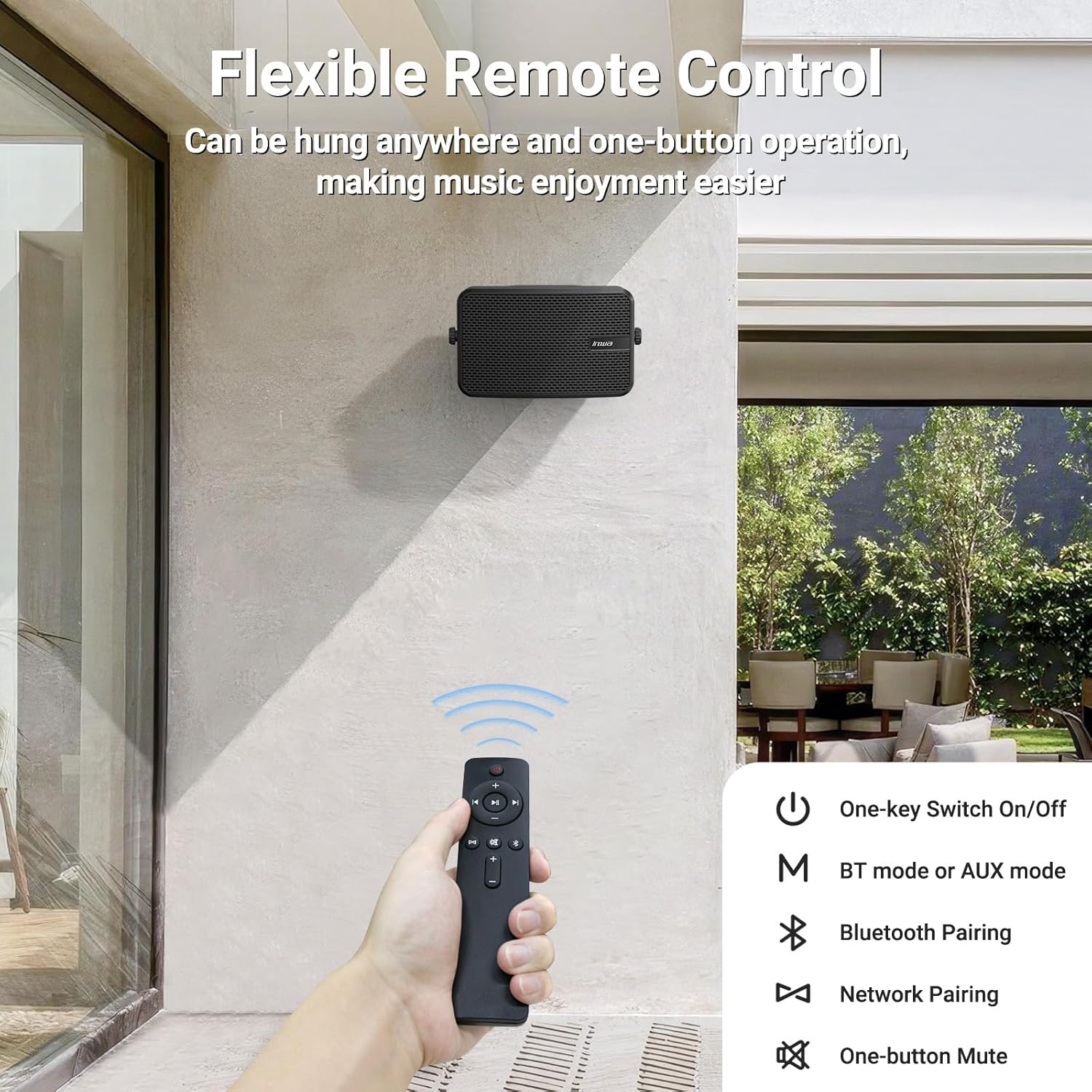
Image: The remote control for the Inwa MZ-622 speakers.
- പവർ ബട്ടൺ (⏻): സ്പീക്കർ സിസ്റ്റം ഓൺ അല്ലെങ്കിൽ ഓഫ് ചെയ്യുന്നു.
- മോഡ് ബട്ടൺ (M): Switches between Bluetooth mode (blue indicator light) and AUX input mode (red indicator light).
- Bluetooth Pairing Button (Ⓘ): ബ്ലൂടൂത്ത് ജോടിയാക്കൽ മോഡ് ആരംഭിക്കുന്നു.
- വോളിയം കൂട്ടുക (+): വോളിയം വർദ്ധിപ്പിക്കുന്നു.
- വോളിയം ഡൗൺ (-): വോളിയം കുറയ്ക്കുന്നു.
- മ്യൂട്ട് ബട്ടൺ (🔇): ഓഡിയോ നിശബ്ദമാക്കുകയോ അൺമ്യൂട്ടുചെയ്യുകയോ ചെയ്യുന്നു.
- Play/Pause Button (⏸): Plays or pauses audio in Bluetooth mode.
- Previous Track (⏮): Skips to the previous track in Bluetooth mode.
- Next Track (⏭): Skips to the next track in Bluetooth mode.
കുറിപ്പ്: In AUX input mode, track control buttons (Play/Pause, Previous, Next) on the remote are disabled as audio control is managed by the connected external device.
5. പ്ലേസ്മെന്റും മൗണ്ടിംഗും
The Inwa MZ-622 speakers are designed for versatile placement, both indoors and outdoors. Their compact size (9.41"W x 6.54"D x 4.61"H) and included mounting accessories make installation straightforward.
5.1 Outdoor Placement Considerations
While the speakers are weatherproof and can withstand splashes and light rain, it is recommended to install them in locations that offer some protection from direct, heavy downpours or prolonged exposure to harsh elements. Ideal locations include:
- Under a patio cover
- On the underside of a porch roof
- Within a gazebo or outdoor bar area
- Inside a garage or small workshop

Image: The weatherproof construction of the Inwa speaker.
5.2 മൗണ്ടിംഗ് നിർദ്ദേശങ്ങൾ
The speakers come with metal brackets and pre-drilled holes for easy wall mounting. Use the provided expansion and fastener screws for secure installation.
- ലൊക്കേഷൻ തിരഞ്ഞെടുക്കുക: Select a suitable mounting location, considering sound dispersion and protection from extreme weather.
- മാർക്ക് ഹോൾസ്: Hold the speaker bracket against the wall and mark the positions for drilling.
- തുളകൾ: Drill pilot holes at the marked positions. Insert expansion screws if necessary for added stability.
- സുരക്ഷിത ബ്രാക്കറ്റ്: Attach the speaker bracket to the wall using the fastener screws.
- സ്പീക്കർ അറ്റാച്ചുചെയ്യുക: Mount the speaker onto the secured bracket. Adjust the angle as desired for optimal sound direction.

ചിത്രം: ഉദാample of outdoor wall mounting.
6 സ്പെസിഫിക്കേഷനുകൾ
| ഫീച്ചർ | വിശദാംശങ്ങൾ |
|---|---|
| മോഡലിൻ്റെ പേര് | MZ-622 |
| സ്പീക്കർ തരം | ഔട്ട്ഡോർ |
| സ്പീക്കർ പരമാവധി ഔട്ട്പുട്ട് പവർ | 400 വാട്ട്സ് |
| കണക്റ്റിവിറ്റി ടെക്നോളജി | ഓക്സിലറി, ബ്ലൂടൂത്ത് |
| വയർലെസ് കമ്മ്യൂണിക്കേഷൻ ടെക്നോളജി | ബ്ലൂടൂത്ത് |
| ബ്ലൂടൂത്ത് പതിപ്പ് | 5.2 |
| ഓഡിയോ put ട്ട്പുട്ട് മോഡ് | സ്റ്റീരിയോ |
| സറൗണ്ട് സൗണ്ട് ചാനൽ കോൺഫിഗറേഷൻ | 2.0 |
| വൂഫർ വ്യാസം | 4 ഇഞ്ച് |
| ട്വീറ്റർ വലുപ്പം | 1 ഇഞ്ച് |
| മെറ്റീരിയൽ | അക്രിലോണിട്രൈൽ ബ്യൂട്ടാഡീൻ സ്റ്റൈറൈൻ (എബിഎസ്) |
| വാട്ടർപ്രൂഫ് ആണ് | സത്യം |
| ഉൽപ്പന്ന അളവുകൾ | 6.54"D x 9.41"W x 4.61"H |
| ഇനത്തിൻ്റെ ഭാരം | 7.78 പൗണ്ട് |
| പവർ ഉറവിടം | കോർഡഡ് ഇലക്ട്രിക് |
| നിയന്ത്രണ രീതി | റിമോട്ട് |
7. പരിപാലനം
To ensure the longevity and optimal performance of your Inwa MZ-622 speakers, follow these maintenance guidelines:
- വൃത്തിയാക്കൽ: Wipe the speaker enclosures with a soft, damp cloth. Avoid using harsh chemicals or abrasive cleaners, as these can damage the ABS material and mesh grille.
- കാലാവസ്ഥ സംരക്ഷണം: Although weatherproof, it is advisable to protect the speakers from extreme weather conditions such as heavy storms, prolonged direct sunlight, or freezing temperatures when not in use for extended periods.
- കേബിൾ മാനേജുമെന്റ്: Ensure all cables are securely connected and not under strain. Periodically check cables for any signs of wear or damage.
- സംഭരണം: If storing the speakers for a long time, disconnect them from power, clean them, and store them in a cool, dry place.
8. പ്രശ്നപരിഹാരം
If you encounter issues with your Inwa MZ-622 speakers, refer to the following common problems and solutions:
| പ്രശ്നം | സാധ്യമായ കാരണം | പരിഹാരം |
|---|---|---|
| No power/Speaker not turning on | പവർ അഡാപ്റ്റർ ബന്ധിപ്പിച്ചിട്ടില്ല അല്ലെങ്കിൽ തകരാറുണ്ട്. | Ensure the 12V DC power adapter is securely connected to the active speaker and a working power outlet. Test the outlet with another device. |
| സ്പീക്കറുകളിൽ നിന്ന് ശബ്ദമില്ല | Volume too low; incorrect input mode; cables loose; device not playing audio. | Increase volume on both the speaker and the connected device. Press the 'M' button on the remote to cycle through modes (Bluetooth/AUX) until the correct mode is selected. Check all audio cables (RCA, AUX) for secure connections. Ensure your audio source is playing. |
| ബ്ലൂടൂത്ത് ജോടിയാക്കുന്നില്ല | Speaker not in pairing mode; device Bluetooth off; interference. | Ensure the active speaker's blue indicator light is flashing. Turn Bluetooth off and on again on your device. Move closer to the speaker. Disconnect other Bluetooth devices from your source. |
| റിമോട്ട് കൺട്രോൾ പ്രവർത്തിക്കുന്നില്ല | Battery low/dead; remote out of range; line of sight blocked. | Replace the remote control battery. Ensure you are within range and have a clear line of sight to the active speaker. |
| വികലമായ ഓഡിയോ | Volume too high; poor audio source quality; damaged cables. | Reduce the volume on both the speaker and the audio source. Test with a different audio source or cable. |
9. വാറൻ്റിയും പിന്തുണയും
The Inwa MZ-622 speakers come with a limited warranty. For specific warranty terms and conditions, please refer to the warranty information provided with your purchase or contact Inwa customer support.
For technical assistance, troubleshooting, or any other inquiries, please visit the official Inwa website or contact their customer service department. Contact details can typically be found in the product packaging or on the manufacturer's webസൈറ്റ്.