
ആമുഖം
This manual provides detailed instructions for the installation, operation, and maintenance of your Carro 44-inch S_White Smart Ceiling Fan. This fan features a 44-inch blade sweep with three white plywood blades, a flush-mounted white motor case, and an integrated dimmable LED light kit. Control options include a remote, mobile app, and voice commands via Amazon Alexa, Google Assistant, and Siri Shortcuts. Please read this manual thoroughly before installation and use to ensure safe and efficient operation.
സുരക്ഷാ വിവരങ്ങൾ
മുന്നറിയിപ്പ്: തീപിടുത്തം, വൈദ്യുതാഘാതം അല്ലെങ്കിൽ വ്യക്തിപരമായ പരിക്കുകൾ എന്നിവ കുറയ്ക്കുന്നതിന്, എല്ലായ്പ്പോഴും ഈ അടിസ്ഥാന മുൻകരുതലുകൾ പാലിക്കുക:
- Read all instructions before installing and using the fan.
- Ensure the installation site can support the fan's weight (minimum 35 lbs / 15.9 kg).
- All wiring must be in accordance with national and local electrical codes. Consult a qualified electrician if you are unfamiliar with wiring.
- Disconnect power at the circuit breaker or fuse box before beginning installation or performing maintenance.
- കേടായ പവർ കോഡോ പ്ലഗോ ഉപയോഗിച്ച് ഫാൻ പ്രവർത്തിപ്പിക്കരുത്.
- ഫാൻ ബ്ലേഡുകളുടെ പാതയിൽ വസ്തുക്കൾ സ്ഥാപിക്കുന്നത് ഒഴിവാക്കുക.
- Do not use the fan near water or in excessively damp പരിസരങ്ങൾ.
- ഈ ഉപകരണം, അവരുടെ സുരക്ഷയ്ക്ക് ഉത്തരവാദിയായ ഒരു വ്യക്തി ഉപകരണത്തിൻ്റെ ഉപയോഗത്തെ സംബന്ധിച്ച മേൽനോട്ടമോ നിർദ്ദേശമോ നൽകിയിട്ടില്ലെങ്കിൽ, ശാരീരികമോ ഇന്ദ്രിയപരമോ മാനസികമോ ആയ കഴിവുകൾ കുറഞ്ഞതോ അനുഭവത്തിൻ്റെയും അറിവിൻ്റെയും അഭാവം ഉള്ള വ്യക്തികൾക്ക് (കുട്ടികൾ ഉൾപ്പെടെ) ഉപയോഗിക്കാൻ ഉദ്ദേശിച്ചുള്ളതല്ല.
പാക്കേജ് ഉള്ളടക്കം
Verify that all components are present before beginning installation. If any parts are missing or damaged, contact Carro customer support.
- Ceiling Fan Motor Assembly (Flush Mount)
- Fan Blades (3x White Plywood)
- എൽഇഡി ലൈറ്റ് കിറ്റ്
- വാൾ മൗണ്ട് ഉപയോഗിച്ച് റിമോട്ട് കൺട്രോൾ
- മൌണ്ടിംഗ് ബ്രാക്കറ്റ്
- ഹാർഡ്വെയർ പായ്ക്ക് (സ്ക്രൂകൾ, വയർ നട്ടുകൾ, വാഷറുകൾ)
- ഉപയോക്തൃ മാനുവൽ
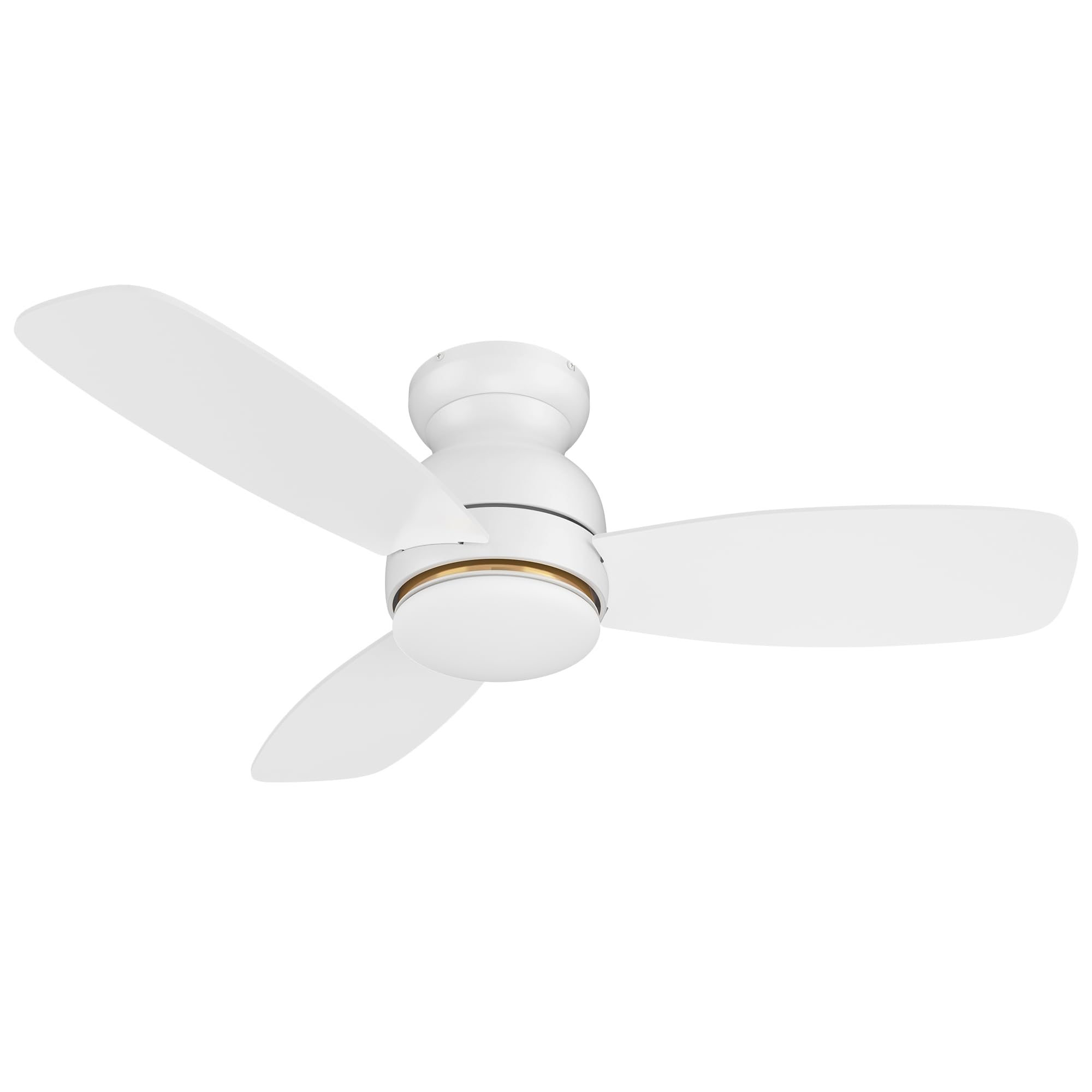
Image: Main components of the Carro 44-inch S_White Smart Ceiling Fan.
സജ്ജീകരണവും ഇൻസ്റ്റാളേഷനും
പ്രധാനപ്പെട്ടത്: Before starting, ensure the power supply is turned off at the circuit breaker.
- മൗണ്ടിംഗ് ബ്രാക്കറ്റ് ഇൻസ്റ്റലേഷൻ: Secure the mounting bracket to the ceiling junction box. Ensure the junction box is rated for ceiling fan support (at least 35 lbs).
- വയറിംഗ്: Connect the fan's electrical wires to the household wiring according to local electrical codes. Typically, this involves connecting live, neutral, and ground wires. Use the provided wire nuts.
- ഫാൻ അസംബ്ലി: Carefully lift the fan motor assembly and attach it to the mounting bracket. Secure all screws.
- ബ്ലേഡ് അറ്റാച്ച്മെൻ്റ്: Attach the three fan blades to the motor housing using the provided screws. Ensure they are securely fastened.
- ലൈറ്റ് കിറ്റ് ഇൻസ്റ്റാളേഷൻ: Connect the LED light kit wires and attach the light kit to the bottom of the fan motor assembly. Secure the light diffuser.
- പവർ ഓൺ: സർക്യൂട്ട് ബ്രേക്കറിൽ വൈദ്യുതി പുനഃസ്ഥാപിക്കുക.
For detailed visual instructions, refer to the installation guide included in your package or visit the Carro support webസൈറ്റ്.
പ്രവർത്തന നിർദ്ദേശങ്ങൾ
നിയന്ത്രണ രീതികൾ
Your Carro Smart Ceiling Fan offers multiple control options:
- റിമോട്ട് കൺട്രോൾ: Use the included remote to power on/off, adjust fan speed, change light settings, and reverse fan direction.
- മൊബൈൽ ആപ്പ്: Download the Carro Home app (or compatible smart home app) to control the fan from your smartphone. This allows for advanced settings like scheduling and grouping.
- ശബ്ദ നിയന്ത്രണം: Integrate with Amazon Alexa, Google Assistant, or Siri Shortcuts for hands-free operation.
ഫാൻ ഓപ്പറേഷൻ
- പവർ ഓൺ/ഓഫ്: Press the power button on the remote or use the app/voice command.
- ഫാൻ വേഗത: The fan features 10 adjustable speeds. Use the speed buttons on the remote or slider in the app to select your desired airflow.

Image: Illustration of the fan operating at different wind speeds.
- Reverse Airflow (Summer/Winter Mode): Change the direction of the fan blades to optimize air circulation for different seasons.
- സമ്മർ മോഡ്: Downward airflow creates a cooling breeze.
- വിന്റർ മോഡ്: മുകളിലേക്കുള്ള വായുപ്രവാഹം സീലിംഗിന് സമീപം കുടുങ്ങിക്കിടക്കുന്ന ചൂടുള്ള വായുവിനെ പ്രസരിപ്പിക്കുന്നു.

Image: Visual representation of summer and winter fan modes.
ലൈറ്റ് ഓപ്പറേഷൻ
- ലൈറ്റ് ഓൺ/ഓഫ്: Control the integrated LED light independently from the fan.
- മങ്ങിയ വെളിച്ചം: Adjust the light brightness from 1% to 100% using the remote or app.
- വർണ്ണ താപനില ക്രമീകരണം: Cycle through different color temperatures:
- കൂൾ ലൈറ്റ് (4000K): Bright white light.
- വാം ലൈറ്റ് (2700K): Soft, yellowish light.
- പ്രകൃതിദത്ത വെളിച്ചം (3000K): A balanced combination.

Image: Different color temperature settings for the LED light.
സ്മാർട്ട് സവിശേഷതകൾ
- ആപ്പ് നിയന്ത്രണം: The mobile app allows for comprehensive control, even when WiFi signal is lost for basic functions.

Image: Remote control and smartphone app for fan operation.
- വോയ്സ് കൺട്രോൾ ഇന്റഗ്രേഷൻ: Connect your fan to Amazon Alexa, Google Assistant, or Siri Shortcuts for voice commands. Example: "Alexa, set the white ceiling fan in bedroom to speed 6, set yellow light to 75%, set white light to 65%."

Image: Voice control compatibility with smart home assistants.
- ടൈമറുകളും ഷെഡ്യൂളുകളും: Use the app to set automatic on/off times and create custom schedules for different rooms.

ചിത്രം: ഉദാample of scheduling functions within the mobile application.
മെയിൻ്റനൻസ്
പതിവ് അറ്റകുറ്റപ്പണികൾ മികച്ച പ്രകടനം ഉറപ്പാക്കുകയും നിങ്ങളുടെ സീലിംഗ് ഫാനിന്റെ ആയുസ്സ് വർദ്ധിപ്പിക്കുകയും ചെയ്യുന്നു.
- വൃത്തിയാക്കൽ: ഫാൻ ബ്ലേഡുകളും മോട്ടോർ ഹൗസിംഗും ഇടയ്ക്കിടെ സോഫ്റ്റ്, ഡി ഉപയോഗിച്ച് പൊടി തുടയ്ക്കുക.amp തുണി. അബ്രാസീവ് ക്ലീനറുകളോ ലായകങ്ങളോ ഉപയോഗിക്കരുത്. വൃത്തിയാക്കുന്നതിന് മുമ്പ് പവർ ഓഫ് ചെയ്തിട്ടുണ്ടെന്ന് ഉറപ്പാക്കുക.
- ബ്ലേഡ് ബാലൻസ്: If the fan wobbles, check that all blade screws are tight and that blades are not bent or damaged. A balancing kit (not included) may be used if necessary.
- ലൈറ്റ് കിറ്റ്: The LED light source is designed for long life and is not user-replaceable. If the light fails, contact customer support.
- ഫാസ്റ്റനറുകൾ ശക്തമാക്കുക: Periodically check and tighten all screws and fasteners on the fan and mounting hardware.
ട്രബിൾഷൂട്ടിംഗ്
| പ്രശ്നം | സാധ്യമായ കാരണം | പരിഹാരം |
|---|---|---|
| ഫാൻ ആരംഭിക്കുന്നില്ല. | ഫാനിലേക്ക് വൈദ്യുതിയില്ല; വയർ കണക്ഷനുകൾ അയഞ്ഞിരിക്കുന്നു; റിമോട്ട് കൺട്രോൾ ബാറ്ററി കുറവാണ്. | Check circuit breaker/fuse. Ensure all wire connections are secure. Replace remote control batteries. |
| ഫാൻ കുലുങ്ങുന്നു. | അയഞ്ഞ ബ്ലേഡ് സ്ക്രൂകൾ; അസന്തുലിതമായ ബ്ലേഡുകൾ; തെറ്റായി ഉറപ്പിക്കൽ. | Tighten all blade screws. Check for bent blades. Ensure mounting bracket is securely installed. |
| വെളിച്ചം പ്രവർത്തിക്കുന്നില്ല. | അയഞ്ഞ വയർ കണക്ഷൻ; LED ലൈറ്റ് കിറ്റ് തകരാറ്. | ലൈറ്റ് കിറ്റ് വയറിംഗ് പരിശോധിക്കുക. പ്രശ്നം നിലനിൽക്കുകയാണെങ്കിൽ, ഉപഭോക്തൃ പിന്തുണയുമായി ബന്ധപ്പെടുക. |
| റിമോട്ട് കൺട്രോൾ പ്രവർത്തിക്കുന്നില്ല. | ബാറ്ററി കുറവാണ്; റിമോട്ട് ഫാനുമായി ജോടിയാക്കിയിട്ടില്ല. | Replace remote batteries. Refer to pairing instructions (usually in a separate remote manual or app guide). |
| App/Voice control not responding. | No Wi-Fi connection; incorrect app settings; device not linked. | Check Wi-Fi router and internet connection. Verify fan is properly linked in the app and smart home assistant. Restart app/fan. |
സ്പെസിഫിക്കേഷനുകൾ
| ബ്രാൻഡ് | കാരോ |
| മോഡൽ | 44-inch S_White Smart Ceiling Fan |
| ഉൽപ്പന്ന അളവുകൾ | 44"D x 44"W x 11.7"H |
| ബ്ലേഡുകളുടെ എണ്ണം | 3 |
| ബ്ലേഡ് മെറ്റീരിയൽ | എഞ്ചിനീയറിംഗ് വുഡ് |
| മോട്ടോർ തരം | ഡിസി മോട്ടോർ |
| ലൈറ്റ് തരം | Dimmable LED (4000K Cool, 3000K Natural, 2700K Warm) |
| നിയന്ത്രണ രീതികൾ | Remote Control, Mobile App, Voice Control (Alexa, Google Home, Siri) |
| വേഗതകളുടെ എണ്ണം | 10 |
| പവർ ഉറവിടം | എസി/ഡിസി |
| വാല്യംtage | 120 വോൾട്ട് |
| വാട്ട്tage | 65 വാട്ട്സ് |
| എയർ ഫ്ലോ കപ്പാസിറ്റി | മിനിറ്റിന് 2800 ക്യുബിക് അടി |
| മൗണ്ടിംഗ് തരം | ഫ്ലഷ് മ .ണ്ട് |
| ഇൻഡോർ/ഔട്ട്ഡോർ ഉപയോഗം | ഇൻഡോർ |
| സർട്ടിഫിക്കേഷൻ | ETL |
വാറൻ്റിയും പിന്തുണയും
For warranty information, please refer to the documentation included with your purchase or visit the official Carro website. If you encounter any issues or require assistance, please contact Carro customer support. Keep your purchase receipt for warranty claims.
ഉപഭോക്തൃ പിന്തുണ: For technical assistance or service inquiries, please visit ആമസോണിലെ കാരോ സ്റ്റോർ അല്ലെങ്കിൽ നിങ്ങളുടെ ഉൽപ്പന്ന പാക്കേജിംഗിൽ നൽകിയിരിക്കുന്ന ബന്ധപ്പെടാനുള്ള വിവരങ്ങൾ പരിശോധിക്കുക.