
1. ആമുഖം
The ZJchao WZ5005 is a high-power, high-accuracy DC regulated power supply designed for laboratory equipment and electronic testing. It features a 1.8-inch high-definition LCD display, constant voltage and constant current output modes, and comprehensive protection mechanisms. This manual provides essential information for the safe and efficient operation of your WZ5005 power supply.

ചിത്രം 1: മുൻഭാഗം view of the WZ5005 DC Regulated Power Supply.
2 സുരക്ഷാ വിവരങ്ങൾ
Please read and understand all safety instructions before operating the device. Failure to follow these instructions may result in electric shock, fire, or damage to the product.
- ഊർജ്ജ സ്രോതസ്സ്: ഇൻപുട്ട് വോളിയം ഉറപ്പാക്കുകtage is within the specified range of DC 6-55V. Using an incorrect power source can damage the unit.
- വെൻ്റിലേഷൻ: വെന്റിലേഷൻ തുറസ്സുകൾ തടയരുത്. അമിതമായി ചൂടാകുന്നത് തടയാൻ യൂണിറ്റിന് ചുറ്റും മതിയായ വായുസഞ്ചാരം ഉറപ്പാക്കുക.
- പരിസ്ഥിതി: Operate the device in a dry, well-ventilated area, away from direct sunlight, high temperatures, and corrosive gases.
- കണക്ഷനുകൾ: Always ensure proper polarity when connecting input and output terminals. Incorrect connections can cause damage.
- പരിപാലനം: യൂണിറ്റ് സ്വയം വേർപെടുത്താനോ നന്നാക്കാനോ ശ്രമിക്കരുത്. എല്ലാ സേവനങ്ങളും യോഗ്യതയുള്ള ഉദ്യോഗസ്ഥരെ ഏൽപ്പിക്കുക.
- സംരക്ഷണ സവിശേഷതകൾ: The unit includes over-voltage (OVP), over-current (OCP), over-temperature (OTP), and under-voltage (LVP) protection. Do not bypass these safety features.
3. ഉൽപ്പന്നം കഴിഞ്ഞുview
3.1 പ്രധാന സവിശേഷതകൾ
- കോൺസ്റ്റന്റ് വോളിയംtage (CV) and Constant Current (CC) output modes.
- 1.8-inch high-definition color LCD display with 4-digit precision.
- ക്രമീകരിക്കാവുന്ന ഔട്ട്പുട്ട് വോള്യംtage (0-50V) and current (0-5A).
- Output power up to 250W.
- ബിൽറ്റ്-ഇൻ ഓവർ-വോളിയംtage (OVP), over-current (OCP), over-temperature (OTP), and under-voltage (LVP) protection.
- Support for PC upper computer software and Android APP for remote control (requires optional USB to TTL or RS485 to TTL module).
- Convenient data storage and recall functions.
- Key lock function to prevent accidental parameter changes.
- Compact and lightweight design with flame-retardant material.
3.2 ഘടകങ്ങളും നിയന്ത്രണങ്ങളും

ചിത്രം 2: കോണാകൃതിയിലുള്ളത് view of the WZ5005 showing main components.
- LCD ഡിസ്പ്ലേ: തത്സമയ വോളിയം കാണിക്കുന്നുtage, current, power, and protection settings.
- V-SET Button: Used to set the output voltage.
- I-SET Button: Used to set the output current limit.
- P-SET Button: Used to set protection parameters (OVP, OCP).
- ഓൺ/ഓഫ് ബട്ടൺ: Toggles the output power.
- Rotary Encoder (MENU): Used for navigating menus and adjusting values. Press to confirm.
- Directional Buttons (M1-M4, OK/LOCK): Used for navigation, data storage/recall, and locking the panel.
- Output Terminals (+/-): Connect your load here. Ensure correct polarity.

Figure 3: WZ5005 with included clip lines.
4 സ്പെസിഫിക്കേഷനുകൾ
The following table details the technical specifications of the ZJchao WZ5005 DC Regulated Power Supply:

Figure 4: WZ5005 with detailed specifications.
| പരാമീറ്റർ | മൂല്യം |
|---|---|
| മോഡൽ | WZ5005 |
| ഇൻപുട്ട് വോളിയംtagഇ റേഞ്ച് | ഡിസി ക്സനുമ്ക്സ-ക്സനുമ്ക്സവ് |
| Putട്ട്പുട്ട് വോളിയംtagഇ റേഞ്ച് | ഡിസി ക്സനുമ്ക്സ-ക്സനുമ്ക്സവ് |
| ഔട്ട്പുട്ട് നിലവിലെ ശ്രേണി | 0-5എ |
| Power ട്ട്പുട്ട് പവർ ശ്രേണി | 0-250W |
| സ്ക്രീൻ ഡിസ്പ്ലേ | 1.8 ഇഞ്ച് കളർ എൽസിഡി |
| ഇൻപുട്ട് വോളിയംtagഇ റെസല്യൂഷൻ | 0.01V |
| Putട്ട്പുട്ട് വോളിയംtagഇ റെസല്യൂഷൻ | 0.01V |
| Output Current Resolution | 0.001എ |
| Putട്ട്പുട്ട് വോളിയംtagഇ കൃത്യത | ± (0.3% + 3 അക്കങ്ങൾ) |
| ഔട്ട്പുട്ട് നിലവിലെ കൃത്യത | ± (0.5% + 5 അക്കങ്ങൾ) |
| Typical Output Ripple | 150mV peak-to-peak |
| Normal Working Temperature Range | -10°C മുതൽ 40°C വരെ |
| ഉൽപ്പന്ന അളവുകൾ (H x W x D) | ഏകദേശം 120 x 74 x 35 മിമി / 4.7 x 2.9 x 1.4 ഇഞ്ച് |
5. സജ്ജീകരണം
- അൺപാക്ക് ചെയ്യുന്നു: Carefully remove the WZ5005 power supply and any accessories from its packaging. Verify that all components are present (WZ5005 unit, 2 x Clip Lines).
- പ്ലേസ്മെൻ്റ്: Place the unit on a stable, flat surface with adequate ventilation. Ensure there is enough space around the unit for heat dissipation.
- ഇൻപുട്ട് പവർ കണക്ഷൻ: Connect a DC power source (6-55V) to the input terminals of the WZ5005. Observe correct polarity: positive to '+' and negative to '-'.
- ഔട്ട്പുട്ട് കണക്ഷൻ: Connect your load to the output terminals using the provided clip lines or other suitable cables. Ensure correct polarity: positive to '+' (red) and negative to '-' (black).
- പ്രാരംഭ പവർ ഓൺ: Once connections are secure, apply power to the input. The LCD screen should illuminate.
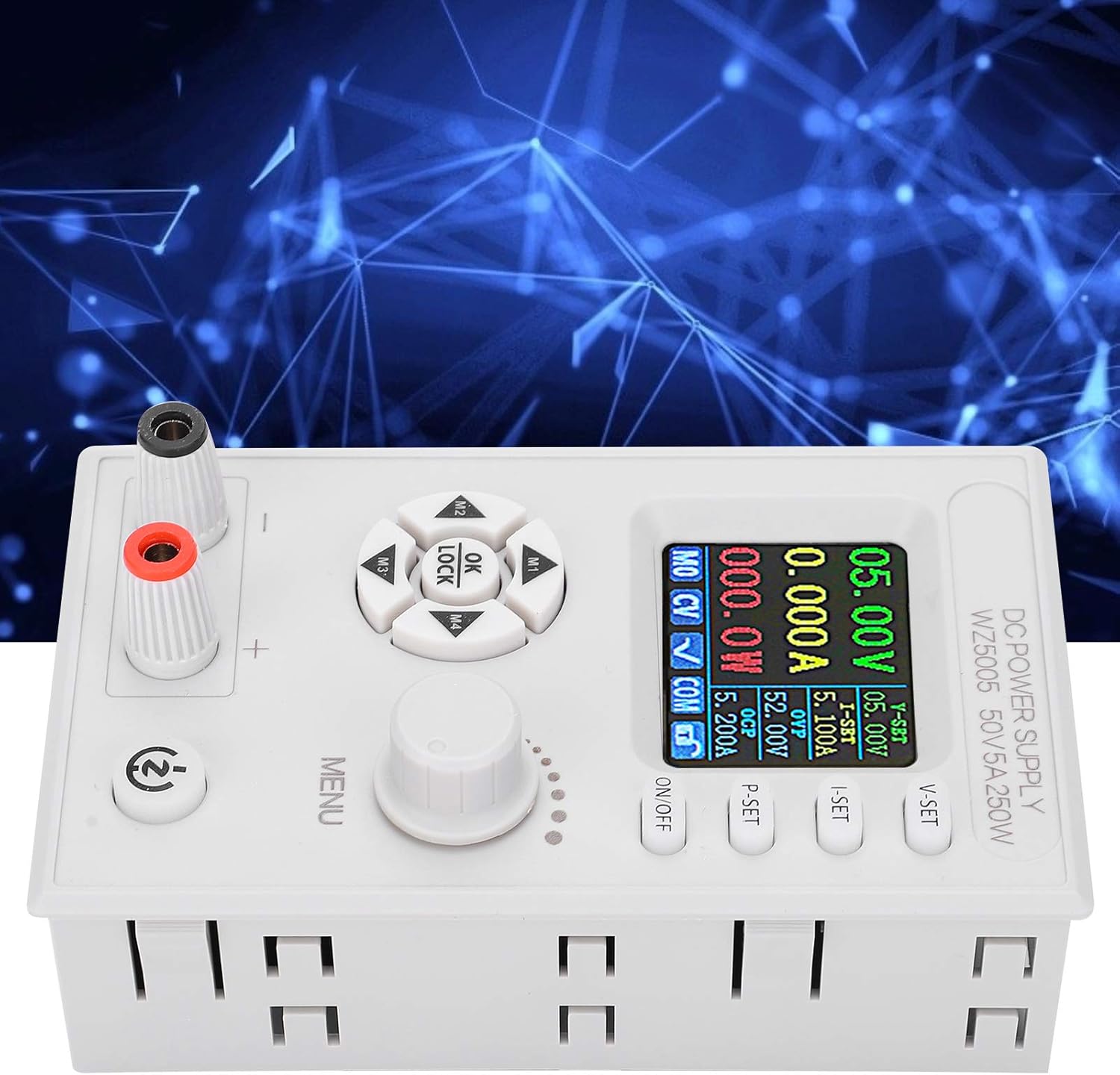
ചിത്രം 5: മുകളിൽ view showing input and output terminals.
6. പ്രവർത്തന നിർദ്ദേശങ്ങൾ
6.1 Powering On/Off Output
അമർത്തുക ഓൺ/ഓഫ് button to enable or disable the output power. When the output is off, the display will show 0.00V and 0.000A.
6.2 Setting Output Voltage (CV Mode)
- അമർത്തുക വി-സെറ്റ് button. The voltage value on the LCD will start blinking.
- തിരിക്കുക മെനു knob to adjust the desired voltage. Press the knob to confirm the setting.
- Alternatively, use the directional buttons (M1-M4) to select digits for finer adjustment.
6.3 Setting Output Current Limit (CC Mode)
- അമർത്തുക ഐ-സെറ്റ് button. The current value on the LCD will start blinking.
- തിരിക്കുക മെനു knob to adjust the desired current limit. Press the knob to confirm the setting.
- This sets the maximum current the power supply will deliver. If the load draws more current, the unit will switch to Constant Current (CC) mode and maintain the set current.
6.4 Setting Protection Parameters (OVP/OCP)
The WZ5005 includes Over-Voltage Protection (OVP) and Over-Current Protection (OCP) to safeguard your equipment.
- അമർത്തുക P-SET button. The OVP value will blink.
- തിരിക്കുക മെനു knob to set the desired OVP threshold. Press the knob to confirm and move to OCP setting.
- തിരിക്കുക മെനു knob to set the desired OCP threshold. Press the knob to confirm.
- ഔട്ട്പുട്ട് വോള്യം ആണെങ്കിൽtage or current exceeds these set values, the power supply will automatically shut off the output to protect the connected device.
6.5 കീ ലോക്ക് പ്രവർത്തനം
To prevent accidental changes to settings, the WZ5005 features a key lock function.
- അമർത്തിപ്പിടിക്കുക ശരി/ലോക്ക് ചെയ്യുക button for a few seconds to activate or deactivate the key lock.
- When locked, a lock icon will appear on the display, and most buttons will be unresponsive.
6.6 Data Storage and Recall
The unit allows for convenient storage and recall of frequently used voltagഇ, നിലവിലെ ക്രമീകരണങ്ങൾ.
- ലേക്ക് സ്റ്റോർ a setting: Adjust the desired voltage and current. Then, press and hold one of the memory buttons (M1, M2, M3, M4) until the display indicates the setting has been saved.
- ലേക്ക് തിരിച്ചുവിളിക്കുക a setting: Briefly press one of the memory buttons (M1, M2, M3, M4) to load the saved voltagഇയും കറൻ്റും.
6.7 റിമോട്ട് കൺട്രോൾ (ഓപ്ഷണൽ)
The WZ5005 supports remote control via PC software or an Android application. This functionality requires an optional USB to TTL module (U2T) or RS485 to TTL module (T485), which are sold separately. Refer to the documentation provided with these modules for connection and software setup instructions.
7. പരിപാലനം
- വൃത്തിയാക്കൽ: Disconnect the power supply from all power sources and loads before cleaning. Use a soft, dry cloth to wipe the exterior of the unit. Do not use abrasive cleaners or solvents.
- സംഭരണം: When not in use for extended periods, store the power supply in a cool, dry place, away from dust and direct sunlight.
- പരിശോധന: Periodically inspect the input and output cables for any signs of damage or wear. Replace damaged cables immediately.
8. പ്രശ്നപരിഹാരം
| പ്രശ്നം | സാധ്യമായ കാരണം | പരിഹാരം |
|---|---|---|
| ഒരു ഡിസ്പ്ലേയും/യൂണിറ്റും ഓണാക്കുന്നില്ല. | No input power or incorrect input voltage. | Check input power source and ensure it is within DC 6-55V. Verify input cable connections. |
| ട്ട്പുട്ട് വോളിയം ഇല്ലtagഇ/കറൻ്റ് | Output is turned off. OVP/OCP/OTP/LVP protection triggered. Incorrect output connections. | Press the ON/OFF button to enable output. Check if any protection (OVP, OCP, OTP, LVP) is active on the display. Verify output cable connections and load. |
| Putട്ട്പുട്ട് വോളിയംtagഇ/കറന്റ് അസ്ഥിരം | Poor connections. Load characteristics. | Ensure all connections are secure. Check the load for intermittent behavior. |
| ബട്ടണുകൾ പ്രതികരിക്കുന്നില്ല | കീ ലോക്ക് സജീവമാണ്. | Press and hold the OK/LOCK button to deactivate the key lock. |
| യൂണിറ്റ് അമിതമായി ചൂടാക്കുന്നു | Blocked ventilation. Excessive load. | Ensure adequate airflow around the unit. Reduce the load or operating time. The unit has built-in over-temperature protection (OTP). |
9. വാറൻ്റിയും പിന്തുണയും
For warranty information or technical support, please refer to the documentation provided at the time of purchase or contact your vendor. You may also visit the official ZJchao store on Amazon for product information and support resources.
ZJchao Store Link: Visit the ZJchao Store