
1. ആമുഖം
വാങ്ങിയതിന് നന്ദി.asing the Andoer 4K 30fps Tiny Action Camera. This compact and versatile camera is designed to capture your adventures in stunning 4K resolution. With its wide-angle lens, built-in WiFi, and various mounting options, it is ideal for a wide range of outdoor activities, including diving, surfing, and skiing.
This manual provides detailed instructions on how to set up, operate, and maintain your camera to ensure optimal performance and longevity. Please read this manual thoroughly before using the product and keep it for future reference.
2 സുരക്ഷാ വിവരങ്ങൾ
ഉപകരണത്തിന് പരിക്കേൽക്കുകയോ കേടുപാടുകൾ സംഭവിക്കുകയോ ചെയ്യാതിരിക്കാൻ ഇനിപ്പറയുന്ന സുരക്ഷാ മുൻകരുതലുകൾ പാലിക്കുക:
- ഉയർന്ന താപനിലയിലോ, ദീർഘനേരം നേരിട്ടുള്ള സൂര്യപ്രകാശത്തിലോ, ഉയർന്ന ആർദ്രതയിലോ ക്യാമറയെ തുറന്നുകാട്ടരുത്.
- Keep the camera and its accessories out of reach of children and pets.
- നിർദ്ദിഷ്ട ചാർജിംഗ് കേബിളും പവർ അഡാപ്റ്ററും മാത്രം ഉപയോഗിക്കുക.
- Do not attempt to disassemble, repair, or modify the camera yourself. Contact authorized service personnel for assistance.
- Ensure the waterproof case is properly sealed before submerging the camera in water.
- ക്യാമറ താഴെയിടുകയോ ശക്തമായ ആഘാതങ്ങൾക്ക് വിധേയമാക്കുകയോ ചെയ്യുന്നത് ഒഴിവാക്കുക.

മുന്നറിയിപ്പ്: To avoid suffocation hazard, keep plastic bags away from babies and children.
3. പാക്കേജ് ഉള്ളടക്കം
താഴെ ലിസ്റ്റ് ചെയ്തിരിക്കുന്ന എല്ലാ ഇനങ്ങളും നിങ്ങളുടെ പാക്കേജിൽ ഉൾപ്പെടുത്തിയിട്ടുണ്ടെന്ന് ഉറപ്പാക്കുക:
- 1 x Andoer 4K Tiny Action Camera
- 1 x ബാക്ക് ക്ലിപ്പ്
- 1 x Magnetic Lanyard
- 1 x Camera Frame
- 1 x വാട്ടർപ്രൂഫ് കേസ്
- 2 x Mounting Bases
- 1 x Buckle Mount
- 1 x Long Screw Mount
- 1 x ഹാൻഡിൽബാർ മൗണ്ട്
- 1 x Mount Adapter
- 1 x സ്ട്രാപ്പ്
- 1 x ടൈപ്പ്-സി ചാർജിംഗ് കേബിൾ
- 1 x ഉപയോക്തൃ മാനുവൽ (ഈ പ്രമാണം)
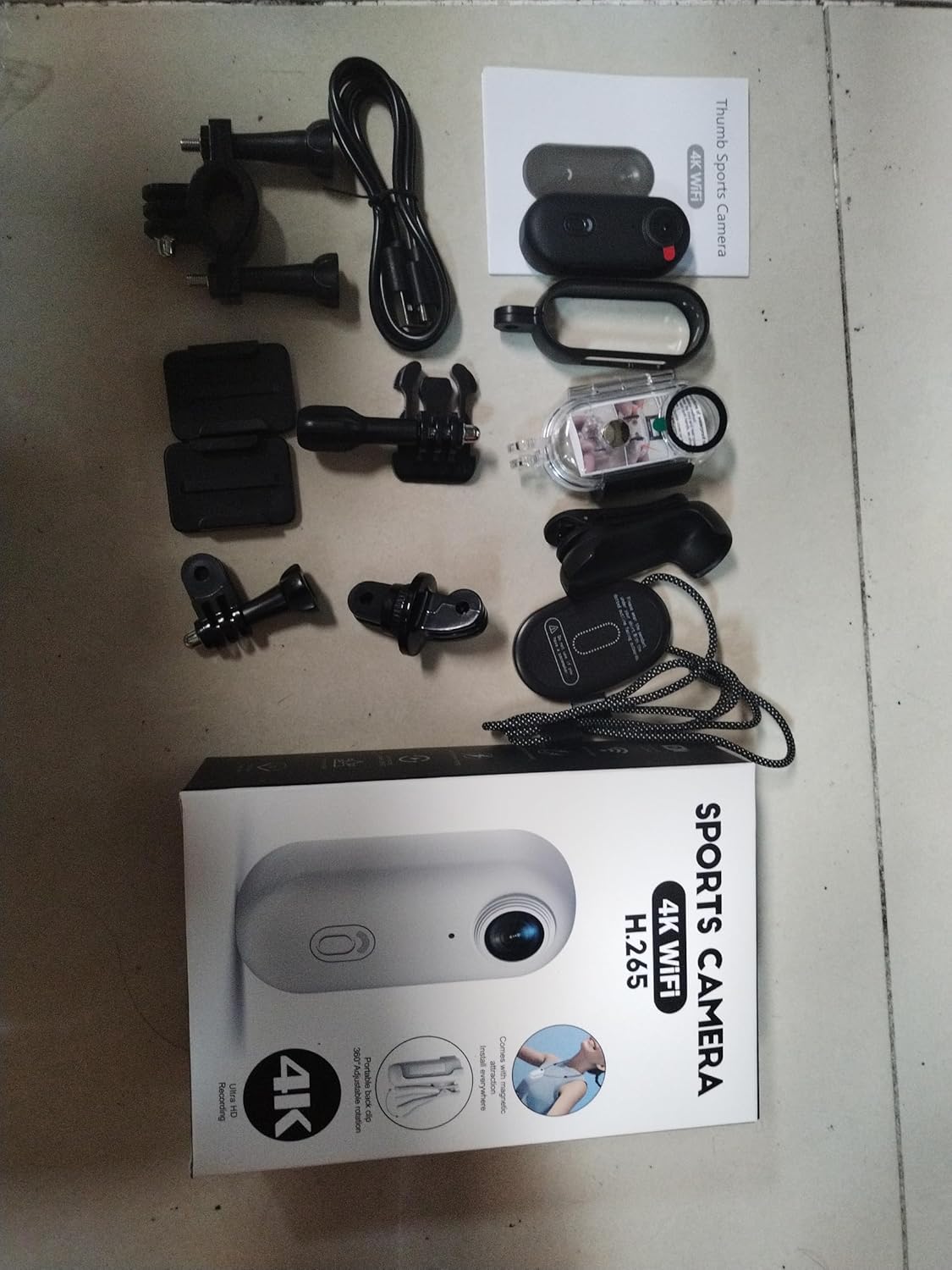
Illustration of the complete package contents.

വിശദമായി view of the camera and its included accessories.
4. ഉൽപ്പന്നം കഴിഞ്ഞുview
The Andoer Tiny Action Camera is designed for portability and ease of use. Familiarize yourself with its main components:

ഫ്രണ്ട് view of the Andoer Tiny Action Camera.
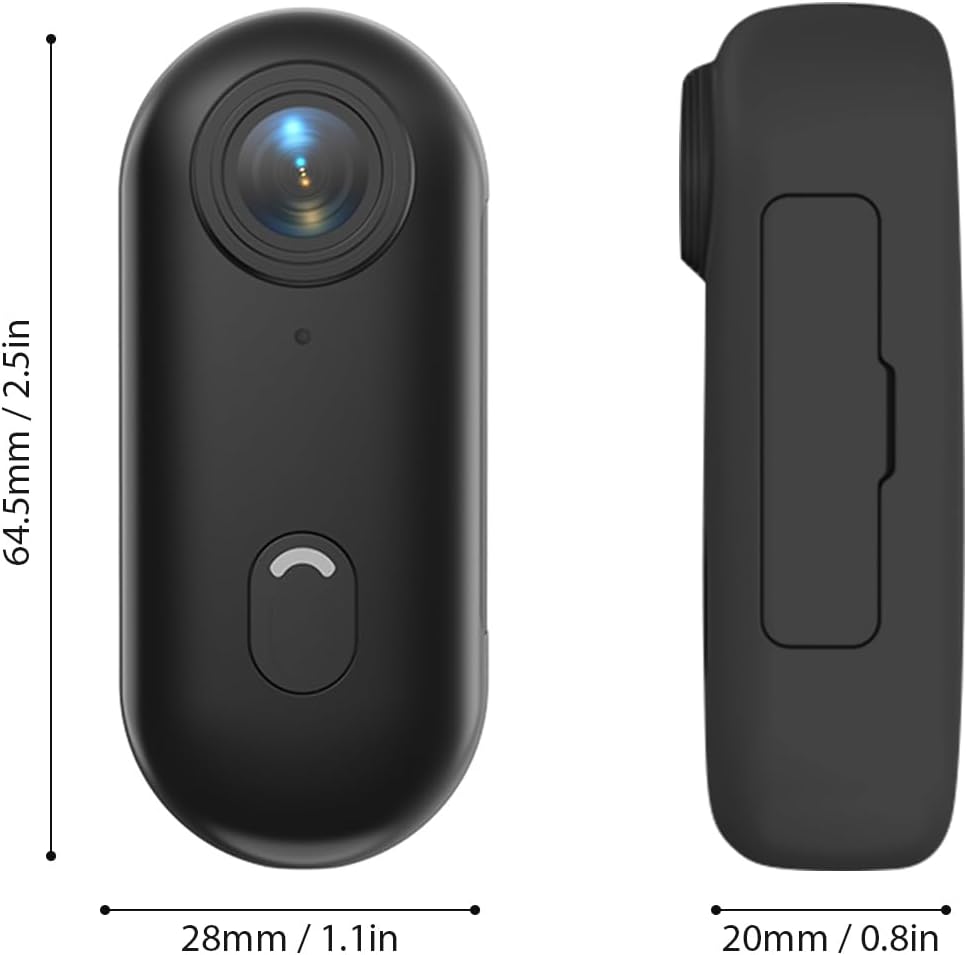
ക്യാമറയുടെ ഭൗതിക അളവുകൾ.
- ലെൻസ്: 120° wide-angle lens for expansive shots.
- പവർ / മോഡ് ബട്ടൺ: Used for powering on/off and switching modes.
- ഇൻഡിക്കേറ്റർ ലൈറ്റ്: Displays camera status (recording, charging, WiFi connection).
- മൈക്രോഫോൺ: ഓഡിയോ ക്യാപ്ചർ ചെയ്യുന്നു.
- യുഎസ്ബി-സി പോർട്ട്: ചാർജിംഗിനും ഡാറ്റ കൈമാറ്റത്തിനും.
- മൈക്രോ എസ്ഡി കാർഡ് സ്ലോട്ട്: മെമ്മറി കാർഡ് ചേർക്കുന്നതിനായി.
5. സജ്ജീകരണം
5.1 ബാറ്ററി ചാർജ് ചെയ്യുന്നു
The camera has a built-in 800mAh lithium battery. Before first use, fully charge the camera.
- Connect the included Type-C charging cable to the camera's USB-C port.
- കേബിളിന്റെ മറ്റേ അറ്റം ഒരു 5V/2A USB പവർ അഡാപ്റ്ററുമായി (ഉൾപ്പെടുത്തിയിട്ടില്ല) അല്ലെങ്കിൽ ഒരു കമ്പ്യൂട്ടർ USB പോർട്ടുമായി ബന്ധിപ്പിക്കുക.
- The indicator light will show charging status (refer to the camera's light indicator guide for specific colors/patterns).
- ഒരു ഫുൾ ചാർജിന് ഏകദേശം 120 മിനിറ്റ് എടുക്കും.
5.2 ഒരു മെമ്മറി കാർഡ് ഇടുന്നു
A MicroSD (TF) card (not included) is required for recording videos and photos. The camera supports cards up to 256GB.
- ക്യാമറയിൽ മൈക്രോ എസ്ഡി കാർഡ് സ്ലോട്ട് കണ്ടെത്തുക.
- Insert the MicroSD card with the contacts facing down until it clicks into place.
- നീക്കം ചെയ്യാൻ, കാർഡ് പുറത്തേക്ക് വരുന്നത് വരെ സൌമ്യമായി അകത്തേക്ക് തള്ളുക.
കുറിപ്പ്: It is recommended to format the MicroSD card in the camera before first use to ensure compatibility and optimal performance. Refer to the app or camera settings for formatting options.
5.3 Mounting Methods
The camera offers multiple versatile mounting options:
- ബിൽറ്റ്-ഇൻ കാന്തങ്ങൾ: The camera has built-in magnets, allowing direct attachment to any iron surface.
- Magnetic Lanyard: Attach the camera to the magnetic lanyard to wear it around your neck for convenient hands-free recording.

Using the magnetic lanyard for hands-free recording.
- ബാക്ക് ക്ലിപ്പ്: Use the included back clip to securely attach the camera to your collar, pocket, or backpack strap.
- വാട്ടർപ്രൂഫ് കേസ്: For underwater activities or protection from harsh elements, enclose the camera in the waterproof case. This case allows the camera to be submerged up to 30 meters. Ensure the case is properly sealed before use.
- മൗണ്ടിംഗ് ആക്സസറികൾ: Utilize the camera frame, mounting bases, buckle mount, long screw mount, handlebar mount, and mount adapter to attach the camera to helmets, bicycles, and other equipment.

Examples of multiple installation methods for the camera.
6. പ്രവർത്തന നിർദ്ദേശങ്ങൾ
6.1 പവർ ഓൺ/ഓഫ്
- പവർ ഓൺ: Press and hold the Power/Mode button for a few seconds until the indicator light illuminates.
- പവർ ഓഫ്: ഇൻഡിക്കേറ്റർ ലൈറ്റ് ഓഫാകുന്നത് വരെ പവർ/മോഡ് ബട്ടൺ വീണ്ടും കുറച്ച് സെക്കൻഡ് അമർത്തിപ്പിടിക്കുക.
6.2 വീഡിയോ റെക്കോർഡിംഗ്
The camera records videos in 4K resolution at 30 frames per second (4K 30fps) in MP4 format.
- Ensure the camera is powered on and a MicroSD card is inserted.
- Press the Power/Mode button once to start video recording. The indicator light will change to indicate recording is in progress (e.g., flashing red).
- Press the Power/Mode button again to stop recording. The indicator light will return to standby mode.
6.3 ഫോട്ടോ എടുക്കൽ
The camera captures photos at 3840x2160 resolution in JPEG format.
- Ensure the camera is powered on and a MicroSD card is inserted.
- (If in video mode, short press the Power/Mode button to switch to photo mode if applicable, or use the app).
- Press the Power/Mode button briefly to take a photo. The indicator light may flash once to confirm the capture.
6.4 വൈഫൈ കണക്ഷനും ആപ്പ് ഉപയോഗവും
The camera supports WiFi connection, allowing you to control it and view/share content via a smartphone application.
- Download the dedicated smartphone application (refer to the product packaging or manufacturer's website for the app name and download links).
- ക്യാമറ ഓൺ ചെയ്യുക.
- Activate WiFi on the camera (usually by a long press or specific button combination, refer to camera's light indicator guide). The camera will broadcast a WiFi network.
- On your smartphone, go to WiFi settings and connect to the camera's WiFi network (SSID and password typically found on the camera or in the app instructions).
- Open the app. You should now be able to see a live preview, control recording, adjust settings, and transfer files.
6.5 ലൂപ്പ് റെക്കോർഡിംഗ്
The camera supports loop recording, which automatically overwrites the oldest fileമെമ്മറി കാർഡ് നിറയുമ്പോൾ, തുടർച്ചയായ റെക്കോർഡിംഗ് ഉറപ്പാക്കുന്നു.
- This feature is typically enabled by default or can be configured via the smartphone app.
- When the memory card reaches its capacity, the camera will automatically delete the oldest video segments to make space for new recordings.
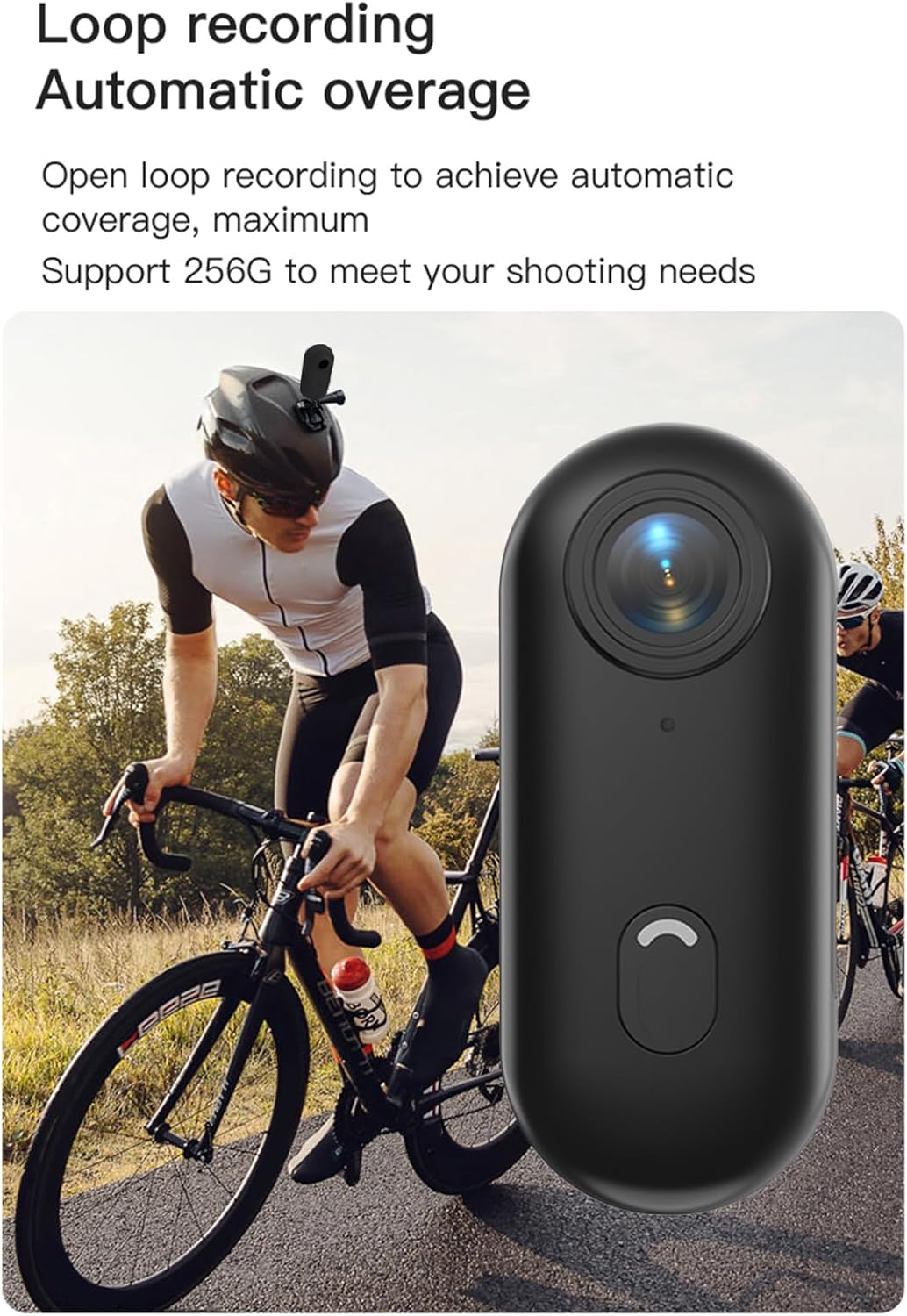
Loop recording functionality ensures continuous capture.
7. പരിപാലനം
- വൃത്തിയാക്കൽ: Use a soft, dry cloth to clean the camera body. For the lens, use a specialized lens cleaning cloth and solution. Do not use harsh chemicals or abrasive materials.
- സംഭരണം: ഉപയോഗത്തിലില്ലാത്തപ്പോൾ, നേരിട്ടുള്ള സൂര്യപ്രകാശവും ഉയർന്ന താപനിലയും ഏൽക്കാത്ത, തണുത്തതും വരണ്ടതുമായ സ്ഥലത്ത് ക്യാമറ സൂക്ഷിക്കുക.
- ബാറ്ററി കെയർ: For long-term storage, charge the battery to about 50% every few months to maintain its health.
- വാട്ടർപ്രൂഫ് കേസ്: After using the waterproof case in saltwater, rinse it thoroughly with fresh water and allow it to air dry. Check the O-ring seal regularly for any debris or damage.
8. പ്രശ്നപരിഹാരം
| പ്രശ്നം | സാധ്യമായ കാരണം | പരിഹാരം |
|---|---|---|
| ക്യാമറ പവർ ഓൺ ചെയ്യുന്നില്ല. | ബാറ്ററി കുറവാണ്; ബാറ്ററി തകരാറ്; പവർ ബട്ടണിന്റെ പ്രശ്നം. | ക്യാമറ പൂർണ്ണമായും ചാർജ് ചെയ്യുക. പ്രശ്നം നിലനിൽക്കുകയാണെങ്കിൽ, പിന്തുണയെ ബന്ധപ്പെടുക. |
| വൈഫൈയിലേക്ക് കണക്റ്റുചെയ്യാൻ കഴിയുന്നില്ല. | WiFi not enabled on camera; incorrect password; app issue. | Ensure camera WiFi is active. Re-enter password. Restart camera and phone. Reinstall app. |
| റെക്കോർഡിംഗ് അപ്രതീക്ഷിതമായി നിലയ്ക്കുന്നു. | Memory card full; slow memory card; battery low. | Check memory card space. Use a high-speed (Class 10 or U3) MicroSD card. Charge battery. |
| മോശം വീഡിയോ/ഫോട്ടോ നിലവാരം. | ലെൻസ് വൃത്തികേടാണ്; കുറഞ്ഞ വെളിച്ചം; തെറ്റായ ക്രമീകരണങ്ങൾ. | Clean the lens. Ensure adequate lighting. Check resolution settings in the app. |
| വാട്ടർപ്രൂഫ് കേസിൽ വെള്ളം ചോർന്നൊലിക്കുന്നു. | തെറ്റായി സീൽ ചെയ്ത കേസ്; കേടായ O-റിംഗ്. | Ensure case is securely latched. Check O-ring for debris or damage and replace if necessary. |
9 സ്പെസിഫിക്കേഷനുകൾ
| ഫീച്ചർ | വിശദാംശങ്ങൾ |
|---|---|
| വീഡിയോ റെസല്യൂഷൻ | 4K 30fps |
| ഫോട്ടോ റെസല്യൂഷൻ | 3840x2160 |
| വീഡിയോ ഫോർമാറ്റ് | MP4 |
| ഫോട്ടോ ഫോർമാറ്റ് | JPEG |
| ലെൻസ് ആംഗിൾ | 120° വൈഡ് ആംഗിൾ |
| കണക്റ്റിവിറ്റി | വൈഫൈ |
| ബാറ്ററി ശേഷി | 800mAh ലിഥിയം ബാറ്ററി |
| ചാർജിംഗ് സമയം | ഏകദേശം 120 മിനിറ്റ് |
| ചാർജ് ചെയ്യുന്നു വോളിയംtage | 5V/2A |
| മെമ്മറി കാർഡ് പിന്തുണ | TF കാർഡ്, 256GB വരെ |
| ഇൻ്റർഫേസ് തരം | ടൈപ്പ്-സി |
| വാട്ടർപ്രൂഫ് ഡെപ്ത് (കേസിനൊപ്പം) | 30M വരെ |
| ഉൽപ്പന്ന അളവുകൾ | 64.5 X28 20 മില്ലിമീറ്റർ (2.54 X1.1 0.8 ഇഞ്ച്) |
| ഇനത്തിൻ്റെ ഭാരം | Approx. 11.3 ounces (camera only) |
| പ്രവർത്തന താപനില | -10°C മുതൽ 60°C വരെ (14°F മുതൽ 140°F വരെ) |
| സംഭരണ താപനില | -10°C മുതൽ 60°C വരെ (14°F മുതൽ 140°F വരെ) |
10. വാറൻ്റിയും പിന്തുണയും
Andoer products are manufactured to the highest quality standards. This product is covered by a limited warranty against defects in materials and workmanship from the date of purchase. Please retain your proof of purchase for warranty claims.
For technical support, troubleshooting assistance, or warranty inquiries, please contact Andoer customer service through the retailer where you purchased the product or visit the official Andoer webബന്ധപ്പെടാനുള്ള വിവരങ്ങൾക്കുള്ള സൈറ്റ്.
Webസൈറ്റ്: Andoer Official Store on Amazon