
ആമുഖം
Thank you for choosing the TECKNET TK-MS017 Ergonomic Wireless Vertical Mouse. This manual provides detailed instructions for setting up, operating, maintaining, and troubleshooting your new mouse. Designed for comfort and efficiency, this vertical mouse helps reduce wrist strain during prolonged use.

The TECKNET Ergonomic Vertical Mouse, designed for comfortable use.
ഉൽപ്പന്ന സവിശേഷതകൾ
- എർഗണോമിക് ലംബ രൂപകൽപ്പന: Mimics a natural handshake posture to reduce wrist and arm pressure, preventing discomfort from prolonged use.
- ക്രമീകരിക്കാവുന്ന DPI: 5 levels of DPI (800/1600/2400/3200/4800) for precise tracking and adaptable sensitivity.
- നിശബ്ദ ക്ലിക്കുകൾ: 99% noise reduction for a quiet working environment. (Forward/Backward buttons are not silent).
- 6 ബട്ടണുകൾ: Includes standard left/right click, scroll wheel, DPI switch, and convenient forward/backward buttons for web നാവിഗേഷൻ.
- Stable 2.4G Wireless Connection: Provides a reliable connection up to 10 meters with a plug-and-play USB receiver.
- നീണ്ട ബാറ്ററി ലൈഫ്: Features an independent power switch and automatic sleep function to conserve battery, offering up to 24 months of use.
- വിശാലമായ അനുയോജ്യത: Supports Windows 11/10/8/7/XP, Mac OS X10.4, Chrome OS, and Linux.
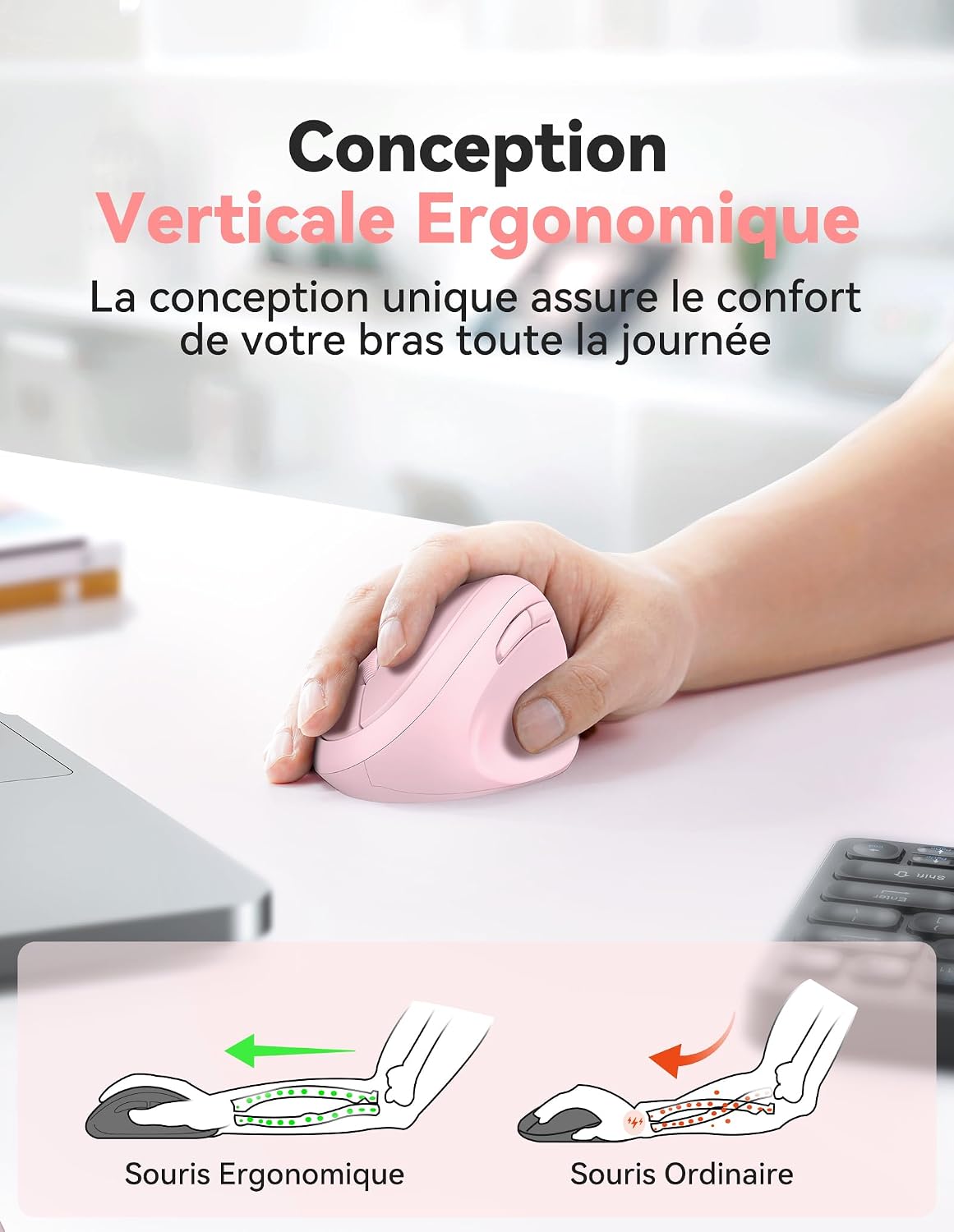
Comparison of vertical ergonomic grip and traditional mouse grip, highlighting reduced wrist tension with the vertical design.
സജ്ജീകരണ നിർദ്ദേശങ്ങൾ
- ബാറ്ററികൾ ഇൻസ്റ്റാൾ ചെയ്യുക:
Locate the battery compartment on the underside of the mouse. Open the cover and insert two AA batteries (not included), ensuring correct polarity. Close the battery cover securely.

The underside of the mouse, illustrating the battery compartment and the storage slot for the USB receiver.
- USB റിസീവർ ബന്ധിപ്പിക്കുക:
Remove the USB receiver from its storage slot next to the battery compartment. Plug the receiver into an available USB port on your computer (PC, laptop, Mac, Chromebook, or tablet).
- പവർ ഓൺ:
Flip the ON/OFF switch on the bottom of the mouse to the "ON" position. The mouse should automatically connect to your device. No additional drivers are typically required for most operating systems.
പ്രവർത്തന നിർദ്ദേശങ്ങൾ
ബട്ടൺ പ്രവർത്തനങ്ങൾ
- ഇടത് ക്ലിക്ക്: സ്റ്റാൻഡേർഡ് തിരഞ്ഞെടുപ്പും സജീവമാക്കലും.
- വലത് ക്ലിക്കിൽ: സന്ദർഭ മെനുകൾ തുറക്കുന്നു.
- സ്ക്രോൾ വീൽ: പ്രമാണങ്ങൾ സ്ക്രോൾ ചെയ്യുന്നു കൂടാതെ web pages vertically. Can also be pressed for middle-click functionality.
- ഡിപിഐ സ്വിച്ച് ബട്ടൺ: Located near the scroll wheel. Press to cycle through DPI settings (800/1600/2400/3200/4800). The red indicator light will flash to confirm the change.
- ഫോർവേഡ് ബട്ടൺ: മുന്നോട്ട് നാവിഗേറ്റ് ചെയ്യുന്നു web ബ്രൗസറുകൾ അല്ലെങ്കിൽ file explorers. (Not supported on Mac OS).
- ബാക്ക്വേർഡ് ബട്ടൺ: പിന്നിലേക്ക് നാവിഗേറ്റ് ചെയ്യുന്നു web ബ്രൗസറുകൾ അല്ലെങ്കിൽ file explorers. (Not supported on Mac OS).
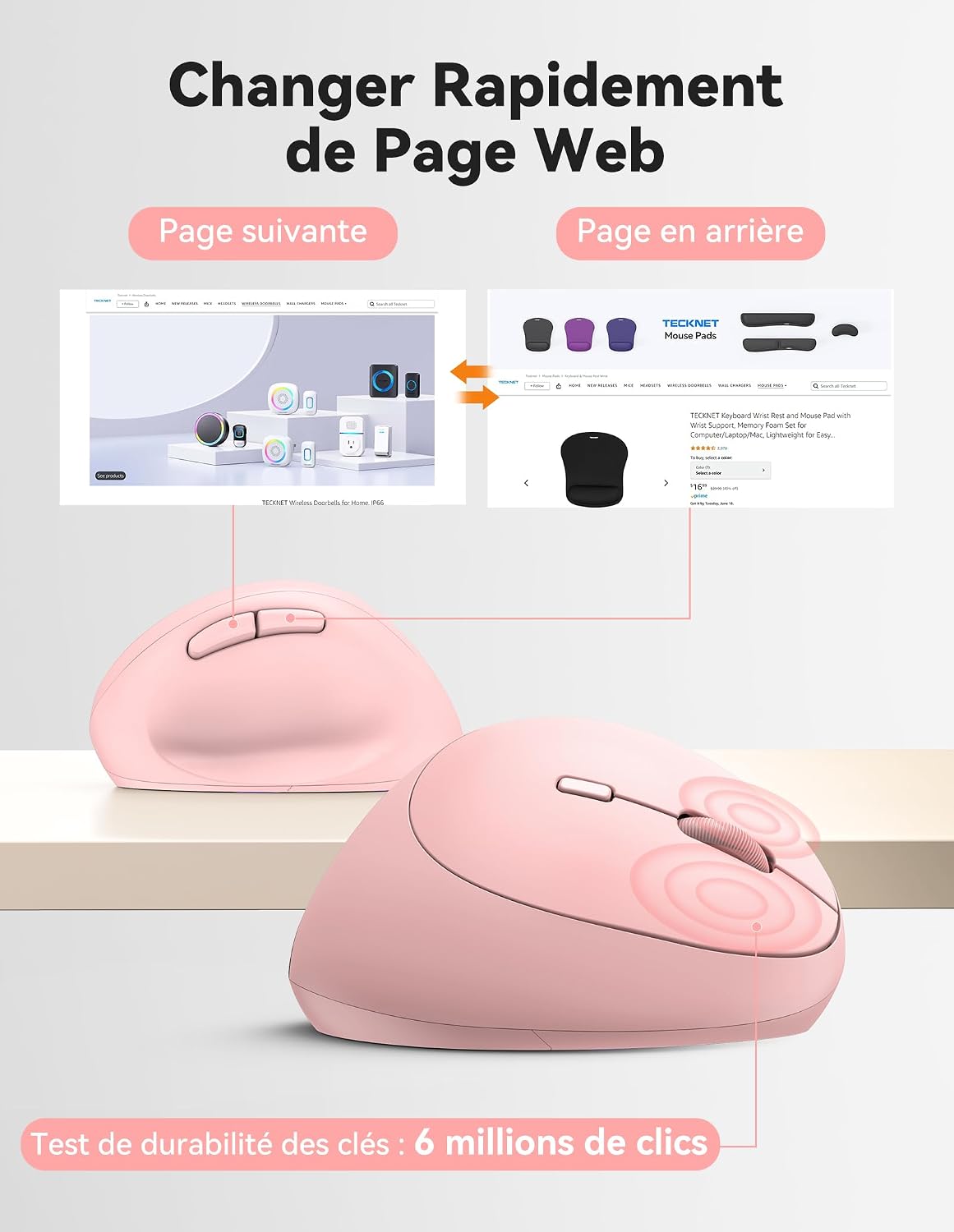
Diagram illustrating the location and function of each button on the TECKNET vertical mouse.
DPI ക്രമീകരണം
The mouse offers 5 adjustable DPI levels to suit various tasks and preferences. Press the DPI switch button to change the cursor speed. The red indicator light will flash a corresponding number of times to indicate the current DPI setting:
- Flash X1: 800 DPI (Web Navigation)
- Flash X2: 1600 DPI (Excel Editing)
- Flash X3: 2400 DPI (Video Editing)
- Flash X4: 3200 DPI (Photoshop)
- Flash X5: 4800 DPI (Gaming Track)

Visual representation of the 5 adjustable DPI levels for different usage scenarios.
പവർ സേവിംഗ് മോഡ്
To conserve battery life, the mouse will automatically enter sleep mode after 8 minutes of inactivity. To wake it up, simply move the mouse or click any button.
മെയിൻ്റനൻസ്
- വൃത്തിയാക്കൽ: മൗസ് വൃത്തിയാക്കാൻ മൃദുവായതും ഉണങ്ങിയതുമായ തുണി ഉപയോഗിക്കുക. കഠിനമായ രാസവസ്തുക്കളോ ഉരച്ചിലുകളോ ഉള്ള വസ്തുക്കൾ ഉപയോഗിക്കുന്നത് ഒഴിവാക്കുക.
- ബാറ്ററി മാറ്റിസ്ഥാപിക്കൽ: When the mouse performance degrades or the cursor becomes erratic, it's time to replace the batteries. Ensure you use fresh AA batteries and dispose of old batteries responsibly.
- സംഭരണം: When not in use for extended periods, turn off the mouse using the ON/OFF switch to further conserve battery life. Store the USB receiver inside the mouse's battery compartment to prevent loss.
ട്രബിൾഷൂട്ടിംഗ്
- മൗസ് പ്രതികരിക്കുന്നില്ല:
- മൗസ് ഓൺ ചെയ്തിട്ടുണ്ടെന്ന് ഉറപ്പാക്കുക.
- ബാറ്ററികൾ ശരിയായി ഇൻസ്റ്റാൾ ചെയ്തിട്ടുണ്ടോ എന്നും ആവശ്യത്തിന് ചാർജ് ഉണ്ടോ എന്നും പരിശോധിക്കുക. ആവശ്യമെങ്കിൽ മാറ്റിസ്ഥാപിക്കുക.
- പ്രവർത്തിക്കുന്ന ഒരു USB പോർട്ടിലേക്ക് USB റിസീവർ സുരക്ഷിതമായി പ്ലഗ് ചെയ്തിട്ടുണ്ടെന്ന് ഉറപ്പാക്കുക. മറ്റൊരു USB പോർട്ട് പരീക്ഷിക്കുക.
- റേഞ്ച് പ്രശ്നങ്ങൾ ഒഴിവാക്കാൻ മൗസ് USB റിസീവറിന് അടുത്തേക്ക് നീക്കുക.
- നിങ്ങളുടെ കമ്പ്യൂട്ടർ പുനരാരംഭിക്കുക.
- ക്രമരഹിതമായ കഴ്സർ ചലനം:
- മൗസിന്റെ അടിയിലുള്ള ഒപ്റ്റിക്കൽ സെൻസർ വൃത്തിയാക്കുക.
- Ensure you are using the mouse on a suitable surface. The mouse is designed to track on various surfaces like resin, wood, fabric, paper, and metal. Avoid highly reflective or transparent surfaces.
- Adjust the DPI setting to a lower level if the cursor is too sensitive.
- മാക്കിൽ ഫോർവേഡ്/ബാക്ക്വേർഡ് ബട്ടണുകൾ പ്രവർത്തിക്കുന്നില്ല:
These side buttons are not supported by Mac OS. This is a system limitation, not a mouse malfunction.
സ്പെസിഫിക്കേഷനുകൾ
| ബ്രാൻഡ് | ടെക്നെറ്റ് |
| മോഡൽ നമ്പർ | TK-MS017 |
| കണക്റ്റിവിറ്റി ടെക്നോളജി | 2.4G Wireless (Radio-frequency) |
| മോഷൻ ഡിറ്റക്ഷൻ ടെക്നോളജി | ഒപ്റ്റിക്കൽ |
| ഡിപിഐ ലെവലുകൾ | 800, 1600, 2400, 3200, 4800 |
| ബട്ടണുകളുടെ എണ്ണം | 6 |
| കൈ ഓറിയൻ്റേഷൻ | ശരിയാണ് |
| ഉൽപ്പന്ന അളവുകൾ | 10.5L x 6.5W സെന്റീമീറ്റർ |
| വയർലെസ് ശ്രേണി | 10 മീറ്റർ വരെ |
| പവർ ഉറവിടം | 2 x AA ബാറ്ററികൾ (ഉൾപ്പെടുത്തിയിട്ടില്ല) |
| ശരാശരി ബാറ്ററി ലൈഫ് | 24 മാസം വരെ |
| അനുയോജ്യമായ ഓപ്പറേറ്റിംഗ് സിസ്റ്റങ്ങൾ | Windows 11/10/8/7/XP, macOS X10.4+, Chrome OS, Linux |
വാറൻ്റിയും പിന്തുണയും
TECKNET provides a 36-month support period for registered products. If you encounter any issues during the use of this product, please contact the professional TECKNET customer service team for assistance.
For more information and support, please visit the official TECKNET webസൈറ്റ് അല്ലെങ്കിൽ അവരുടെ ഉപഭോക്തൃ സേവനവുമായി നേരിട്ട് ബന്ധപ്പെടുക.
Webസൈറ്റ്: ആമസോണിലെ TECKNET സ്റ്റോർ