
1. ആമുഖം
This manual provides essential information for setting up, operating, maintaining, and troubleshooting your Acer Nitro V ANV15-41 gaming laptop. Please read this manual thoroughly to ensure proper use and to maximize the performance and longevity of your device.

ചിത്രം 1.1: മുൻഭാഗം view of the Acer Nitro V ANV15-41 Gaming Laptop.
2. ആരംഭിക്കുന്നു
2.1 അൺപാക്ക് ചെയ്യലും പ്രാരംഭ സജ്ജീകരണവും
- ലാപ്ടോപ്പും എല്ലാ അനുബന്ധ ഉപകരണങ്ങളും പാക്കേജിംഗിൽ നിന്ന് ശ്രദ്ധാപൂർവ്വം നീക്കം ചെയ്യുക.
- 'ബോക്സിൽ എന്താണുള്ളത്' എന്ന വിഭാഗത്തിൽ പട്ടികപ്പെടുത്തിയിരിക്കുന്ന എല്ലാ ഘടകങ്ങളും നിലവിലുണ്ടെന്ന് ഉറപ്പാക്കുക.
- Connect the power adapter to the laptop's power connector and then to an electrical outlet.
- ലാപ്ടോപ്പ് ലിഡ് തുറന്ന് പവർ ബട്ടൺ അമർത്തി ഉപകരണം ഓണാക്കുക.
- പ്രാരംഭ വിൻഡോസ് 11 ഹോം സജ്ജീകരണം പൂർത്തിയാക്കാൻ ഓൺ-സ്ക്രീൻ നിർദ്ദേശങ്ങൾ പാലിക്കുക.
2.2 ബോക്സിൽ എന്താണുള്ളത്
- Acer Nitro V ANV15-41 Laptop
- പവർ അഡാപ്റ്റർ
- ബാറ്ററി (സംയോജിത)
3. ഹാർഡ്വെയർ ഓവർview
3.1 ഡിസ്പ്ലേ
The laptop features a 15.6-inch (39.6 cm) Full HD (1920 x 1080) IPS display with a 165 Hz refresh rate. It includes Acer ComfyView technology for reduced glare and enhanced viewആശ്വാസം.
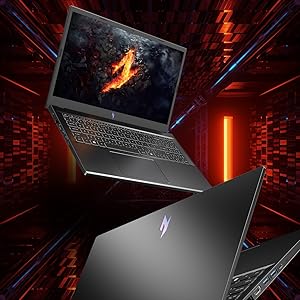
Figure 3.1: The laptop's 15.6-inch Full HD IPS display with a high refresh rate.
3.2 കീബോർഡും ടച്ച്പാഡും
The Acer Nitro V ANV15-41 is equipped with a backlit keyboard, offering visibility in low-light conditions. It includes a dedicated NitroSense key for quick access to system performance settings and a Copilot key for AI assistance.
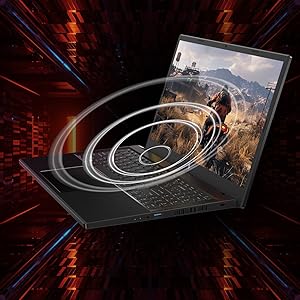
Figure 3.2: Keyboard layout highlighting the NitroSense and Copilot keys.
3.3 പോർട്ടുകളും കണക്ടറുകളും
The laptop provides various ports for connectivity:
- 2 x USB 3.2 Gen 1 പോർട്ടുകൾ
- 1 x USB 3.2 Gen 1 port with power-off charging
- 1 x USB 4 പോർട്ട്
- 1 x HDMI 2.1 പോർട്ട്
- 1 x ഇഥർനെറ്റ് (RJ-45) പോർട്ട്
- 1 x Headset/speaker jack
- Power connector (DC-in)
- കെൻസിംഗ്ടൺ ലോക്ക് സ്ലോട്ട്
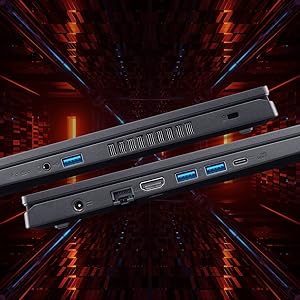
ചിത്രം 3.3: വശം view illustrating the available ports and connectors.
4. പ്രകടന സവിശേഷതകൾ
4.1 പ്രോസസ്സറും ഗ്രാഫിക്സും
The laptop is powered by an AMD Ryzen 5 6600H hexa-core processor and features an NVIDIA GeForce RTX 3050 GPU with 6 GB of dedicated GDDR6 VRAM for graphics processing.
4.2 മെമ്മറിയും സംഭരണവും
It comes with 16 GB of DDR5 system memory, upgradable up to 32 GB. Storage is provided by a 512 GB PCIe Gen4 NVMe SSD, with support for up to two 1 TB drives.
4.3 കൂളിംഗ് സിസ്റ്റം
The Acer Nitro V ANV15-41 incorporates a dual-fan cooling system designed to maintain optimal operating temperatures during intensive use.
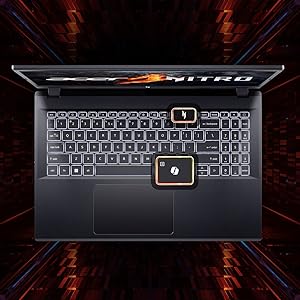
Figure 4.1: Illustration of the dual-fan cooling system.
5. Audio and Visual
5.1 ഓഡിയോ ടെക്നോളജി
The laptop features DTS:X Ultra Audio for an immersive sound experience. Acer PurifiedVoice technology, with AI-powered noise reduction, enhances clarity for built-in microphones.

Figure 5.1: Visual representation of DTS:X Ultra Audio and Acer PurifiedVoice technologies.
5.2 Webക്യാമറ
A T-Type HD camera is integrated for video conferencing and communication.
6. പരിപാലനവും പരിചരണവും
- വൃത്തിയാക്കൽ: Use a soft, lint-free cloth to clean the screen and exterior. Avoid harsh chemicals.
- വെൻ്റിലേഷൻ: Ensure the laptop's ventilation openings are clear and unobstructed to prevent overheating.
- സോഫ്റ്റ്വെയർ അപ്ഡേറ്റുകൾ: Regularly update your operating system and drivers to ensure optimal performance and security.
- ബാറ്ററി കെയർ: To prolong battery life, avoid extreme temperatures and fully discharging the battery frequently.
- സംഭരണം: Store the laptop in a cool, dry place when not in use.
7. പ്രശ്നപരിഹാരം
7.1 പൊതുവായ പ്രശ്നങ്ങളും പരിഹാരങ്ങളും
| ഇഷ്യൂ | സാധ്യമായ പരിഹാരം |
|---|---|
| ലാപ്ടോപ്പ് ഓണാകുന്നില്ല. | പവർ അഡാപ്റ്റർ സുരക്ഷിതമായി ബന്ധിപ്പിച്ചിട്ടുണ്ടെന്നും ഔട്ട്ലെറ്റ് പ്രവർത്തിക്കുന്നുണ്ടെന്നും ഉറപ്പാക്കുക. ബാറ്ററി ചാർജ് ലെവൽ പരിശോധിക്കുക. |
| സിസ്റ്റം മന്ദഗതിയിലാണ് അല്ലെങ്കിൽ പ്രതികരിക്കുന്നില്ല. | Close unnecessary applications. Check for background processes. Ensure sufficient free storage space. Update drivers. |
| അമിത ചൂടാക്കൽ | Ensure ventilation openings are clear. Use the laptop on a hard, flat surface. Consider using NitroSense software to adjust fan speeds. |
| ഡിസ്പ്ലേ പ്രശ്നങ്ങൾ (ചിത്രമില്ല, മിന്നിമറയുന്നു) | Check display cable connections if using an external monitor. Restart the laptop. Update graphics drivers. |
| കീബോർഡ് ബാക്ക്ലൈറ്റ് പ്രവർത്തിക്കുന്നില്ല | Check keyboard backlight settings in Windows or via dedicated function keys. |
8 സാങ്കേതിക സവിശേഷതകൾ
| ഫീച്ചർ | സ്പെസിഫിക്കേഷൻ |
|---|---|
| ബ്രാൻഡ് | ഏസർ |
| മോഡലിൻ്റെ പേര് | Nitro V |
| മോഡൽ നമ്പർ | ANV15-41 |
| സ്ക്രീൻ വലിപ്പം | 15.6 ഇഞ്ച് |
| ഡിസ്പ്ലേ റെസല്യൂഷൻ | 1920 x 1080 (പൂർണ്ണ HD) |
| ഡിസ്പ്ലേ ടെക്നോളജി | IPS, LED, 165 Hz Refresh Rate |
| പ്രോസസ്സർ | AMD Ryzen 5 6600H hexa-core (3.3 GHz base, up to 4.5 GHz max boost) |
| ഗ്രാഫിക്സ് കാർഡ് | NVIDIA GeForce RTX 3050 with 6 GB GDDR6 VRAM |
| റാം മെമ്മറി | 16 GB DDR5 (4800 MHz), upgradable to 32 GB |
| സംഭരണം | 512 GB NVMe SSD (PCIe Gen4) |
| ഓപ്പറേറ്റിംഗ് സിസ്റ്റം | വിൻഡോസ് 11 ഹോം |
| വയർലെസ് കണക്റ്റിവിറ്റി | വൈ-ഫൈ 6 (802.11ax), ബ്ലൂടൂത്ത് |
| തുറമുഖങ്ങൾ | 2x USB 3.2 Gen 1, 1x USB 3.2 Gen 1 (power-off charging), 1x USB 4, 1x HDMI 2.1, 1x RJ-45, 1x Headset/speaker jack |
| Webക്യാമറ | T-Type HD camera |
| കീബോർഡ് | Backlit Keyboard, Numeric Keypad |
| ബാറ്ററി എനർജി ഉള്ളടക്കം | 57 Watt Hours (Lithium Ion) |
| ഇനത്തിൻ്റെ ഭാരം | 2.1 കിലോഗ്രാം |
| Dimensions (L x W x Thickness) | 24L x 36.2W x 2.4-ാം സെന്റീമീറ്റർ |
9. വാറൻ്റിയും പിന്തുണയും
9.1 വാറൻ്റി വിവരങ്ങൾ
This product comes with a 1-Year Manufacturer's Limited Warranty. Please refer to the warranty card included with your product for detailed terms and conditions.
9.2 Manufacturer and Importer Information
നിർമ്മാതാവ്: Acer, Compal Electronics Pvt Ltd, No.D01, Zone D, Air Port Section of LiangLu CunTan Free Trade Port Area, YuBei District, Chongqing, China
ഇറക്കുമതിക്കാരൻ: ACER INDIA PRIVATE LIMITED Embassy Heights, 6th Floor, No. 13 Magrath Road, Next to HOSMAT Hospital, Bangalore, INDIA – 560025
For technical support or service inquiries, please contact your local Acer support center or visit the official Acer webസൈറ്റ്.


