
ആമുഖം
The Mars Gaming MPB650SI is a 650W ATX power supply designed for desktop computers. It features an advanced cooling system with an SI fan, FDB bearings, and AI2-RPM smart control for optimal balance between silence and cooling efficiency. This power supply also incorporates DC-DC and SMD technologies for enhanced durability and energy efficiency, holding an 80 Plus Bronze 230V EU certification. This manual provides essential information for the proper installation, operation, maintenance, and troubleshooting of your MPB650SI power supply.
സുരക്ഷാ വിവരങ്ങൾ
Please read all safety instructions before installing or operating the power supply. Failure to do so may result in damage to the unit, other components, or personal injury.
- ഇൻസ്റ്റാളേഷൻ അല്ലെങ്കിൽ അറ്റകുറ്റപ്പണികൾക്ക് മുമ്പ് എസി ഔട്ട്ലെറ്റിൽ നിന്ന് വൈദ്യുതി വിതരണം വിച്ഛേദിക്കപ്പെട്ടുവെന്ന് ഉറപ്പാക്കുക.
- പവർ സപ്ലൈ തുറക്കരുത് casing. ഉയർന്ന വോളിയംtages are present inside, and there are no user-serviceable parts.
- താപ സ്രോതസ്സുകളിൽ നിന്നും ഈർപ്പത്തിൽ നിന്നും അകന്ന്, നന്നായി വായുസഞ്ചാരമുള്ള സ്ഥലത്ത് വൈദ്യുതി വിതരണം സ്ഥാപിക്കുക.
- വൈദ്യുതി വിതരണത്തിനൊപ്പം നൽകിയിരിക്കുന്ന കേബിളുകൾ മാത്രം ഉപയോഗിക്കുക.
- Ensure all connectors are securely attached to prevent electrical shorts or damage.
പാക്കേജ് ഉള്ളടക്കം
പാക്കേജിൽ എല്ലാ ഇനങ്ങളും ഉണ്ടെന്ന് ഉറപ്പാക്കുക:
- Mars Gaming MPB650SI 650W ATX Power Supply
- എസി പവർ കോർഡ്
- മൗണ്ടിംഗ് സ്ക്രൂകൾ
- ഉപയോക്തൃ മാനുവൽ (ഈ പ്രമാണം)
സജ്ജീകരണവും ഇൻസ്റ്റാളേഷനും
Follow these steps to install your Mars Gaming MPB650SI power supply:
- നിങ്ങളുടെ സിസ്റ്റം തയ്യാറാക്കുക: Ensure your computer is completely powered off and unplugged from the wall outlet. Open your computer case.
- പഴയ പവർ സപ്ലൈ നീക്കം ചെയ്യുക (ബാധകമെങ്കിൽ): Disconnect all cables from your old power supply to the motherboard, graphics card, drives, and other components. Unscrew and remove the old power supply from the case.
- Install New Power Supply: Carefully place the MPB650SI power supply into the designated power supply bay in your computer case. Ensure the fan is oriented correctly for optimal airflow (typically facing downwards if there's a bottom vent, or upwards if not). Secure the power supply with the provided mounting screws.

ചിത്രം 1: The SI fan with copper core, designed for extreme silence and efficient cooling. Ensure proper fan orientation during installation.
- പ്രധാന പവർ കേബിളുകൾ ബന്ധിപ്പിക്കുക:
- 24-പിൻ ATX മദർബോർഡ് പവർ കേബിൾ നിങ്ങളുടെ മദർബോർഡിലെ അനുബന്ധ പോർട്ടിലേക്ക് ബന്ധിപ്പിക്കുക.
- Connect the 4+4-pin EPS +12V CPU power cable to the CPU power port on your motherboard.

ചിത്രം 2: കഴിഞ്ഞുview of available connectors: 1x ATX MB 24 PIN, 1x EPS +12V 4+4 PIN, 2x PCIe 6+2 PIN, 5x SATA, 3x Molex 4 PIN.
- ഗ്രാഫിക്സ് കാർഡ് പവർ ബന്ധിപ്പിക്കുക: If your graphics card requires external power, connect the 6+2-pin PCIe power cables from the power supply to your graphics card. The MPB650SI provides two 6+2-pin PCIe connectors.
- പെരിഫറൽ പവർ ബന്ധിപ്പിക്കുക: Connect SATA power cables to your SSDs, HDDs, and optical drives. Use Molex connectors for any other peripherals that require them.
- കേബിൾ മാനേജുമെന്റ്: നിങ്ങളുടെ കേസിനുള്ളിലെ വായുപ്രവാഹവും സൗന്ദര്യവും മെച്ചപ്പെടുത്തുന്നതിന് കേബിളുകൾ വൃത്തിയായി റൂട്ട് ചെയ്യുക.
- കേസ് അടച്ച് എസി പവർ ബന്ധിപ്പിക്കുക: Close your computer case. Connect the AC power cord to the power supply's AC inlet and then plug it into a wall outlet. Ensure the power switch on the power supply is in the OFF position before plugging it in.
പ്രവർത്തന നിർദ്ദേശങ്ങൾ
Operating the Mars Gaming MPB650SI power supply is straightforward:
- പവർ ഓൺ: After all connections are secure and the AC power cord is plugged in, flip the power switch on the back of the power supply to the ON (I) position.
- സിസ്റ്റം ആരംഭം: Press the power button on your computer case to start your system. The power supply will provide stable power to all connected components.
- AI2-RPM Smart Control: The integrated AI2-RPM technology will automatically adjust the fan speed based on the system's load and temperature. This ensures optimal cooling while maintaining low noise levels.

ചിത്രം 3: The MPB650SI incorporates AI2-RPM for intelligent fan control, alongside DC-DC and SMD technologies for efficiency and durability.
- പവർ ഓഫ്: To shut down your system, use the operating system's shutdown procedure. Once the system is off, you can flip the power switch on the power supply to the OFF (O) position for complete power disconnection.
മെയിൻ്റനൻസ്
ശരിയായ അറ്റകുറ്റപ്പണി നിങ്ങളുടെ വൈദ്യുതി വിതരണത്തിന്റെ ദീർഘായുസ്സും മികച്ച പ്രകടനവും ഉറപ്പാക്കുന്നു:
- പൊടി വൃത്തിയാക്കൽ: Periodically (every 3-6 months, depending on environment) disconnect the power supply from the AC outlet and use compressed air to clean dust from the fan and ventilation grilles. Dust accumulation can hinder cooling and reduce efficiency.
- ശരിയായ വായുപ്രവാഹം ഉറപ്പാക്കുക: Make sure there are no obstructions blocking the air intake or exhaust vents of the power supply. Good airflow is crucial for heat dissipation.
- കേബിൾ പരിശോധന: Occasionally check all power cables to ensure they are securely connected and not damaged.
ട്രബിൾഷൂട്ടിംഗ്
If you encounter issues with your MPB650SI power supply, refer to the following common problems and solutions:
| പ്രശ്നം | സാധ്യമായ കാരണം | പരിഹാരം |
|---|---|---|
| സിസ്റ്റം പവർ ഓണാക്കുന്നില്ല. |
|
|
| സിസ്റ്റം ഓൺ ആവുന്നു, പക്ഷേ ഉടൻ തന്നെ ഷട്ട് ഡൗൺ ആകും. |
|
|
| ഫാൻ ശബ്ദമുണ്ടാക്കുന്നു അല്ലെങ്കിൽ കറങ്ങുന്നില്ല. |
|
|
If the problem persists after attempting these solutions, please contact Mars Gaming customer support.
സ്പെസിഫിക്കേഷനുകൾ
Key technical specifications for the Mars Gaming MPB650SI power supply:
| ഫീച്ചർ | വിശദാംശങ്ങൾ |
|---|---|
| മോഡലിൻ്റെ പേര് | എംപിബി650എസ്ഐ |
| ബ്രാൻഡ് | മാർസ് ഗെയിമിംഗ് |
| ഔട്ട്പുട്ട് വാട്ട്tage | 650W |
| ഫോം ഫാക്ടർ | ATX |
| കാര്യക്ഷമതാ സർട്ടിഫിക്കേഷൻ | 80 Plus Bronze 230V EU (90% efficiency) |
| തണുപ്പിക്കൽ രീതി | Air (SI Extreme Silence Fan with Copper Core, FDB bearings, AI2-RPM) |
| സാങ്കേതികവിദ്യകൾ | DC-DC, SMD |
| സംരക്ഷണ സംവിധാനങ്ങൾ | OPP, OVP, UVP, SCP, OCP |
| ഇൻപുട്ട് വോളിയംtage | 230 വോൾട്ട് (എസി) |
| അളവുകൾ (L x W x H) | 5.91 x 5.71 x 3.35 ഇഞ്ച് (150 x 145 x 85 മിമി) |
| ഭാരം | 1.5 കിലോഗ്രാം |
| കണക്ടറുകൾ |
|

ചിത്രം 4: Power supply label detailing 650W total power and DC output voltages.
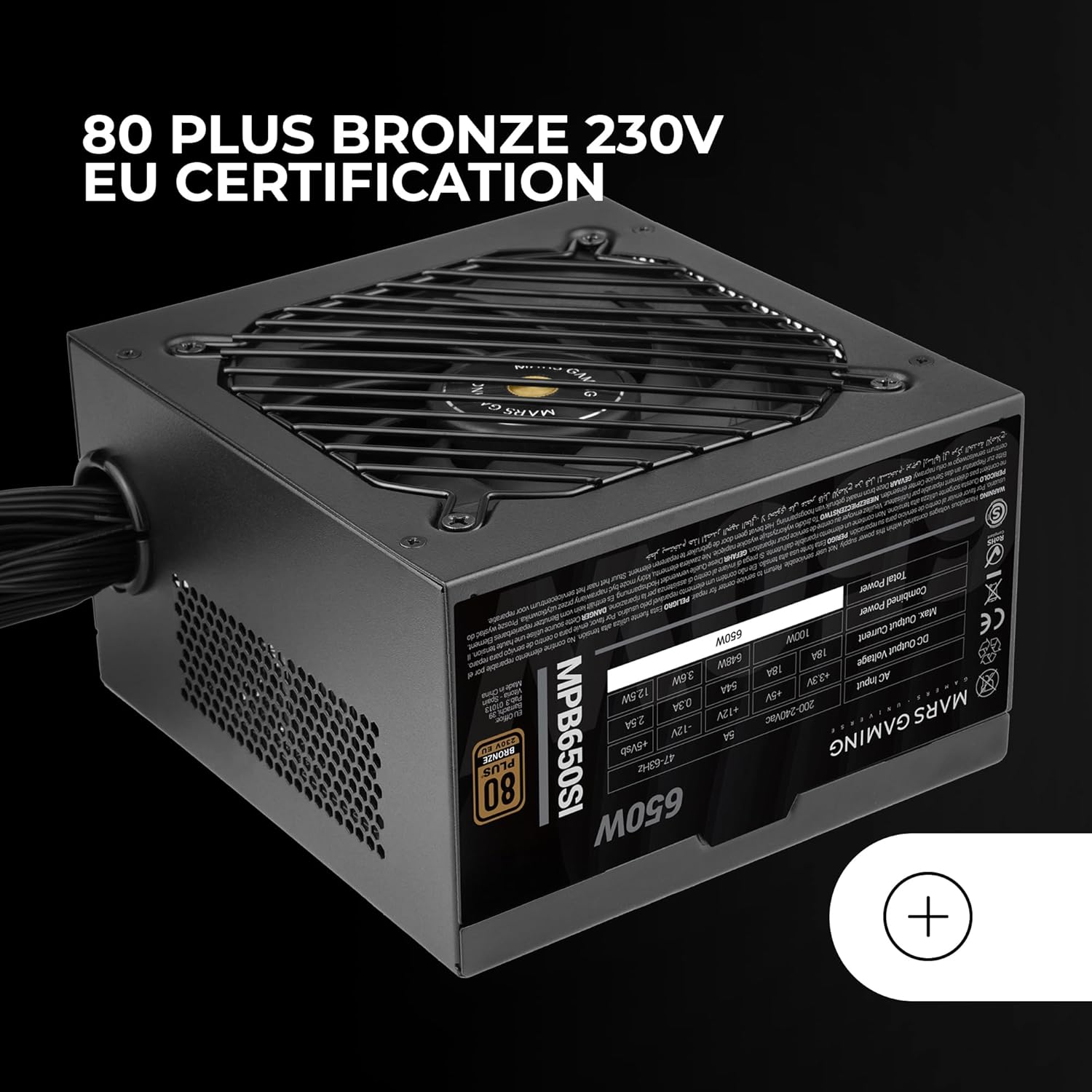
ചിത്രം 5: The 80 Plus Bronze 230V EU certification logo, indicating high energy efficiency.
വാറൻ്റിയും പിന്തുണയും
വാറൻ്റി വിവരങ്ങൾ
The Mars Gaming MPB650SI power supply comes with an extended 7 വർഷത്തെ വാറൻ്റി from the date of purchase. This warranty covers defects in materials and workmanship under normal use. It does not cover damage caused by improper installation, accident, abuse, misuse, natural disaster, or unauthorized modification.
For warranty claims, please retain your proof of purchase. The warranty is subject to the terms and conditions specified by Mars Gaming.
ഉപഭോക്തൃ പിന്തുണ
If you have any questions, require technical assistance, or need to initiate a warranty claim, please contact Mars Gaming customer support through their official website or the retailer where you purchased the product. Please have your product model (MPB650SI) and proof of purchase ready when contacting support.
For the most up-to-date support information, visit the official Mars Gaming webസൈറ്റ്: www.marsgaming.eu