
ആമുഖം
The MiBOXER C5 4-Zone RGB+CCT Remote is a versatile wireless controller designed to manage up to four independent lighting zones. It utilizes 2.4GHz RF wireless technology to provide precise control over brightness, color temperature (CCT), and color saturation for RGB+CCT lighting systems. This manual provides detailed instructions for setting up, operating, and maintaining your C5 remote.

Figure 1: MiBOXER C5 4-Zone RGB+CCT Remote, front view. This image shows the sleek black remote with its color ring, brightness slider, and various control buttons.
ഉൽപ്പന്ന സവിശേഷതകൾ
- 4-മേഖല നിയന്ത്രണം: Independently manage up to four distinct lighting zones.
- Adjustable RGB, CCT & Saturation: Fine-tune colors, color temperature (warm white to cool white), brightness, and color saturation.
- 2.4GHz RF Wireless Technology: Ensures a reliable and interference-free connection for responsive control.
- ഉപയോക്തൃ-സൗഹൃദ ഇൻ്റർഫേസ്: Ergonomic design with an intuitive button layout for easy operation.
- ബഹുമുഖ ആപ്ലിക്കേഷൻ: Suitable for various environments including homes, offices, restaurants, and retail spaces.
Product Components and Button Functions
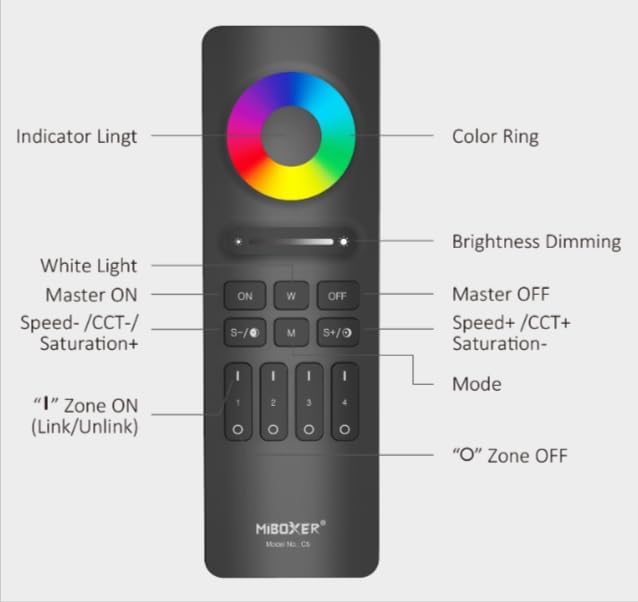
Figure 2: MiBOXER C5 Remote Button Diagram. This diagram illustrates the various buttons and their corresponding functions on the remote control.
- കളർ റിംഗ്: Touch to select desired RGB color.
- ഇൻഡിക്കേറ്റർ ലൈറ്റ്: Illuminates to confirm button presses.
- Brightness Dimming Slider: Slide to adjust brightness level.
- ON (Master ON): Turns on all linked lights.
- W (White Light): Activates pure white light mode.
- OFF (Master OFF): Turns off all linked lights.
- S-/CCT-/Saturation+: Decreases speed in dynamic mode, decreases color temperature (warmer white), or increases saturation.
- എം (മോഡ്): Cycles through dynamic modes.
- S+/CCT+/Saturation-: Increases speed in dynamic mode, increases color temperature (cooler white), or decreases saturation.
- Zone ON (1, 2, 3, 4): Press 'I' to turn on a specific zone and link/unlink.
- Zone OFF (1, 2, 3, 4): Press 'O' to turn off a specific zone.
സജ്ജീകരണ നിർദ്ദേശങ്ങൾ
1. ബാറ്ററി ഇൻസ്റ്റാളേഷൻ
The C5 remote requires 2x AAA batteries (not included). Follow these steps:
- റിമോട്ടിന്റെ പിൻഭാഗത്ത് ബാറ്ററി കമ്പാർട്ട്മെന്റ് കവർ കണ്ടെത്തുക.
- തുറക്കാൻ കവർ താഴേക്ക് സ്ലൈഡ് ചെയ്യുക.
- ശരിയായ പോളാരിറ്റി (+ ഉം - ഉം) ഉറപ്പാക്കിക്കൊണ്ട് രണ്ട് AAA ബാറ്ററികൾ ഇടുക.
- കവർ സുരക്ഷിതമായി ക്ലിക്കുചെയ്യുന്നത് വരെ അതിൻ്റെ സ്ഥാനത്തേക്ക് തിരികെ സ്ലൈഡ് ചെയ്യുക.
2. Linking/Pairing the Remote with Lights
To control your lights, the C5 remote must be linked to compatible MiBOXER lighting products. This process typically involves the following steps:
- Ensure the light(s) you wish to link are powered off.
- Power on the light(s).
- Within 3 seconds of powering on the light, press the 'I' (ON) button of the desired zone (1, 2, 3, or 4) on the C5 remote മൂന്നു തവണ.
- The light(s) should flash three times slowly, indicating successful linking.
- If linking fails, power off the light, wait 10 seconds, and repeat the process.
3. Unlinking the Remote from Lights
To unlink a light from a specific zone, follow these steps:
- Ensure the light(s) you wish to unlink are powered off.
- Power on the light(s).
- Within 3 seconds of powering on the light, press the 'I' (ON) button of the previously linked zone (1, 2, 3, or 4) on the C5 remote അഞ്ച് തവണ.
- The light(s) should flash ten times quickly, indicating successful unlinking.
പ്രവർത്തന നിർദ്ദേശങ്ങൾ
Once linked, you can control your lights using the C5 remote:
- മാസ്റ്റർ ഓൺ/ഓഫ്: അമർത്തുക ON button to turn on all linked lights. Press the ഓഫ് button to turn off all linked lights.
- സോൺ നിയന്ത്രണം: To control a specific zone, first press the 'I' (ON) button for that zone (1, 2, 3, or 4) to activate it. Then, use the other control buttons. Press the 'O' (OFF) button for a zone to turn off lights in that specific zone.
- തെളിച്ച ക്രമീകരണം: ഉപയോഗിക്കുക Brightness Dimming Slider പ്രകാശ തീവ്രത കൂട്ടുകയോ കുറയ്ക്കുകയോ ചെയ്യുക.
- Color Selection (RGB): തൊടുക കളർ റിംഗ് to select any desired color from the spectrum.
- വൈറ്റ് ലൈറ്റ് മോഡ്: അമർത്തുക W button to switch to pure white light.
- വർണ്ണ താപനില (CCT) ക്രമീകരണം: In white light mode, use the S-/CCT-/Saturation+ ഒപ്പം S+/CCT+/Saturation- buttons to adjust the color temperature. S- makes it warmer, S+ makes it cooler.
- Saturation Adjustment: When in a color mode, use the S-/CCT-/Saturation+ (increase saturation) and S+/CCT+/Saturation- (decrease saturation) buttons.
- ഡൈനാമിക് മോഡുകൾ: അമർത്തുക M (Mode) button to cycle through various pre-programmed dynamic lighting effects.
- ഡൈനാമിക് മോഡ് സ്പീഡ് ക്രമീകരണം: While in a dynamic mode, use the S- (decrease speed) and S+ (increase speed) buttons.
മെയിൻ്റനൻസ്
- വൃത്തിയാക്കൽ: Wipe the remote with a soft, dry cloth. Do not use abrasive cleaners or immerse in water.
- ബാറ്ററി മാറ്റിസ്ഥാപിക്കൽ: Replace batteries when the indicator light becomes dim or the remote's response becomes sluggish. Always use new AAA batteries and dispose of old batteries responsibly.
- സംഭരണം: Store the remote in a cool, dry place away from direct sunlight and extreme temperatures. If storing for extended periods, remove the batteries to prevent leakage.
ട്രബിൾഷൂട്ടിംഗ്
| പ്രശ്നം | സാധ്യമായ കാരണം | പരിഹാരം |
|---|---|---|
| റിമോട്ട് ലൈറ്റുകൾക്ക് മറുപടി നൽകുന്നില്ല. |
|
|
| Lights flash unexpectedly. |
|
|
| Color or brightness control is erratic. |
|
|
സ്പെസിഫിക്കേഷനുകൾ
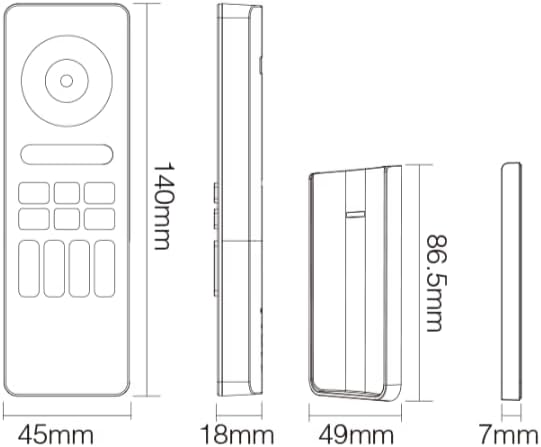
Figure 3: MiBOXER C5 Remote Dimensions. This diagram provides the physical measurements of the remote control in millimeters.
| ഫീച്ചർ | വിശദാംശങ്ങൾ |
|---|---|
| മോഡൽ നമ്പർ | C5 |
| ആശയവിനിമയ മോഡ് | 2.4GHz RF Wireless |
| നിയന്ത്രണ മേഖലകൾ | 4 സോണുകൾ |
| നിയന്ത്രണ തരം | RGB+CCT (Brightness, Color Temperature, Saturation) |
| വൈദ്യുതി വിതരണം | 2x AAA ബാറ്ററികൾ (ഉൾപ്പെടുത്തിയിട്ടില്ല) |
| വിദൂര അളവുകൾ | 140mm x 45mm x 18mm (ഏകദേശം 5.5 x 1.8 x 0.7 ഇഞ്ച്) |
| ഇനത്തിൻ്റെ ഭാരം | 2.88 ഔൺസ് (ഏകദേശം 81.6 ഗ്രാം) |
| പ്രവർത്തന താപനില | -20°C മുതൽ 60°C വരെ (ഏകദേശം -4°F മുതൽ 140°F വരെ) |
| ദൂരം നിയന്ത്രിക്കുക | Up to 30 meters (approx. 98 feet) in open area |
വാറൻ്റിയും പിന്തുണയും
For detailed warranty information, please refer to the official MiBOXER website or contact your point of purchase. MiBOXER products typically come with a limited warranty covering manufacturing defects.
If you encounter any issues not covered in the troubleshooting section or require further assistance, please visit the official MiBOXER support page or contact their customer service. You can often find contact details and FAQs on the MiBOXER Amazon Store അല്ലെങ്കിൽ അവരുടെ ഉദ്യോഗസ്ഥൻ webസൈറ്റ്.