
ഉൽപ്പന്നം കഴിഞ്ഞുview
The XO BE18 is a stereo audio wireless Bluetooth headset featuring RGB lighting. It is designed for immersive listening experiences and convenient communication, offering multiple playback modes including Bluetooth, AUX, TF card, and FM radio.
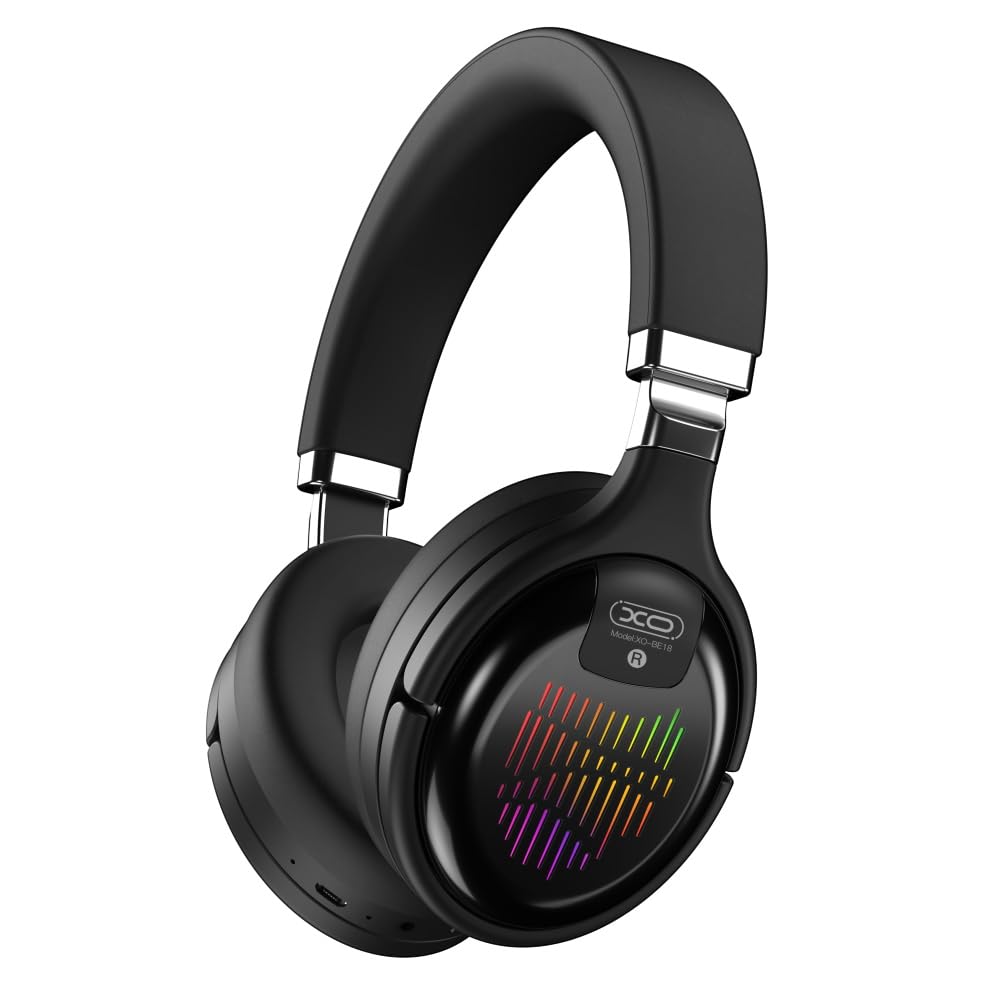
Image: The XO BE18 Wireless Bluetooth Headset, showcasing its over-ear design and integrated RGB lighting on the earcups.
പാക്കേജ് ഉള്ളടക്കം
പാക്കേജിൽ എല്ലാ ഇനങ്ങളും ഉണ്ടെന്ന് ഉറപ്പാക്കുക:
- XO BE18 Wireless Bluetooth Headset
- ചാർജിംഗ് കേബിൾ
- ഉപയോക്തൃ മാനുവൽ (ഈ പ്രമാണം)

Image: The XO BE18 headset shown within its retail packaging, indicating the included accessories.
സജ്ജമാക്കുക
ഹെഡ്സെറ്റ് ചാർജ് ചെയ്യുന്നു
- ഹെഡ്സെറ്റിൽ ചാർജിംഗ് പോർട്ട് കണ്ടെത്തുക.
- Connect the provided charging cable to the headset and a compatible USB power source (e.g., computer USB port, USB wall adapter).
- The LED indicator on the headset will typically show a specific color (e.g., red) during charging and change (e.g., turn off or blue) when fully charged.
- ഒരു ഫുൾ ചാർജിന് ഏകദേശം 2.5 മണിക്കൂർ എടുക്കും.
പവർ ചെയ്യുന്നത് ഓൺ/ഓഫ്
- പവർ ഓണാക്കാൻ: Press and hold the Power button for approximately 3-5 seconds until the LED indicator lights up and you hear an audible prompt.
- പവർ ഓഫ് ചെയ്യാൻ: Press and hold the Power button for approximately 3-5 seconds until the LED indicator turns off and you hear an audible prompt.
പ്രവർത്തന നിർദ്ദേശങ്ങൾ
ബ്ലൂടൂത്ത് ജോടിയാക്കൽ
- ഹെഡ്സെറ്റ് പവർ ഓഫ് ആണെന്ന് ഉറപ്പാക്കുക.
- Press and hold the Power button for approximately 5-7 seconds until the LED indicator flashes rapidly (e.g., alternating blue and red), indicating pairing mode.
- നിങ്ങളുടെ ഉപകരണത്തിൽ (സ്മാർട്ട്ഫോൺ, ടാബ്ലെറ്റ്, കമ്പ്യൂട്ടർ), ബ്ലൂടൂത്ത് പ്രവർത്തനക്ഷമമാക്കി ലഭ്യമായ ഉപകരണങ്ങൾക്കായി തിരയുക.
- Select "XO BE18" from the list of found devices.
- Once paired, the LED indicator will typically flash slowly or turn solid blue, and you will hear a confirmation tone.
അടിസ്ഥാന നിയന്ത്രണങ്ങൾ
The headset features various buttons for controlling audio playback and calls. Refer to the image below for button locations.

ചിത്രം: ക്ലോസ്-അപ്പ് view of the XO BE18 headset earcup, highlighting the control buttons and ports.
- പവർ ബട്ടൺ: പവർ ഓൺ/ഓഫ് ചെയ്യാൻ അമർത്തിപ്പിടിക്കുക. സംഗീതം പ്ലേ ചെയ്യാൻ/താൽക്കാലികമായി നിർത്താൻ അല്ലെങ്കിൽ കോളുകൾക്ക് മറുപടി നൽകാൻ/അവസാനിപ്പിക്കാൻ ഹ്രസ്വമായി അമർത്തുക.
- വോളിയം കൂട്ടുക (+): ശബ്ദം കൂട്ടാൻ ഷോർട്ട് പ്രസ് ചെയ്യുക. അടുത്ത ട്രാക്കിനായി ദീർഘനേരം അമർത്തുക.
- വോളിയം ഡൗൺ (-): ശബ്ദം കുറയ്ക്കാൻ ഷോർട്ട് പ്രസ് ചെയ്യുക. മുമ്പത്തെ ട്രാക്കിനായി ദീർഘനേരം അമർത്തുക.
- മോഡ് ബട്ടൺ (M): Short press to switch between Bluetooth, AUX, TF card, and Radio modes.
RGB ലൈറ്റിംഗ്
The headset features integrated RGB lighting on the earcups. This lighting typically activates automatically when the headset is powered on. Specific controls for the RGB lighting (if any) may be integrated with the mode button or a dedicated button not explicitly detailed.

Image: The XO BE18 headset displaying its colorful RGB lighting on the earcups.
മൈക്രോഫോൺ ഉപയോഗിക്കുന്നു
The built-in microphone allows for hands-free calls. When a call comes in, press the Power button once to answer. Press again to end the call.
AUX മോഡ്
Connect an audio cable (not included) from your device's 3.5mm audio jack to the headset's AUX port to use it in wired mode. The headset does not require power in AUX mode.
ടിഎഫ് കാർഡ് മോഡ്
ഓഡിയോ ഉള്ള ഒരു TF (മൈക്രോ എസ്ഡി) കാർഡ് ചേർക്കുക files into the designated slot. Use the Mode button to switch to TF card mode.
റേഡിയോ മോഡ്
Use the Mode button to switch to Radio mode. The headset will automatically scan for available FM radio stations.
മെയിൻ്റനൻസ്
- വൃത്തിയാക്കൽ: ഹെഡ്സെറ്റ് വൃത്തിയാക്കാൻ മൃദുവായതും ഉണങ്ങിയതുമായ തുണി ഉപയോഗിക്കുക. അബ്രസീവ് ക്ലീനറുകളോ ലായകങ്ങളോ ഉപയോഗിക്കരുത്.
- സംഭരണം: When not in use, store the headset in a cool, dry place. The headset features a portable folding design for compact storage.
- ബാറ്ററി കെയർ: ബാറ്ററി ലൈഫ് വർദ്ധിപ്പിക്കാൻ, ബാറ്ററി ഇടയ്ക്കിടെ പൂർണ്ണമായും ഡിസ്ചാർജ് ചെയ്യുന്നത് ഒഴിവാക്കുക. തുടർച്ചയായ ഉപയോഗത്തിലല്ലെങ്കിൽ പോലും ഹെഡ്സെറ്റ് പതിവായി ചാർജ് ചെയ്യുക.
- വാട്ടർ എക്സ്പോഷർ: This headset is not waterproof. Avoid exposure to water or excessive moisture.

Image: The XO BE18 headset shown in its folded configuration, demonstrating its portable design.
ട്രബിൾഷൂട്ടിംഗ്
| പ്രശ്നം | സാധ്യമായ പരിഹാരം |
|---|---|
| ഹെഡ്സെറ്റ് ഓണാക്കുന്നില്ല. | ഹെഡ്സെറ്റ് പൂർണ്ണമായും ചാർജ് ചെയ്തിട്ടുണ്ടെന്ന് ഉറപ്പാക്കുക. ഒരു പവർ സ്രോതസ്സിലേക്ക് കണക്റ്റ് ചെയ്ത് വീണ്ടും ശ്രമിക്കുക. |
| ഉപകരണവുമായി ജോടിയാക്കാൻ കഴിയില്ല. |
|
| ശബ്ദമില്ല അല്ലെങ്കിൽ കുറഞ്ഞ ശബ്ദമില്ല. |
|
| മൈക്രോഫോൺ പ്രവർത്തിക്കുന്നില്ല. |
|
| RGB ലൈറ്റിംഗ് പ്രവർത്തിക്കുന്നില്ല. | Ensure the headset is powered on. If the issue persists, contact customer support. |
സ്പെസിഫിക്കേഷനുകൾ
| ഫീച്ചർ | വിശദാംശങ്ങൾ |
|---|---|
| മോഡലിൻ്റെ പേര് | BE18 |
| കണക്റ്റിവിറ്റി | വയർലെസ്സ് (ബ്ലൂടൂത്ത് V5.0) |
| വയർലെസ് ശ്രേണി | ഏകദേശം 10 മീറ്റർ |
| ഓഡിയോ ടെക്നോളജി | Hi-Fis Audio, Intelligent Noise Reduction |
| ചെവി പ്ലേസ്മെൻ്റ് | ചെവിയിൽ |
| ശബ്ദ നിയന്ത്രണം | സൗണ്ട് ഐസൊലേഷൻ |
| മൈക്രോഫോൺ | അന്തർനിർമ്മിത |
| ബാറ്ററി ശേഷി | 250mAh |
| സംഗീത പ്ലേബാക്ക് സമയം | ഏകദേശം 4 മണിക്കൂർ |
| കോൾ സമയം | ഏകദേശം 4 മണിക്കൂർ |
| ചാർജിംഗ് സമയം | ഏകദേശം 2.5 മണിക്കൂർ |
| സ്റ്റാൻഡ്ബൈ സമയം | Long Standby Capability |
| സ്പീക്കർ പവർ | 3 മെഗാവാട്ട് |
| സംവേദനക്ഷമത | 94 ± 3dBm |
| എസ്/എൻ അനുപാതം | >=75dB |
| പ്രവർത്തന ആവൃത്തി | 20Hz-20KHz |
| പ്ലേ മോഡുകൾ | Bluetooth, AUX, TF Card, Radio |
| ബ്ലൂടൂത്ത് പ്രോട്ടോക്കോളുകൾ | A2DP, HSP, HFP |
| അളവുകൾ (പാക്കേജ്) | 195 x 195 x 80 മിമി |
| നിറം | കറുപ്പ് |

Image: A detailed table outlining the technical specifications and product information for the XO BE18 headset.
വാറൻ്റിയും പിന്തുണയും
This product comes with a standard manufacturer's warranty. For specific warranty terms and conditions, please refer to the warranty card included in your product packaging or contact the retailer where you purchased the product.
For technical support or further assistance, please contact your retailer or visit the official XO webസൈറ്റ് (ലഭ്യമെങ്കിൽ).