
ആമുഖം
Thank you for choosing the AWEI T95 Wireless Earbuds. This manual provides essential information for setting up, operating, maintaining, and troubleshooting your new earbuds. Please read it carefully to ensure optimal performance and longevity of your device.
The AWEI T95 earbuds are designed for a secure fit and deliver high-fidelity audio with advanced Bluetooth 5.3 technology. They feature IPX6 waterproofing, making them suitable for various activities, including workouts.
പാക്കേജ് ഉള്ളടക്കം
നിങ്ങളുടെ പാക്കേജിൽ എല്ലാ ഇനങ്ങളും ഉണ്ടെന്ന് ഉറപ്പാക്കുക:
- AWEI T95 Wireless Bluetooth Headset (Left and Right Earbuds)
- ചാർജിംഗ് കേസ്
- USB-C ചാർജിംഗ് കേബിൾ
- User Instructions (This Manual)
സജ്ജമാക്കുക
1. ഇയർബഡുകളും കേസും ചാർജ് ചെയ്യുന്നു
ആദ്യമായി ഉപയോഗിക്കുന്നതിന് മുമ്പ്, ഇയർബഡുകളും ചാർജിംഗ് കേസും പൂർണ്ണമായും ചാർജ് ചെയ്യുക.
- Connect the provided USB-C charging cable to the charging port on the case and to a USB power source.
- ചാർജിംഗ് കേസിലെ ഇൻഡിക്കേറ്റർ ലൈറ്റുകൾ ചാർജിംഗ് നില കാണിക്കും.
- ഇയർബഡുകൾ ചാർജിംഗ് കെയ്സിൽ വയ്ക്കുക. അവ സ്വയമേവ ചാർജ് ചെയ്യാൻ തുടങ്ങും.
A 5-minute quick charge provides approximately 1 hour of usage.
2. പ്രാരംഭ ജോടിയാക്കൽ
The AWEI T95 earbuds feature automatic pairing for convenience.
- ചാർജിംഗ് കേസ് തുറക്കുക. ഇയർബഡുകൾ സ്വയമേവ ഓണാകുകയും ജോടിയാക്കൽ മോഡിലേക്ക് പ്രവേശിക്കുകയും ചെയ്യും.
- നിങ്ങളുടെ ഉപകരണത്തിൽ (സ്മാർട്ട്ഫോൺ, ടാബ്ലെറ്റ്, ലാപ്ടോപ്പ്), ബ്ലൂടൂത്ത് പ്രവർത്തനക്ഷമമാക്കുക.
- ഇതിനായി തിരയുക available Bluetooth devices and select "AWEI T95" from the list.
- കണക്റ്റ് ചെയ്തുകഴിഞ്ഞാൽ, ഒരു സ്ഥിരീകരണ ടോൺ നിങ്ങൾ കേൾക്കും, ഇയർബഡുകൾ ഉപയോഗത്തിന് തയ്യാറാകും.
3. Automatic Reconnection
After initial pairing, the earbuds will automatically connect to the last paired device when removed from the charging case, provided Bluetooth is enabled on the device and it is within range (up to 33 feet).
4. ഇയർബഡുകൾ ധരിക്കുന്നു
The AWEI T95 earbuds are designed with ergonomic ear hooks for a secure and comfortable fit, especially during physical activities.
- Gently place the earbud into your ear canal.
- Adjust the ear hook over your ear until it feels snug and stable.
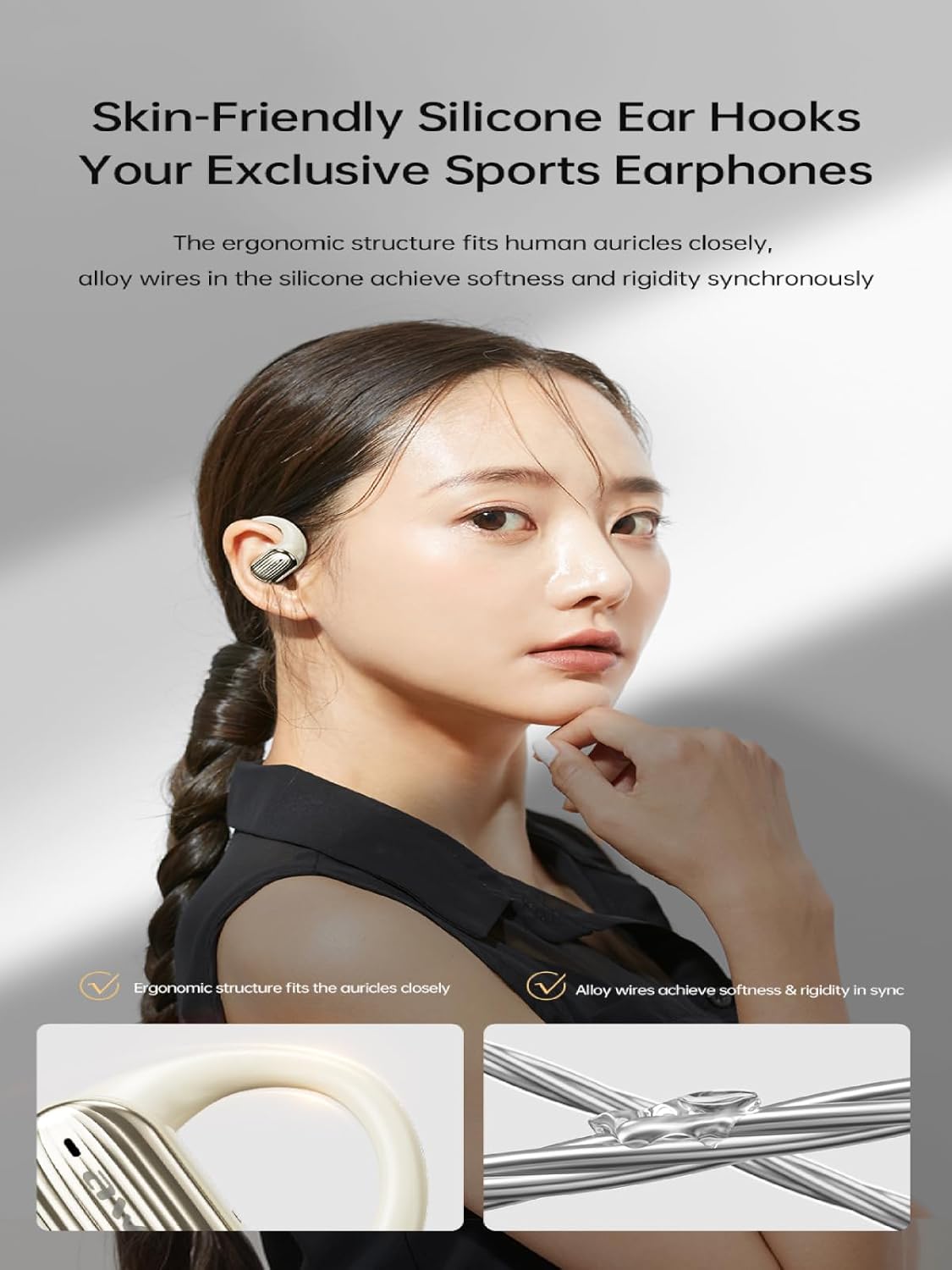
Image: The AWEI T95 earbud with its skin-friendly silicone ear hook, designed for a secure and comfortable fit. The image highlights the ergonomic structure and the alloy wires that provide both softness and rigidity.
പ്രവർത്തന നിർദ്ദേശങ്ങൾ
1. പവർ ഓൺ/ഓഫ്
- പവർ ഓൺ: ചാർജിംഗ് കേസ് തുറക്കുക, അല്ലെങ്കിൽ രണ്ട് ഇയർബഡുകളിലെയും ടച്ച് ഏരിയ കുറച്ച് സെക്കൻഡ് അമർത്തിപ്പിടിക്കുക.
- പവർ ഓഫ്: ഇയർബഡുകൾ ചാർജിംഗ് കെയ്സിലേക്ക് തിരികെ വയ്ക്കുക, ലിഡ് അടയ്ക്കുക, അല്ലെങ്കിൽ രണ്ട് ഇയർബഡുകളിലെയും ടച്ച് ഏരിയ കുറച്ച് സെക്കൻഡ് അമർത്തിപ്പിടിച്ച് അവ ഓഫ് ആകുന്നതുവരെ പിടിക്കുക.
2. ടച്ച് നിയന്ത്രണങ്ങൾ
The AWEI T95 earbuds feature intuitive touch controls. Specific functions may vary slightly depending on your device and operating system.
- പ്ലേ/താൽക്കാലികമായി നിർത്തുക: ഇയർബഡുകളിൽ ഏതെങ്കിലുമൊന്നിൽ ഒറ്റ ടാപ്പ് ചെയ്യുക.
- അടുത്ത ട്രാക്ക്: വലതുവശത്തെ ഇയർബഡിൽ രണ്ടുതവണ ടാപ്പ് ചെയ്യുക.
- മുമ്പത്തെ ട്രാക്ക്: ഇടതുവശത്തെ ഇയർബഡിൽ രണ്ടുതവണ ടാപ്പ് ചെയ്യുക.
- ഉത്തരം/അവസാന കോൾ: ഇൻകമിംഗ് കോൾ വരുമ്പോൾ ഏത് ഇയർബഡിലും ഒറ്റ ടാപ്പ് ചെയ്യുക.
- കോൾ നിരസിക്കുക: ഇൻകമിംഗ് കോൾ വരുമ്പോൾ, ഇയർബഡുകളിൽ ഏതെങ്കിലുമൊന്ന് 2 സെക്കൻഡ് അമർത്തിപ്പിടിക്കുക.
- വോയ്സ് അസിസ്റ്റന്റിനെ സജീവമാക്കുക: ഇയർബഡുകളിൽ ഏതെങ്കിലുമൊന്നിൽ മൂന്ന് തവണ ടാപ്പ് ചെയ്യുക.
3. ഓഡിയോ സവിശേഷതകൾ
The AWEI T95 earbuds are equipped with 14.2mm drivers and ULF Enhancement Algorithm for a rich audio experience.

Image: An illustration of the AWEI T95 earbud's internal structure, emphasizing the ULF Enhancement Algorithm designed to enhance low-frequency sounds for deep bass. A graph indicates an 83% increase in bass details.
Enjoy crisp trebles, full midranges, and deep bass across various music genres. The earbuds also offer dynamic spatial sound effects for an immersive listening experience.

Image: A visual representation of the AWEI T95 earbuds' dynamic spatial sound effects, showing sound waves creating an immersive 3D surround stereo experience around a listener.
4. Directional Propagation
The earbuds feature directional sound propagation, allowing you to stay aware of your surroundings while listening to audio, and maintaining privacy during calls in crowded environments.

Image: An AWEI T95 earbud in an ear, demonstrating directional sound propagation. This technology helps users remain aware of their environment and ensures privacy during calls by directing sound efficiently.
മെയിൻ്റനൻസ്
1. വൃത്തിയാക്കൽ
- ഇയർബഡുകളും ചാർജിംഗ് കെയ്സും മൃദുവായതും ഉണങ്ങിയതും ലിന്റ് രഹിതവുമായ തുണി ഉപയോഗിച്ച് പതിവായി വൃത്തിയാക്കുക.
- അബ്രാസീവ് ക്ലീനറുകൾ, ആൽക്കഹോൾ, കെമിക്കൽ ലായകങ്ങൾ എന്നിവ ഉപയോഗിക്കരുത്.
- ഇയർബഡ് നുറുങ്ങുകളിൽ നിന്നും സ്പീക്കർ മെഷിൽ നിന്നും ഇയർവാക്സ് അല്ലെങ്കിൽ അവശിഷ്ടങ്ങൾ ഉണ്ടെങ്കിൽ, ചെറുതും മൃദുവായതുമായ ഒരു ബ്രഷ് അല്ലെങ്കിൽ കോട്ടൺ സ്വാബ് ഉപയോഗിച്ച് സൌമ്യമായി നീക്കം ചെയ്യുക.
2. ജല പ്രതിരോധം (IPX6)
The AWEI T95 earbuds are IPX6 waterproof, meaning they are protected against powerful water jets. This makes them resistant to sweat and rain.
- ഇയർബഡുകൾ വെള്ളത്തിൽ മുക്കരുത്.
- After exposure to sweat or rain, wipe the earbuds dry with a clean cloth before placing them back in the charging case to prevent damage to the charging contacts.
- The charging case is not waterproof. Keep it dry.
3. സംഭരണം
- ഇയർബഡുകൾ ഉപയോഗിക്കാത്തപ്പോൾ അവയുടെ ചാർജ്ജിംഗ് കെയ്സിൽ സൂക്ഷിക്കുക, അവയെ സംരക്ഷിക്കുകയും ചാർജ്ജ് ചെയ്തിരിക്കുകയും ചെയ്യുക.
- Avoid storing the earbuds in extreme temperatures or high humidity.
ട്രബിൾഷൂട്ടിംഗ്
If you encounter issues with your AWEI T95 earbuds, try the following solutions:
1. ഇയർബഡുകൾ ജോടിയാക്കുകയോ ബന്ധിപ്പിക്കുകയോ ചെയ്യുന്നില്ല.
- ഇയർബഡുകൾ ചാർജ്ജ് ചെയ്തിട്ടുണ്ടെന്ന് ഉറപ്പാക്കുക.
- നിങ്ങളുടെ ഉപകരണത്തിൽ ബ്ലൂടൂത്ത് പ്രവർത്തനക്ഷമമാക്കിയിട്ടുണ്ടെന്ന് ഉറപ്പാക്കുക.
- Place the earbuds back in the charging case, close the lid, wait a few seconds, then open it again to re-enter pairing mode.
- On your device, forget or delete "AWEI T95" from your Bluetooth device list, then attempt to pair again.
- Ensure the earbuds are within the 33-foot operating range of your device.
2. ശബ്ദമില്ല അല്ലെങ്കിൽ കുറഞ്ഞ ശബ്ദം
- നിങ്ങളുടെ ഇയർബഡുകളിലും കണക്റ്റുചെയ്ത ഉപകരണത്തിലും വോളിയം ലെവലുകൾ പരിശോധിക്കുക.
- ഇയർബഡുകൾ നിങ്ങളുടെ ഉപകരണവുമായി ശരിയായി ബന്ധിപ്പിച്ചിട്ടുണ്ടെന്ന് ഉറപ്പാക്കുക.
- Clean any debris from the earbud speaker mesh that might be obstructing sound.
- വ്യത്യസ്തമായ ഒരു ആപ്ലിക്കേഷനിൽ നിന്നോ ഉറവിടത്തിൽ നിന്നോ ഓഡിയോ പ്ലേ ചെയ്യാൻ ശ്രമിക്കുക.
3. ഇയർബഡുകൾ ചാർജ് ചെയ്യുന്നില്ല
- ചാർജിംഗ് കേബിൾ കേസിലേക്കും പവർ സ്രോതസ്സിലേക്കും സുരക്ഷിതമായി ബന്ധിപ്പിച്ചിട്ടുണ്ടെന്ന് ഉറപ്പാക്കുക.
- പവർ സ്രോതസ്സ് സജീവമാണെന്ന് ഉറപ്പാക്കുക.
- ഇയർബഡുകളിലെയും ചാർജിംഗ് കെയ്സിനുള്ളിലെയും ചാർജിംഗ് കോൺടാക്റ്റുകൾ വൃത്തിയാക്കുക.
- Try using a different USB-C charging cable or power adapter.
4. ഇടവിട്ടുള്ള കണക്ഷൻ
- ഇയർബഡുകളും നിങ്ങളുടെ ഉപകരണവും തമ്മിലുള്ള ദൂരം കുറയ്ക്കുക.
- Avoid obstacles between the earbuds and your device, such as walls or large electronic equipment.
- Minimize interference from other 2.4GHz wireless devices (e.g., Wi-Fi routers, microwaves).
സ്പെസിഫിക്കേഷനുകൾ

Image: The AWEI T95 TWS Sports Earphones, showcasing the earbuds and their charging case. This image highlights their open wearable stereo design, heavy bass capabilities, Bluetooth 5.3 connectivity, and snug fit.
| ഫീച്ചർ | വിശദാംശങ്ങൾ |
|---|---|
| മോഡൽ | T95 |
| ബ്രാൻഡ് | അവേയ് |
| കണക്റ്റിവിറ്റി ടെക്നോളജി | വയർലെസ്സ് (ബ്ലൂടൂത്ത് 5.3) |
| വയർലെസ് കമ്മ്യൂണിക്കേഷൻ ടെക്നോളജീസ് | ബ്ലൂടൂത്ത് |
| ചെവി പ്ലേസ്മെൻ്റ് | തുറന്ന ചെവി |
| ഫോം ഫാക്ടർ | യഥാർത്ഥ വയർലെസ് |
| ജല പ്രതിരോധ നില | IPX6 (വാട്ടർപ്രൂഫ്) |
| പരമാവധി പ്രവർത്തന ദൂരം | 33 അടി (10 മീറ്റർ) |
| ബാറ്ററി ലൈഫ് | 28 മണിക്കൂർ വരെ (ചാർജിംഗ് കേസ് ഉപയോഗിച്ച്) |
| ഡ്രൈവർ വലിപ്പം | 14.2 മി.മീ |
| ഉൾപ്പെടുത്തിയ ഘടകങ്ങൾ | USB-C Charging Cable, Wireless Bluetooth Headset, User Instructions, Wireless Bluetooth Headset Charging Case |

ചിത്രം: ഒരു ആന്തരികം view of the AWEI T95 earbud, emphasizing the Bluetooth 5.3 technology. This image illustrates how Bluetooth 5.3 ensures stable audio and video synchronization, reduces interference, and offers high-speed transmission with lower power consumption.
വാറൻ്റിയും പിന്തുണയും
1. വാറൻ്റി വിവരങ്ങൾ
The AWEI T95 Wireless Earbuds come with a 1 വർഷത്തെ വാറൻ്റി വാങ്ങിയ തീയതി മുതൽ. ഈ വാറന്റി നിർമ്മാണ വൈകല്യങ്ങൾ ഉൾക്കൊള്ളുന്നു. ദുരുപയോഗം, അപകടങ്ങൾ, അനധികൃത പരിഷ്കാരങ്ങൾ, അല്ലെങ്കിൽ സാധാരണ തേയ്മാനം എന്നിവ മൂലമുണ്ടാകുന്ന നാശനഷ്ടങ്ങൾക്ക് ഇത് പരിരക്ഷ നൽകുന്നില്ല.
വാറൻ്റി ക്ലെയിമുകൾക്കായി നിങ്ങളുടെ വാങ്ങിയതിൻ്റെ തെളിവ് സൂക്ഷിക്കുക.
2. ഉപഭോക്തൃ പിന്തുണ
For technical assistance, warranty claims, or any other inquiries, please contact Awei customer support through their official webനിങ്ങൾ ഉൽപ്പന്നം വാങ്ങിയ സൈറ്റ് അല്ലെങ്കിൽ റീട്ടെയിലർ.
When contacting support, please provide your product model (T95) and a detailed description of the issue.