
1. ആമുഖം
വാങ്ങിയതിന് നന്ദി.asing the TecTake Kade Retro Mushroom Table Lamp. നിങ്ങളുടെ പുതിയ കമ്പ്യൂട്ടറിന്റെ സുരക്ഷിതവും കാര്യക്ഷമവുമായ ഉപയോഗത്തിന് ആവശ്യമായ വിവരങ്ങൾ ഈ മാനുവൽ നൽകുന്നു.amp. ഉപയോഗിക്കുന്നതിന് മുമ്പ് ദയവായി ഈ നിർദ്ദേശങ്ങൾ ശ്രദ്ധാപൂർവ്വം വായിക്കുകയും ഭാവിയിലെ റഫറൻസിനായി സൂക്ഷിക്കുകയും ചെയ്യുക.
2. സുരക്ഷാ നിർദ്ദേശങ്ങൾ
- എൽ ഉറപ്പാക്കുകamp ടിപ്പിംഗ് തടയാൻ ഒരു സ്ഥിരതയുള്ള, പരന്ന പ്രതലത്തിൽ സ്ഥാപിച്ചിരിക്കുന്നു.
- എൽ വെളിപ്പെടുത്തരുത്amp to water or excessive moisture. This product is for indoor use only.
- എൽ സൂക്ഷിക്കുകamp away from heat sources, direct sunlight, and flammable materials.
- l ഡിസ്അസംബ്ലിംഗ് ചെയ്യാനോ പരിഷ്ക്കരിക്കാനോ ശ്രമിക്കരുത്amp. ഇത് വാറന്റി അസാധുവാക്കുകയും സുരക്ഷാ അപകടമുണ്ടാക്കുകയും ചെയ്തേക്കാം.
- ചാർജ് ചെയ്യുന്നതിന് നൽകിയിരിക്കുന്ന ചാർജിംഗ് കേബിളോ സാക്ഷ്യപ്പെടുത്തിയ USB-C കേബിളോ മാത്രം ഉപയോഗിക്കുക.
- എൽ പ്രവർത്തിപ്പിക്കരുത്amp if the cable or any part of the lamp കേടായതാണ്.
- The integrated battery is not user-replaceable.
- Dispose of the product responsibly according to local regulations at the end of its lifespan.
3. പാക്കേജ് ഉള്ളടക്കം
പാക്കേജിൽ എല്ലാ ഇനങ്ങളും ഉണ്ടോ എന്ന് ദയവായി പരിശോധിക്കുക:
- 1 x TecTake Kade Retro Mushroom Table Lamp
- 1 x യുഎസ്ബി-സി ചാർജിംഗ് കേബിൾ
- 1 x ഉപയോക്തൃ മാനുവൽ (ഈ പ്രമാണം)
4. ഉൽപ്പന്നം കഴിഞ്ഞുview
The TecTake Kade Retro Mushroom Table Lamp features a classic 70s-inspired design with modern functionality. It offers indirect, glare-free illumination with three adjustable brightness levels, controlled by a touch switch on the lampതണല്. എൽamp is cordless and rechargeable, providing flexibility for placement.
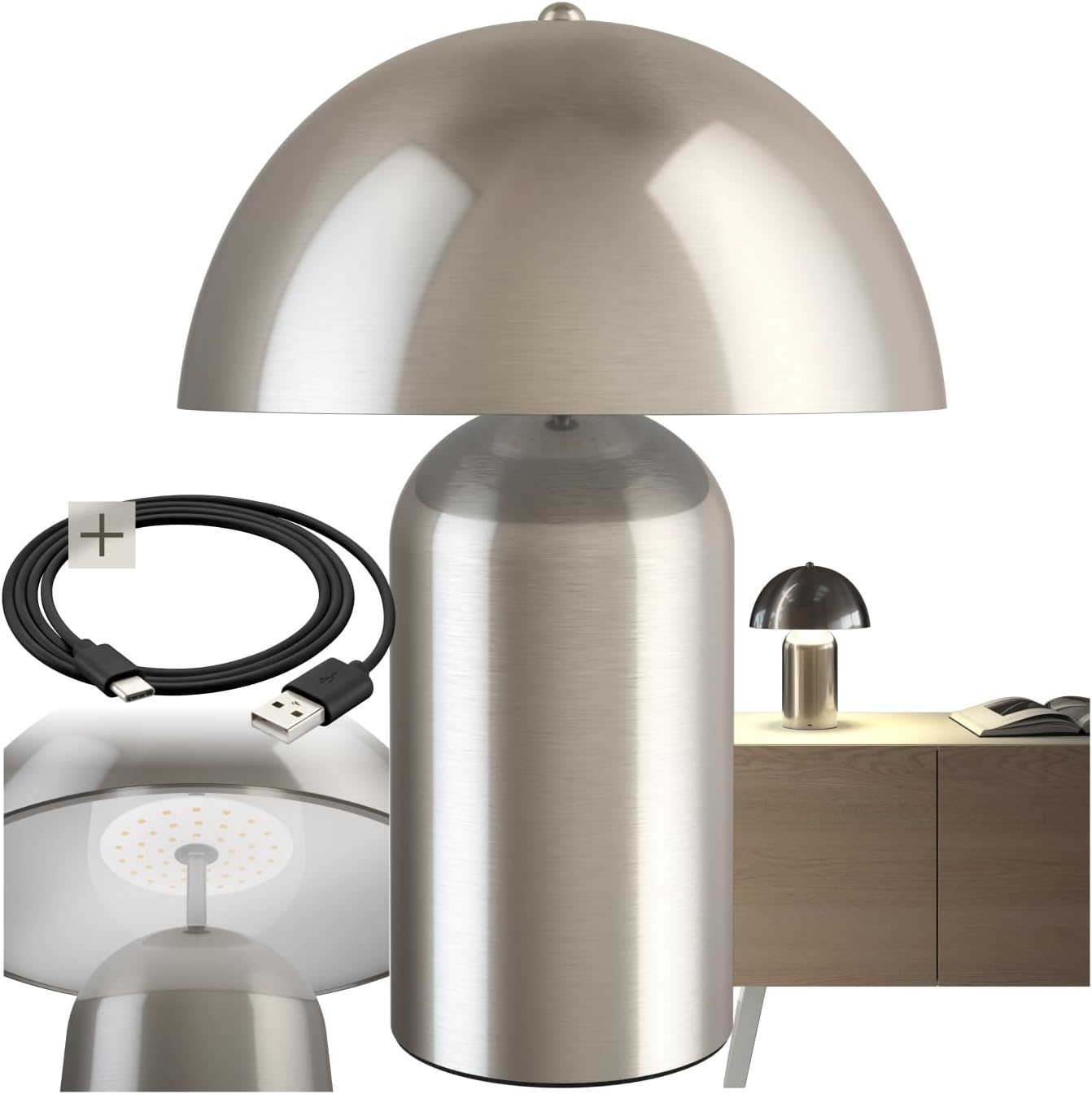
Image 1: The TecTake Kade Retro Mushroom Table Lamp, കാണിക്കുകasing its full design and included USB-C charging cable.
5. സജ്ജീകരണം
- അൺപാക്ക് ചെയ്യുന്നു: പാക്കേജിംഗിൽ നിന്ന് എല്ലാ ഘടകങ്ങളും ശ്രദ്ധാപൂർവ്വം നീക്കം ചെയ്യുക. ഭാവിയിലെ സംഭരണത്തിനോ ഗതാഗതത്തിനോ വേണ്ടി പാക്കേജിംഗ് സൂക്ഷിക്കുക.
- പ്രാരംഭ ചാർജ്: ആദ്യ ഉപയോഗത്തിന് മുമ്പ്, l പൂർണ്ണമായും ചാർജ് ചെയ്യുകamp. Connect the USB-C end of the charging cable to the lamp's charging port (located on the base) and the USB-A end to a suitable USB power adapter (not included) or a computer USB port. The charging indicator (if present, usually a small LED) will show charging status. A full charge typically takes 4-6 hours.
ചിത്രം 2: ക്ലോസ്-അപ്പ് view യുടെ എൽamp's base, showing the USB-C charging port and the included charging cable.
6. പ്രവർത്തന നിർദ്ദേശങ്ങൾ
എൽamp features a touch-sensitive switch located on the top of the lampshade for easy control.
- ഓൺ/ഓഫ് ചെയ്യുന്നു: Lightly touch the top of the lampl തിരിയാൻ തണൽamp on. Touch it again to cycle through brightness levels and eventually turn it off.
- തെളിച്ചം ക്രമീകരിക്കൽ: എൽamp has three brightness levels. Each subsequent touch of the lampshade will cycle to the next brightness level (Low > Medium > High > Off).
- ചാർജിംഗ്: When the battery is low, the light output may diminish. Connect the lamp to a power source using the USB-C cable as described in the Setup section. The lamp can be used while charging. A full charge provides approximately 8-10 hours of operation, depending on the brightness level used.

ചിത്രം 3: അടിവശം view യുടെ എൽampshade, highlighting the integrated LED light source and the area for touch control.
7. പരിപാലനം
- വൃത്തിയാക്കൽ: എൽ വിച്ഛേദിക്കുകamp from any power source before cleaning. Wipe the lamp മൃദുവായതോ, ഉണങ്ങിയതോ, അല്ലെങ്കിൽ ചെറുതായി ഡി ഉള്ളതോamp തുണി. അബ്രാസീവ് ക്ലീനറുകൾ, ലായകങ്ങൾ, അല്ലെങ്കിൽ കഠിനമായ രാസവസ്തുക്കൾ എന്നിവ ഉപയോഗിക്കരുത്.
- സംഭരണം: എൽ സൂക്ഷിക്കുകയാണെങ്കിൽamp for an extended period, ensure it is fully charged and store it in a cool, dry place. Recharge the lamp every 3-6 months to maintain battery health.
8. പ്രശ്നപരിഹാരം
- Lamp ഓണാക്കുന്നില്ല:
- ബാറ്ററി ചാർജ്ജ് ചെയ്തിട്ടുണ്ടെന്ന് ഉറപ്പാക്കുക. l കണക്റ്റുചെയ്യുകamp to a power source and try again.
- Verify that the touch switch area is clean and unobstructed.
- Lamp നിരക്ക് ഈടാക്കുന്നില്ല:
- Check if the USB-C cable is securely connected to both the lamp and the power adapter.
- കേബിൾ/അഡാപ്റ്റർ പ്രശ്നങ്ങൾ ഒഴിവാക്കാൻ മറ്റൊരു USB-C കേബിളോ പവർ അഡാപ്റ്ററോ ഉപയോഗിക്കാൻ ശ്രമിക്കുക.
- പവർ ഔട്ട്ലെറ്റ് പ്രവർത്തനക്ഷമമാണെന്ന് ഉറപ്പാക്കുക.
- Brightness levels are not changing:
- Ensure you are touching the correct area on the lampതണൽ.
- If the battery is very low, the lamp may not be able to sustain higher brightness levels. Charge the lamp.
If you encounter issues not covered here, please contact TecTake customer support.
9 സ്പെസിഫിക്കേഷനുകൾ

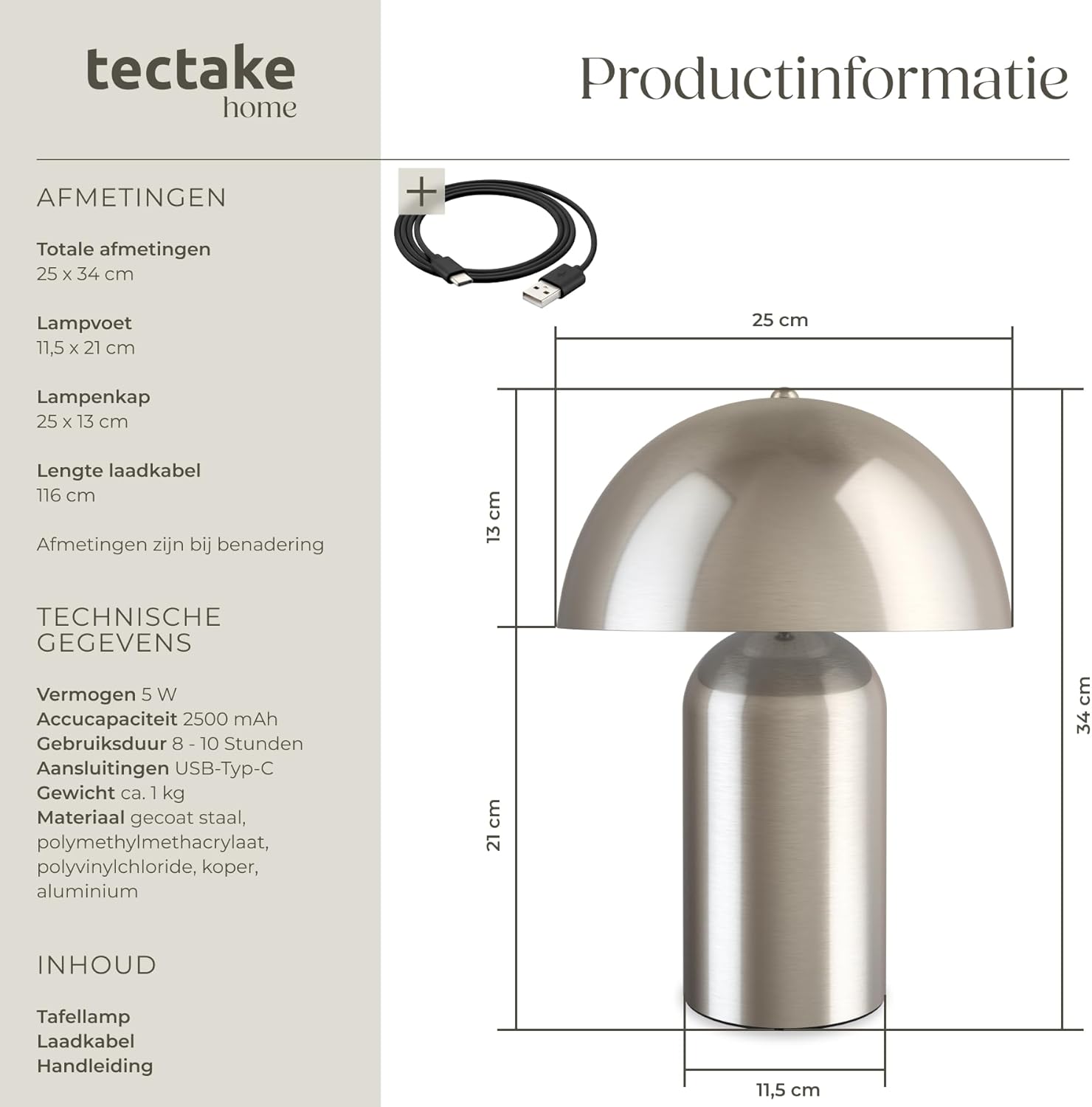
Image 4: Technical diagram illustrating the dimensions of the lamp, including total height, base diameter, and lampshade dimensions.
| ഫീച്ചർ | സ്പെസിഫിക്കേഷൻ |
|---|---|
| മോഡൽ നമ്പർ | 405246 |
| ബ്രാൻഡ് | ടെക് ടേക്ക് |
| Total Dimensions (Diameter x Height) | Approx. 25 x 34 cm (9.8 x 13.4 inches) |
| Lamp Base (Diameter x Height) | Approx. 11.5 x 21 cm (4.5 x 8.3 inches) |
| Lampshade (Diameter x Height) | Approx. 25 x 13 cm (9.8 x 5.1 inches) |
| ചാർജിംഗ് കേബിൾ നീളം | ഏകദേശം 116 സെ.മീ (45.7 ഇഞ്ച്) |
| ശക്തി | 5 W |
| വർണ്ണ താപനില | 3000 കെ |
| ബാറ്ററി ശേഷി | 2500 mAh |
| ചാർജിംഗ് സമയം | ഏകദേശം 4-6 മണിക്കൂർ |
| പ്രവർത്തന സമയം | Approx. 8-10 hours (depending on brightness) |
| കണക്ഷൻ തരം | USB-C |
| ഭാരം | ഏകദേശം 1.2 കി.ഗ്രാം (2.6 പൗണ്ട്) |
| മെറ്റീരിയൽ | Coated steel, polymethyl methacrylate, polyvinyl chloride, copper, aluminum |
10. വാറൻ്റിയും പിന്തുണയും
TecTake products are designed for quality and reliability. For information regarding warranty terms and conditions, please refer to the warranty card included with your purchase or visit the official TecTake website. For technical support, spare parts, or service inquiries, please contact TecTake customer service directly.
Contact information can typically be found on the product packaging or the TecTake official webസൈറ്റ്.