ജനറിക് A30C മിനി പോർട്ടബിൾ LED പ്രൊജക്ടർ ഉപയോക്തൃ മാനുവൽ
Model: A30C | Brand: Generic
ആമുഖം
This manual provides essential information for the safe and effective operation of your Generic A30C Mini Portable LED Projector. Please read this manual thoroughly before using the product and retain it for future reference. This compact, high-definition LED projector is designed to transform any space into a vibrant viewing experience, perfect for movies, gaming, and family entertainment.

Image: The Generic A30C Mini Portable LED Projector, a compact black device with a lens and control buttons on top.
സജ്ജീകരണ ഗൈഡ്
1 അൺപാക്ക് ചെയ്യുന്നു
പാക്കേജിംഗിൽ നിന്ന് എല്ലാ ഘടകങ്ങളും ശ്രദ്ധാപൂർവ്വം നീക്കം ചെയ്യുക. ഇനിപ്പറയുന്ന ഇനങ്ങൾ ഉണ്ടെന്ന് ഉറപ്പാക്കുക:
- Generic A30C Mini Portable LED Projector
- പവർ അഡാപ്റ്റർ
- റിമോട്ട് കൺട്രോൾ (ഉൾപ്പെടുത്തിയാൽ)
- ഉപയോക്തൃ മാനുവൽ (ഈ പ്രമാണം)
2. പ്ലേസ്മെന്റ്
പ്രൊജക്ടർ ഒരു സ്ഥിരതയുള്ളതും പരന്നതുമായ പ്രതലത്തിൽ സ്ഥാപിക്കുക. ഒപ്റ്റിമൽ ആയി viewing, position the projector perpendicular to the projection surface (wall or screen). The projection distance directly affects the screen size. Refer to the diagram below for recommended distances and corresponding screen sizes.

Image: A diagram illustrating recommended projection distances and corresponding screen sizes, ranging from 33 inches at 3.28 feet (1m) to 300 inches at 29.52 feet (9m). A recommended range of 1.5m-3m is highlighted.
Ensure adequate ventilation around the projector to prevent overheating. Do not block the ventilation openings.
3. പവർ കണക്ഷൻ
Connect the power adapter to the DC input port on the projector. Plug the other end of the power adapter into a suitable electrical outlet. The power indicator light will illuminate.
പ്രവർത്തന നിർദ്ദേശങ്ങൾ
1. പവർ ഓൺ/ഓഫ്
Press the power button on the projector or the remote control to turn the device on. Press it again to turn off the projector.
2. ഇൻപുട്ട് ഉറവിട തിരഞ്ഞെടുപ്പ്
The projector supports multiple input sources including HDMI, USB, SD card, and audio jack. Use the "Source" button on the projector or remote control to cycle through available input options and select your desired source.

Image: An illustration showing the projector connecting wirelessly via WiFi to Android and iOS devices, and wired via USB cable to other devices, highlighting its versatile connectivity.
- എച്ച്ഡിഎംഐ: Connect to laptops, gaming consoles, Blu-ray players, etc.
- USB: മീഡിയ പ്ലേ ചെയ്യുക fileഒരു USB ഫ്ലാഷ് ഡ്രൈവിൽ നിന്ന് നേരിട്ട്.
- SD കാർഡ്: മീഡിയ പ്ലേ ചെയ്യുക files directly from an SD memory card.
- ഓഡിയോ Outട്ട്: ബാഹ്യ സ്പീക്കറുകളോ ഹെഡ്ഫോണുകളോ ബന്ധിപ്പിക്കുക.
- ബ്ലൂടൂത്ത് കണക്റ്റിവിറ്റി: Connect to Bluetooth-enabled audio devices.
3. Focusing and Keystone Correction
Adjust the focus ring near the lens until the projected image is clear and sharp. If the image appears trapezoidal, use the keystone correction feature (if available on your model, typically a manual dial or digital setting) to adjust the image to a rectangular shape.
4. ഡിസ്പ്ലേ ക്വാളിറ്റി
The A30C projector features an LCD imaging system and LED light source, supporting up to 1920 x 1080 pixels for crisp and clear images. Its advanced display technology provides enhanced brightness and contrast compared to standard projectors.
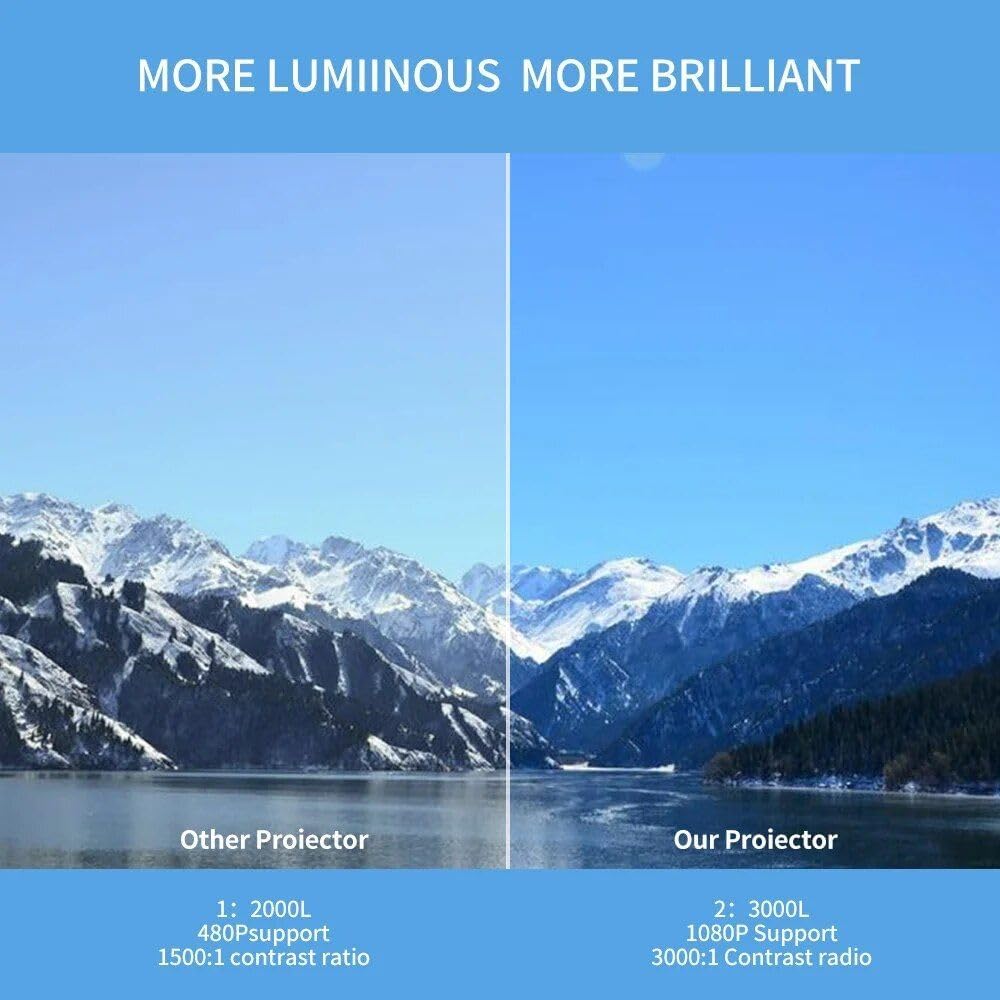
Image: A side-by-side comparison showing the superior brightness and clarity of "Our Projector" (3000L, 1080P Support, 3000:1 Contrast Ratio) versus "Other Projector" (2000L, 480P Support, 1500:1 Contrast Ratio), demonstrating the enhanced visual experience.
മെയിൻ്റനൻസ്
1. വൃത്തിയാക്കൽ
- ലെൻസ്: ഒപ്റ്റിക്കൽ ലെൻസുകൾക്കായി പ്രത്യേകം രൂപകൽപ്പന ചെയ്ത മൃദുവായ, ലിന്റ് രഹിത തുണി ഉപയോഗിക്കുക. അബ്രസീവ് ക്ലീനറുകളോ ലായകങ്ങളോ ഉപയോഗിക്കരുത്.
- പുറം: Wipe the projector's exterior with a soft, dry cloth. For stubborn dirt, slightly dampവെള്ളം കൊണ്ട് തുണി.
- വെന്റിലേഷൻ പോർട്ടുകൾ: Periodically check and gently clean the ventilation ports to ensure proper airflow and prevent dust buildup. Use a soft brush or compressed air.
2. സംഭരണം
When not in use for extended periods, store the projector in a cool, dry place, away from direct sunlight and extreme temperatures. It is recommended to use the original packaging or a protective case to prevent dust accumulation and physical damage.

Image: A hand placing the compact projector into a pant pocket, illustrating its small size and portability for easy storage and transport.
ട്രബിൾഷൂട്ടിംഗ്
| പ്രശ്നം | സാധ്യമായ കാരണം | പരിഹാരം |
|---|---|---|
| ഒരു ചിത്രവും പ്രൊജക്റ്റ് ചെയ്തിട്ടില്ല. | Power not connected; Incorrect input source; Lens cap on. | പവർ കണക്ഷൻ പരിശോധിക്കുക; ശരിയായ ഇൻപുട്ട് ഉറവിടം തിരഞ്ഞെടുക്കുക; ലെൻസ് ക്യാപ്പ് നീക്കം ചെയ്യുക. |
| ചിത്രം മങ്ങിയതാണ് | ഫോക്കസിന് പുറത്താണ്; തെറ്റായ പ്രൊജക്ഷൻ ദൂരം. | Adjust focus ring; Adjust projector distance. |
| ചിത്രം ട്രപസോയിഡൽ ആണ് | പ്രൊജക്ടർ സ്ക്രീനിന് ലംബമല്ല. | കീസ്റ്റോൺ തിരുത്തൽ ക്രമീകരിക്കുക; പ്രൊജക്ടർ പുനഃസ്ഥാപിക്കുക. |
| ശബ്ദമില്ല | ശബ്ദം വളരെ കുറവാണ്; മ്യൂട്ട് ചെയ്തു; ബാഹ്യ ഓഡിയോ ഉപകരണം ശരിയായി ബന്ധിപ്പിച്ചിട്ടില്ല. | Increase volume; Unmute; Check audio cable connections or Bluetooth pairing. |
| അമിത ചൂടാക്കൽ | വായുസഞ്ചാരം തടസ്സപ്പെട്ടു; ദീർഘകാല ഉപയോഗം. | Ensure ventilation ports are clear; Allow projector to cool down. |
സ്പെസിഫിക്കേഷനുകൾ
| ഫീച്ചർ | വിശദാംശങ്ങൾ |
|---|---|
| ബ്രാൻഡ് | ജനറിക് |
| മോഡൽ | A30C |
| ഡിസ്പ്ലേ ടെക്നോളജി | LCD Imaging System, LED Light Source |
| നേറ്റീവ് റെസല്യൂഷൻ | 1280 x 720 പിക്സലുകൾ |
| പിന്തുണയുള്ള റെസല്യൂഷൻ | Up to 1920 x 1080 pixels (1080P) |
| കണക്റ്റിവിറ്റി | HDMI, USB, SD Card Slot, Audio Jack, DC Power Input, Bluetooth |
| നിറം | കറുപ്പ് |
| ഇനത്തിൻ്റെ ഭാരം | 14.1 ഔൺസ് (ഏകദേശം 400 ഗ്രാം) |
| ഉൽപ്പന്ന അളവുകൾ | 6.3 x 4.72 x 2.16 ഇഞ്ച് (ഏകദേശം 16 x 12 x 5.5 സെ.മീ) |
| ശുപാർശ ചെയ്യുന്ന ഉപയോഗം | ഇൻഡോർ |
| മാതൃരാജ്യം | ചൈന |
വാറൻ്റിയും പിന്തുണയും
This product is covered by a standard manufacturer's warranty. For specific warranty terms and conditions, please refer to the documentation provided at the time of purchase or contact your retailer. For technical support, troubleshooting assistance, or service inquiries, please contact the Generic customer support team through the contact information provided with your purchase or on the official Generic webസൈറ്റ്.
Please have your product model (A30C) and ASIN (B0DM84NGD2) ready when contacting support.


