
ആമുഖം
Thank you for choosing the Alonefire SV116 60W UV LED Flashlight. This powerful 365nm UV flashlight is designed for various professional and domestic applications, including detection of pet urine, identification of minerals, amber, and currency, and resin curing. This manual provides essential information for the safe and effective use, maintenance, and troubleshooting of your device. Please read it thoroughly before operation.
സുരക്ഷാ വിവരങ്ങൾ
- യുവി വികിരണ മുന്നറിയിപ്പ്: Direct exposure to UV light can be harmful to eyes and skin. Always wear the provided UV protective glasses when operating the flashlight. Avoid pointing the light directly at people or animals.
- ബാറ്ററി സുരക്ഷ: Use only the specified Lithium-ion battery. Do not disassemble, short-circuit, or expose the battery to high temperatures or fire. Keep batteries out of reach of children.
- ചാർജിംഗ്: Use the provided USB-C cable for charging. Ensure the charging port is dry and clean before connecting.
- ചൂട്: The flashlight may become warm during prolonged use. This is normal. Avoid touching the head of the flashlight when it is hot.
- ജല പ്രതിരോധം: ഈ ഉൽപ്പന്നം വാട്ടർപ്രൂഫ് അല്ല. വെള്ളത്തിലോ ഉയർന്ന ആർദ്രതയിലോ സമ്പർക്കം ഒഴിവാക്കുക.
പാക്കേജ് ഉള്ളടക്കം
നിങ്ങളുടെ പാക്കേജിൽ എല്ലാ ഇനങ്ങളും ഉണ്ടെന്ന് ഉറപ്പാക്കുക:
- Alonefire SV116 UV LED Flashlight
- Rechargeable Lithium-ion Battery (pre-installed or separate)
- USB-C ചാർജിംഗ് കേബിൾ
- UV Protective Glasses
- റിസ്റ്റ് സ്ട്രാപ്പ്

Image: Contents of the Alonefire SV116 package, including the flashlight, USB-C cable, and UV protective glasses.
ഉൽപ്പന്ന സവിശേഷതകൾ
- High-Quality 365nm UV LED: Features 6pcs 4-core 365nm UV LEDs, offering up to 60W power consumption and 8000mW light output for professional applications.
- UV Filter Black Lens: Equipped with a hardened black optical filter lens to block ambient visible light, ensuring a purer and more powerful ultraviolet output.
- ഈടുനിൽക്കുന്ന അലുമിനിയം അലോയ് സിasing: Constructed from high-quality aluminum alloy for enhanced heat dissipation, extending the flashlight's lifespan and ensuring reliability.
- USB-C റീചാർജ് ചെയ്യാവുന്നത്: Features a reversible USB-C charging port for convenient and easy charging. A charging indicator shows the power status. Includes a high-capacity rechargeable battery.
- Reverse Charging (Power Bank Function): Supports reverse charging via a USB-A output port, allowing the flashlight to function as a portable power bank for other devices using its high-capacity battery.

ചിത്രം: ക്ലോസ്-അപ്പ് view of the Alonefire SV116 flashlight head, highlighting the 6 UV LEDs and the filter lens.
സജ്ജമാക്കുക
- ബാറ്ററി ഇൻസ്റ്റാളേഷൻ: If the battery is not pre-installed, unscrew the tail cap of the flashlight. Insert the included Lithium-ion battery with the positive (+) end facing towards the head of the flashlight. Screw the tail cap back on securely.
- പ്രാരംഭ ചാർജ്: For optimal performance, fully charge the flashlight before first use. Refer to the "Charging" section for detailed instructions.
- Attach Wrist Strap: Thread the wrist strap through the loop on the tail cap for secure handling.
പ്രവർത്തന നിർദ്ദേശങ്ങൾ
To operate the Alonefire SV116 UV LED Flashlight:
- സംരക്ഷണ ഗ്ലാസുകൾ ധരിക്കുക: Always put on the UV protective glasses before activating the flashlight.
- പവർ ഓൺ/ഓഫ്: Press the power button located on the side of the flashlight to turn it on. Press the button again to turn it off.
- ഉപയോഗം: Point the UV light at the area or object you wish to inspect. The 365nm UV light will reveal fluorescent materials or markings.
ചാർജിംഗ്
The Alonefire SV116 features a convenient USB-C charging port:
- Locate the USB-C port on the side of the flashlight.
- Connect the included USB-C cable to the flashlight's port.
- Connect the other end of the USB-C cable to a compatible USB power source (e.g., wall adapter, power bank, laptop).
- ചാർജ് ചെയ്യുമ്പോൾ ചാർജിംഗ് ഇൻഡിക്കേറ്റർ ലൈറ്റ് ചുവപ്പ് നിറത്തിൽ കാണിക്കുകയും പൂർണ്ണമായും ചാർജ് ചെയ്യുമ്പോൾ പച്ചയായി മാറുകയും ചെയ്യും.
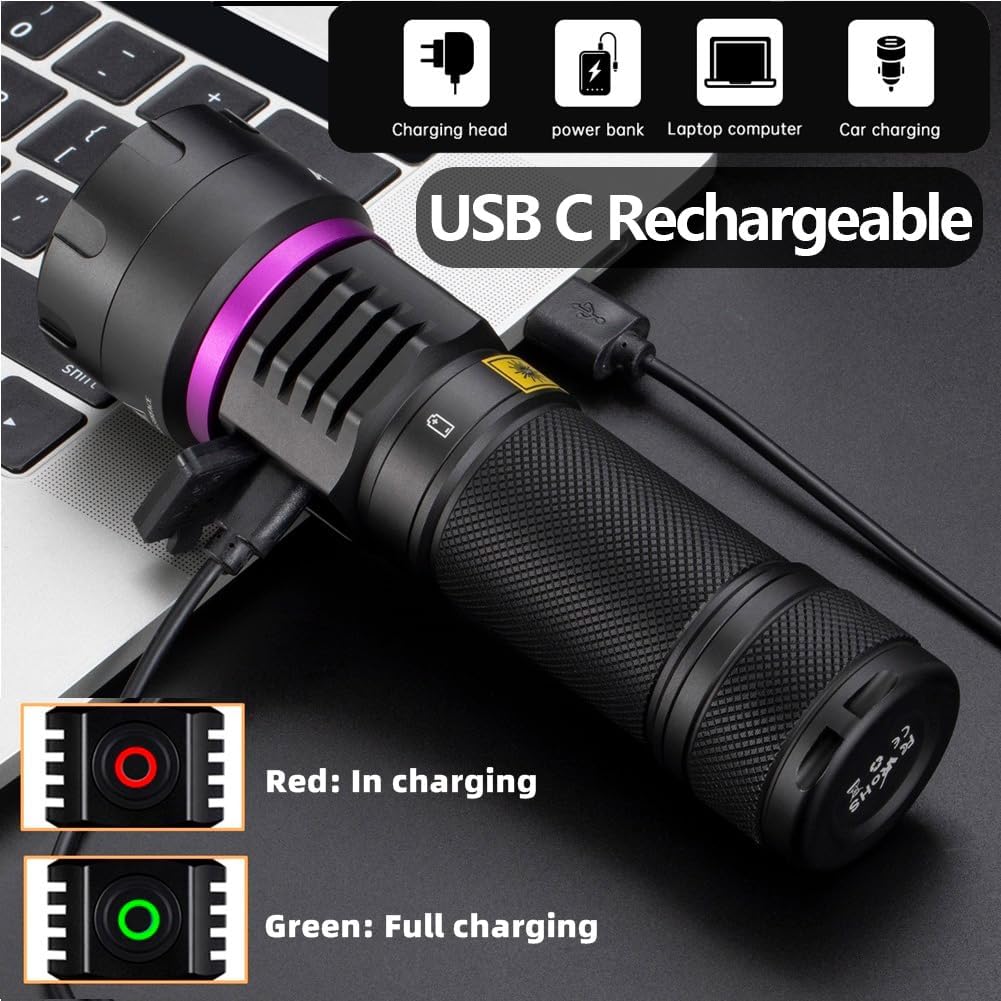
Image: The Alonefire SV116 flashlight being charged via its USB-C port, with an illustration of the red (charging) and green (full) indicator lights.
Reverse Charging (Power Bank Function)
The Alonefire SV116 can also function as a power bank to charge other devices:
- Locate the USB-A output port, typically near the USB-C input port.
- Connect your device's charging cable (with a USB-A connector) to the flashlight's USB-A output port.
- The flashlight's internal battery will begin charging your connected device.

Image: The Alonefire SV116 flashlight connected to a smartphone, demonstrating its reverse charging capability.
അപേക്ഷകൾ
The 365nm UV light of the Alonefire SV116 is suitable for various detection and curing tasks:
- Pet Urine and Stains: Detect invisible pet urine stains on carpets, furniture, and floors.
- Mineral and Gemstone Identification: Observe fluorescence in various minerals, amber, and other geological sampലെസ്.
- തേൾ കണ്ടെത്തൽ: Scorpions fluoresce under 365nm UV light, making them easier to spot in dark environments.
- Currency and Document Verification: Reveal security features on banknotes, passports, and other official documents.
- Resin Curing: Accelerate the curing process of UV-sensitive resins and adhesives.
- ചോർച്ച കണ്ടെത്തൽ: Identify leaks in HVAC systems or automotive fluids when a fluorescent dye is added.

ചിത്രം: വിഷ്വൽ എക്സ്amples of the Alonefire SV116's utility, including detecting pet stains on a toilet, revealing fluorescence on a cat, and highlighting features on tomatoes.
മെയിൻ്റനൻസ്
- വൃത്തിയാക്കൽ: ഫ്ലാഷ്ലൈറ്റ് ബോഡി മൃദുവായ, ഡി ഉപയോഗിച്ച് തുടയ്ക്കുക.amp cloth. Do not use abrasive cleaners or solvents. Clean the lens gently with a lens cleaning cloth.
- സംഭരണം: Store the flashlight in a cool, dry place away from direct sunlight and extreme temperatures. If storing for an extended period, remove the battery or ensure it is partially charged to prevent deep discharge.
- ബാറ്ററി കെയർ: Recharge the battery regularly, even if not in use, to maintain its lifespan. Avoid fully discharging the battery.
ട്രബിൾഷൂട്ടിംഗ്
| പ്രശ്നം | സാധ്യമായ കാരണം | പരിഹാരം |
|---|---|---|
| ടോർച്ച് ഓണാകുന്നില്ല. | ബാറ്ററി തീർന്നു അല്ലെങ്കിൽ തെറ്റായി ചേർത്തിരിക്കുന്നു. | Charge the battery or ensure it is inserted with the correct polarity. |
| വെളിച്ചം മങ്ങിയതാണ്. | കുറഞ്ഞ ബാറ്ററി ചാർജ്. | ബാറ്ററി പൂർണ്ണമായും റീചാർജ് ചെയ്യുക. |
| Flashlight gets hot quickly. | Normal operation for high-power UV LEDs. | Reduce continuous usage time if discomfort occurs. Ensure proper ventilation. |
| Cannot charge other devices (reverse charging). | Low flashlight battery or incorrect cable/port. | Ensure flashlight battery is sufficiently charged. Use the correct USB-A output port and a compatible cable for your device. |
സ്പെസിഫിക്കേഷനുകൾ
| ഫീച്ചർ | വിശദാംശങ്ങൾ |
|---|---|
| മോഡൽ | SV116 |
| ബ്രാൻഡ് | എലോൺഫയർ |
| UV LED Type | 6pcs 4-core 365nm UV LED |
| വൈദ്യുതി ഉപഭോഗം | 60 വാട്ട് വരെ |
| UV Output Power | 8000mW |
| മെറ്റീരിയൽ | അലുമിനിയം അലോയ് |
| നിറം | Dark Violet |
| ബാറ്ററി തരം | 1 x ലിഥിയം-അയൺ (ഉൾപ്പെടുത്തിയിരിക്കുന്നു) |
| ചാർജിംഗ് പോർട്ട് | USB-C |
| റിവേഴ്സ് ചാർജിംഗ് | USB-A putട്ട്പുട്ട് പോർട്ട് |
| ഭാരം | 400 ഗ്രാം |
| അളവുകൾ (ഏകദേശം) | 18.4 x 9 x 5.9 സെ.മീ (പാക്കേജ്) |
| ജല പ്രതിരോധം | വാട്ടർപ്രൂഫ് അല്ല |
| മാതൃരാജ്യം | ചൈന |
വാറൻ്റിയും പിന്തുണയും
For warranty information or technical support, please refer to the documentation provided with your purchase or contact Alonefire customer service through your retailer. Keep your purchase receipt as proof of purchase.