
1. ഉൽപ്പന്നം കഴിഞ്ഞുview
The MOBAPAD N1 HD is a versatile wireless controller designed for an enhanced gaming experience across multiple platforms. It features advanced technologies such as Hall Effect Joysticks for precise control, ALPS Dual-Axis Motors for immersive HD vibration, and six-axis motion control. This controller is compatible with Nintendo Switch, PC, iOS, and Android devices, offering seamless connectivity and responsive performance.

ചിത്രം: മുൻഭാഗം view of the MOBAPAD N1 HD Wireless Controller, showcasing അതിന്റെ എർഗണോമിക് ഡിസൈനും ബട്ടൺ ലേഔട്ടും.
2 പ്രധാന സവിശേഷതകൾ
- മൾട്ടി-പ്ലാറ്റ്ഫോം അനുയോജ്യത: Fully compatible with Nintendo Switch, PC, iOS, and Android devices, ensuring broad usability.
- ഹാൾ ഇഫക്റ്റ് ജോയ്സ്റ്റിക്കുകൾ: Provides smooth, precise, and durable control with minimal wear, ideal for accurate gaming.
- ALPS Dual-Axis Motors with HD Vibration: Delivers realistic and immersive haptic feedback for enhanced gameplay.
- ആറ്-ആക്സിസ് മോഷൻ കൺട്രോൾ: Built-in gyroscope enables enhanced motion control for compatible games.
- NFC for Amiibo Scanning: Supports NFC technology for scanning Amiibo figures on Nintendo Switch.

Image: The controller illustrating its immersive motion control capabilities with swirling lines around it.

Image: The controller positioned in front of a collection of Amiibo figures, highlighting its NFC scanning function.

Image: The controller shown alongside icons for Switch, Android/iOS, and PC, demonstrating its multi-device compatibility.
3. സജ്ജീകരണവും കണക്ഷനും
Follow these steps to connect your MOBAPAD N1 HD controller to your desired device.
3.1. നിൻടെൻഡോ സ്വിച്ചിലേക്ക് കണക്റ്റുചെയ്യുന്നു
- ഹോം മെനുവിൽ നിന്ന് തിരഞ്ഞെടുക്കുക കൺട്രോളറുകൾ, പിന്നെ ഗ്രിപ്പ്/ഓർഡർ മാറ്റുക.
- While the screen is displaying "Press L + R on the controller", press and hold the ഹോം ബട്ടൺ on the MOBAPAD N1 HD controller for 3-5 seconds until the player LEDs begin to flash.
- Once connected, the player LED(s) corresponding to the controller number will remain lit.
3.2. പിസിയിലേക്ക് (വിൻഡോസ്) കണക്റ്റുചെയ്യുന്നു
- Connect the controller to your PC using a USB-C cable. The controller will be recognized as a wired controller.
- For wireless connection, ensure your PC has Bluetooth enabled. Go to Bluetooth & other devices settings.
- "Bluetooth അല്ലെങ്കിൽ മറ്റ് ഉപകരണം ചേർക്കുക" തിരഞ്ഞെടുത്ത് "Bluetooth" തിരഞ്ഞെടുക്കുക.
- അമർത്തിപ്പിടിക്കുക ഹോം ബട്ടൺ on the controller until the LEDs flash rapidly, indicating pairing mode.
- Select "MOBAPAD N1 HD" from the list of available devices.
3.3. Connecting to iOS/Android Devices
- നിങ്ങളുടെ iOS അല്ലെങ്കിൽ Android ഉപകരണത്തിൽ ബ്ലൂടൂത്ത് പ്രവർത്തനക്ഷമമാക്കുക.
- Go to Bluetooth settings and search for new devices.
- അമർത്തിപ്പിടിക്കുക ഹോം ബട്ടൺ on the controller until the LEDs flash rapidly.
- Select "MOBAPAD N1 HD" from the list of available devices to pair.
4. കൺട്രോളർ പ്രവർത്തിപ്പിക്കൽ
Familiarize yourself with the controller's layout and functions for optimal gameplay.
4.1. ബട്ടൺ ലേഔട്ട്
- ഇടത് അനലോഗ് സ്റ്റിക്ക്: For movement and camera control. Features Hall Effect technology.
- വലത് അനലോഗ് സ്റ്റിക്ക്: For camera control and aiming. Features Hall Effect technology.
- ഡി-പാഡ്: Directional input for menu navigation and specific game actions.
- A/B/X/Y ബട്ടണുകൾ: സ്റ്റാൻഡേർഡ് ആക്ഷൻ ബട്ടണുകൾ.
- എൽ/ആർ ബട്ടണുകൾ: തോളിലെ ബട്ടണുകൾ.
- ZL/ZR ബട്ടണുകൾ: ട്രിഗർ ബട്ടണുകൾ.
- മൈനസ് (-) ബട്ടൺ: Typically for opening in-game menus or specific functions.
- പ്ലസ് (+) ബട്ടൺ: Typically for opening in-game menus or specific functions.
- ഹോം ബട്ടണ്: Returns to the system's home screen. Also used for pairing and NFC scanning.
- ക്യാപ്ചർ ബട്ടൺ: Takes screenshots or video clips (Nintendo Switch).
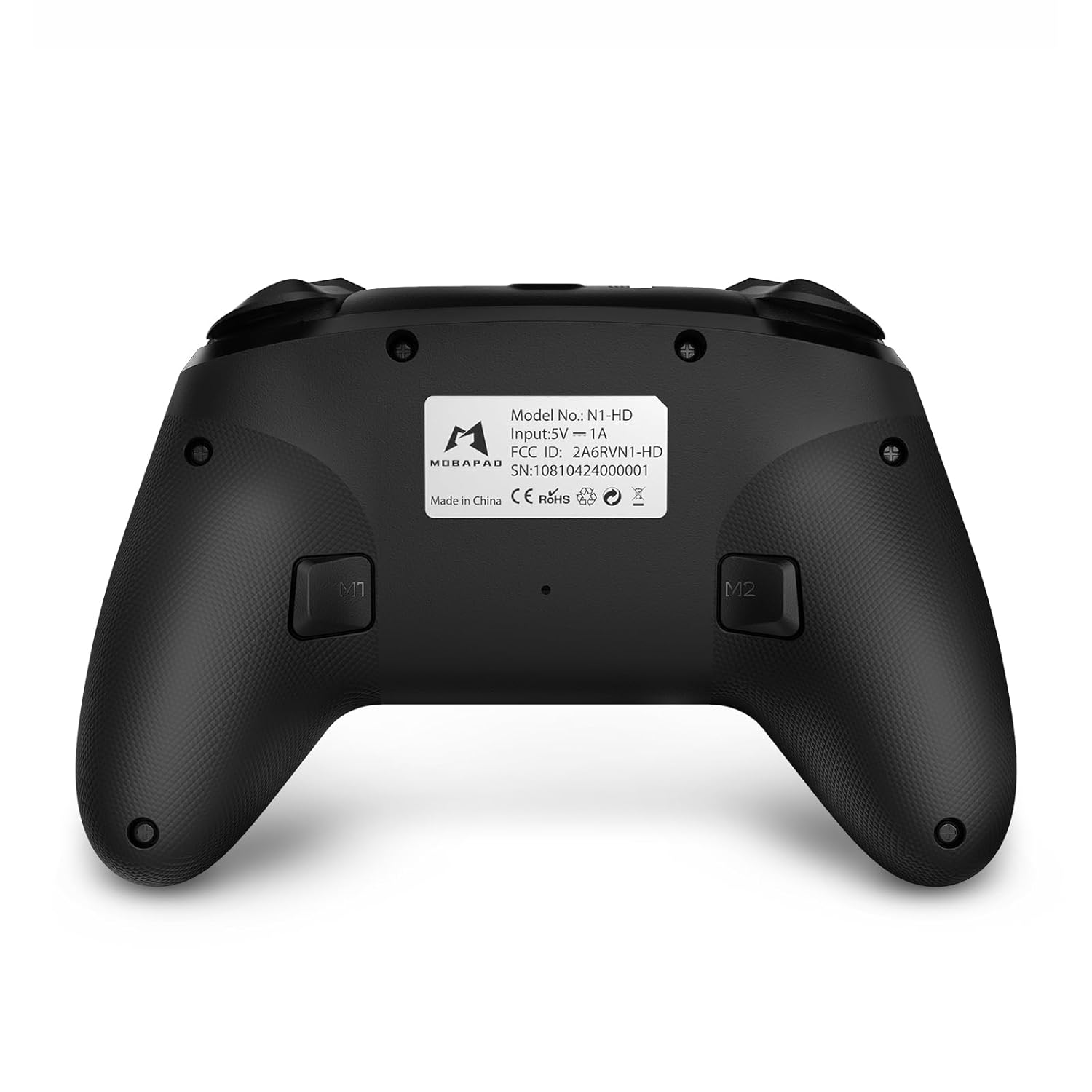
- M1/M2 ബട്ടണുകൾ: Programmable back buttons for custom macros or remapping.
ചിത്രം: വിശദമായ മുൻഭാഗം view of the MOBAPAD N1 HD controller, showing all buttons and joysticks.

ചിത്രം: പിന്നിലേക്ക് view of the MOBAPAD N1 HD controller, highlighting the M1 and M2 programmable buttons and product label.
4.2. NFC Functionality (Amiibo Scanning)
To use the NFC function for Amiibo scanning on Nintendo Switch:
- Ensure your controller is connected to the Nintendo Switch.
- In a compatible game, when prompted to scan an Amiibo, place the Amiibo figure directly over the ഹോം ബട്ടൺ area on the controller.
- Hold the Amiibo in place until the game registers the scan.
5. പരിപാലനവും പരിചരണവും
ശരിയായ അറ്റകുറ്റപ്പണി നിങ്ങളുടെ കൺട്രോളറിന്റെ ദീർഘായുസ്സും മികച്ച പ്രകടനവും ഉറപ്പാക്കുന്നു.
- വൃത്തിയാക്കൽ: കൺട്രോളർ തുടയ്ക്കാൻ മൃദുവായതും ഉണങ്ങിയതുമായ തുണി ഉപയോഗിക്കുക. കഠിനമായ അഴുക്കിന്, ചെറുതായി dampതുണിയിൽ വെള്ളം ഒഴിക്കുക. കഠിനമായ രാസവസ്തുക്കളോ ഉരച്ചിലുകളോ ഉള്ള വസ്തുക്കൾ ഒഴിവാക്കുക.
- സംഭരണം: കൺട്രോളർ നേരിട്ട് സൂര്യപ്രകാശം ഏൽക്കാത്തതും തീവ്രമായ താപനില ഏൽക്കാത്തതുമായ ഒരു തണുത്ത വരണ്ട സ്ഥലത്ത് സൂക്ഷിക്കുക.
- ബാറ്ററി കെയർ: The controller contains a Lithium Ion battery. Avoid fully discharging the battery frequently. If storing for extended periods, charge the battery to about 50% to prolong its lifespan. Do not expose the battery to fire or extreme heat.
- കൈകാര്യം ചെയ്യൽ: Avoid dropping the controller or subjecting it to strong impacts, as this can damage internal components.
6. പ്രശ്നപരിഹാരം
If you encounter issues with your MOBAPAD N1 HD controller, refer to the following common solutions.
| പ്രശ്നം | സാധ്യമായ കാരണം | പരിഹാരം |
|---|---|---|
| Controller does not connect. | Low battery, out of range, incorrect pairing mode, interference. | Charge the controller fully. Ensure it is within range of the device. Re-enter pairing mode (hold Home button). Move closer to the device or away from other wireless devices. |
| ബട്ടണുകളോ ജോയ്സ്റ്റിക്കുകളോ പ്രതികരിക്കുന്നില്ല. | Software glitch, physical obstruction, damage. | Restart the controller and the connected device. Check for any debris around the buttons/joysticks. If issues persist, contact customer support. |
| വൈബ്രേഷൻ ദുർബലമാണ് അല്ലെങ്കിൽ ഇല്ല. | Vibration setting off, game does not support vibration, motor issue. | Check in-game settings and system settings to ensure vibration is enabled. Verify if the game supports vibration feedback. |
| NFC scanning fails. | Incorrect placement, game not prompting scan, controller not connected. | Ensure the Amiibo is placed directly over the Home button area. Confirm the game is prompting for an Amiibo scan. Verify controller is properly connected to the Switch. |
7 സ്പെസിഫിക്കേഷനുകൾ
| ഫീച്ചർ | വിശദാംശങ്ങൾ |
|---|---|
| മോഡൽ നമ്പർ | Mobapad N1 HD Black |
| അളവുകൾ (L x W x H) | 5.91 x 2.36 x 3.94 ഇഞ്ച് |
| ഭാരം | 7.05 ഔൺസ് |
| ബാറ്ററി തരം | 1 ലിഥിയം അയോൺ ബാറ്ററി (ഉൾപ്പെടുത്തിയിരിക്കുന്നു) |
| കണക്റ്റിവിറ്റി | Wireless (Bluetooth), USB-C (wired) |
| അനുയോജ്യത | Nintendo Switch, PC, iOS, Android |
| പ്രത്യേക സവിശേഷതകൾ | Hall Effect Joysticks, ALPS Dual-Axis Motors, HD Vibration, Six-Axis Gyroscope, NFC |
8. വാറൻ്റിയും പിന്തുണയും
For warranty information or technical support, please contact MOBAPAD customer service. Refer to the official MOBAPAD webനിർദ്ദിഷ്ട വാറന്റി നിബന്ധനകൾക്കും ബന്ധപ്പെടാനുള്ള വിശദാംശങ്ങൾക്കും സൈറ്റ് അല്ലെങ്കിൽ നിങ്ങളുടെ വാങ്ങൽ ഡോക്യുമെന്റേഷൻ.
You can visit the official MOBAPAD store on Amazon for more information: MOBAPAD Store