
1. ആമുഖം
Welcome to the user manual for your new FOREVER Kids Look Me! 3 KW-520 Smartwatch. This guide provides essential information for setting up, operating, and maintaining your device. Please read it carefully to ensure proper use and to maximize the benefits of all its features.
The FOREVER Kids Look Me! 3 KW-520 is designed to provide communication and safety features for children, offering GPS tracking, two-way calling, video calls, and an SOS function, all within a durable and child-friendly design.
2 സുരക്ഷാ വിവരങ്ങൾ
- ബാറ്ററി സുരക്ഷ: Do not attempt to replace the battery yourself. Use only the provided charging cable. Do not expose the watch to extreme temperatures or direct sunlight for prolonged periods.
- ജല പ്രതിരോധം: The watch is IP65 rated, meaning it is splash-proof and resistant to dust. It is not suitable for swimming, showering, or submersion in water. Avoid exposing it to high-pressure water.
- ശ്വാസംമുട്ടൽ അപകടം: Keep small parts, such as the SIM card, away from young children to prevent accidental ingestion.
- നീക്കം ചെയ്യൽ: Dispose of the device and its battery responsibly according to local regulations. Do not dispose of it with household waste.
- മേൽനോട്ടം: Parental supervision is recommended during initial setup and to ensure safe usage of all features.
3. പാക്കേജ് ഉള്ളടക്കം
താഴെ പറയുന്ന ഇനങ്ങൾക്കായി ബോക്സ് ചെക്ക് ചെയ്യുക:
- FOREVER Kids Look Me! 3 KW-520 Smartwatch
- യുഎസ്ബി ചാർജിംഗ് കേബിൾ
- ഉപയോക്തൃ മാനുവൽ (ഈ പ്രമാണം)
ഏതെങ്കിലും ഇനങ്ങൾ നഷ്ടപ്പെട്ടാലോ കേടുപാടുകൾ സംഭവിച്ചാലോ, ദയവായി നിങ്ങളുടെ റീട്ടെയിലറെ ബന്ധപ്പെടുക.
4. ഡിവൈസ് ഓവർview
Familiarize yourself with the physical components of your smartwatch:

Figure 1: The FOREVER Kids Look Me! 3 KW-520 Smartwatch in pink, featuring a large display and a SIM card slot. A child is shown wearing the watch.

Figure 2: The smartwatch display showing the main interface with time, date, and feature icons.
- ഡിസ്പ്ലേ: 1.85-inch touchscreen for interaction.
- Power/SOS Button: Used to power on/off the device and activate the SOS function.
- സിം കാർഡ് സ്ലോട്ട്: For inserting a Nano-SIM card.
- ക്യാമറ: Integrated camera for photos and video calls.
- മൈക്രോഫോണും സ്പീക്കറും: For calls and voice messages.
5. സജ്ജീകരണം
5.1 സിം കാർഡ് ഇൻസ്റ്റാളേഷൻ
- Ensure the smartwatch is powered off.
- Locate the SIM card slot on the side of the watch (refer to Figure 1).
- Carefully open the SIM card slot cover.
- Insert a Nano-SIM card with an active 4G data plan into the slot, ensuring the correct orientation.
- Close the SIM card slot cover securely to maintain water resistance.
- Power on the smartwatch. The network signal indicator should appear on the screen.
5.2 ആപ്പ് ഇൻസ്റ്റാളേഷനും ജോടിയാക്കലും
To manage the smartwatch and access its full features, you need to install the companion application on a parent's smartphone.
- Download the 'FOREVER Kids' application from your smartphone's app store (Google Play Store for Android or Apple App Store for iOS).
- ആപ്പ് തുറന്ന് ഒരു പുതിയ അക്കൗണ്ട് സൃഷ്ടിക്കുക അല്ലെങ്കിൽ നിങ്ങൾക്ക് ഇതിനകം ഒന്ന് ഉണ്ടെങ്കിൽ ലോഗിൻ ചെയ്യുക.
- ആപ്പിൽ, ഒരു പുതിയ ഉപകരണം ചേർക്കാനുള്ള ഓപ്ഷൻ തിരഞ്ഞെടുക്കുക.
- The app will prompt you to scan a QR code. On the smartwatch, navigate to the pairing menu to display its unique QR code.
- നിങ്ങളുടെ സ്മാർട്ട്ഫോൺ ഉപയോഗിച്ച് QR കോഡ് സ്കാൻ ചെയ്യുക.
- Follow the on-screen instructions in the app to complete the pairing process and set up parental controls, contacts, and other settings.

ചിത്രം 3: ഓവർview of the companion mobile application interface for managing the smartwatch.
6. സ്മാർട്ട് വാച്ച് പ്രവർത്തിപ്പിക്കൽ
6.1 അടിസ്ഥാന നാവിഗേഷൻ
- ടച്ച് സ്ക്രീൻ: Swipe left/right to navigate between main screens (e.g., clock, apps). Swipe up/down to access notifications or quick settings.
- ടാപ്പ് ചെയ്യുക: Tap an icon to open an application or select an option.
- പവർ ബട്ടൺ: A short press usually returns to the home screen. A long press powers the device on/off or activates the SOS function (if configured).
6.2 കോളുകൾ ചെയ്യുന്നു
The smartwatch supports two-way voice calls with pre-approved contacts. Parents can manage the contact list through the companion app.
- From the main screen, tap the 'Phone' or 'Contacts' icon.
- ലിസ്റ്റിൽ നിന്ന് ആവശ്യമുള്ള കോൺടാക്റ്റ് തിരഞ്ഞെടുക്കുക.
- കോൾ ആരംഭിക്കാൻ കോൾ ഐക്കണിൽ ടാപ്പ് ചെയ്യുക.
- To answer an incoming call, tap the green answer icon. To reject, tap the red reject icon.
6.3 Video Calls
The smartwatch allows for video calls with approved contacts, providing a visual connection.
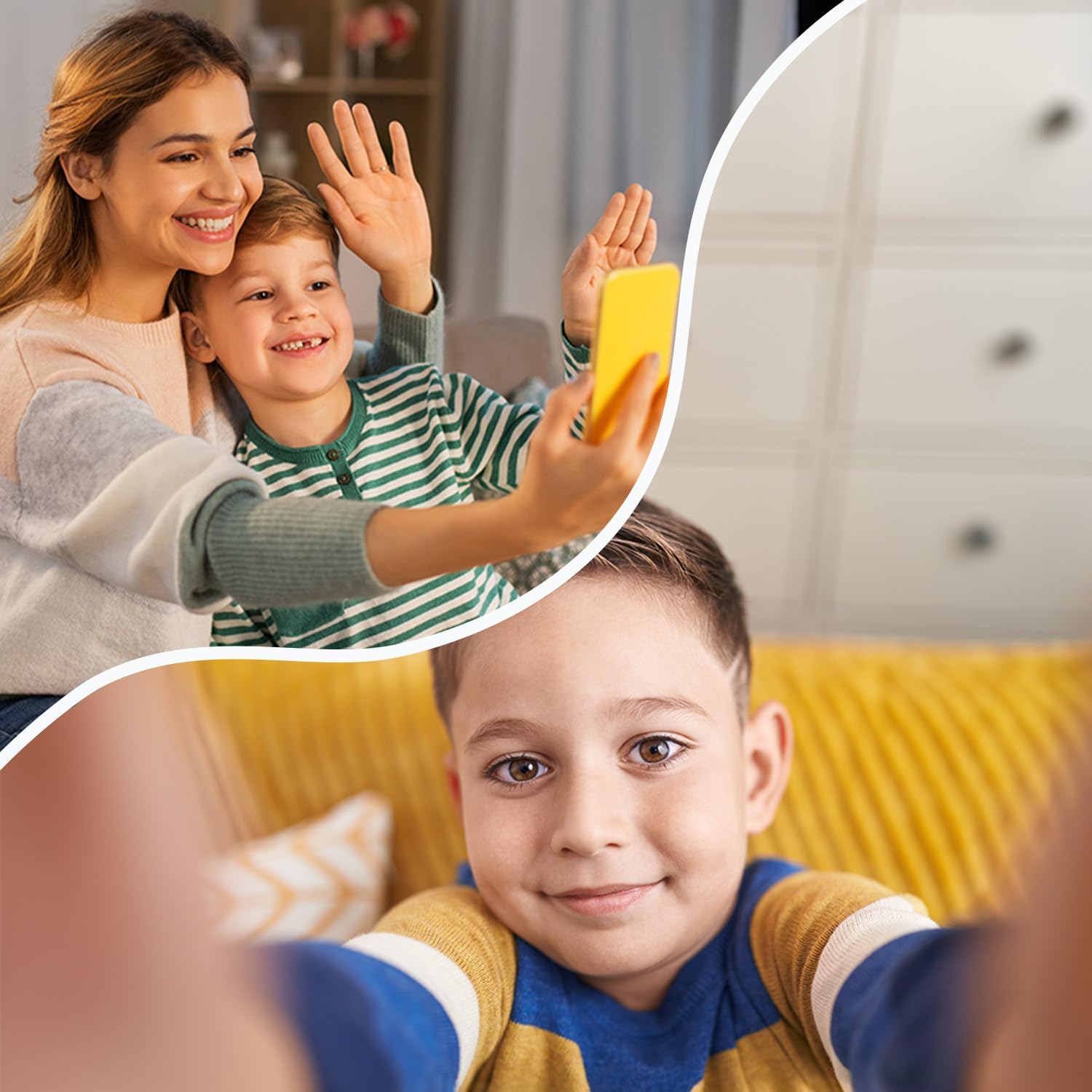
Figure 4: The video call feature allows children to connect visually with family members.
- Tap the 'Video Call' icon on the smartwatch.
- Select the contact you wish to video call.
- The call will connect, allowing for real-time video communication.
6.4 സന്ദേശമയയ്ക്കൽ
Children can send and receive voice messages and text messages from approved contacts.
- ശബ്ദ സന്ദേശങ്ങൾ: Tap the 'Chat' or 'Messages' icon, select a contact, and hold the microphone icon to record and send a voice message.
- വാചക സന്ദേശങ്ങൾ: The watch supports receiving text messages. Sending text messages may be limited to pre-defined quick replies or require a virtual keyboard, depending on the software version.
6.5 Location Tracking (GPS/LBS/Wi-Fi)
The smartwatch uses a combination of GPS, LBS (Location Based Service), and Wi-Fi positioning to provide accurate location tracking, visible through the companion app.
- ജിപിഎസ്: Provides precise outdoor location data.
- എൽബിഎസ്: Uses cellular network towers for location when GPS signal is weak or unavailable (e.g., indoors).
- വൈഫൈ: Utilizes known Wi-Fi networks for improved indoor positioning accuracy.
6.6 എസ്ഒഎസ് പ്രവർത്തനം
In an emergency, the child can activate the SOS function to alert pre-set emergency contacts.
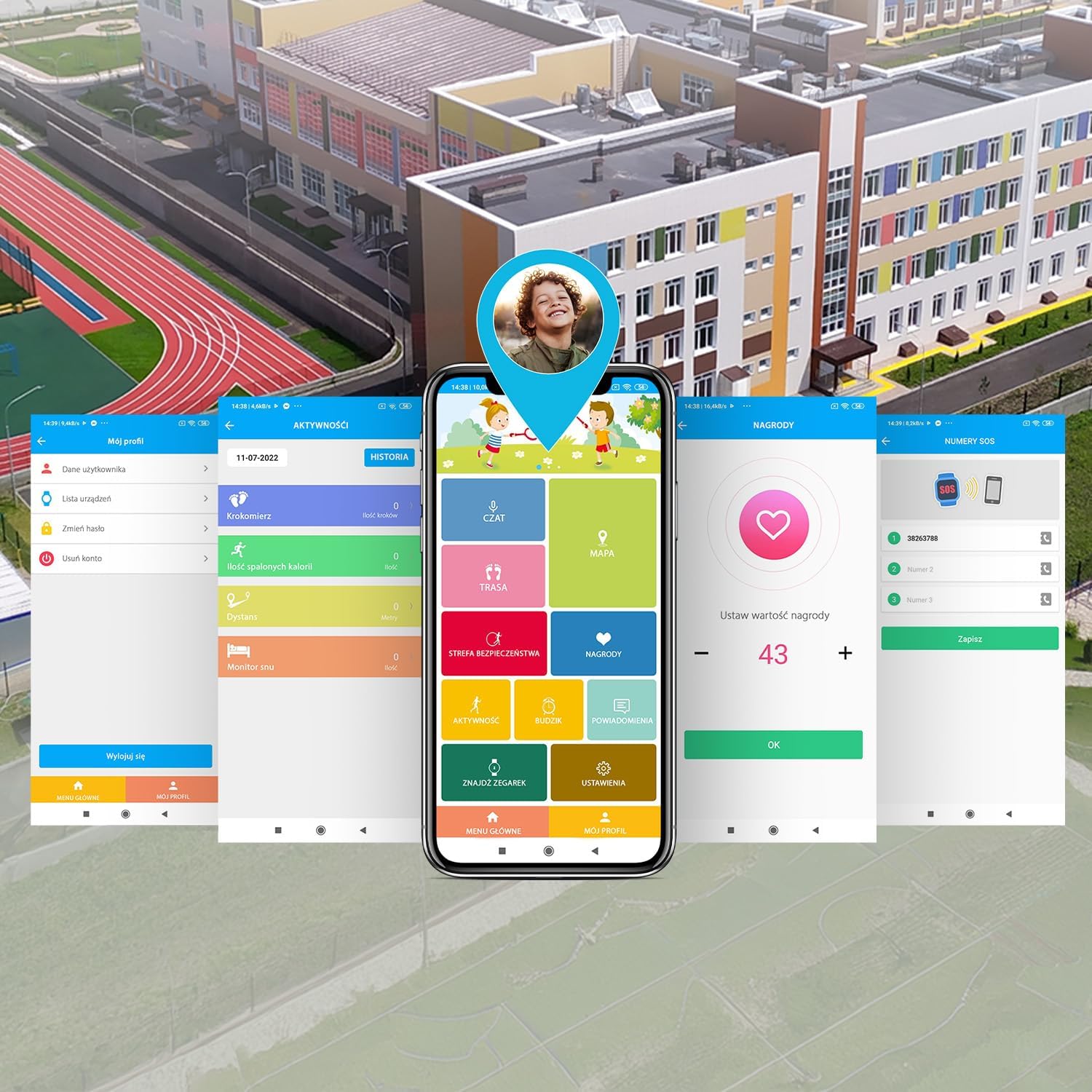
Figure 5: The SOS button provides a quick way for children to alert emergency contacts.
- To activate, press and hold the SOS button (usually the power button) for a few seconds.
- The watch will automatically call the emergency contacts in a pre-defined sequence until one answers.
- An alert message with the child's location will also be sent to the emergency contacts via the app.
6.7 Geofencing (Safety Zones)
Parents can set up virtual boundaries (geofences) in the companion app. You will receive notifications when the child enters or leaves these designated safe zones (e.g., home, school).
6.8 Games & Learning Apps
The smartwatch includes pre-installed games and learning applications to keep children engaged.

Figure 6: The smartwatch features educational and entertaining games.
- Tap the 'Games' icon on the watch screen.
- Select a game from the list to start playing.
6.9 പെഡോമീറ്റർ
The built-in pedometer tracks the child's steps throughout the day, promoting physical activity.
- Tap the 'Pedometer' or 'Activity' icon to view the daily step count.
- Activity data can also be viewകമ്പാനിയൻ ആപ്പിൽ രജിസ്റ്റർ ചെയ്തു.
6.10 ക്യാമറ
The integrated camera allows children to take photos.
- Tap the 'Camera' icon.
- ഒരു ഫോട്ടോ എടുക്കാൻ സ്ക്രീനിൽ ടാപ്പ് ചെയ്യുക.
- ഫോട്ടോകൾ ആകാം viewed in the 'Gallery' and may be accessible via the companion app.
6.11 ഫേസ് അൺലോക്ക്
The smartwatch supports face unlock for convenient and secure access.

Figure 7: The face unlock feature provides secure and easy access to the smartwatch.
- Navigate to 'Settings' on the smartwatch and find the 'Face Unlock' option.
- Follow the on-screen prompts to register the child's face.
- Once set up, the watch will unlock automatically when it recognizes the registered face.
7. പരിപാലനം
7.1 ചാർജിംഗ്
സ്മാർട്ട് വാച്ച് ചാർജ് ചെയ്യാൻ:
- Connect the provided USB charging cable to the charging port on the watch.
- USB കേബിളിന്റെ മറ്റേ അറ്റം ഒരു സ്റ്റാൻഡേർഡ് USB പവർ അഡാപ്റ്ററുമായി (ഉൾപ്പെടുത്തിയിട്ടില്ല) അല്ലെങ്കിൽ ഒരു കമ്പ്യൂട്ടറിന്റെ USB പോർട്ടുമായി ബന്ധിപ്പിക്കുക.
- The watch screen will indicate that it is charging. A full charge typically takes approximately 2-3 hours.
- ബാറ്ററി ആയുസ്സ് വർദ്ധിപ്പിക്കുന്നതിന് ബാറ്ററി നിറഞ്ഞു കഴിഞ്ഞാൽ ചാർജർ വിച്ഛേദിക്കുക.
7.2 ജല പ്രതിരോധം (IP65)
The FOREVER Kids Look Me! 3 KW-520 Smartwatch has an IP65 rating, which means it is protected against dust ingress and low-pressure water jets from any direction. This makes it suitable for everyday use, such as splashes from handwashing or light rain.
- ചെയ്യരുത് immerse the watch in water.
- ചെയ്യരുത് wear the watch while swimming, showering, or bathing.
- Avoid exposing the watch to high-pressure water, such as from a faucet or hose.
- Ensure the SIM card slot cover is securely closed to maintain water resistance.
7.3 വൃത്തിയാക്കൽ
To clean your smartwatch:
- Wipe the screen and body with a soft, dry, lint-free cloth.
- കഠിനമായ അടയാളങ്ങൾക്ക്, ചെറുതായി dampതുണിയിൽ വെള്ളം ഒഴിക്കുക. കഠിനമായ രാസവസ്തുക്കളോ ഉരച്ചിലുകളോ ഉള്ള വസ്തുക്കൾ ഉപയോഗിക്കരുത്.
- Ensure the watch is completely dry before charging or using it again.
8. പ്രശ്നപരിഹാരം
If you encounter issues with your smartwatch, refer to the following common problems and solutions:
| പ്രശ്നം | സാധ്യമായ പരിഹാരം |
|---|---|
| വാച്ച് ഓണാകുന്നില്ല. | Ensure the watch is fully charged. Press and hold the power button for at least 10 seconds. |
| നെറ്റ്വർക്ക് സിഗ്നൽ ഇല്ല | Check if the SIM card is correctly inserted and activated. Ensure the SIM card has an active 4G data plan. Move to an area with better network coverage. |
| കോളുകൾ വിളിക്കാനോ സ്വീകരിക്കാനോ കഴിയില്ല | Verify network signal. Check if the contact numbers are correctly saved in the companion app and synced to the watch. Ensure parental controls are not restricting calls. |
| കൃത്യമല്ലാത്ത ലൊക്കേഷൻ ട്രാക്കിംഗ് | വാച്ചിൽ ക്ലിയർ ലൈറ്റ് ഉണ്ടെന്ന് ഉറപ്പാക്കുക view of the sky for GPS. Check if Wi-Fi is enabled on the watch for better indoor positioning. Update the location in the companion app. |
| Companion app cannot connect to watch | Ensure the watch has an active internet connection (via SIM card). Restart both the watch and the smartphone app. Re-pair the watch if necessary. |
| ബാറ്ററി പെട്ടെന്ന് തീരുന്നു | Reduce screen brightness. Close unused applications. Limit frequent location updates in the app settings. |
പ്രശ്നം നിലനിൽക്കുകയാണെങ്കിൽ, ദയവായി ഉപഭോക്തൃ പിന്തുണയുമായി ബന്ധപ്പെടുക.
9 സ്പെസിഫിക്കേഷനുകൾ
Key technical specifications for the FOREVER Kids Look Me! 3 KW-520 Smartwatch:
| ഫീച്ചർ | സ്പെസിഫിക്കേഷൻ |
|---|---|
| ബ്രാൻഡ് | എന്നേക്കും |
| മോഡൽ നമ്പർ | കെ.ഡബ്ല്യു -520 |
| നിറം | റോസ് |
| ഓപ്പറേറ്റിംഗ് സിസ്റ്റം | OS 3.0 ധരിക്കുക |
| സ്ക്രീൻ വലിപ്പം | 1.85 ഇഞ്ച് |
| കണക്റ്റിവിറ്റി | Wi-Fi, Bluetooth, 4G (via SIM) |
| പ്രത്യേക സവിശേഷതകൾ | Advanced GPS/LBS/Wi-Fi location functions, SOS button, Video calls, Geofencing |
| അനുയോജ്യമായ ഉപകരണങ്ങൾ | സ്മാർട്ട്ഫോൺ |
| ബാറ്ററി കോമ്പോസിഷൻ | ലിഥിയം-അയൺ |
| ബാറ്ററി ശേഷി | 850 mAh (estimated from '850 Modificateur inconnu') |
| മെമ്മറി സ്റ്റോറേജ് കപ്പാസിറ്റി | 16 MB |
| ജല പ്രതിരോധം | IP65 |
10. വാറൻ്റിയും പിന്തുണയും
Your FOREVER Kids Look Me! 3 KW-520 Smartwatch is covered by a manufacturer's warranty. Please refer to the warranty card included in your package or visit the official FOREVER webവിശദമായ വാറന്റി നിബന്ധനകൾക്കും വ്യവസ്ഥകൾക്കും സൈറ്റ്.
For technical support, troubleshooting assistance, or inquiries about your product, please contact the retailer where you purchased the device or visit the FOREVER customer support portal online.
നിർമ്മാതാവ്: ടെൽഫോഴ്സ് വൺ


