
SIMATE S2
SIMATE S2 Electric Scooter User Manual
മോഡൽ: S2
For Kids Ages 6-14, Rider Height 4.0 ft-5.3 ft
1. ആമുഖം
Thank you for choosing the SIMATE S2 Electric Scooter. This manual provides essential information for the safe operation, maintenance, and troubleshooting of your new scooter. Please read it thoroughly before first use and keep it for future reference. Proper use and maintenance will ensure a long and enjoyable experience.
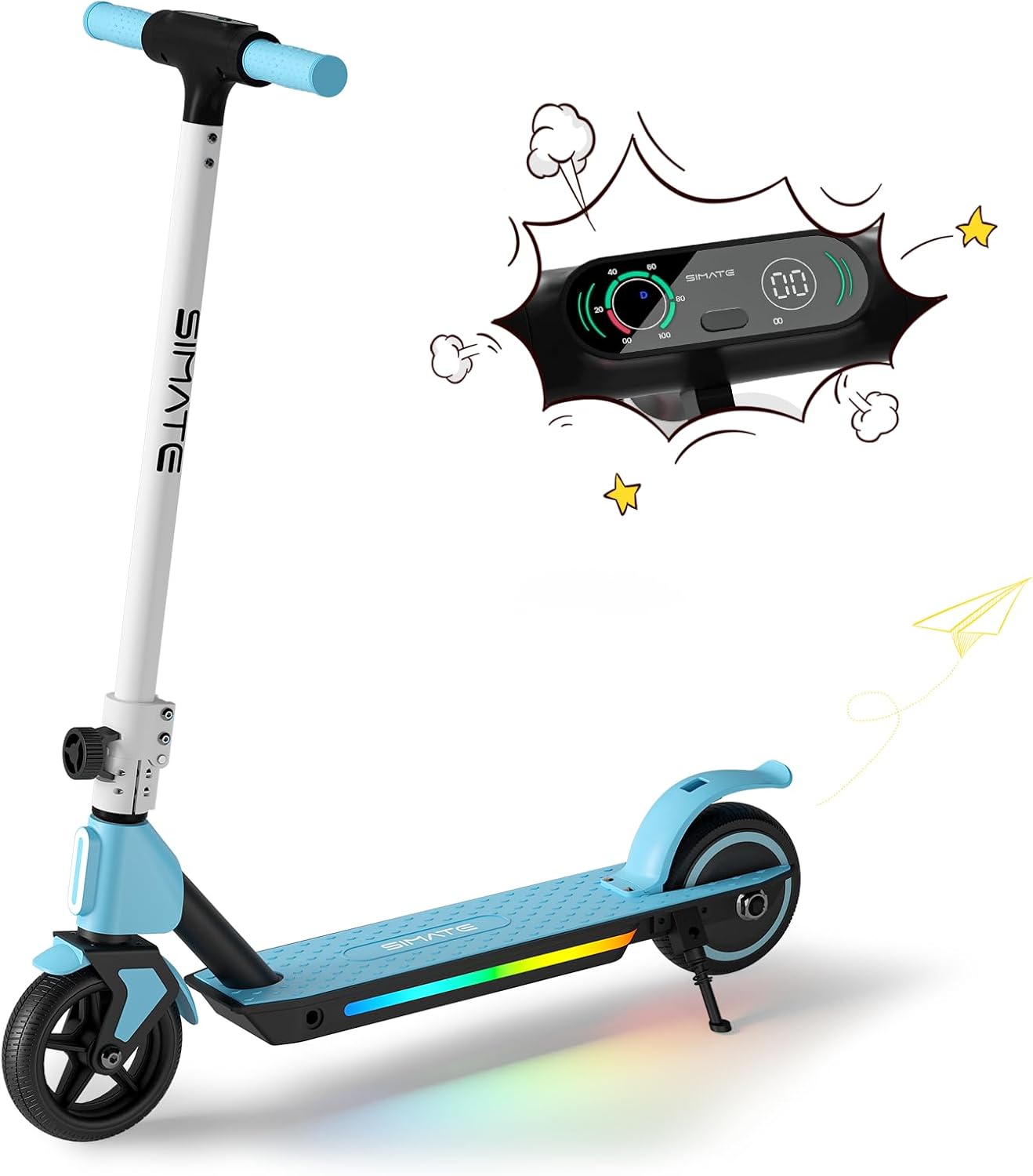
Figure 1: SIMATE S2 Electric Scooter (Blue)
The SIMATE S2 Electric Scooter features a sleek design with an integrated LED display and colorful lights on the deck. It is designed for easy learning and use, making it an ideal choice for young riders.
2 സുരക്ഷാ വിവരങ്ങൾ
WARNING: Always wear a helmet and appropriate safety gear when riding. Adult supervision is recommended for young riders.
- Do not ride in wet conditions, on uneven surfaces, or near traffic.
- ഓരോ യാത്രയ്ക്കും മുമ്പ് എല്ലാ ബോൾട്ടുകളും ഫാസ്റ്റനറുകളും മുറുക്കിയിട്ടുണ്ടെന്ന് ഉറപ്പാക്കുക.
- Familiarize yourself with both the electronic brake and foot brake.
- ഒരു റൈഡർക്ക് മാത്രമായി സ്കൂട്ടർ രൂപകൽപ്പന ചെയ്തിരിക്കുന്നു.
- The motor will not engage until the riding speed reaches 2 mph for safety.
3. ഘടകങ്ങൾ കഴിഞ്ഞുview
The SIMATE S2 Electric Scooter consists of several key components:
- ഹാൻഡിൽബാർ: Adjustable height for comfortable riding.
- LED ഡിജിറ്റൽ ഡിസ്പ്ലേ: Shows speed, speed gear, and battery capacity.
- Electronic Throttle: ത്വരണം നിയന്ത്രിക്കുന്നു.
- ഇലക്ട്രോണിക് ബ്രേക്ക്: Lever on the handlebar for quick stopping.
- കാൽ ബ്രേക്ക്: Rear fender brake for additional stopping power.
- ഡെക്ക്: Non-slip surface with colorful LED lights.
- ചക്രങ്ങൾ: Solid anti-puncture rubber tires for smooth riding.
- മടക്കാനുള്ള സംവിധാനം: എളുപ്പത്തിൽ സംഭരിക്കാനും ഗതാഗതം ചെയ്യാനും അനുവദിക്കുന്നു.

Figure 2: Handlebar and Display Features
The intuitive LED display provides real-time information about your ride, enhancing safety and control.

Figure 3: Dual Brake System
The scooter is equipped with both an electronic brake and a foot brake for reliable stopping power in various conditions.
4. സജ്ജീകരണം
Follow these steps to set up your SIMATE S2 Electric Scooter:
- അൺപാക്ക്: പാക്കേജിംഗിൽ നിന്ന് എല്ലാ ഘടകങ്ങളും ശ്രദ്ധാപൂർവ്വം നീക്കം ചെയ്യുക.
- തുറക്കുക: Release the folding mechanism and raise the handlebar stem until it locks into place. Ensure it is securely latched.
- ഹാൻഡിൽബാർ ഉയരം ക്രമീകരിക്കുക: ദ്രുത-റിലീസ് cl അഴിക്കുകamp on the handlebar stem. Adjust the handlebar to a comfortable height for the rider, ensuring the rider can maintain a slight bend in their elbows while holding the grips. Tighten the clamp സുരക്ഷിതമായി.
- പ്രാരംഭ ചാർജ്: Before first use, fully charge the scooter's battery. Connect the charger to the charging port and plug it into a power outlet. The indicator light on the charger will change when fully charged.

ചിത്രം 4: എളുപ്പത്തിൽ സംഭരിക്കുന്നതിനായി മടക്കാവുന്ന ഡിസൈൻ
The scooter's foldable design makes it easy to store and transport, fitting conveniently into car trunks.
5. പ്രവർത്തന നിർദ്ദേശങ്ങൾ
To operate your SIMATE S2 Electric Scooter:
- പവർ ഓൺ: Press and hold the power button on the LED display to turn on the scooter.
- Kick-Start Assist: For safety, the motor will only engage after the scooter reaches a speed of 2 mph (3.2 km/h). Place one foot on the deck and use the other foot to push off the ground, similar to a traditional kick scooter.
- ത്വരിതപ്പെടുത്തുക: Once moving, gently press the electronic throttle with your thumb to accelerate.
- ബ്രേക്കിംഗ്: To slow down or stop, release the throttle and use either the electronic brake lever on the handlebar or press down on the rear foot brake. Use both brakes simultaneously for quicker stops.
- LED ലൈറ്റുകൾ: The colorful LED lights on the deck and front light activate automatically when the scooter is powered on, enhancing visibility and style.
- പവർ ഓഫ്: Press and hold the power button to turn off the scooter when you are finished riding.

Figure 5: Large-Sized LED Digital Display
The clear LED display provides essential riding information at a glance, including current speed and battery level.

Figure 6: Front and Pedal Lights
The integrated lighting system enhances visibility and adds a fun element to the ride, especially in low-light conditions.
Video 1: SIMATE Electric Kids Scooter in action, demonstrating riding and features.
Watch this video to see the SIMATE Electric Scooter's features and how it performs in various settings.
6. പരിപാലനം
പതിവ് അറ്റകുറ്റപ്പണികൾ നിങ്ങളുടെ സ്കൂട്ടറിന്റെ ദീർഘായുസ്സും സുരക്ഷിതമായ പ്രവർത്തനവും ഉറപ്പാക്കുന്നു:
- വൃത്തിയാക്കൽ: പരസ്യം ഉപയോഗിച്ച് സ്കൂട്ടർ തുടയ്ക്കുകamp cloth after each use. Do not use harsh chemicals or abrasive cleaners. Avoid direct water spray to prevent damage to electronic components.
- ബാറ്ററി കെയർ: Charge the battery fully after each ride. If storing for an extended period, charge the battery every 30-60 days to maintain its health. Do not overcharge or completely drain the battery.
- ടയറുകൾ: The scooter is equipped with solid anti-puncture rubber tires, requiring minimal maintenance. Periodically check for debris or damage.
- ബ്രേക്കുകൾ: Regularly check the functionality of both the electronic and foot brakes. Ensure they respond promptly and effectively.
- ഫാസ്റ്റനറുകൾ: Periodically inspect all screws, bolts, and connections to ensure they are tight and secure.

Figure 7: Anti-Puncture Tire and Non-Slip Pedal
The durable solid tires and non-slip deck are designed for low maintenance and enhanced safety.
7. പ്രശ്നപരിഹാരം
സാധാരണ പ്രശ്നങ്ങളും അവയുടെ പരിഹാരങ്ങളും:
| പ്രശ്നം | സാധ്യമായ കാരണം | പരിഹാരം |
|---|---|---|
| സ്കൂട്ടർ ഓൺ ആകുന്നില്ല. | ബാറ്ററി കുറവാണ്; കണക്ഷൻ തെറ്റി. | ബാറ്ററി പൂർണ്ണമായും ചാർജ് ചെയ്യുക. എല്ലാ കേബിൾ കണക്ഷനുകളും പരിശോധിക്കുക. |
| മോട്ടോർ പ്രവർത്തിക്കുന്നില്ല. | Not kick-started; safety feature activated. | Ensure scooter is moving at least 2 mph before pressing throttle. |
| കുറഞ്ഞ ശ്രേണി അല്ലെങ്കിൽ വേഗത. | Low battery; heavy load; uphill riding; cold weather. | Charge battery fully. Ensure rider weight is within limits. Performance may vary with conditions. |
| ബ്രേക്കുകൾ ഫലപ്രദമല്ല. | Brake mechanism issue. | Inspect brake levers and foot brake for damage or obstruction. Contact support if issues persist. |
8 സ്പെസിഫിക്കേഷനുകൾ
| ഫീച്ചർ | വിശദാംശങ്ങൾ |
|---|---|
| മോഡലിൻ്റെ പേര് | S2 |
| ബ്രാൻഡ് | സിമേറ്റ് |
| പ്രായപരിധി (ശുപാർശ ചെയ്യുന്നത്) | 6-14 വർഷം |
| Rider Height (Recommended) | 4.0 അടി - 5.3 അടി |
| മോട്ടോർ പവർ | 130W |
| പരമാവധി വേഗത | 8.7 mph (14 km/h) |
| പരമാവധി ശ്രേണി | 5 മൈൽ വരെ (8 കി.മീ) |
| Max Load (Weight Limit) | 154 പൗണ്ട് |
| ചാർജിംഗ് സമയം | 2-3 മണിക്കൂർ |
| ഉൽപ്പന്ന അളവുകൾ | 32"L x 16"W x 6"H |
| ഫ്രെയിം മെറ്റീരിയൽ | അലുമിനിയം |
| ടയർ തരം | Solid Anti-Puncture Rubber |
| ബ്രേക്ക് സിസ്റ്റം | Electronic Brake & Foot Brake |
| പ്രത്യേക സവിശേഷതകൾ | Digital Display, Colorful Lights, Lightweight, Foldable, Rechargeable |

ചിത്രം 8: പ്രധാന ഉൽപ്പന്ന സ്പെസിഫിക്കേഷനുകൾ
A summary of the SIMATE S2 Electric Scooter's performance and physical characteristics.
9. വാറൻ്റിയും പിന്തുണയും
The SIMATE S2 Electric Scooter comes with a limited warranty. Please refer to the warranty card included in your product packaging for specific terms and conditions.
For technical support, replacement parts, or any inquiries not covered in this manual, please contact SIMATE customer service:
- ഓൺലൈൻ പിന്തുണ: സന്ദർശിക്കുക SIMATE Store on Amazon.
- നിർമ്മാതാവ്: Jinhua Smart Electric Technology Co., Ltd
Ask a question about this manual
Ask about setup, troubleshooting, compatibility, parts, safety, or missing instructions. Manuals+ will review the question and use this page’s manual context to help answer it.