
PDDAXLQUE DX-CP27
PDDAXLQUE DX-CP27 BLE 5.1 Beacon User Manual
Model: DX-CP27
1. ആമുഖവും അവസാനവുംview
The PDDAXLQUE DX-CP27 is a compact and versatile BLE 5.1 Beacon designed for various tracking and management applications. It supports both iBeacon and Eddystone protocols, allowing for flexible integration into existing systems. Its robust IP67 waterproof rating and long battery life make it suitable for use in diverse environments.
This manual provides detailed instructions for setting up, operating, and maintaining your DX-CP27 Beacon, ensuring optimal performance and longevity.
2 പ്രധാന സവിശേഷതകൾ
- Dual Protocol Support: Compatible with both iBeacon and Eddystone protocols, including UID, URL, and TLM frames.
- Custom Broadcast Data: Configurable for custom broadcast data to meet specific application needs.
- വിപുലീകരിച്ച ശ്രേണി: Offers an open-air communication distance of 50-70 meters.
- നീണ്ട ബാറ്ററി ലൈഫ്: Provides 6 months to 1 year of operation with its non-removable lithium battery.
- മോടിയുള്ള ഡിസൈൻ: IP67 waterproof rating ensures reliability in humid or challenging environments.
- ഒതുക്കമുള്ള വലിപ്പം: മിനി tag design (40x24x5mm) allows for easy attachment or hanging.
- Free Companion App & SDK: Available for Android ("DX-Ibeacon" or "DX-SMART") and iOS ("DX-SMART") for configuration and development.
- Simultaneous Broadcasting: Supports broadcasting of up to six different packet types concurrently.

Image: The DX-CP27 Beacon showing its dimensions (40mm length, 24mm width, 5.6mm thickness) and internal structure. Key features listed include Renesas DA14531 Chip, Bluetooth BLE 5.1 protocol, support for 6 UUID broadcasts, 6 months to 1 year battery life, IP67 protection, 22.1µA working power consumption, iBeacon & Eddystone support, 50-70m communication distance, 36x16.5x4mm module size, and CE, FCC, ROHS certification.
3. പാക്കേജ് ഉള്ളടക്കം
The DX-CP27 Bluetooth Beacon package typically includes the following items:
- DX-CP27 User Manual (x1)
- Product Guide (x1)
- DX-CP27 Beacons (quantity varies by package, e.g., 3, 10)
- Foam Tape (quantity matches beacons)
Video: This video demonstrates the unboxing of the DX-CP27 Bluetooth Beacon, showing the user manual, product guide, multiple beacons, and foam tapes included in the package. It also illustrates the power-on and power-off procedures for the beacon, indicated by the blinking of the indicator light.
4. സജ്ജീകരണവും പ്രവർത്തനവും
4.1 Powering On/Off the Beacon
- പവർ ഓൺ: Long press the power key on the beacon for 2 seconds. The indicator light will blink twice, signifying successful startup.
- പവർ ഓഫ്: Long press the power key for 5 seconds. The indicator light will stay on steadily and then turn off, indicating the beacon has shut down.
4.2 കമ്പാനിയൻ ആപ്പ് ഇൻസ്റ്റാൾ ചെയ്യുന്നു
To configure and manage your DX-CP27 Beacon, you need to download the companion app:
- നിങ്ങളുടെ ഫോണിന്റെ ബ്ലൂടൂത്ത് പ്രവർത്തനക്ഷമമാക്കിയിട്ടുണ്ടെന്ന് ഉറപ്പാക്കുക.
- For Android devices, search for "DX-Ibeacon" or "DX-SMART" in the Google Play Store.
- For iOS devices, search for "DX-SMART" in the Apple App Store.
- ആപ്പ് ഡൗൺലോഡ് ചെയ്ത് ഇൻസ്റ്റാൾ ചെയ്യുക.
- Once installed, open the app to access the home screen.

Image: Screenshots of the DX-SMART app interface, demonstrating how to search for the app, connect to a beacon, and access parameter settings for iBeacon, UID, URL, and TLM frames. It highlights the ability to modify broadcast parameters like UUID, Major, Minor, and BLE Name.
കുറിപ്പ്: A free app SDK is also provided for user development convenience. The app allows for configuration of broadcast data such as UUID, Major, Minor, UID, and URL.
4.3 Connecting and Configuring the Beacon
- On the app's home screen, refresh the device list to find your DX-CP27 Beacon.
- If there are many nearby Bluetooth devices, use the "Edit Filter" function or scan the QR code on the beacon for quicker connection.
- Tap on the found DX-CP27 Beacon and enter the default password "dx1234" (this can be changed later).
- Enter the parameter settings interface and select any Frame (e.g., Frame1 for DeviceInfo) for verification.
- You can change parameters like the "BLE Name" (e.g., to "Beacon Test").
- Click "SAVE" to apply changes. A "Save Success" prompt indicates the settings have been saved successfully.
- Return to the home screen and refresh the device list to confirm the updated parameters.
പ്രധാനപ്പെട്ടത്: This product needs to be used with an APP or a backend management system with a gateway.
5. ആപ്ലിക്കേഷൻ സാഹചര്യങ്ങൾ
The DX-CP27 Beacon is suitable for a wide range of applications due to its versatile features:
- Personnel Tracking: Monitor the location and movement of staff within a defined area.
- Warehouse Asset Management: Track inventory, equipment, and other assets in warehouses or storage facilities.
- Goods Labeling: Attach to products for identification and tracking throughout the supply chain.
- Advertising Push: Deliver location-based notifications or promotions to nearby mobile devices.
- Cargo Tracking: Monitor the status and location of cargo during transit.
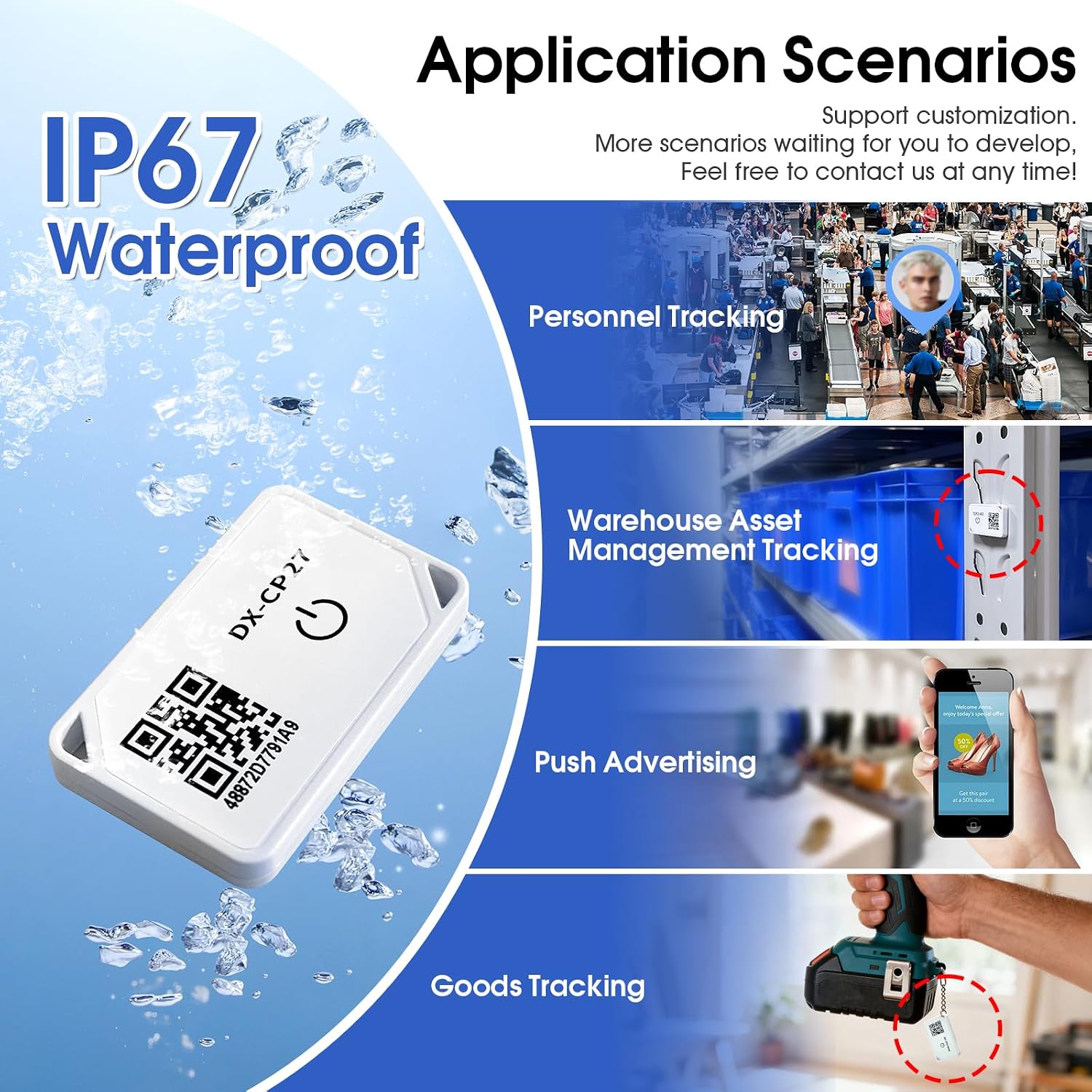
Image: Various application scenarios for the IP67 waterproof DX-CP27 Beacon, including personnel tracking, warehouse asset management tracking, push advertising, and goods tracking. The beacon is shown in different environments to illustrate its versatility.

ചിത്രം: കൂടുതൽ ഉദാഹരണങ്ങൾamples of the DX-CP27 Beacon's use in practical settings, such as attached to items in a warehouse, storage cabinets, toolboxes, and various equipment, demonstrating its integration with a mobile phone app for scanning and displaying product information.

Image: A diagram illustrating two primary uses: Asset Tracking/Management, where CP27 Beacons broadcast BLE signals to a CP34 Bluetooth Host, which then sends data via LoRAWAN to a LoRAWAN Gateway and TTN Cloud Platform; and Goods Labeling, where a CP27 Beacon attached to goods is scanned by a mobile phone app to display product information.
6 സ്പെസിഫിക്കേഷനുകൾ
| ഫീച്ചർ | വിശദാംശങ്ങൾ |
|---|---|
| മോഡൽ | ഡിഎക്സ്-സിപി27 |
| ബ്രാൻഡ് | പിഡിഎക്സ്എൽക്യു |
| ബ്ലൂടൂത്ത് പതിപ്പ് | BLE 5.1 |
| പ്രോട്ടോക്കോളുകൾ പിന്തുണയ്ക്കുന്നു | iBeacon, Eddystone (UID, URL, TLM), Custom Broadcast Data |
| ആശയവിനിമയ ദൂരം | 50-70 meters (open air) |
| ബാറ്ററി തരം | CR2032 (Lithium Polymer, non-replaceable) |
| ബാറ്ററി ശേഷി | 210 മില്ലിamp മണിക്കൂറുകൾ |
| ബാറ്ററി ലൈഫ് | 6-12 മാസം |
| അളവുകൾ | 40mm x 24mm x 5mm (ഏകദേശം) |
| സംരക്ഷണ നില | IP67 വാട്ടർപ്രൂഫ് |
| ശുപാർശ ചെയ്യുന്ന ഉപയോഗങ്ങൾ | Cargo tracking, personnel tracking, personnel management, warehouse management, goods labeling, advertising push. |
7. പരിപാലനവും പരിചരണവും
- വൃത്തിയാക്കൽ: Wipe the beacon with a soft, dry cloth. Avoid using harsh chemicals or abrasive cleaners.
- ബാറ്ററി: The DX-CP27 features a non-replaceable battery due to its waterproof design. When the battery life ends, the unit should be replaced.
- സംഭരണം: Store the beacon in a cool, dry place away from direct sunlight and extreme temperatures.
- ജല പ്രതിരോധം: While IP67 waterproof, avoid prolonged submersion or exposure to high-pressure water jets to maintain integrity.
8. പ്രശ്നപരിഹാരം
- Beacon not powering on: Ensure the power button is pressed for the correct duration (2 seconds for on). If still unresponsive, the battery may be depleted.
- App not detecting beacon:
- Verify the beacon is powered on.
- നിങ്ങളുടെ മൊബൈൽ ഉപകരണത്തിൽ ബ്ലൂടൂത്ത് പ്രവർത്തനക്ഷമമാക്കിയിട്ടുണ്ടെന്ന് ഉറപ്പാക്കുക.
- Refresh the device list in the app.
- Move closer to the beacon to improve signal strength.
- Check for any physical obstructions that might interfere with the signal.
- Parameters not saving: Ensure you click the "SAVE" button in the app after making changes. Confirm the "Save Success" prompt appears.
- Inconsistent range: Environmental factors such as walls, metal objects, and other wireless signals can affect range. Test in an open area for optimal performance.
9. പിന്തുണയും വാറണ്ടിയും
PDDAXLQUE is a manufacturer supporting OEM and ODM services, including customization of product firmware, gateways, and apps. For technical support or any issues encountered, please contact us directly. You can typically find support information by navigating to "User Guide" → "Product Information" → "Support" within the app or on the official webസൈറ്റ്.
നിർദ്ദിഷ്ട വാറന്റി വിശദാംശങ്ങൾക്ക് നിങ്ങളുടെ വാങ്ങൽ ഡോക്യുമെന്റേഷൻ പരിശോധിക്കുക.
Ask a question about this manual
Ask about setup, troubleshooting, compatibility, parts, safety, or missing instructions. Manuals+ will review the question and use this page’s manual context to help answer it.