
Temtop PMD371 & Airing2000 Bundle
ടെംടോപ്പ് PMD371 & Airing2000 പ്രൊഫഷണൽ എയർ ക്വാളിറ്റി മോണിറ്ററിംഗ് ബണ്ടിൽ യൂസർ മാനുവൽ
Model: PMD371 & Airing2000 | Brand: Temtop
1. ആമുഖം
This user manual provides detailed instructions for the operation and maintenance of the Temtop PMD371 and Airing2000 Professional Air Quality Monitoring Bundle. This bundle offers a comprehensive solution for precise particle and air quality monitoring in various environments, including laboratories, cleanrooms, and field applications. The PMD371 is designed for detailed particle detection and environmental monitoring, while the Airing2000 extends capabilities with advanced particulate and formaldehyde detection. Please read this manual thoroughly before using the devices to ensure proper function and safety.
2 സുരക്ഷാ വിവരങ്ങൾ
- Do not expose the devices to extreme temperatures, humidity, or direct sunlight.
- ഉപകരണങ്ങൾ താഴെയിടുകയോ ശക്തമായ ആഘാതങ്ങൾക്ക് വിധേയമാക്കുകയോ ചെയ്യുന്നത് ഒഴിവാക്കുക.
- ഉപകരണങ്ങൾ വേർപെടുത്താനോ പരിഷ്ക്കരിക്കാനോ ശ്രമിക്കരുത്. എല്ലാ സേവനങ്ങളും യോഗ്യതയുള്ള ഉദ്യോഗസ്ഥരെ ഏൽപ്പിക്കുക.
- Keep the devices away from water and other liquids.
- അടച്ചിട്ട സ്ഥലങ്ങളിൽ പ്രവർത്തിക്കുമ്പോൾ ശരിയായ വായുസഞ്ചാരം ഉറപ്പാക്കുക.
- Use only the specified power adapters and accessories provided by Temtop.
3. പാക്കേജ് ഉള്ളടക്കം
പാക്കേജിൽ എല്ലാ ഇനങ്ങളും ഉണ്ടെന്ന് ഉറപ്പാക്കുക:
- Temtop PMD371 Particle Counter
- Temtop Airing2000 Particulate Monitor
- USB ചാർജിംഗ് കേബിളുകൾ (x2)
- പവർ അഡാപ്റ്ററുകൾ (x2)
- ഉപയോക്തൃ മാനുവൽ (ഈ പ്രമാണം)
- കാലിബ്രേഷൻ സർട്ടിഫിക്കറ്റ് (ബാധകമെങ്കിൽ)
4. ഉൽപ്പന്നം കഴിഞ്ഞുview

Image: The Temtop PMD371 (right) and Airing2000 (left) air quality monitors, showcasing their distinct designs and displays.
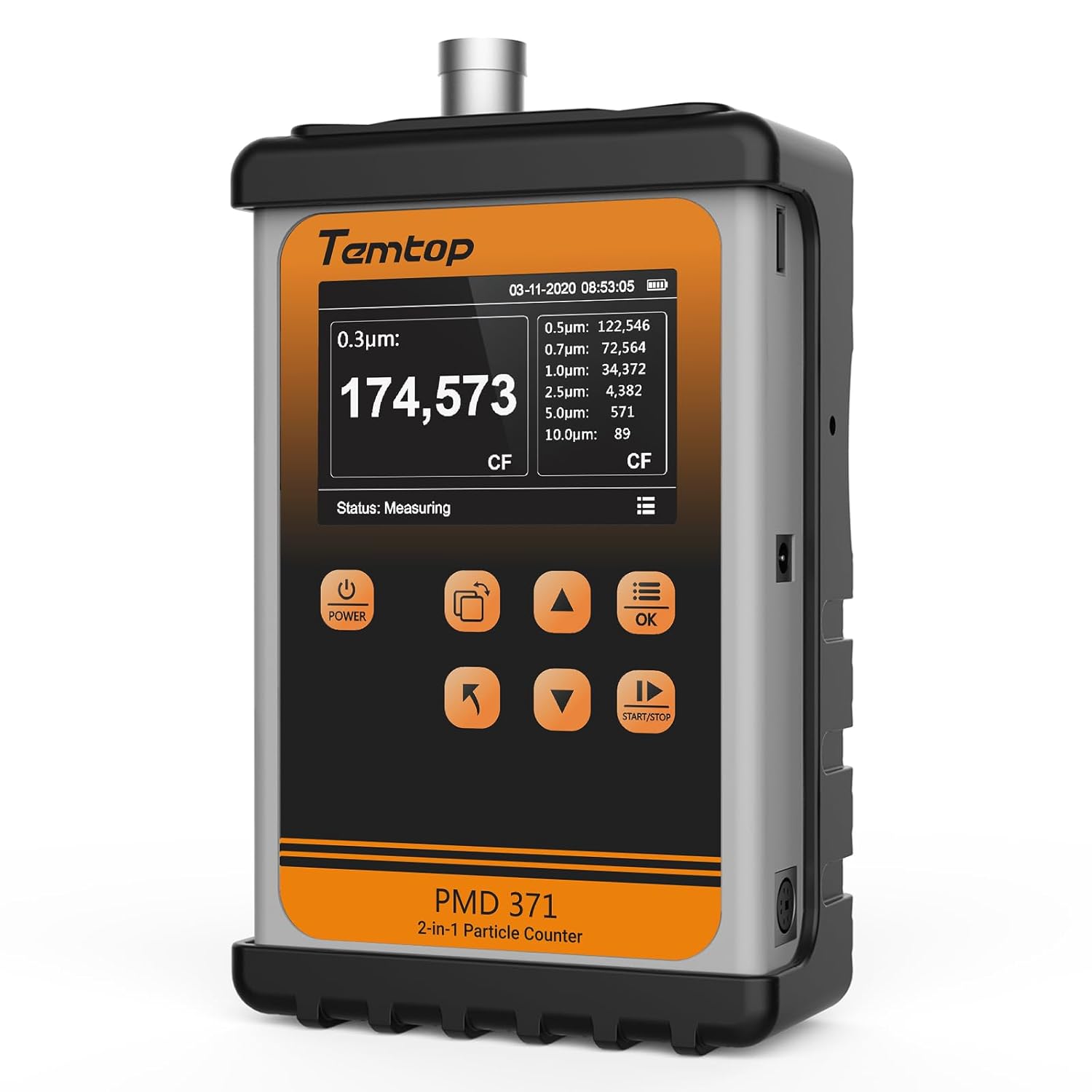
ചിത്രം: മുൻഭാഗം view of the Temtop PMD371 Particle Counter, highlighting its display and control buttons.

ചിത്രം: മുൻഭാഗം view of the Temtop Airing2000 Particulate Monitor, showing its ergonomic design and display.
4.1 Temtop PMD371 Particle Counter
The PMD371 is a precision instrument designed for multi-size particle detection and environmental monitoring. It features a robust all-metal construction for durability and reliable data collection.
- ഡിസ്പ്ലേ സ്ക്രീൻ: Shows real-time particle counts (0.3µm, 0.5µm, 1.0µm, 2.5µm, 5.0µm, 10.0µm), PM2.5, PM10, temperature, and humidity.
- പവർ ബട്ടൺ: ഉപകരണം ഓൺ/ഓഫ് ചെയ്യുന്നു.
- ഫംഗ്ഷൻ ബട്ടണുകൾ: Navigation and selection for various modes and settings.
- ഇൻലെറ്റ് പോർട്ട്: Where air samples are drawn in for analysis.
- USB പോർട്ട്: ചാർജിംഗിനും ഡാറ്റ കൈമാറ്റത്തിനും.

Image: The Temtop PMD371 highlighting its durable all-metal casing, ensuring robust performance.

Image: The Temtop PMD371 illustrating its compact size (170 x 110 x 48 mm) and lightweight design (1.76 lbs), emphasizing its portability.
4.2 Temtop Airing2000 Particulate Monitor
The Airing2000 is designed for comprehensive field monitoring, providing accurate measurements of PM2.5, PM10, TSP, temperature, humidity, and formaldehyde.
- ഡിസ്പ്ലേ സ്ക്രീൻ: Shows real-time readings for PM2.5, PM10, TSP, temperature, humidity, and HCHO.
- പവർ ബട്ടൺ: For turning the device on/off.
- നാവിഗേഷൻ ബട്ടണുകൾ: For menu navigation and setting adjustments.
- എയർ ഇൻലെറ്റ്/ഔട്ട്ലെറ്റ്: Ports for air sampലിംഗ്.
- ചാർജിംഗ് പോർട്ട്: ആന്തരിക ബാറ്ററി റീചാർജ് ചെയ്യുന്നതിന്.

Image: The Temtop Airing2000 showcasing its enterprise-grade precision, industrial-grade pumping sensor, comprehensive monitoring, instant data access, user-friendly operation, and portable design.

Image: The Temtop Airing2000 demonstrating its comprehensive monitoring capabilities, including particulate concentration (PM2.5, PM10, TSP), particle count (0.3µm, 0.5µm, 1.0µm), and environmental conditions (temperature, humidity).

ചിത്രം: വിശദമായ ഒരു ചിത്രം view of the Temtop Airing2000's internal pump-suction sensor, highlighting its advanced optics and wide particle size detection capabilities.
5. സജ്ജീകരണം
5.1 പ്രാരംഭ ചാർജിംഗ്
Before first use, fully charge both the PMD371 and Airing2000 devices. Connect the provided USB charging cables to the respective devices and plug them into the power adapters. A full charge typically takes 3-4 hours. The battery indicator on the screen will show charging status.
5.2 പവർ ഓൺ/ഓഫ്
- പവർ ഓൺ ചെയ്യാൻ: അമർത്തിപ്പിടിക്കുക ശക്തി സ്ക്രീൻ പ്രകാശിക്കുന്നത് വരെ ബട്ടൺ അമർത്തുക.
- പവർ ഓഫ് ചെയ്യാൻ: അമർത്തിപ്പിടിക്കുക ശക്തി സ്ക്രീൻ ഓഫാകുന്നതുവരെ ബട്ടൺ.
5.3 അടിസ്ഥാന ക്രമീകരണങ്ങൾ
Upon first power-on, you may need to set the date, time, and preferred units. Navigate through the menu using the arrow buttons and confirm selections with the OK ബട്ടൺ.
- തീയതിയും സമയവും: Set current date and time for accurate data logging.
- യൂണിറ്റുകൾ: Select preferred units for temperature (°C/°F) and particulate matter (µg/m³).
6. പ്രവർത്തന നിർദ്ദേശങ്ങൾ
6.1 Taking Measurements with PMD371
- പ്ലേസ്മെൻ്റ്: Position the PMD371 in the area you wish to monitor. Ensure the air inlet is unobstructed.
- അളക്കൽ ആരംഭിക്കുക: അമർത്തുക ആരംഭിക്കുക/നിർത്തുക button to begin continuous monitoring. The screen will display real-time particle counts and environmental data.
- Interpreting Readings:
- Particle Counts: Displays the number of particles per liter for various sizes (0.3µm, 0.5µm, 1.0µm, 2.5µm, 5.0µm, 10.0µm).
- PM2.5/PM10: Shows the concentration of particulate matter in micrograms per cubic meter (µg/m³).
- താപനില/ഈർപ്പം: Displays ambient temperature and relative humidity.
- Stop Measurement: അമർത്തുക ആരംഭിക്കുക/നിർത്തുക button again to pause or stop monitoring.
- ഡാറ്റ ലോഗിംഗ്: The device automatically logs data. You can access historical data through the menu.

Image: The Temtop PMD371's screen displaying detailed particle count data for various sizes (0.3µm, 0.5µm, 0.7µm, 1.0µm, 2.5µm, 5.0µm, 10.0µm) and PM2.5/PM10 concentrations.
6.2 Taking Measurements with Airing2000
- പ്ലേസ്മെൻ്റ്: Hold the Airing2000 or place it in the desired monitoring location. Ensure the air inlet is clear.
- അളക്കൽ ആരംഭിക്കുക: The device typically starts measuring automatically upon power-on. Observe the real-time readings on the display.
- Interpreting Readings:
- PM2.5/PM10/TSP: Displays concentrations of various particulate matters.
- HCHO: Shows formaldehyde concentration.
- താപനില/ഈർപ്പം: Displays ambient temperature and relative humidity.
- ഡാറ്റ മാനേജ്മെൻ്റ്: Use the navigation buttons to review historical data or adjust settings.
6.3 Data Transfer and Analysis
Both devices support data export. Connect the devices to a computer using the provided USB cables. The devices will appear as a removable storage device, allowing you to access logged data files (e.g., CSV format) for further analysis using spreadsheet software.
7. പരിപാലനം
7.1 വൃത്തിയാക്കൽ
- Wipe the exterior of the devices with a soft, dry cloth.
- അബ്രാസീവ് ക്ലീനറുകളോ, ലായകങ്ങളോ, ശക്തമായ രാസവസ്തുക്കളോ ഉപയോഗിക്കരുത്.
- Ensure the air inlet and outlet ports are free from dust and debris. Use a soft brush or compressed air if necessary, but avoid forcing anything into the ports.
7.2 സംഭരണം
- Store the devices in a cool, dry place, away from direct sunlight and extreme temperatures.
- If storing for an extended period, ensure the batteries are partially charged (around 50%) to prolong battery life. Recharge every 3-6 months.
7.3 കാലിബ്രേഷൻ
The devices are factory calibrated. For professional applications requiring high accuracy, periodic re-calibration by authorized service centers is recommended. Refer to Temtop's official website or contact customer support for calibration services.
8. പ്രശ്നപരിഹാരം
| പ്രശ്നം | സാധ്യമായ കാരണം | പരിഹാരം |
|---|---|---|
| ഉപകരണം പവർ ഓണാക്കുന്നില്ല. | ബാറ്ററി കുറവാണ്; ഉപകരണത്തിന്റെ തകരാറ്. | ഉപകരണം പൂർണ്ണമായും ചാർജ് ചെയ്യുക. പ്രശ്നം നിലനിൽക്കുകയാണെങ്കിൽ, പിന്തുണയെ ബന്ധപ്പെടുക. |
| കൃത്യമല്ലാത്ത വായനകൾ. | Sensor obstruction; environmental interference; need for calibration. | Ensure air inlets are clear. Move away from strong air currents or dust sources. Consider professional calibration. |
| സ്ക്രീൻ ശൂന്യമാണ് അല്ലെങ്കിൽ നിശ്ചലമാണ്. | Software error; low battery. | Recharge the device. Perform a hard reset (refer to specific device manual for button combination, usually holding power for 10+ seconds). |
| കമ്പ്യൂട്ടറുമായി ബന്ധിപ്പിക്കാൻ കഴിയില്ല. | Faulty USB cable; driver issue; device not in data transfer mode. | Try a different USB cable or port. Ensure the device is powered on and in data transfer mode if applicable. |
9 സ്പെസിഫിക്കേഷനുകൾ
9.1 Temtop PMD371 Particle Counter
- Particle Size Channels: 0.3µm, 0.5µm, 1.0µm, 2.5µm, 5.0µm, 10.0µm
- Measurement Range (PM2.5/PM10): 0-999 µg/m³
- താപനില പരിധി: -10°C മുതൽ 50°C വരെ (14°F മുതൽ 122°F വരെ)
- ഈർപ്പം പരിധി: 0-99% RH
- ബാറ്ററി: റീചാർജ് ചെയ്യാവുന്ന ലിഥിയം-അയോൺ
- അളവുകൾ: ഏകദേശം 170 x 110 x 48 മിമി (6.7 x 4.3 x 1.9 ഇഞ്ച്)
- ഭാരം: ഏകദേശം 0.8 കി.ഗ്രാം (1.76 പൗണ്ട്)
- ഡാറ്റ സംഭരണം: 5000 സെറ്റ് ഡാറ്റ വരെ
9.2 Temtop Airing2000 Particulate Monitor
- Particulate Measurement: PM2.5, PM10, TSP
- Formaldehyde (HCHO) Range: 0-1.0 mg/m³
- താപനില പരിധി: -10°C മുതൽ 50°C വരെ (14°F മുതൽ 122°F വരെ)
- ഈർപ്പം പരിധി: 0-99% RH
- ബാറ്ററി: Rechargeable Lithium-ion (Extended battery life)
- ഡാറ്റ സംഭരണം: Ample storage for continuous logging
- സെൻസർ തരം: Industrial-grade pumping sensor
10. വാറൻ്റിയും പിന്തുണയും
10.1 വാറൻ്റി വിവരങ്ങൾ
Temtop products typically come with a standard manufacturer's warranty covering defects in materials and workmanship. Please refer to the warranty card included with your product or visit the official Temtop webനിർദ്ദിഷ്ട വാറന്റി നിബന്ധനകൾക്കും വ്യവസ്ഥകൾക്കും സൈറ്റ്. വാങ്ങിയതിന്റെ തെളിവായി നിങ്ങളുടെ വാങ്ങൽ രസീത് സൂക്ഷിക്കുക.
10.2 ഉപഭോക്തൃ പിന്തുണ
For technical assistance, troubleshooting, or service inquiries, please contact Temtop customer support:
- Webസൈറ്റ്: www.temtop.com
- ഇമെയിൽ: ഔദ്യോഗിക പേജിലെ കോൺടാക്റ്റ് വിഭാഗം കാണുക. webസൈറ്റ്.
- ഫോൺ: ഔദ്യോഗിക പേജിലെ കോൺടാക്റ്റ് വിഭാഗം കാണുക. webസൈറ്റ്.
When contacting support, please have your product model number (PMD371 & Airing2000) and purchase date ready.
Ask a question about this manual
Ask about setup, troubleshooting, compatibility, parts, safety, or missing instructions. Manuals+ will review the question and use this page’s manual context to help answer it.