
TMT MP-TR200-7173-001
TMT Terrier 200 Single Automatic Gate Opener User Manual
Model: MP-TR200-7173-001
1. ആമുഖം
Thank you for choosing the TMT Terrier 200 Single Automatic Gate Opener. This manual provides comprehensive instructions for the safe and efficient installation, operation, and maintenance of your new gate opener. Please read this manual thoroughly before beginning installation or operation to ensure proper functionality and to prevent damage or injury.
The TMT Terrier 200 is designed for medium-duty swing gates, supporting gates up to 8 feet in length and 550 pounds in weight. It features a robust aluminum alloy shell, ensuring durability in various weather conditions, and offers flexible power options including AC electricity, battery, and solar compatibility.
2. ഉൽപ്പന്ന സവിശേഷതകൾ
| ഫീച്ചർ | വിശദാംശങ്ങൾ |
|---|---|
| മോഡൽ നമ്പർ | MP-TR200-7173-001 |
| Gate Weight Capacity | 550 പൗണ്ട് വരെ |
| Gate Length Capacity | 8 അടി വരെ |
| പ്രവർത്തന താപനില | -4°F മുതൽ 122°F വരെ (-20°C മുതൽ 50°C വരെ) |
| മെറ്റീരിയൽ | High-quality Aluminum Alloy Shell |
| പവർ ഓപ്ഷനുകൾ | AC Electricity, Battery, Solar Compatible (Solar panels not included) |
| റിമോട്ട് കൺട്രോൾ റേഞ്ച് | 328 അടി വരെ |
| ഉൾപ്പെടുത്തിയ ഘടകങ്ങൾ | Terrier 200 Single Gate Opener, mounting hardware |
| ഉൽപ്പന്ന അളവുകൾ | 32.2 x 3.9 x 7.6 ഇഞ്ച് |
| ഇനത്തിൻ്റെ ഭാരം | 8.97 പൗണ്ട് |
3. സജ്ജീകരണവും ഇൻസ്റ്റാളേഷനും
The TMT Terrier 200 is designed for easy DIY installation, often completed within one hour using basic household tools. No welding or high voltage wiring is required. All necessary hardware is included in the kit.
3.1. പാക്കേജ് ഉള്ളടക്കം
Before starting, verify that all components are present:
- Terrier 200 Single Gate Opener Actuator
- നിയന്ത്രണ ബോക്സ്
- Remote Controls (quantity as per kit)
- Mounting Brackets (U-shaped tube brackets for ranch gates, flat brackets)
- Adjustable Ground Stopper
- Installation Hardware (bolts, nuts, washers, etc.)
- ഉപയോക്തൃ മാനുവൽ (ഈ പ്രമാണം)

Image: Complete kit contents for the TMT Terrier 200 Single Automatic Gate Opener, including the main actuator, control boxes, remote controls, and various mounting hardware.
3.2 പ്രീ-ഇൻസ്റ്റലേഷൻ ചെക്ക്ലിസ്റ്റ്
- Ensure your gate is in good working condition, swinging freely without obstruction.
- Confirm your gate dimensions (length and weight) are within the opener's capacity (up to 8ft and 550lb).
- Identify the gate's opening direction (pull-to-open or push-to-open) as the opener supports both.
- Gather necessary tools: drill, wrenches, measuring tape, level, etc.
3.3. ഓപ്പണർ മൌണ്ട് ചെയ്യുന്നു
The opener can be installed on various gate types including tubular, chain-link, wood, steel, and vinyl gates. Specific U-shaped tube brackets are provided for ranch gates.

Image: Close-up of U-shaped tube brackets, ideal for securely mounting the gate opener to round or tubular gate frames, commonly found on ranch gates.
Refer to the detailed diagrams for outward and inward opening configurations to determine optimal mounting points for the actuator and brackets. Precise measurements are crucial for smooth operation.

Image: Technical diagrams illustrating the mounting dimensions and angles for both outward and inward swinging gate installations, crucial for correct setup.
3.4. പവർ കണക്ഷൻ
The gate opener supports multiple power supply modes:
- AC Electricity: Connect to a standard AC power source.
- ബാറ്ററി ബാക്കപ്പ്: The system is compatible with 2x12V batteries (not included) for backup power.
- സോളാർ അനുയോജ്യത: Can be powered by solar panels (not included) for off-grid operation.

Image: Schematic diagram illustrating the two primary power supply modes: one utilizing solar panels and 12V batteries, and the other using utility power with 12V batteries for backup.
3.5. Ground Stopper Installation
An adjustable ground stopper is included to provide flexible positioning for gate stops, ensuring the gate closes securely and consistently.

Image: A black adjustable ground stopper component, designed to be installed on the driveway to provide a secure stopping point for the gate in both open and closed positions.
4. പ്രവർത്തന നിർദ്ദേശങ്ങൾ
The TMT Terrier 200 offers multiple convenient ways to operate your gate.
4.1. വിദൂര നിയന്ത്രണ പ്രവർത്തനം
Use the included remote controls to open or close your gate from a distance of up to 328 feet. The remote features advanced security password technology and a professional rolling code function to prevent unauthorized access.
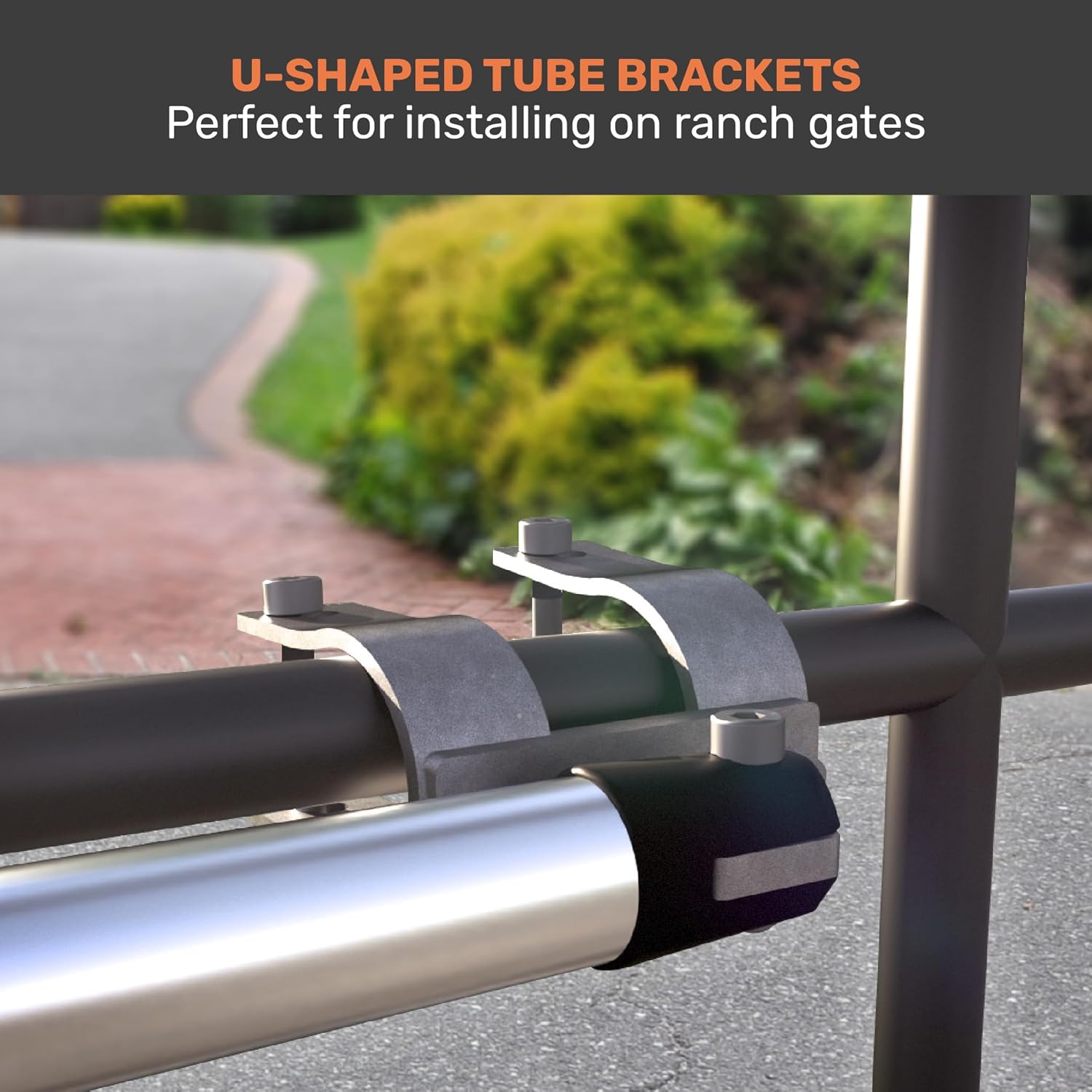
Image: A hand holding a black gate opener remote control, demonstrating its use to open a gate from inside a vehicle, highlighting the convenience of remote operation.
4.2. Smartphone App Control (Chow! App)
The gate opener is APP compatible, allowing you to control and monitor your gate via Wi-Fi and Bluetooth using the Chow! app. This provides intelligent operation and remote control capabilities from anywhere.

Image: A smartphone displaying the Chow! app interface for gate control, showing options to open, close, stop, and activate pedestrian mode, with Wi-Fi and Bluetooth icons indicating connectivity.
Download the Chow! App: http://onelink.to/tmk5na
Key App Features:
- Easy to Share: Share access with up to 10 users (friends, family, colleagues).
- Master Your Gates: Effortlessly pair and control all your TMT openers.
- Safeguarding Home and Family: Receive notifications for every entry through your gate.
5. പരിപാലനം
Regular maintenance ensures the longevity and optimal performance of your TMT Terrier 200 gate opener.
- ശുചിത്വം: Keep the actuator arm and control box free from dirt, debris, and insects.
- ലൂബ്രിക്കേഷൻ: Periodically check and lubricate moving parts as recommended in the full installation guide (if applicable).
- ഹാർഡ്വെയർ പരിശോധന: Inspect all mounting bolts and connections regularly to ensure they are tight and secure.
- ഗേറ്റ് അവസ്ഥ: Ensure the gate itself remains in good working order, swinging freely without resistance. Address any issues with gate hinges or alignment promptly.
- വൈദ്യുതി വിതരണം: If using battery backup or solar, periodically check battery health and solar panel cleanliness.
6. പ്രശ്നപരിഹാരം
നിങ്ങളുടെ ഗേറ്റ് ഓപ്പണറിൽ നിങ്ങൾ നേരിട്ടേക്കാവുന്ന പൊതുവായ പ്രശ്നങ്ങളെ ഈ വിഭാഗം അഭിസംബോധന ചെയ്യുന്നു.
| പ്രശ്നം | സാധ്യമായ കാരണം | പരിഹാരം |
|---|---|---|
| ഗേറ്റ് തുറക്കുന്നില്ല/അടയ്ക്കുന്നില്ല | No power; remote battery dead; obstruction; motor issue. | Check power supply; replace remote battery; remove obstruction; consult support if motor is faulty. |
| Gate opens partially | Obstruction; limit switch miscalibration; low power. | Clear obstruction; recalibrate limit switches (refer to full manual); check power supply. |
| റിമോട്ട് കൺട്രോൾ പ്രവർത്തിക്കുന്നില്ല | ബാറ്ററി ഡെഡ്; പരിധിക്ക് പുറത്താണ്; റിമോട്ട് പ്രോഗ്രാം ചെയ്തിട്ടില്ല. | Replace battery; move closer to gate; reprogram remote (refer to full manual). |
| Unusual noises from opener | Lack of lubrication; worn parts; foreign object. | Lubricate moving parts; inspect for worn components; remove any foreign objects. |
For more detailed troubleshooting steps or issues not listed here, please refer to the comprehensive installation manual or contact customer support.
7. വാറൻ്റി വിവരങ്ങൾ
TMT Automation Inc. provides the following warranty for the Terrier 200 Single Automatic Gate Opener:
- മോട്ടോർ: 24 മാസം
- മറ്റ് ഘടകങ്ങൾ: 12 മാസം
This warranty covers defects in materials and workmanship under normal use. Please retain your proof of purchase for warranty claims. For full warranty terms and conditions, please visit the TMT Automation Inc. webസൈറ്റ് അല്ലെങ്കിൽ ഉപഭോക്തൃ പിന്തുണയുമായി ബന്ധപ്പെടുക.

Image: Graphic highlighting "Designed in TAIWAN" and "12-MONTH WARRANTY", indicating the product's origin and warranty period.
8. ഉപഭോക്തൃ പിന്തുണ
Should you require assistance with installation, operation, or troubleshooting, please contact TMT Automation Inc. customer support.
For North America ONLY:
ഫോൺ: 1-310-367-6086
For help in other regions, please refer to our main site or email:
Webസൈറ്റ്: www.tmt-automation.com
ഇമെയിൽ: sales@tmt-automation.com

Image: A group of customer service representatives wearing headsets, with a QR code and contact information for TMT Automation Inc. support.
Ask a question about this manual
Ask about setup, troubleshooting, compatibility, parts, safety, or missing instructions. Manuals+ will review the question and use this page’s manual context to help answer it.