
എസ്ലോ EZL-B-2700-6W-A19-US
എസ്ലോ ഇസഡ്-വേവ് എൽഇഡി ബൾബ് യൂസർ മാനുവൽ
മോഡൽ: EZL-B-2700-6W-A19-US
1. ആമുഖം
നിങ്ങളുടെ Z-Wave സ്മാർട്ട് ഹോം സിസ്റ്റത്തിലേക്ക് തടസ്സമില്ലാത്ത സംയോജനത്തിനായി രൂപകൽപ്പന ചെയ്തിരിക്കുന്ന ഒരു സ്മാർട്ട് ലൈറ്റിംഗ് പരിഹാരമാണ് Ezlo Z-Wave LED ബൾബ്. ഈ ബൾബ് റിമോട്ട് കൺട്രോൾ കഴിവുകൾ, ക്രമീകരിക്കാവുന്ന തെളിച്ചം, ഇഷ്ടാനുസൃതമാക്കിയ ലൈറ്റിംഗ് രംഗങ്ങൾ സൃഷ്ടിക്കാനുള്ള കഴിവ് എന്നിവ വാഗ്ദാനം ചെയ്യുന്നു, അതേസമയം ഊർജ്ജക്ഷമതയുള്ളതും ദീർഘകാലം നിലനിൽക്കുന്നതുമാണ്.

ചിത്രം 1.1: മുൻഭാഗം view എസ്ലോ ഇസഡ്-വേവ് എൽഇഡി ബൾബിന്റെ.

ചിത്രം 1.2: ഉൽപ്പന്ന പാക്കേജിംഗിനൊപ്പം കാണിച്ചിരിക്കുന്ന എസ്ലോ ഇസഡ്-വേവ് എൽഇഡി ബൾബ്.
2 അനുയോജ്യത
ഈ Z-Wave LED ബൾബ്, EzloPlus, HomeAssistant, SmartThings എന്നിവയുൾപ്പെടെയുള്ള പ്രധാന Z-Wave സ്മാർട്ട് ഹോം ഹബ്ബുകളുമായി പ്രവർത്തിക്കാൻ രൂപകൽപ്പന ചെയ്തിരിക്കുന്നു. നിയന്ത്രണത്തിനും ഓട്ടോമേഷനും ഒരു Z-Wave അനുയോജ്യമായ ഹബ് ആവശ്യമാണ്.
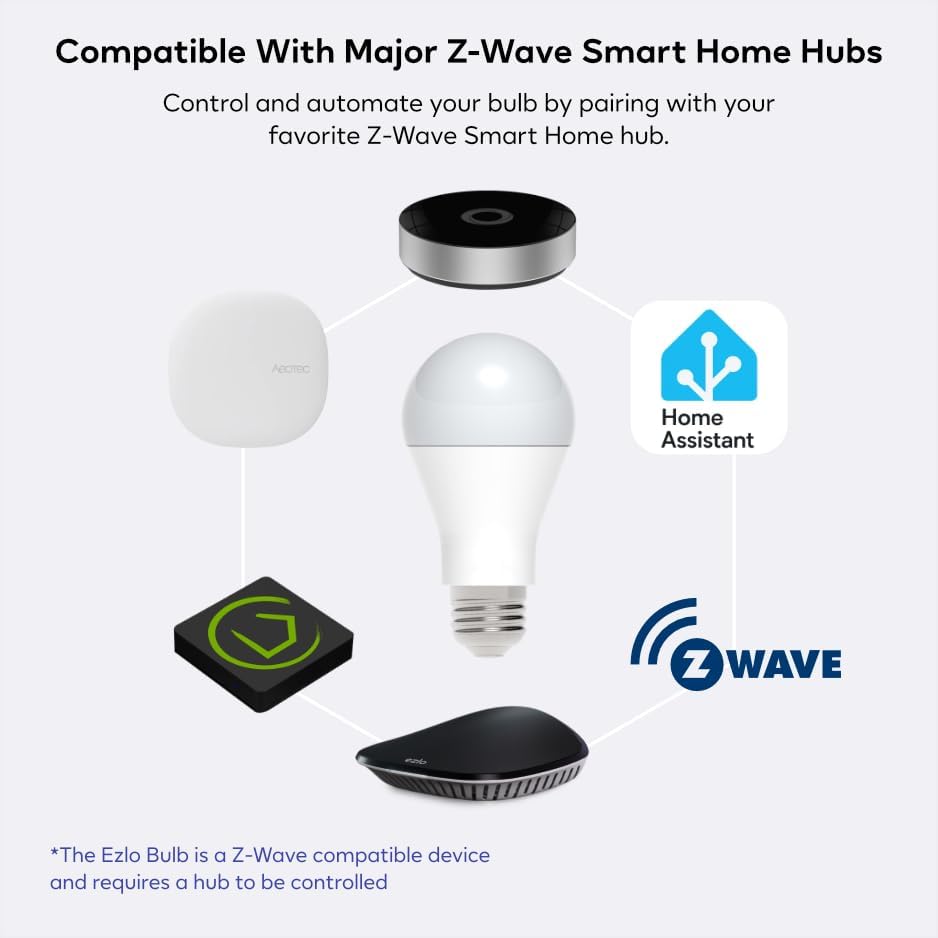
ചിത്രം 2.1: വിവിധ Z-Wave സ്മാർട്ട് ഹോം ഹബ്ബുകളുമായുള്ള Ezlo Z-Wave LED ബൾബിന്റെ അനുയോജ്യത ചിത്രീകരിക്കുന്ന ഡയഗ്രം.
3. സജ്ജീകരണവും ഇൻസ്റ്റാളേഷനും
ഇലക്ട്രീഷ്യന്റെ ആവശ്യമില്ലാതെ തന്നെ സ്റ്റാൻഡേർഡ് ബൾബ് സോക്കറ്റുകളിൽ എളുപ്പത്തിൽ ഇൻസ്റ്റാൾ ചെയ്യാവുന്ന തരത്തിലാണ് എസ്ലോ ഇസഡ്-വേവ് എൽഇഡി ബൾബ് രൂപകൽപ്പന ചെയ്തിരിക്കുന്നത്. നിങ്ങളുടെ ബൾബ് സജ്ജീകരിക്കാൻ ഈ ഘട്ടങ്ങൾ പാലിക്കുക:
- ബൾബ് സ്ക്രൂ ചെയ്യുക: നിങ്ങളുടെ എസ്ലോ ഇസഡ്-വേവ് ബൾബ് ആവശ്യമുള്ള ലൈറ്റ് ഫിക്ചറിലേക്ക് സ്ക്രൂ ചെയ്യുക. ഇൻസ്റ്റാൾ ചെയ്യുന്നതിന് മുമ്പ് ലൈറ്റ് ഫിക്ചർ ഓഫാക്കിയിട്ടുണ്ടെന്ന് ഉറപ്പാക്കുക.
- നിങ്ങളുടെ ഇസഡ്-വേവ് ഹബ് തയ്യാറാക്കുക: നിങ്ങളുടെ Z-Wave ഹബ് അല്ലെങ്കിൽ കൺട്രോളർ ജോടിയാക്കൽ (ഉൾപ്പെടുത്തൽ) മോഡിലേക്ക് മാറ്റുക. ജോടിയാക്കൽ എങ്ങനെ ആരംഭിക്കാം എന്നതിനെക്കുറിച്ചുള്ള വിശദാംശങ്ങൾക്ക് നിങ്ങളുടെ നിർദ്ദിഷ്ട ഹബ്ബിന്റെ നിർദ്ദേശങ്ങൾ പരിശോധിക്കുക.
- ജോടിയാക്കൽ ക്രമം ആരംഭിക്കുക: നിങ്ങളുടെ എസ്ലോ ബൾബ് ഓഫാക്കിയ ശേഷം, വാൾ സ്വിച്ചിൽ ഇനിപ്പറയുന്ന ക്രമം നടപ്പിലാക്കുക: ഓൺ > ഓഫ് > ഓൺ > ഓഫ് > ഓൺ. ബൾബ് കണ്ടെത്തിയെന്നും ജോടിയാക്കൽ മോഡിലാണെന്നും സ്ഥിരീകരിക്കാൻ ബൾബ് മിന്നിമറയും.
- ജോടിയാക്കൽ സ്ഥിരീകരിക്കുക: ബൾബ് മിന്നിത്തുടങ്ങിയാൽ, നിങ്ങളുടെ Z-Wave ഹബ് ബൾബ് കണ്ടെത്തി നിങ്ങളുടെ നെറ്റ്വർക്കിലേക്ക് ചേർക്കണം. ജോടിയാക്കൽ പ്രക്രിയ പൂർത്തിയാക്കാൻ നിങ്ങളുടെ ഹബ്ബിന്റെ ആപ്ലിക്കേഷനിലെ ഏതെങ്കിലും ഓൺ-സ്ക്രീൻ നിർദ്ദേശങ്ങൾ പാലിക്കുക.

ചിത്രം 3.1: എസ്ലോ ഇസഡ്-വേവ് എൽഇഡി ബൾബിന്റെ എളുപ്പത്തിലുള്ള സജ്ജീകരണത്തിനും ജോടിയാക്കൽ പ്രക്രിയയ്ക്കുമുള്ള വിഷ്വൽ ഗൈഡ്.
4. പ്രവർത്തന നിർദ്ദേശങ്ങൾ
നിങ്ങളുടെ Z-Wave ഹബ്ബുമായി ജോടിയാക്കിക്കഴിഞ്ഞാൽ, Ezlo Z-Wave LED ബൾബ് നിരവധി പ്രവർത്തനങ്ങൾ വാഗ്ദാനം ചെയ്യുന്നു:
- റിമോട്ട് കൺട്രോൾ: നിങ്ങളുടെ Z-Wave ഹബ്ബിന്റെ ആപ്ലിക്കേഷൻ വഴി നിങ്ങളുടെ സ്മാർട്ട്ഫോണോ ടാബ്ലെറ്റോ ഉപയോഗിച്ച് ഏത് സ്ഥലത്തുനിന്നും നിങ്ങളുടെ ലൈറ്റിംഗ് നിയന്ത്രിക്കുക.
- ക്രമീകരിക്കാവുന്ന തെളിച്ചം: ആവശ്യമുള്ള അന്തരീക്ഷം സജ്ജീകരിക്കുന്നതിനോ തിളക്കം കുറയ്ക്കുന്നതിനോ ബൾബ് 5% മുതൽ 100% വരെ എളുപ്പത്തിൽ മങ്ങിക്കുക.
- ഇഷ്ടാനുസൃതമാക്കിയ ലൈറ്റ് സീനുകൾ: നിങ്ങളുടെ ദിനചര്യയ്ക്ക് അനുയോജ്യമായ രീതിയിൽ വ്യക്തിഗതമാക്കിയ ലൈറ്റിംഗ് രംഗങ്ങൾ സൃഷ്ടിക്കുകയും ടൈമറുകൾ ഓട്ടോമേറ്റ് ചെയ്യുകയും ചെയ്യുക, ഉദാഹരണത്തിന് രാവിലെ ഉണരുമ്പോൾ ക്രമേണ തെളിച്ചം ക്രമീകരിക്കുക.
- ഊർജ്ജ കാര്യക്ഷമത: പരമ്പരാഗത ഇൻകാൻഡസെന്റ് ബൾബുകളെ അപേക്ഷിച്ച് 84% വരെ ഗണ്യമായ ഊർജ്ജ ലാഭത്തിന്റെ പ്രയോജനം.
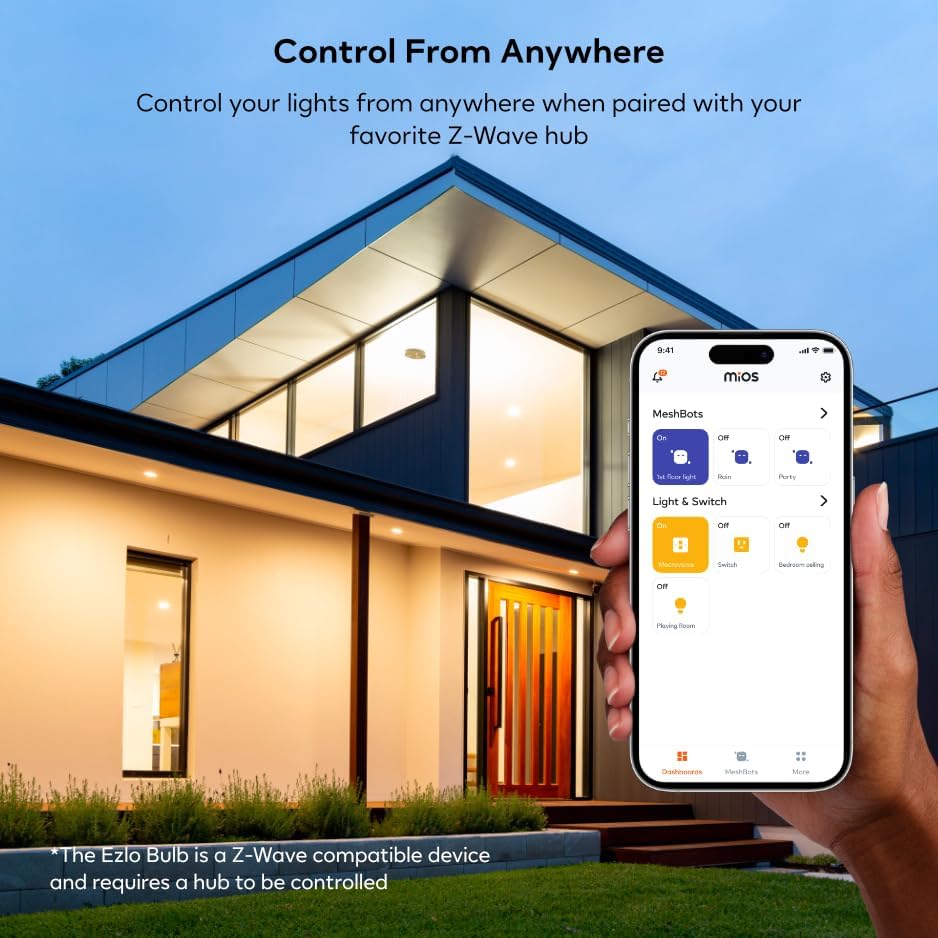
ചിത്രം 4.1: ഒരു സ്മാർട്ട്ഫോൺ ആപ്ലിക്കേഷൻ വഴി എസ്ലോ ഇസഡ്-വേവ് എൽഇഡി ബൾബ് വിദൂരമായി നിയന്ത്രിക്കുന്നു.

ചിത്രം 4.2: എസ്ലോ ആപ്പ് വഴി നിയന്ത്രിക്കാവുന്ന, മറ്റ് എസ്ലോ സ്മാർട്ട് ഹോം ഉപകരണങ്ങളുമായി സംയോജിപ്പിച്ചിരിക്കുന്ന എസ്ലോ ഇസഡ്-വേവ് എൽഇഡി ബൾബ്.
5. പരിപാലനം
എസ്ലോ ഇസഡ്-വേവ് എൽഇഡി ബൾബ് ദീർഘകാല വിശ്വാസ്യതയ്ക്കായി രൂപകൽപ്പന ചെയ്തിരിക്കുന്നു, കുറഞ്ഞ അറ്റകുറ്റപ്പണികളോടെ. ശരാശരി 20,000 മണിക്കൂർ വരെ ആയുസ്സുള്ളതിനാൽ, പതിവായി മാറ്റിസ്ഥാപിക്കൽ ആവശ്യമില്ല.
- വൃത്തിയാക്കൽ: വൃത്തിയാക്കുന്നതിനുമുമ്പ് ബൾബ് തണുത്തതാണെന്നും പവർ ഓഫ് ചെയ്തിട്ടുണ്ടെന്നും ഉറപ്പാക്കുക. മൃദുവായതും ഉണങ്ങിയതുമായ തുണി ഉപയോഗിച്ച് ബൾബ് തുടയ്ക്കുക. ലിക്വിഡ് ക്ലീനറുകളോ ഉരച്ചിലുകളുള്ള വസ്തുക്കളോ ഉപയോഗിക്കരുത്.
- സംഭരണം: ബൾബ് സൂക്ഷിക്കുകയാണെങ്കിൽ, നേരിട്ടുള്ള സൂര്യപ്രകാശത്തിൽ നിന്നും കടുത്ത താപനിലയിൽ നിന്നും അകന്ന് തണുത്തതും വരണ്ടതുമായ സ്ഥലത്ത് സൂക്ഷിക്കുക.
6. പ്രശ്നപരിഹാരം
| പ്രശ്നം | സാധ്യമായ കാരണം | പരിഹാരം |
|---|---|---|
| ബൾബ് കത്തുന്നില്ല. | ഫിക്സ്ചറിലേക്ക് വൈദ്യുതിയില്ല; ബൾബ് ശരിയായി സ്ക്രൂ ചെയ്തിട്ടില്ല; ബൾബ് തകരാറാണ്. | ഫിക്സ്ചറിലേക്കുള്ള പവർ സപ്ലൈ പരിശോധിക്കുക. ബൾബ് സോക്കറ്റിൽ സുരക്ഷിതമായി സ്ക്രൂ ചെയ്തിട്ടുണ്ടെന്ന് ഉറപ്പാക്കുക. പ്രവർത്തിക്കുന്ന മറ്റൊരു ഫിക്സ്ചറിൽ ബൾബ് പരിശോധിക്കുക. |
| ബൾബ് Z-Wave ഹബ്ബുമായി ജോടിയാക്കുന്നില്ല. | ഹബ് ജോടിയാക്കൽ മോഡിലല്ല; തെറ്റായ ജോടിയാക്കൽ ക്രമം; ഇടപെടൽ; ബൾബ് ഹബിൽ നിന്ന് വളരെ അകലെയാണ്. | നിങ്ങളുടെ Z-Wave ഹബ് ജോടിയാക്കൽ (ഉൾപ്പെടുത്തൽ) മോഡിൽ സജീവമാണെന്ന് ഉറപ്പാക്കുക. ON > OFF > ON > OFF > ON എന്ന ക്രമം ശ്രദ്ധാപൂർവ്വം ആവർത്തിക്കുക. ജോടിയാക്കുമ്പോൾ ബൾബ് ഹബ്ബിനടുത്തേക്ക് നീക്കുക. തടസ്സം സൃഷ്ടിക്കുന്ന മറ്റ് Z-Wave ഉപകരണങ്ങൾ പരിശോധിക്കുക. |
| ജോടിയാക്കിയ ശേഷം ബൾബ് പ്രതികരിക്കുന്നില്ല. | നെറ്റ്വർക്ക് പ്രശ്നം; ഹബ് ആശയവിനിമയ പ്രശ്നം; ബൾബ് പരിധിക്ക് പുറത്താണ്. | നിങ്ങളുടെ Z-Wave നെറ്റ്വർക്ക് ശരിയായി പ്രവർത്തിക്കുന്നുണ്ടെന്ന് ഉറപ്പാക്കുക. ബൾബ് വീണ്ടും ജോടിയാക്കാൻ ശ്രമിക്കുക. ബൾബ് നിങ്ങളുടെ Z-Wave ഹബ്ബിന്റെയോ Z-Wave റിപ്പീറ്ററിന്റെയോ പരിധിയിലാണെന്ന് ഉറപ്പാക്കുക. |
| ഡിമ്മിംഗ് പ്രവർത്തനം പ്രവർത്തിക്കുന്നില്ല. | ഹബ് അല്ലെങ്കിൽ ആപ്പ് ക്രമീകരണങ്ങൾ തെറ്റാണ്; പൊരുത്തപ്പെടാത്ത ഡിമ്മർ സ്വിച്ച്. | നിങ്ങളുടെ Z-Wave ഹബ്ബിന്റെ ആപ്ലിക്കേഷനിലെ ഡിമ്മിംഗ് ക്രമീകരണങ്ങൾ പരിശോധിക്കുക. ബൾബ് ഒരു അനുയോജ്യമല്ലാത്ത ഡിമ്മർ സ്വിച്ചിലേക്ക് ബന്ധിപ്പിച്ചിട്ടില്ലെന്ന് ഉറപ്പാക്കുക (പരമ്പരാഗത വാൾ ഡിമ്മറുകൾ വഴിയല്ല, Z-Wave വഴി സ്മാർട്ട് ഡിമ്മിംഗിനായി ഈ ബൾബ് രൂപകൽപ്പന ചെയ്തിരിക്കുന്നു). |
7. ഉൽപ്പന്ന സവിശേഷതകൾ
| ബ്രാൻഡ് | എസ്ലോ |
| മോഡലിൻ്റെ പേര് | EZL-B-2700-6W-A19-US ഉൽപ്പന്ന വിവരണം |
| ലൈറ്റ് തരം | എൽഇഡി |
| വാട്ട്tage | 9 വാട്ട്സ് |
| ജ്വലിക്കുന്ന തുല്യത | 40 വാട്ട്സ് |
| ബൾബ് ആകൃതി വലിപ്പം | A15 |
| ബൾബ് ബേസ് | E26 |
| തെളിച്ചം | 500 ല്യൂമെൻസ് |
| വർണ്ണ താപനില | 2700 കെൽവിൻ (വാം വൈറ്റ്) |
| വാല്യംtage | 100 മുതൽ 120 വോൾട്ട് വരെ (50 ഹെർട്സ്) |
| ശരാശരി ജീവിതം | 20,000 മണിക്കൂർ |
| ഇൻഡോർ/ഔട്ട്ഡോർ ഉപയോഗം | ഇൻഡോർ |
| ഇനത്തിൻ്റെ ഭാരം | 5.3 ഔൺസ് |
| പാക്കേജ് അളവുകൾ | 4.92 x 2.52 x 2.48 ഇഞ്ച് |
| യു.പി.സി | 850010803081 |
8. വാറൻ്റി വിവരങ്ങൾ
നിർദ്ദിഷ്ട വാറന്റി വിശദാംശങ്ങൾ സാധാരണയായി ഉൽപ്പന്ന പാക്കേജിംഗിലോ നിർമ്മാതാവിന്റെ ഔദ്യോഗിക അറിയിപ്പിലോ നൽകിയിട്ടുണ്ട്. webനിങ്ങളുടെ Ezlo Z-Wave LED ബൾബിന്റെ വാറന്റി കാലയളവിനെയും നിബന്ധനകളെയും കുറിച്ചുള്ള വിവരങ്ങൾക്ക്, ദയവായി നിങ്ങളുടെ വാങ്ങലിനൊപ്പം ഉൾപ്പെടുത്തിയിരിക്കുന്ന ഡോക്യുമെന്റേഷൻ പരിശോധിക്കുക അല്ലെങ്കിൽ ഔദ്യോഗിക Ezlo പിന്തുണ പേജ് സന്ദർശിക്കുക.
ബൈബോക്സ് വിജയിയുടെ വിവരങ്ങൾ അനുസരിച്ച്, ആമസോൺ വഴിയുള്ള ഉൽപ്പന്നത്തിന്റെ റിട്ടേൺ പോളിസി റീഫണ്ട്/മാറ്റിസ്ഥാപിക്കലിന് 30 ദിവസമാണ്.
9. പിന്തുണയും സമ്പർക്കവും
നിങ്ങളുടെ Ezlo Z-Wave LED ബൾബിനെക്കുറിച്ചുള്ള കൂടുതൽ സഹായത്തിനോ സാങ്കേതിക പിന്തുണയ്ക്കോ അന്വേഷണങ്ങൾക്കോ, ദയവായി Ezlo ഉപഭോക്തൃ പിന്തുണയുമായി ബന്ധപ്പെടുക. സാധാരണയായി ഔദ്യോഗിക Ezlo-യിൽ ബന്ധപ്പെടാനുള്ള വിവരങ്ങൾ നിങ്ങൾക്ക് കണ്ടെത്താൻ കഴിയും. webസൈറ്റ് അല്ലെങ്കിൽ നിങ്ങളുടെ ഉൽപ്പന്ന ഡോക്യുമെന്റേഷനിൽ.
നിങ്ങളുടെ വാങ്ങലുമായി ബന്ധപ്പെട്ട പൊതുവായ അന്വേഷണങ്ങൾക്ക്, നിങ്ങൾക്ക് ആമസോണിലെ വിൽപ്പനക്കാരനായ സെൻട്രലൈറ്റിനെയും റഫർ ചെയ്യാവുന്നതാണ്.
കുറിപ്പ്: ഔദ്യോഗിക എസ്ലോയിൽ ലഭ്യമായ ഏറ്റവും പുതിയ വിവരങ്ങൾ എപ്പോഴും പരിശോധിക്കുക. webഏറ്റവും കാലികമായ പിന്തുണാ ഉറവിടങ്ങൾക്കും ഉൽപ്പന്ന വിവരങ്ങൾക്കുമുള്ള സൈറ്റ്.
Ask a question about this manual
Ask about setup, troubleshooting, compatibility, parts, safety, or missing instructions. Manuals+ will review the question and use this page’s manual context to help answer it.