
1. ആമുഖം
Welcome to the user manual for your new Monster Airmars XKT05 Bluetooth Earphones. These true wireless earphones are designed to provide a convenient and high-quality audio experience. This manual will guide you through the setup, operation, maintenance, and troubleshooting of your device.
1.1 പാക്കേജ് ഉള്ളടക്കം
നിങ്ങളുടെ പാക്കേജിൽ എല്ലാ ഇനങ്ങളും ഉണ്ടെന്ന് ഉറപ്പാക്കുക:
- Monster Airmars XKT05 Earphones (Left and Right)
- ചാർജിംഗ് കേസ്
- യുഎസ്ബി ചാർജിംഗ് കേബിൾ
- ഉപയോക്തൃ മാനുവൽ (ഈ പ്രമാണം)
2. ഉൽപ്പന്നം കഴിഞ്ഞുview
The Monster Airmars XKT05 earphones feature a compact and ergonomic design for comfortable, long-lasting wear. They utilize Bluetooth technology for seamless wireless connectivity and offer integrated controls for easy management of audio and calls.
2.1 ഇയർഫോൺ ഘടകങ്ങൾ

Figure 1: Monster Airmars XKT05 Bluetooth Earphones (White) with Charging Case.
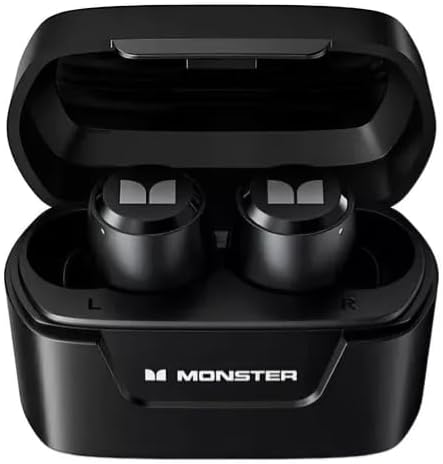
Figure 2: Monster Airmars XKT05 Bluetooth Earphones (Black) inside their Charging Case.

Figure 3: Monster Airmars XKT05 Bluetooth Earphones (Blue) and Retail Box.
The earphones consist of two independent earbuds (left and right) and a portable charging case. Each earbud features a touch-sensitive area for control, and the charging case protects the earbuds while also recharging them.
3. സജ്ജീകരണം
3.1 പ്രാരംഭ ചാർജിംഗ്
ആദ്യ ഉപയോഗത്തിന് മുമ്പ്, ഇയർഫോണുകളും ചാർജിംഗ് കേസും പൂർണ്ണമായും ചാർജ് ചെയ്യുക.
- രണ്ട് ഇയർഫോണുകളും ചാർജിംഗ് കെയ്സിലേക്ക് വയ്ക്കുക.
- USB ചാർജിംഗ് കേബിൾ കേസിലെ ചാർജിംഗ് പോർട്ടിലേക്കും ഒരു USB പവർ സ്രോതസ്സിലേക്കും (ഉദാ: കമ്പ്യൂട്ടർ, വാൾ അഡാപ്റ്റർ) ബന്ധിപ്പിക്കുക.
- കേസിലെ ഇൻഡിക്കേറ്റർ ലൈറ്റ് ചാർജിംഗ് സ്റ്റാറ്റസ് കാണിക്കും. പൂർണ്ണമായി ചാർജ് ചെയ്തുകഴിഞ്ഞാൽ, ലൈറ്റ് മാറുകയോ ഓഫാകുകയോ ചെയ്യും.
സാധാരണയായി ഒരു പൂർണ്ണ ചാർജ് ഏകദേശം 1-2 മണിക്കൂർ എടുക്കും.
3.2 ഒരു ഉപകരണവുമായി ജോടിയാക്കൽ
നിങ്ങളുടെ ഇയർഫോണുകൾ ഒരു സ്മാർട്ട്ഫോണിലേക്കോ ടാബ്ലെറ്റിലേക്കോ മറ്റ് ബ്ലൂടൂത്ത് പ്രവർത്തനക്ഷമമാക്കിയ ഉപകരണത്തിലേക്കോ ബന്ധിപ്പിക്കാൻ:
- ഇയർഫോണുകൾ ചാർജ് ചെയ്തിട്ടുണ്ടെന്ന് ഉറപ്പാക്കുക.
- ചാർജിംഗ് കേസ് തുറക്കുക. ഇയർഫോണുകൾ യാന്ത്രികമായി ജോടിയാക്കൽ മോഡിലേക്ക് പ്രവേശിക്കും (ഇൻഡിക്കേറ്റർ ലൈറ്റുകൾ മിന്നിമറയും).
- നിങ്ങളുടെ ഉപകരണത്തിൽ, Bluetooth ക്രമീകരണങ്ങളിലേക്ക് പോയി Bluetooth ഓണാക്കുക.
- ഇതിനായി തിരയുക available devices. Select "Monster Airmars XKT05" from the list.
- Once connected, the earphone indicator lights will stop flashing, and your device will confirm the connection.
ഉപകരണത്തിൽ ബ്ലൂടൂത്ത് പ്രവർത്തനക്ഷമമാക്കിയിട്ടുണ്ടെങ്കിൽ, കേസിൽ നിന്ന് നീക്കം ചെയ്യുമ്പോൾ ഇയർഫോണുകൾ അവസാനം ജോടിയാക്കിയ ഉപകരണവുമായി യാന്ത്രികമായി വീണ്ടും കണക്റ്റുചെയ്യും.
4. പ്രവർത്തന നിർദ്ദേശങ്ങൾ
The Monster Airmars XKT05 earphones feature touch controls for various functions.
4.1 പവർ ഓൺ/ഓഫ്
- പവർ ഓൺ: Open the charging case, or long-press the touch area on both earbuds for 3 seconds if they are outside the case and off.
- പവർ ഓഫ്: Place the earphones back into the charging case and close the lid, or long-press the touch area on both earbuds for 5 seconds.
4.2 മ്യൂസിക് പ്ലേബാക്ക്
- പ്ലേ/താൽക്കാലികമായി നിർത്തുക: ഇയർബഡുകളിൽ ഏതെങ്കിലുമൊന്നിൽ ഒറ്റ ടാപ്പ് ചെയ്യുക.
- അടുത്ത ട്രാക്ക്: വലതുവശത്തെ ഇയർബഡിൽ രണ്ടുതവണ ടാപ്പ് ചെയ്യുക.
- മുമ്പത്തെ ട്രാക്ക്: ഇടതുവശത്തെ ഇയർബഡിൽ രണ്ടുതവണ ടാപ്പ് ചെയ്യുക.
- വോളിയം കൂട്ടുക: വലതുവശത്തെ ഇയർബഡിൽ മൂന്ന് തവണ ടാപ്പ് ചെയ്യുക.
- വോളിയം താഴേക്ക്: ഇടതുവശത്തെ ഇയർബഡിൽ മൂന്ന് തവണ ടാപ്പ് ചെയ്യുക.
4.3 കോൾ മാനേജ്മെന്റ്
- ഉത്തരം/അവസാന കോൾ: ഇയർബഡുകളിൽ ഏതെങ്കിലുമൊന്നിൽ ഒറ്റ ടാപ്പ് ചെയ്യുക.
- കോൾ നിരസിക്കുക: ഇയർബഡുകളിൽ ഏതെങ്കിലുമൊന്നിൽ 2 സെക്കൻഡ് ദീർഘനേരം അമർത്തിപ്പിടിക്കുക.
4.4 വോയ്സ് അസിസ്റ്റന്റ്
- വോയ്സ് അസിസ്റ്റന്റ് (സിരി, ഗൂഗിൾ അസിസ്റ്റന്റ് മുതലായവ) സജീവമാക്കുക: (കോൾ ചെയ്യാത്തപ്പോൾ) ഇയർബഡുകളിൽ ഏതെങ്കിലുമൊന്നിൽ 3 സെക്കൻഡ് ദീർഘനേരം അമർത്തിപ്പിടിക്കുക.
4.5 നിയന്ത്രണങ്ങൾ കഴിഞ്ഞുview മേശ
| ആക്ഷൻ | നിയന്ത്രണം |
|---|---|
| പവർ ഓൺ | Open case / Long-press 3s |
| പവർ ഓഫ് | Close case / Long-press 5s |
| പ്ലേ/താൽക്കാലികമായി നിർത്തുക | Single tap (either earbud) |
| അടുത്ത ട്രാക്ക് | Double tap (right earbud) |
| മുമ്പത്തെ ട്രാക്ക് | Double tap (left earbud) |
| വോളിയം കൂട്ടുക | Triple tap (right earbud) |
| വോളിയം ഡൗൺ | Triple tap (left earbud) |
| ഉത്തരം / കോൾ അവസാനിപ്പിക്കുക | Single tap (either earbud) |
| കോൾ നിരസിക്കുക | Long-press 2s (either earbud) |
| വോയ്സ് അസിസ്റ്റൻ്റ് സജീവമാക്കുക | Long-press 3s (either earbud) |
5. പരിപാലനം
5.1 വൃത്തിയാക്കൽ
മികച്ച പ്രകടനവും ശുചിത്വവും നിലനിർത്തുന്നതിന്:
- ഇയർഫോണുകളും ചാർജിംഗ് കെയ്സും മൃദുവായതും ഉണങ്ങിയതും ലിന്റ് രഹിതവുമായ തുണി ഉപയോഗിച്ച് തുടയ്ക്കുക.
- അബ്രാസീവ് ക്ലീനറുകൾ, ആൽക്കഹോൾ, കെമിക്കൽ ലായകങ്ങൾ എന്നിവ ഉപയോഗിക്കരുത്.
- ചാർജിംഗ് കോൺടാക്റ്റുകൾ വൃത്തിയായും അവശിഷ്ടങ്ങൾ ഇല്ലാതെയും സൂക്ഷിക്കുക.
5.2 സംഭരണം
When not in use, store the earphones in their charging case to protect them and keep them charged. Store in a cool, dry place away from extreme temperatures and direct sunlight.
6. പ്രശ്നപരിഹാരം
If you encounter any issues with your Monster Airmars XKT05 earphones, please refer to the following common problems and solutions:
- Earphones not pairing with device:
- നിങ്ങളുടെ ഉപകരണത്തിൽ ബ്ലൂടൂത്ത് പ്രവർത്തനക്ഷമമാക്കിയിട്ടുണ്ടെന്ന് ഉറപ്പാക്കുക.
- Make sure the earphones are charged and in pairing mode (indicator lights flashing).
- നിങ്ങളുടെ ഉപകരണത്തിൽ Bluetooth ഓഫാക്കി വീണ്ടും ഓണാക്കാൻ ശ്രമിക്കുക.
- Forget the device ("Monster Airmars XKT05") from your device's Bluetooth list and try pairing again.
- Restart both your device and the earphones.
- ഒന്നോ രണ്ടോ ഇയർബഡുകളിൽ നിന്ന് ശബ്ദമില്ല:
- നിങ്ങളുടെ ഉപകരണത്തിലെയും ഇയർഫോണുകളിലെയും വോളിയം ലെവൽ പരിശോധിക്കുക.
- ഇയർഫോണുകൾ നിങ്ങളുടെ ഉപകരണവുമായി ശരിയായി ബന്ധിപ്പിച്ചിട്ടുണ്ടെന്ന് ഉറപ്പാക്കുക.
- രണ്ട് ഇയർബഡുകളും ചാർജിംഗ് കെയ്സിലേക്ക് തിരികെ വയ്ക്കാൻ ശ്രമിക്കുക, ലിഡ് അടച്ച് വീണ്ടും പുറത്തെടുക്കുക.
- ഇയർഫോണുകൾ ചാർജ് ചെയ്യുന്നില്ല:
- ചാർജിംഗ് കേബിൾ കേസിലേക്കും പവർ സ്രോതസ്സിലേക്കും സുരക്ഷിതമായി ബന്ധിപ്പിച്ചിട്ടുണ്ടെന്ന് ഉറപ്പാക്കുക.
- പവർ സ്രോതസ്സ് പ്രവർത്തിക്കുന്നുണ്ടോയെന്ന് പരിശോധിക്കുക.
- ഇയർഫോണുകളിലെയും കേസിലെയും ചാർജിംഗ് കോൺടാക്റ്റുകൾ വൃത്തിയാക്കുക.
- മോശം ഓഡിയോ നിലവാരം:
- Ensure the earphones are within the Bluetooth range of your device.
- ഇയർഫോണുകൾക്കും നിങ്ങളുടെ ഉപകരണത്തിനും ഇടയിലുള്ള തടസ്സങ്ങൾ ഒഴിവാക്കുക.
- Try disconnecting and reconnecting the earphones.
7 സ്പെസിഫിക്കേഷനുകൾ
| ഫീച്ചർ | വിശദാംശങ്ങൾ |
|---|---|
| മോഡലിൻ്റെ പേര് | എയർമാർസ് XKT05 |
| കണക്റ്റിവിറ്റി ടെക്നോളജി | വയർലെസ് (ബ്ലൂടൂത്ത്) |
| വയർലെസ് കമ്മ്യൂണിക്കേഷൻ ടെക്നോളജി | ബ്ലൂടൂത്ത് |
| ഉൾപ്പെടുത്തിയ ഘടകങ്ങൾ | Charging Cable, Charging Case, Earphones |
| മെറ്റീരിയൽ | പ്ലാസ്റ്റിക് |
| നിയന്ത്രണ തരം | സ്പർശിക്കുക |
| ജല പ്രതിരോധ നില | വാട്ടർ റെസിസ്റ്റൻ്റ് അല്ല |
| പവർ ഉറവിടം | ബാറ്ററി |
| ചെവി പ്ലേസ്മെൻ്റ് | ഇൻ-ഇയർ |
| പ്രതിരോധം | 10 ഓം |
| നിർമ്മാതാവ് | രാക്ഷസൻ |
8. വാറൻ്റി വിവരങ്ങൾ
The Monster Airmars XKT05 Bluetooth Earphones come with a manufacturer's warranty of 3 മാസം വാങ്ങിയ തീയതി മുതൽ. സാധാരണ ഉപയോഗത്തിലുള്ള മെറ്റീരിയലുകളിലെയും വർക്ക്മാൻഷിപ്പുകളിലെയും വൈകല്യങ്ങൾ ഈ വാറന്റി ഉൾക്കൊള്ളുന്നു.
ദുരുപയോഗം, അപകടം, അനധികൃത പരിഷ്കരണം, അല്ലെങ്കിൽ സാധാരണ തേയ്മാനം എന്നിവ മൂലമുണ്ടാകുന്ന നാശനഷ്ടങ്ങൾക്ക് വാറന്റി പരിരക്ഷ നൽകുന്നില്ല. വാറന്റി ക്ലെയിമുകൾക്കായി നിങ്ങളുടെ വാങ്ങിയതിന്റെ തെളിവ് സൂക്ഷിക്കുക.
9. ഉപഭോക്തൃ പിന്തുണ
For further assistance, technical support, or warranty inquiries, please refer to the contact information provided with your product packaging or visit the official Monster support website. When contacting support, please have your product model (XKT05) and proof of purchase ready.