
1. ആമുഖം
This manual provides comprehensive instructions for the installation, configuration, and operation of your Real HD 8 Port 2.5Gb Web Managed Ethernet Network Switch. This device is designed to enhance network performance for various applications, including 4K video streaming, gaming, and NAS systems, by providing high-speed 2.5 Gigabit Ethernet connectivity.

Image 1.1: Real HD 8 Port 2.5Gb Web Managed Ethernet Network Switch.
2. ഉൽപ്പന്നം കഴിഞ്ഞുview
The Real HD 8 Port 2.5Gb Web Managed Ethernet Network Switch (Model SW8-25G-MG) is a high-performance network device featuring 8 x 2.5 Gigabit RJ45 ports and 1 x 10G SFP+ uplink port. It offers advanced web-managed features for secure and efficient network control.
പ്രധാന സവിശേഷതകൾ:
- 8 x 2.5G RJ45 Ports: Provides high-speed connectivity for multiple devices.
- 1 x 10G SFP+ Port: Offers a high-bandwidth uplink for connecting to core networks or servers.
- Web Managed Interface: Allows for secure setup and configuration of network parameters such as VLAN, QoS, security, and multicast.
- ഫാനില്ലാത്ത ഡിസൈൻ: Ensures quiet operation, suitable for office and home environments.
- ഡ്യൂറബിൾ മെറ്റൽ ഹൗസിംഗ്: ശക്തമായ സംരക്ഷണവും കാര്യക്ഷമമായ താപ വിസർജ്ജനവും നൽകുന്നു.
- 4KV മിന്നൽ സംരക്ഷണം: Enhances device safety in various environments.
- 60Gbps Bandwidth: Supports high data transfer rates across the network.
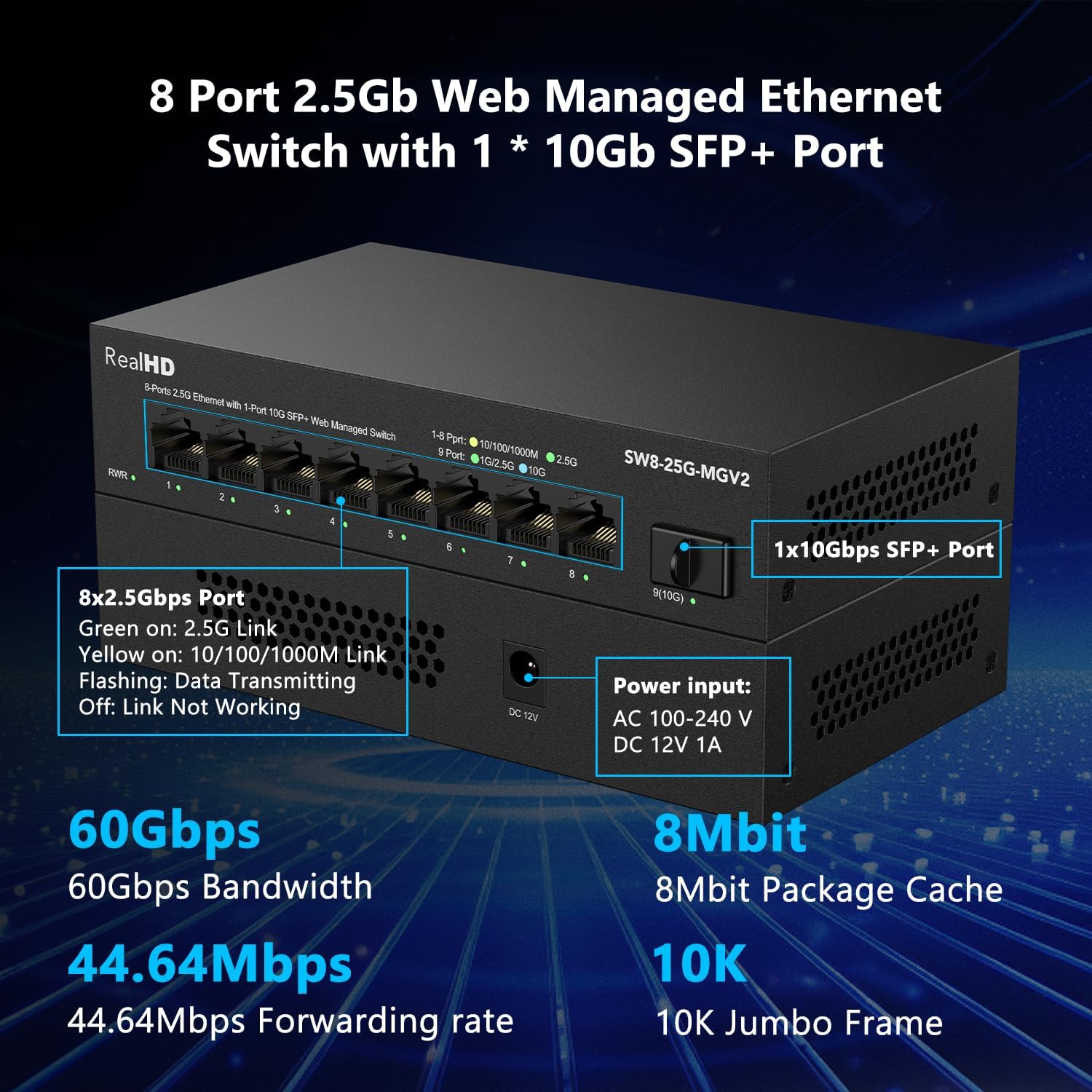
ചിത്രം 2.1: മുൻഭാഗം view of the switch with port descriptions and key specifications.
3. സജ്ജീകരണ നിർദ്ദേശങ്ങൾ
3.1 പാക്കേജ് ഉള്ളടക്കം
നിങ്ങളുടെ പാക്കേജിൽ ഇനിപ്പറയുന്ന ഇനങ്ങൾ അടങ്ങിയിട്ടുണ്ടെന്ന് പരിശോധിക്കുക:
- Real HD 8 Port 2.5Gb Web Managed Ethernet Network Switch
- Power Adapter (AC 100-240V to DC 12V 1A)
- ഉപയോക്തൃ മാനുവൽ
3.2 ഫിസിക്കൽ ഇൻസ്റ്റലേഷൻ
- പവർ കണക്ഷൻ: Connect the provided power adapter to the DC 12V port on the switch and then plug it into a power outlet. The Power LED (PWR) on the front panel should illuminate.
- നെറ്റ്വർക്ക് കേബിൾ കണക്ഷൻ: Connect your network devices (e.g., computers, NAS, Wi-Fi 6 routers) to the RJ45 ports (1-8) using Ethernet cables. For optimal 2.5Gbps speed, use CAT6 or higher-level pure copper Ethernet cables.
- SFP+ Uplink (Optional): If using the 10G SFP+ port, insert a compatible SFP+ module (not included) and connect it to your core network device using an appropriate fiber optic cable.

ചിത്രം 3.1: ഉദാample of physical connections for the switch.
3.3 പ്രാരംഭം Web മാനേജ്മെൻ്റ് ആക്സസ്
ആക്സസ് ചെയ്യാൻ web മാനേജ്മെന്റ് ഇന്റർഫേസ്:
- Ensure your computer is connected to one of the switch's RJ45 ports.
- എ തുറക്കുക web ബ്രൗസറിൽ ക്ലിക്ക് ചെയ്ത് ഡിഫോൾട്ട് ഐപി വിലാസം നൽകുക: 192.168.2.1
- ആവശ്യപ്പെടുമ്പോൾ, ഡിഫോൾട്ട് ലോഗിൻ ക്രെഡൻഷ്യലുകൾ നൽകുക:
ഉപയോക്തൃ നാമം: അഡ്മിൻ
പാസ്വേഡ്: അഡ്മിൻ - You will then be able to configure the switch settings. It is recommended to change the default password for security purposes.

Image 3.2: Default login information for web മാനേജ്മെൻ്റ്.
4. പ്രവർത്തന നിർദ്ദേശങ്ങൾ
ദി web management interface provides comprehensive control over the switch's functions. Below are some key features you can configure:
4.1 VLAN കോൺഫിഗറേഷൻ
Virtual Local Area Networks (VLANs) allow you to segment your network into smaller, isolated broadcast domains. This enhances security and network efficiency. The switch supports various VLAN functions to build a well-managed and secure network.

Image 4.1: VLAN for enhanced network security.
4.2 സേവനത്തിന്റെ ഗുണനിലവാരം (QoS)
QoS allows network administrators to prioritize specific types of traffic. This is crucial for applications like voice and video, ensuring they receive sufficient bandwidth and minimal latency for a fluent online experience.

Image 4.2: QoS for fluent online experience.
4.3 Link Aggregation (LACP)
Link Aggregation combines multiple network connections in parallel to increase throughput beyond what a single link could achieve, and to provide redundancy. For Static Link Aggregation with NAS devices, select "Balance XOR" in the configuration.
4.4 IGMP സ്നൂപ്പിംഗ്
IGMP Snooping optimizes multicast traffic delivery, preventing it from flooding the entire network. This is particularly beneficial for applications such as IPTV, ensuring a better network experience.

Image 4.3: IGMP Snooping for multicast optimization.
4.5 Other Management Features
ദി web interface also allows configuration of:
- Jumbo Frame support
- Loop detection and prevention
- Spanning Tree Protocol (STP/RSTP) settings
- MAC address table management

Image 4.4: Basic management features for network efficiency.
5. പരിപാലനം
To ensure optimal performance and longevity of your Real HD Network Switch, follow these maintenance guidelines:
- വൃത്തിയായി സൂക്ഷിക്കു: മൃദുവായതും ഉണങ്ങിയതുമായ തുണി ഉപയോഗിച്ച് സ്വിച്ചിന്റെ പുറംഭാഗം പതിവായി വൃത്തിയാക്കുക. ലിക്വിഡ് ക്ലീനറുകളോ എയറോസോളുകളോ ഉപയോഗിക്കുന്നത് ഒഴിവാക്കുക.
- വെൻ്റിലേഷൻ: അമിതമായി ചൂടാകുന്നത് തടയാൻ സ്വിച്ച് നന്നായി വായുസഞ്ചാരമുള്ള സ്ഥലത്ത് സ്ഥാപിച്ചിട്ടുണ്ടെന്ന് ഉറപ്പാക്കുക. വെന്റിലേഷൻ ദ്വാരങ്ങൾ അടയ്ക്കരുത്.
- കേബിൾ മാനേജുമെന്റ്: സിഗ്നൽ ഡീഗ്രേഡേഷൻ തടയുന്നതിന് നെറ്റ്വർക്ക് കേബിളുകൾ ചിട്ടയോടെയും അമിതമായ വളവുകളോ വളച്ചൊടിക്കലോ ഇല്ലാതെ സൂക്ഷിക്കുക.
- ഫേംവെയർ അപ്ഡേറ്റുകൾ: നിർമ്മാതാവിന്റെ website for firmware updates to ensure your device has the latest features and security patches.
6. പ്രശ്നപരിഹാരം
If you encounter issues with your Real HD Network Switch, refer to the following common troubleshooting steps:
6.1 വൈദ്യുതിയില്ല
- Verify the power adapter is securely connected to both the switch and a working power outlet.
- മറ്റൊരു ഉപകരണം പ്ലഗ് ഇൻ ചെയ്ത് പവർ ഔട്ട്ലെറ്റ് പ്രവർത്തനക്ഷമമാണോ എന്ന് പരിശോധിക്കുക.
6.2 നെറ്റ്വർക്ക് കണക്റ്റിവിറ്റി ഇല്ല
- Ensure Ethernet cables are properly connected to both the switch and your devices. Check the link/activity LEDs on the switch ports.
- Confirm that your devices' network adapters are enabled and configured correctly.
- സ്വിച്ചും ബന്ധിപ്പിച്ച ഉപകരണങ്ങളും പുനരാരംഭിക്കുക.
6.3 കുറഞ്ഞ നെറ്റ്വർക്ക് വേഗത
- കേബിൾ തരം: Ensure you are using CAT6 or higher-level pure copper Ethernet cables for 2.5Gbps connections.
- ഉപകരണ അനുയോജ്യത: For the entire network to operate at 2.5Gbps, all connected devices (network cards, routers, etc.) must support 2.5Gbps speeds. The network speed will be limited by the slowest device in the chain.
- Traffic Load: High network traffic can impact performance. Check for bandwidth-intensive applications.

Image 6.1: Understanding 2.5Gbps network speed requirements.
6.4 ആക്സസ് ചെയ്യാൻ കഴിയില്ല Web മാനേജ്മെന്റ് ഇന്റർഫേസ്
- Confirm your computer's IP address is in the same subnet as the switch (default 192.168.2.x).
- Ensure no firewall or antivirus software is blocking access.
- Try resetting the switch to factory defaults (refer to the full product manual for specific instructions on factory reset).
7 സ്പെസിഫിക്കേഷനുകൾ
| ഫീച്ചർ | വിവരണം |
|---|---|
| ബ്രാൻഡ് | Real HD |
| മോഡൽ നമ്പർ | SW8-25G-MG |
| തുറമുഖങ്ങളുടെ എണ്ണം | 8 x 2.5G RJ45, 1 x 10G SFP+ |
| സ്വിച്ച് തരം | Web നിയന്ത്രിച്ചു |
| ഡാറ്റ കൈമാറ്റ നിരക്ക് | 60 Gigabits Per Second (Bandwidth) |
| ഇൻ്റർഫേസ് | ആർജെ45, എസ്എഫ്പി+ |
| കേസ് മെറ്റീരിയൽ | ലോഹം |
| നിറം | കറുപ്പ് |
| പ്രവർത്തന താപനില | -20 മുതൽ 50 ഡിഗ്രി സെൽഷ്യസ് വരെ |
| അനുയോജ്യമായ ഉപകരണങ്ങൾ | Camera, Desktop, Gaming Console, Laptop, Printer |
8. വാറൻ്റിയും പിന്തുണയും
8.1 ഉൽപ്പന്ന വാറന്റി
This Real HD Network Switch comes with a 1 വർഷത്തെ വാറൻ്റി വാങ്ങിയ തീയതി മുതൽ, നിർമ്മാണ വൈകല്യങ്ങൾ ഉൾക്കൊള്ളുന്നു.
8.2 സാങ്കേതിക പിന്തുണ
For technical assistance, please contact Real HD's local tech support. Our Chicago-based team is available from 9 AM to 5 PM CST. Refer to your product packaging or the official Real HD webനിർദ്ദിഷ്ട കോൺടാക്റ്റ് വിശദാംശങ്ങൾക്കായി സൈറ്റ്.