
പ്രധാനപ്പെട്ട സുരക്ഷാ വിവരങ്ങൾ
Please read all instructions carefully before using this product. Failure to follow these instructions may result in injury or damage to the product.
- This elliptical machine is designed for seated use only. Do not stand on the pedals.
- പ്രവർത്തന സമയത്ത് കുട്ടികളെയും വളർത്തുമൃഗങ്ങളെയും മെഷീനിൽ നിന്ന് അകറ്റി നിർത്തുക.
- Consult a physician before starting any new exercise program, especially if you have pre-existing health conditions.
- Do not use if you are pregnant, have hypertension, heart disease, or any other medical condition that could be aggravated by exercise.
- Ensure the machine is placed on a stable, flat surface before use.
- ചലിക്കുന്ന എല്ലാ ഭാഗങ്ങളിൽ നിന്നും കൈകളും കാലുകളും സൂക്ഷിക്കുക.
- ഉപയോഗത്തിലില്ലാത്തപ്പോഴോ വൃത്തിയാക്കുന്നതിന് മുമ്പോ പവർ ഔട്ട്ലെറ്റിൽ നിന്ന് മെഷീൻ ഊരിമാറ്റുക.

Image: Remote control with warning text indicating not for children, pregnant women, or individuals with hypertension or heart disease.
ഉൽപ്പന്നം കഴിഞ്ഞുview
The OLIXIS Under-Desk Elliptical Machine is a compact and quiet mini pedal exerciser designed for low-impact leg workouts while seated. It features adjustable speed levels, an LED display, and both manual and remote controls for convenience.
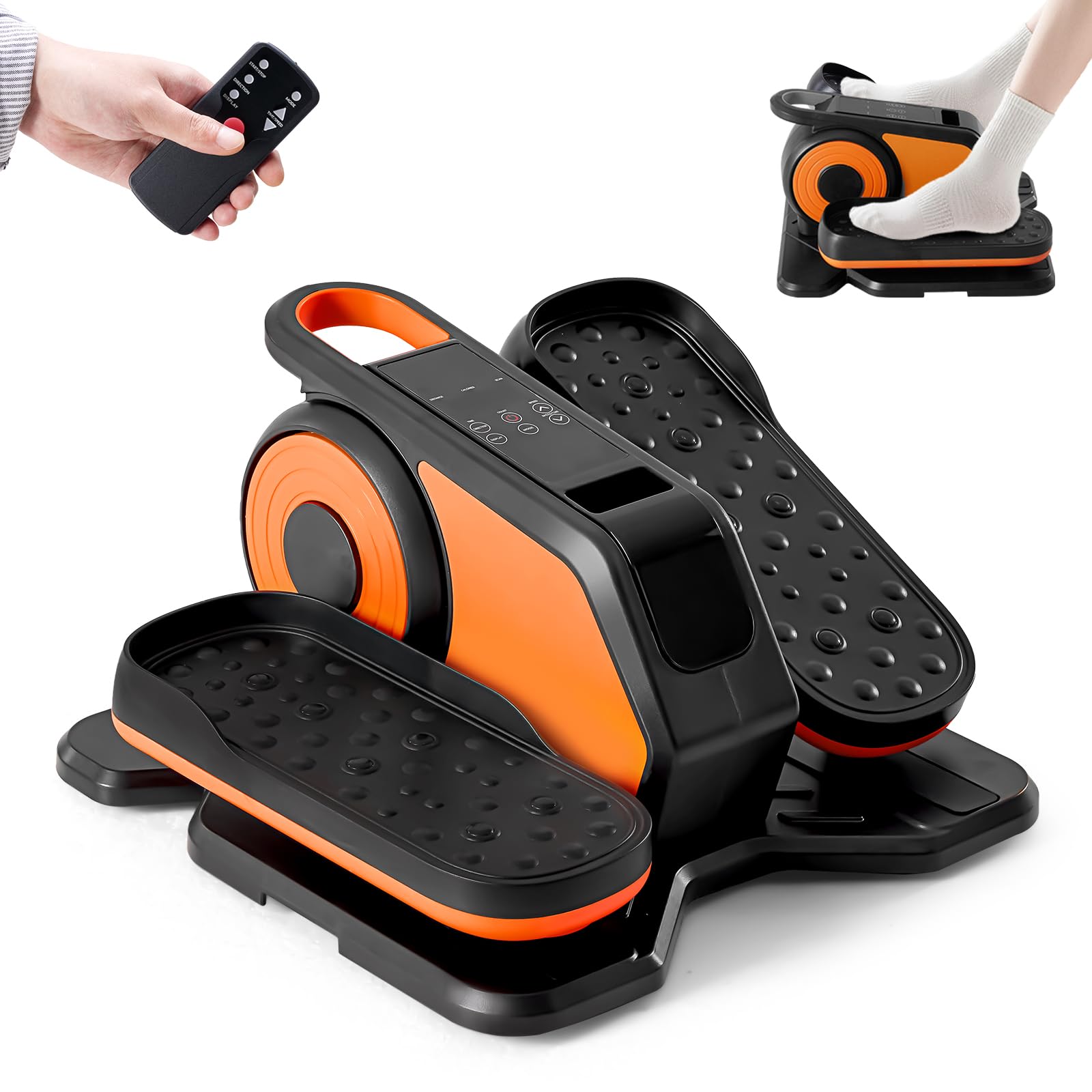
Image: The OLIXIS Under-Desk Elliptical Machine in black and orange.
സജ്ജമാക്കുക
- അൺപാക്ക് ചെയ്യുന്നു: Carefully remove the elliptical machine from its packaging. Retain all packaging materials for future storage or transport.
- പ്ലേസ്മെൻ്റ്: Place the elliptical machine on a flat, stable surface under your desk or in front of your chair/sofa. Ensure there is enough space for your legs to move freely without obstruction.
- പവർ കണക്ഷൻ: Connect the power adapter to the machine's power input port, then plug the adapter into a standard electrical outlet.
- റിമോട്ട് കൺട്രോൾ: Insert batteries into the remote control (if not already installed).

Image: A person using the OLIXIS elliptical machine while seated at a desk, demonstrating its compact design for office use.

Image: A person using the OLIXIS elliptical machine while seated on a sofa and reading, highlighting its versatility for home use.
പ്രവർത്തന നിർദ്ദേശങ്ങൾ
ആമുഖം
- Sit comfortably in a chair with the elliptical machine placed in front of you.
- Place your feet securely on the pedals.
- Press the "Start/Stop" button on the machine or remote control to begin exercising.
നിയന്ത്രണങ്ങളും പ്രവർത്തനങ്ങളും
The OLIXIS elliptical machine can be controlled via the buttons on the unit or the included remote control.
- ആരംഭിക്കുക/നിർത്തുക: Initiates or pauses the exercise.
- വേഗത ക്രമീകരണം: The machine offers 12 adjustable speed levels. Use the speed buttons on the unit or remote to increase or decrease the intensity.
- ദിശ: The pedals can move in both forward and reverse directions. Use the direction button to switch between modes, engaging different muscle groups.
- മോഡ് തിരഞ്ഞെടുക്കൽ: Choose between manual mode (HR Mode) where you control speed and direction, or automatic modes (P1-P12) which cycle through various speeds and directions every 3 minutes.
- LED ഡിസ്പ്ലേ: The integrated LED display tracks key metrics such as:
- Time (duration of exercise)
- Distance (simulated distance covered)
- Speed (current speed level)
- Count (number of pedal rotations)
- Calories (estimated calories burned)

Image: The control panel and display of the OLIXIS elliptical, illustrating its various functions including speed, mode, direction, time, distance, count, and calorie tracking.

Image: Demonstration of the dual-direction pedal motion (forward and backward) of the OLIXIS elliptical, highlighting its benefits for circulation and joint protection.

Image: A user operating the elliptical, with text explaining the HR (manual) mode and Auto mode, which changes speed and direction every 3 minutes.
ഔദ്യോഗിക ഉൽപ്പന്ന വീഡിയോ
വീഡിയോ: ഒരു ഉദ്യോഗസ്ഥൻview of the OLIXIS Under-Desk Elliptical Machine, demonstrating its features and use.
മെയിൻ്റനൻസ്
- വൃത്തിയാക്കൽ: ഒരു സോഫ്റ്റ് ഉപയോഗിച്ച് മെഷീൻ തുടയ്ക്കുക, ഡിamp ഓരോ ഉപയോഗത്തിനു ശേഷവും തുണി ഉപയോഗിക്കുക. ഉരച്ചിലുകൾ ഉണ്ടാക്കുന്ന ക്ലീനറുകളോ ലായകങ്ങളോ ഒഴിവാക്കുക.
- സംഭരണം: Store the elliptical in a cool, dry place away from direct sunlight and extreme temperatures. Its compact size and light weight (11 lbs) make it easy to move and store.
- പരിശോധന: എല്ലാ സ്ക്രൂകളും കണക്ഷനുകളും ഇറുകിയതും സുരക്ഷിതവുമാണെന്ന് ഉറപ്പാക്കാൻ ഇടയ്ക്കിടെ പരിശോധിക്കുക.

Image: A person easily carrying the OLIXIS elliptical machine, demonstrating its portability and light weight of 11 lbs.
ട്രബിൾഷൂട്ടിംഗ്
- മെഷീൻ ഓണാക്കുന്നില്ല:
- Ensure the power adapter is securely plugged into both the machine and a working electrical outlet.
- മറ്റൊരു ഉപകരണം പ്ലഗ് ഇൻ ചെയ്ത് പവർ ഔട്ട്ലെറ്റ് പ്രവർത്തനക്ഷമമാണോ എന്ന് പരിശോധിക്കുക.
- പെഡലുകൾ സുഗമമായി നീങ്ങുന്നില്ല:
- Verify that no objects are obstructing the pedal movement.
- മെഷീൻ പരന്നതും സ്ഥിരതയുള്ളതുമായ ഒരു പ്രതലത്തിലാണെന്ന് ഉറപ്പാക്കുക.
- റിമോട്ട് കൺട്രോൾ പ്രവർത്തിക്കുന്നില്ല:
- റിമോട്ട് കൺട്രോളിലെ ബാറ്ററികൾ പരിശോധിച്ച് മാറ്റിസ്ഥാപിക്കുക.
- Ensure there are no obstructions between the remote and the machine's sensor.
- അസാധാരണമായ ശബ്ദങ്ങൾ:
- Stop using the machine immediately.
- Inspect for any loose parts or foreign objects.
- ശബ്ദം തുടരുകയാണെങ്കിൽ, ഉപഭോക്തൃ പിന്തുണയുമായി ബന്ധപ്പെടുക.
സ്പെസിഫിക്കേഷനുകൾ
| ഫീച്ചർ | വിശദാംശങ്ങൾ |
|---|---|
| മോഡലിൻ്റെ പേര് | എലിപ്റ്റിക്കൽ മെഷീൻ |
| ബ്രാൻഡ് | ഒലിക്സിസ് |
| മോഡൽ നമ്പർ | OL-TYJ-OG253 |
| നിറം | കറുപ്പ്/ഓറഞ്ച് |
| ഉൽപ്പന്ന അളവുകൾ (D x W x H) | 15.5"D x 15.24"W x 8.66"H |
| ഇനത്തിൻ്റെ ഭാരം | 11 പൗണ്ട് |
| മെറ്റീരിയൽ | Acrylonitrile Butadiene Styrene (ABS), Alloy Steel, Polypropylene (PP) |
| പ്രതിരോധ സംവിധാനം | കാന്തിക |
| പ്രതിരോധ നിലകളുടെ എണ്ണം | 12 |
| പരമാവധി ഭാരം ശുപാർശ | 100 കിലോഗ്രാം (220 പൗണ്ട്) |
| ഉൾപ്പെടുത്തിയ ഘടകങ്ങൾ | എലിപ്റ്റിക്കൽ മെഷീൻ |

Image: A visual representation of the OLIXIS elliptical machine's dimensions (15.55 inches depth, 15.24 inches width, 8.66 inches height) and its maximum weight capacity of 220 lbs.
വാറൻ്റി വിവരങ്ങൾ
This OLIXIS Under-Desk Elliptical Machine comes with a 1 വർഷത്തെ നിർമ്മാതാവിൻ്റെ വാറൻ്റി വാങ്ങിയ തീയതി മുതൽ. സാധാരണ ഉപയോഗത്തിലുള്ള മെറ്റീരിയലുകളിലെയും വർക്ക്മാൻഷിപ്പുകളിലെയും വൈകല്യങ്ങൾ ഈ വാറന്റി ഉൾക്കൊള്ളുന്നു.
വാറൻ്റി ഉൾപ്പെടുന്നില്ല:
- അനുചിതമായ ഉപയോഗം, പരിപാലനം അല്ലെങ്കിൽ സംഭരണം എന്നിവ മൂലമുണ്ടാകുന്ന നാശനഷ്ടം.
- സാധാരണ തേയ്മാനം.
- Damage resulting from unauthorized repairs or modifications.
- ആകസ്മികമായ കേടുപാടുകൾ.
To make a warranty claim, please retain your proof of purchase and contact OLIXIS customer support.
ഉപഭോക്തൃ പിന്തുണ
For any questions, concerns, or technical assistance regarding your OLIXIS Under-Desk Elliptical Machine, please contact our customer support team.
- Webസൈറ്റ്: Visit the official OLIXIS webപതിവുചോദ്യങ്ങൾക്കും പിന്തുണാ ഉറവിടങ്ങൾക്കുമുള്ള സൈറ്റ്.
- ഇമെയിൽ: [ഉപഭോക്തൃ പിന്തുണ ഇമെയിൽ ഇവിടെ ചേർക്കുക]
- ഫോൺ: [ഉപഭോക്തൃ പിന്തുണാ ഫോൺ നമ്പർ ഇവിടെ ചേർക്കുക]
Please have your model number (OL-TYJ-OG253) and proof of purchase ready when contacting support.