
Acekool 5000BTU
Acekool 5000 BTU Window Air Conditioner User Manual
Model: 5000BTU | Brand: Acekool
ആമുഖം
This manual provides comprehensive instructions for the safe and efficient operation, installation, and maintenance of your Acekool 5000 BTU Window Air Conditioner. Designed for compact rooms up to 150 square feet, this unit offers quick and efficient cooling with user-friendly mechanical controls and a reusable filter. Please read this manual thoroughly before use and retain it for future reference.

Figure 1: Acekool 5000 BTU Window Air Conditioner Unit
ബോക്സിൽ എന്താണുള്ളത്
അൺപാക്ക് ചെയ്യുമ്പോൾ, താഴെ ലിസ്റ്റ് ചെയ്തിരിക്കുന്ന എല്ലാ ഇനങ്ങളും ഉണ്ടെന്നും കേടുപാടുകൾ സംഭവിച്ചിട്ടില്ലെന്നും ഉറപ്പാക്കുക:
- 1 x Window Air Conditioner Unit
- 1 x Window Bracket
- 1 x Installation Kits (includes Filler Panels, Lock Frame & Sash Lock, Window Sash Seal, Insulation Strips, Screws, Top Mounting Rail)
- 2 x ഉപയോക്തൃ മാനുവലുകൾ

Figure 2: Included Installation Kit Components
സജ്ജീകരണവും ഇൻസ്റ്റാളേഷനും
The Acekool 5000 BTU Window Air Conditioner is designed for easy installation in standard windows. Follow these steps for proper setup:
- വിൻഡോ തയ്യാറാക്കുക: Ensure your window is clean and free of obstructions. The unit requires a vertical clearance of at least 14.5 inches and a width between 23-34 inches.
- Attach Top Mounting Rail: Secure the top mounting rail to the top of the air conditioner unit using the provided screws. Ensure the screw hole on the rail faces outwards, as this will be used to secure the window.
- അക്കോഡിയൻ പാനലുകൾ ഇൻസ്റ്റാൾ ചെയ്യുക: Attach the expandable accordion panels to both sides of the air conditioner unit. These panels are labeled "Left" and "Right" and slide into the designated guides on the unit. Stretch them out to their full length.
- യൂണിറ്റ് സ്ഥാപിക്കുക: Carefully lift the air conditioner and place it into the window opening. Ensure the bottom lip of the unit rests securely on the window sill and the top mounting rail is positioned against the upper window frame.
- Secure the Window: Lower the window sash firmly against the top mounting rail of the air conditioner.
- Extend and Secure Side Panels: Pull out the accordion side panels to fill the remaining gap in the window opening. Secure these panels to the window frame using the provided screws.
- Apply Insulation Strips: Use the provided insulation strips to seal any remaining gaps around the unit and panels to prevent air leakage and improve efficiency.
- Install Lock Frame & Sash Lock: For added security, install the lock frame and sash lock as per the instructions in the installation kit to prevent the window from being opened from the outside.
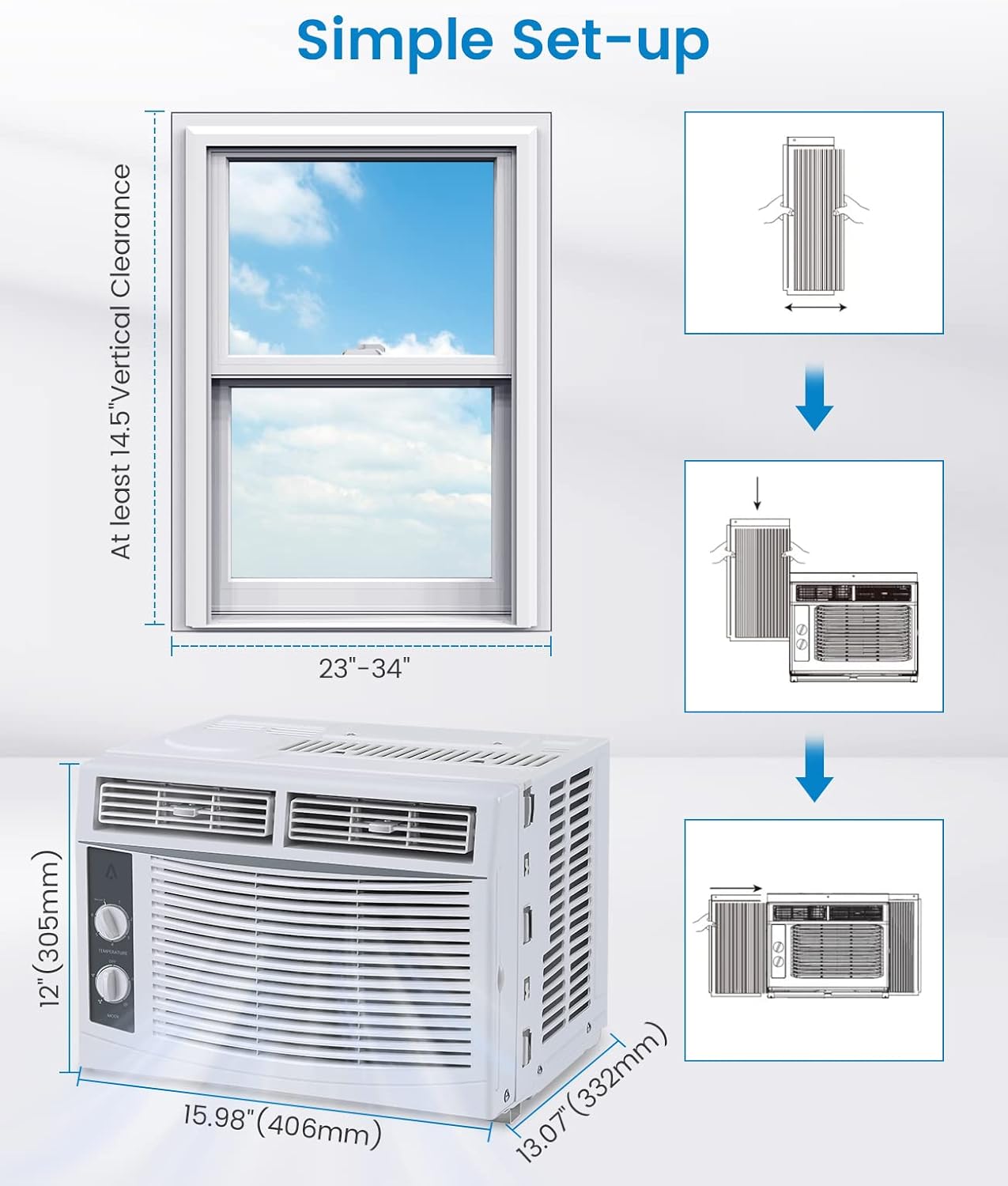
Figure 3: Visual Guide for Simple Setup
പ്രവർത്തന നിർദ്ദേശങ്ങൾ
Your Acekool air conditioner features easy-to-use mechanical controls for optimal comfort.

Figure 4: Temperature and Mode Control Knobs

Figure 5: Adjustable Air Direction Vents
താപനില നിയന്ത്രണ ഡയൽ:
- The top dial controls the temperature setting from 1 (warmest) to 7 (coldest).
- Turn the dial towards 7 for maximum cooling.
Mode Control Dial:
- ഓഫാണ്: യൂണിറ്റ് ഓഫ് ചെയ്യുന്നു.
- FAN ONLY (Low/High): Operates the fan without cooling. Use for air circulation.
- COOL (Low/High): Activates the cooling function.
- Low Cool: Provides gentle cooling with lower fan speed.
- High Cool: Provides powerful cooling with higher fan speed.
വായുവിന്റെ ദിശ:
- യൂണിറ്റിന്റെ മുൻവശത്തുള്ള തിരശ്ചീനവും ലംബവുമായ ലൂവറുകൾ ആവശ്യാനുസരണം വായുപ്രവാഹം നയിക്കുന്നതിന് ക്രമീകരിക്കുക.
മെയിൻ്റനൻസ്
പതിവ് അറ്റകുറ്റപ്പണികൾ നിങ്ങളുടെ എയർ കണ്ടീഷണറിന്റെ മികച്ച പ്രകടനവും ദീർഘായുസ്സും ഉറപ്പാക്കുന്നു.
എയർ ഫിൽട്ടർ വൃത്തിയാക്കൽ:
The reusable air filter should be cleaned regularly (every two weeks or more often depending on usage and air quality) to maintain cooling efficiency.
- Locate the filter on the right side of the unit.
- Gently pull the filter out from its slot.
- Rinse the filter under running water to remove dust and debris. For heavy dirt, use a mild detergent.
- യൂണിറ്റിലേക്ക് വീണ്ടും ചേർക്കുന്നതിന് മുമ്പ് ഫിൽട്ടർ പൂർണ്ണമായും വായുവിൽ ഉണങ്ങാൻ അനുവദിക്കുക.

Figure 6: Removing the Reusable Air Filter for Cleaning
പൊതുവായ ശുചീകരണം:
- ഒരു സോഫ്റ്റ്, ഡി ഉപയോഗിച്ച് യൂണിറ്റിൻ്റെ പുറംഭാഗം തുടയ്ക്കുകamp തുണി. കഠിനമായ രാസവസ്തുക്കളോ ഉരച്ചിലുകളുള്ള ക്ലീനറുകളോ ഉപയോഗിക്കരുത്.
- Ensure the unit is unplugged before any cleaning or maintenance.
സ്പെസിഫിക്കേഷനുകൾ
| ഫീച്ചർ | വിശദാംശങ്ങൾ |
|---|---|
| ബ്രാൻഡ് നാമം | അസെക്കൂൾ |
| മോഡൽ വിവരം | 5000 ബി ടി യു |
| ഇനത്തിൻ്റെ ഭാരം | 36.4 പൗണ്ട് |
| ഉൽപ്പന്ന അളവുകൾ | 13.07 x 15.98 x 12 ഇഞ്ച് |
| മാതൃരാജ്യം | ചൈന |
| ശേഷി | 30 പിൻസ് |
| വാർഷിക ഊർജ്ജ ഉപഭോഗം | പ്രതിവർഷം 1 കിലോവാട്ട് മണിക്കൂർ |
| ശബ്ദ നില | 50 ഡി.ബി |
| ഇൻസ്റ്റലേഷൻ തരം | ജാലകം |
| പ്രത്യേക സവിശേഷതകൾ | 4 Way Swing, Fast Cooling |
| നിറം | വെള്ള |
| വാല്യംtage | 115.0V |
| കൂളിംഗ് പവർ | 5000 ബ്രിട്ടീഷ് തെർമൽ യൂണിറ്റുകൾ |
ട്രബിൾഷൂട്ടിംഗ്
If you encounter issues with your Acekool air conditioner, please refer to the following common troubleshooting steps:
- യൂണിറ്റ് ഓണാക്കുന്നില്ല:
- പവർ കോർഡ് ഒരു ഗ്രൗണ്ടഡ് ഔട്ട്ലെറ്റിൽ സുരക്ഷിതമായി പ്ലഗ് ചെയ്തിട്ടുണ്ടെന്ന് ഉറപ്പാക്കുക.
- നിങ്ങളുടെ വീട്ടിലെ സർക്യൂട്ട് ബ്രേക്കർ പരിശോധിക്കുക.
- Verify the mode dial is not set to "OFF".
- അപര്യാപ്തമായ തണുപ്പിക്കൽ:
- Check if the air filter is dirty and needs cleaning.
- Ensure windows and doors in the room are closed to prevent warm air from entering.
- Verify the temperature setting is set to a colder level (e.g., 7).
- Ensure the unit is appropriately sized for the room (up to 150 sq.ft for 5000 BTU).
- അസാധാരണമായ ശബ്ദം:
- കംപ്രസ്സറിൽ നിന്ന് നേരിയ ഒരു മൂളൽ ശബ്ദം കേൾക്കുന്നത് സാധാരണമാണ്.
- Check for any loose parts or obstructions around the fan.
- Ensure the unit is installed level to prevent rattling.
- വെള്ളം ചോർച്ച:
- Ensure the unit is slightly tilted outwards to allow condensate to drain properly.
- Check for any blockages in the drainage area.
ഈ ഘട്ടങ്ങൾ പരീക്ഷിച്ചതിനു ശേഷവും പ്രശ്നങ്ങൾ നിലനിൽക്കുകയാണെങ്കിൽ, ദയവായി ഉപഭോക്തൃ പിന്തുണയുമായി ബന്ധപ്പെടുക.
വാറൻ്റി & പിന്തുണ
Acekool is committed to providing excellent customer service and product quality. Your product comes with:
- Email Support within 12 hours
- 30 days Unreasonable Return policy
- 12 Months Free Maintenance and Technology Supports
For further assistance, please refer to the contact information provided with your purchase or visit the official Acekool webസൈറ്റ്.

Figure 7: Acekool Customer Support Details
Ask a question about this manual
Ask about setup, troubleshooting, compatibility, parts, safety, or missing instructions. Manuals+ will review the question and use this page’s manual context to help answer it.