
Hy-T26
Hy-T26 Pro വയർലെസ് ബ്ലൂടൂത്ത് ട്രാൻസ്ലേഷൻ ഇയർബഡ്സ് യൂസർ മാനുവൽ
Model: Hy-T26
ഉൽപ്പന്നം കഴിഞ്ഞുview
The Hy-T26 Pro Wireless Bluetooth Translation Earbuds are designed to facilitate seamless communication across language barriers, offering real-time two-way translation. These earbuds also provide high-quality audio for music and calls, featuring a comfortable ear-hanging design and extended battery life.
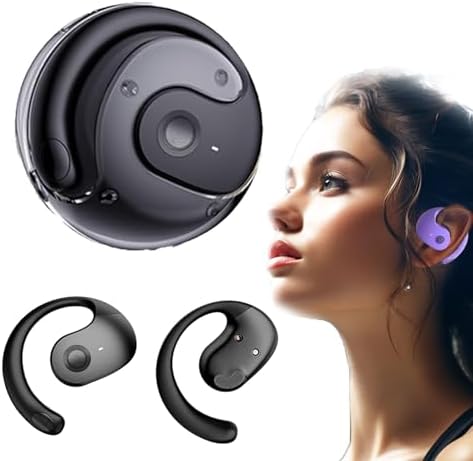
Image: Hy-T26 Pro Earbuds and their compact charging case, showcasing മിനുസമാർന്ന കറുത്ത ഡിസൈൻ.
Key features include Bluetooth 5.3 connectivity, IPX5 waterproof rating, and a 300mAh charging compartment capacity for extended use. The earbuds are equipped with 16mm dynamic speakers for 360° Hi-Fi stereo sound and noise reduction technology for clear audio.
സജ്ജീകരണ ഗൈഡ്
Follow these steps to set up your Hy-T26 Pro Translation Earbuds for first-time use.
1. ഇയർബഡുകളും കേസും ചാർജ് ചെയ്യുന്നു
- ആദ്യ ഉപയോഗത്തിന് മുമ്പ്, ചാർജിംഗ് കെയ്സും ഇയർബഡുകളും പൂർണ്ണമായും ചാർജ് ചെയ്യുക.
- ടൈപ്പ്-സി ചാർജിംഗ് കേബിൾ കേസിലെ ചാർജിംഗ് പോർട്ടിലേക്കും ഒരു പവർ സ്രോതസ്സിലേക്കും ബന്ധിപ്പിക്കുക.
- കേസിലെ ഇൻഡിക്കേറ്റർ ലൈറ്റുകൾ ചാർജിംഗ് നില കാണിക്കും.
- കേസ് മുഴുവൻ ചാർജ് ചെയ്യാൻ ഏകദേശം 2 മണിക്കൂർ എടുക്കും.

Image: Visual representation of the Hy-T26 Pro earbuds and charging case, highlighting battery duration: 4.5 hours use time, 2 hours charging time, and 15 hours total playtime with the charging case.
2. Downloading the Companion Application
For full translation functionality, it is essential to download the dedicated companion application. Based on user feedback, the application is named NebulaBudsAPP. ഇതിനായി തിരയുക this application on your device's app store (Android or iOS).
- Open your smartphone's app store (Google Play Store for Android or Apple App Store for iOS).
- ഇതിനായി തിരയുക "NebulaBudsAPP".
- ആപ്ലിക്കേഷൻ ഡൗൺലോഡ് ചെയ്ത് ഇൻസ്റ്റാൾ ചെയ്യുക.
3. നിങ്ങളുടെ ഉപകരണവുമായി ജോടിയാക്കുന്നു
- ഇയർബഡുകൾ ചാർജ് ചെയ്തിട്ടുണ്ടെന്നും ചാർജിംഗ് കെയ്സിൽ വച്ചിട്ടുണ്ടെന്നും ഉറപ്പാക്കുക.
- ചാർജിംഗ് കേസ് തുറക്കുക. ഇയർബഡുകൾ സ്വയമേവ ജോടിയാക്കൽ മോഡിലേക്ക് പ്രവേശിക്കും.
- നിങ്ങളുടെ സ്മാർട്ട്ഫോണിലോ ടാബ്ലെറ്റിലോ, ബ്ലൂടൂത്ത് ക്രമീകരണങ്ങളിലേക്ക് പോയി ബ്ലൂടൂത്ത് ഓണാക്കുക.
- Select "Hy-T26 Pro" from the list of available devices to connect.
- കണക്റ്റ് ചെയ്തുകഴിഞ്ഞാൽ, ഒരു സ്ഥിരീകരണ ശബ്ദം പ്ലേ ചെയ്യും, ഇയർബഡുകൾ ഉപയോഗത്തിന് തയ്യാറാകും.

Image: A visual guide demonstrating the smart pairing connection process: Download App, Headphones pairing, Connect Bluetooth, Open App, Set Target language, and Start conversation.
പ്രവർത്തന നിർദ്ദേശങ്ങൾ
Learn how to use your Hy-T26 Pro Earbuds for various functions, including translation, audio playback, and calls.
1. Using the Translation Function
The core feature of the Hy-T26 Pro is its real-time translation capability, which requires the companion app.
- Ensure your earbuds are connected to your device via Bluetooth.
- തുറക്കുക NebulaBudsAPP നിങ്ങളുടെ സ്മാർട്ട്ഫോണിൽ.
- Within the app, select the source language (the language being spoken) and the target language (the language you want to hear/see the translation in).
- Choose the desired translation mode (e.g., two-way conversation, lecture mode, or text/picture translation).
- Speak clearly into the earbud's microphone. The app will process your speech and provide real-time translation through the earbuds and/or display it on your screen.
- For two-way conversations, the other party can speak into their earbud (if they also have one paired to their device and app) or into your phone's microphone, and the translation will be provided to both parties.

Image: Depicts the cross-language communication feature, showing real-time translation of speech and text/picture translation capabilities on a laptop and smartphone screen.
The earbuds are designed for efficient communication anytime, anywhere, making them suitable for travel, professional use, and sports.

Image: The Hy-T26 Pro earbuds and charging case positioned near a smartphone, symbolizing efficient communication capabilities in various settings.
2. ഓഡിയോ പ്ലേബാക്കും കോളുകളും
- സംഗീത പ്ലേബാക്ക്: Once connected, your earbuds will automatically play audio from your device. Use your device's controls to play, pause, skip tracks, and adjust volume.
- കോളുകൾ ചെയ്യുക/സ്വീകരിക്കുക: When a call comes in, the earbuds will ring. Tap the control button on either earbud to answer or end a call. Press and hold to reject a call.
- ശബ്ദ നിയന്ത്രണം: The earbuds support voice control. Refer to the app or your device's settings for specific voice command functionalities.

Image: A man wearing the Hy-T26 Pro earbuds, illustrating the comfortable ear-hanging style that allows ears to breathe freely and ensures a stable, non-in-ear fit.
മെയിൻ്റനൻസ്
Proper maintenance ensures the longevity and optimal performance of your Hy-T26 Pro Earbuds.
- വൃത്തിയാക്കൽ: ഇയർബഡുകളും ചാർജിംഗ് കെയ്സും മൃദുവായതും ഉണങ്ങിയതും ലിന്റ് രഹിതവുമായ തുണി ഉപയോഗിച്ച് പതിവായി തുടയ്ക്കുക. അബ്രാസീവ് ക്ലീനറുകളോ ലായകങ്ങളോ ഉപയോഗിക്കരുത്.
- സംഭരണം: ഉപയോഗത്തിലില്ലാത്തപ്പോൾ, ഇയർബഡുകൾ സംരക്ഷിക്കുന്നതിനും ചാർജ്ജ് ചെയ്ത നിലയിൽ നിലനിർത്തുന്നതിനും അവ ചാർജിംഗ് കേസിൽ സൂക്ഷിക്കുക.
- ജല പ്രതിരോധം: The earbuds have an IPX5 waterproof level, meaning they are resistant to splashes and sweat. Do not submerge them in water or expose them to heavy rain. Dry them thoroughly if they get wet.
- ചാർജിംഗ്: Use only the provided Type-C cable for charging. Avoid using damaged cables or chargers.
ട്രബിൾഷൂട്ടിംഗ്
If you encounter issues with your Hy-T26 Pro Earbuds, refer to the following common solutions.
| പ്രശ്നം | സാധ്യമായ കാരണം / പരിഹാരം |
|---|---|
| ഇയർബഡുകൾ ജോടിയാക്കുന്നില്ല/കണക്റ്റ് ചെയ്യുന്നില്ല. |
|
| Translation function not working. |
|
| മോശം ഓഡിയോ നിലവാരം അല്ലെങ്കിൽ കണക്ഷൻ വിച്ഛേദിക്കൽ. |
|
| ഇയർബഡുകൾ ചാർജ് ചെയ്യുന്നില്ല. |
|
സ്പെസിഫിക്കേഷനുകൾ
| ഫീച്ചർ | വിശദാംശങ്ങൾ |
|---|---|
| മോഡലിൻ്റെ പേര് | Hy-T26 |
| കണക്റ്റിവിറ്റി ടെക്നോളജി | വയർലെസ് (ബ്ലൂടൂത്ത്) |
| ബ്ലൂടൂത്ത് പതിപ്പ് | 5.3 |
| ട്രാൻസ്മിഷൻ ദൂരം | 10 മീറ്റർ |
| വാട്ടർപ്രൂഫ് ലെവൽ | IPX5 |
| ഉപയോഗ തരം | Ear-hanging type |
| ചാർജിംഗ് ഇൻ്റർഫേസ് | ടൈപ്പ്-സി |
| ചാർജിംഗ് കമ്പാർട്ട്മെന്റ് ശേഷി | 300mAh |
| Use Time (Earbuds) | 4.5 മണിക്കൂർ |
| ചാർജിംഗ് സമയം (കേസ്) | 2 മണിക്കൂർ |
| കേസുള്ള മൊത്തം പ്ലേടൈം | 15 മണിക്കൂർ |
| ഓഡിയോ ഡ്രൈവർ തരം | ഡൈനാമിക് ഡ്രൈവർ |
| ഓഡിയോ ഡ്രൈവർ വലിപ്പം | 16 മില്ലിമീറ്റർ |
| നിയന്ത്രണ തരം | ശബ്ദ നിയന്ത്രണം |
| ഉൾപ്പെടുത്തിയ ഘടകങ്ങൾ | വയർലെസ് ചാർജിംഗ് കേസ് |
| ഇനത്തിൻ്റെ ഭാരം | 3.53 ഔൺസ് |
| പാക്കേജ് അളവുകൾ | 3.94 x 3.94 x 1.97 ഇഞ്ച് |
| നിർമ്മാതാവ് | ജനറിക് |
| മാതൃരാജ്യം | ചൈന |
വാറൻ്റിയും പിന്തുണയും
For warranty information and customer support, please refer to the documentation included with your purchase or contact the seller directly. The manufacturer, Generic, typically provides support for product defects and operational issues.
ഏതെങ്കിലും വാറന്റി ക്ലെയിമുകൾക്കായി നിങ്ങളുടെ വാങ്ങിയതിന്റെ തെളിവ് സൂക്ഷിക്കാൻ ശുപാർശ ചെയ്യുന്നു.
Ask a question about this manual
Ask about setup, troubleshooting, compatibility, parts, safety, or missing instructions. Manuals+ will review the question and use this page’s manual context to help answer it.