
1. ആമുഖം
AI HY-Y16 ഭാഷാ വിവർത്തന ഇയർബഡുകൾ, തടസ്സമില്ലാത്ത ക്രോസ്-ലാംഗ്വേജ് ആശയവിനിമയം സുഗമമാക്കുന്നതിനും വിപുലമായ AI സവിശേഷതകളിലൂടെ ദൈനംദിന ഉൽപ്പാദനക്ഷമത വർദ്ധിപ്പിക്കുന്നതിനുമായി രൂപകൽപ്പന ചെയ്തിരിക്കുന്നു. ഈ ഇയർബഡുകൾ തത്സമയ വിവർത്തനം, AI വോയ്സ് ഡയലോഗ്, മൾട്ടി-ഫങ്ഷണൽ AI ആപ്ലിക്കേഷനുമായുള്ള സംയോജനം എന്നിവ വാഗ്ദാനം ചെയ്യുന്നു, ഇത് യാത്ര, ബിസിനസ് മീറ്റിംഗുകൾ, വ്യക്തിഗത ഉപയോഗം എന്നിവയ്ക്ക് അനുയോജ്യമാക്കുന്നു.
ഒപ്റ്റിമൽ പ്രകടനവും ഉപയോക്തൃ അനുഭവവും ഉറപ്പാക്കുന്നതിന് നിങ്ങളുടെ AI HY-Y16 ഇയർബഡുകൾ സജ്ജീകരിക്കുന്നതിനും പ്രവർത്തിപ്പിക്കുന്നതിനും പരിപാലിക്കുന്നതിനും ഈ മാനുവൽ വിശദമായ നിർദ്ദേശങ്ങൾ നൽകുന്നു.
2. പാക്കേജ് ഉള്ളടക്കം
- AI HY-Y16 ഇയർബഡുകൾ (2 യൂണിറ്റുകൾ)
- ചാർജിംഗ് കേസ് (1 യൂണിറ്റ്)
- യുഎസ്ബി ഡാറ്റ കേബിൾ (1 യൂണിറ്റ്)
- ഉപയോക്തൃ മാനുവൽ (1 യൂണിറ്റ്)

ചിത്രം: AI HY-Y16 ഇയർബഡ്സ് പാക്കേജിലെ ഇയർബഡുകൾ, ചാർജിംഗ് കേസ്, ഡാറ്റ കേബിൾ എന്നിവയുൾപ്പെടെയുള്ള ഉള്ളടക്കങ്ങൾ.
3. ഉൽപ്പന്നം കഴിഞ്ഞുview
ആശയവിനിമയത്തിനും ഉൽപ്പാദനക്ഷമതയ്ക്കുമായി നൂതന AI കഴിവുകൾ സമന്വയിപ്പിച്ചുകൊണ്ട്, സുഖസൗകര്യങ്ങൾക്കും പ്രവർത്തനക്ഷമതയ്ക്കും വേണ്ടിയാണ് AI HY-Y16 ഇയർബഡുകൾ രൂപകൽപ്പന ചെയ്തിരിക്കുന്നത്.
പ്രധാന ഘടകങ്ങൾ:
- ഇയർബഡുകൾ: വോയ്സ് ഇൻപുട്ടിനായി മൈക്രോഫോണുകളും ഓഡിയോ ഔട്ട്പുട്ടിനായി സ്പീക്കറുകളും സജ്ജീകരിച്ചിരിക്കുന്നു.
- ചാർജിംഗ് കേസ്: ഇയർബഡുകൾ സംഭരിക്കുകയും ചാർജ് ചെയ്യുകയും ചെയ്യുന്നു, പലപ്പോഴും ബാറ്ററി നിലയ്ക്കായി ഒരു ഡിജിറ്റൽ ഡിസ്പ്ലേ ഉൾപ്പെടുന്നു.
- USB ഡാറ്റ കേബിൾ: കേസ് ചാർജ് ചെയ്യാൻ ഉപയോഗിക്കുന്നു.

ചിത്രം: ചാർജിംഗ് കേസിൽ വിശ്രമിക്കുന്ന AI HY-Y16 ഇയർബഡുകൾ, അവയുടെ ഒതുക്കമുള്ള രൂപകൽപ്പനയും ആധുനിക സാങ്കേതികവിദ്യയുമായുള്ള സംയോജനവും എടുത്തുകാണിക്കുന്നു.

ചിത്രം: ചാർജിംഗ് കേസിൽ AI HY-Y16 ഇയർബഡുകൾ, റെക്കോർഡിംഗ്, എഴുത്ത്, വിവർത്തനം, കേൾക്കൽ, സംസാരിക്കൽ എന്നിവയ്ക്കുള്ള അവയുടെ മൾട്ടി-ഫങ്ഷണൽ കഴിവുകളെ ഊന്നിപ്പറയുന്നു.
4. സജ്ജീകരണം
4.1 ഇയർബഡുകളും കേസും ചാർജ് ചെയ്യുന്നു
- ഇയർബഡുകൾ ചാർജിംഗ് കെയ്സിൽ വയ്ക്കുക. ചാർജിംഗ് പിന്നുകളുമായി സമ്പർക്കം പുലർത്തുന്നതിന് അവ ശരിയായി സ്ഥാപിച്ചിട്ടുണ്ടെന്ന് ഉറപ്പാക്കുക.
- കേസിലെ ചാർജിംഗ് പോർട്ടിലേക്ക് USB ഡാറ്റ കേബിൾ ബന്ധിപ്പിച്ച് മറ്റേ അറ്റം ഒരു USB പവർ അഡാപ്റ്ററിലേക്കോ (ഉൾപ്പെടുത്തിയിട്ടില്ല) കമ്പ്യൂട്ടറിന്റെ USB പോർട്ടിലേക്കോ പ്ലഗ് ചെയ്യുക.
- കേസിലെ ചാർജിംഗ് ഇൻഡിക്കേറ്റർ ബാറ്ററി ശതമാനം പ്രകാശിപ്പിക്കുകയോ പ്രദർശിപ്പിക്കുകയോ ചെയ്യും.tage, ചാർജിംഗ് പുരോഗമിക്കുന്നുവെന്ന് സൂചിപ്പിക്കുന്നു.
- ഇയർബഡുകളും ചാർജിംഗ് കേസും പൂർണ്ണമായി ചാർജ് ചെയ്യാൻ ഏകദേശം 1-2 മണിക്കൂർ അനുവദിക്കുക.
4.2 ബ്ലൂടൂത്ത് ജോടിയാക്കൽ
- ഇയർബഡുകൾ ചാർജ്ജ് ചെയ്തിട്ടുണ്ടെന്ന് ഉറപ്പാക്കുക.
- ചാർജിംഗ് കേസ് തുറക്കുക. ഇയർബഡുകൾ സ്വയമേവ ജോടിയാക്കൽ മോഡിലേക്ക് പ്രവേശിക്കും, ഇയർബഡുകളിലെ ഒരു ഇൻഡിക്കേറ്റർ ലൈറ്റ് മിന്നിയേക്കാം.
- നിങ്ങളുടെ സ്മാർട്ട്ഫോണിലോ ബ്ലൂടൂത്ത് പ്രവർത്തനക്ഷമമാക്കിയ ഉപകരണത്തിലോ, ബ്ലൂടൂത്ത് ക്രമീകരണങ്ങളിലേക്ക് പോകുക.
- ഇതിനായി തിരയുക ലഭ്യമായ ഉപകരണങ്ങൾ. ലിസ്റ്റിൽ നിന്ന് "HY-Y16" അല്ലെങ്കിൽ സമാനമായ ഒരു പേര് തിരഞ്ഞെടുക്കുക.
- കണക്റ്റ് ചെയ്തുകഴിഞ്ഞാൽ, ഒരു വോയ്സ് പ്രോംപ്റ്റ് ജോടിയാക്കൽ വിജയകരമാണെന്ന് സ്ഥിരീകരിക്കും, ഇയർബഡുകളിലെ ഇൻഡിക്കേറ്റർ ലൈറ്റ് മിന്നുന്നത് നിർത്തും.
4.3 AI ആപ്പ് ഇൻസ്റ്റാളേഷൻ
വിവർത്തനത്തിന്റെയും AI സവിശേഷതകളുടെയും പൂർണ്ണ ശ്രേണി പ്രയോജനപ്പെടുത്തുന്നതിന്, നിങ്ങളുടെ സ്മാർട്ട്ഫോണിൽ സമർപ്പിത AI ആപ്ലിക്കേഷൻ ഡൗൺലോഡ് ചെയ്യുക.
- ആപ്പ് ഡൗൺലോഡ് ചെയ്യാൻ ഫിസിക്കൽ മാനുവലിലോ ഉൽപ്പന്ന പാക്കേജിംഗിലോ നൽകിയിരിക്കുന്ന QR കോഡ് സ്കാൻ ചെയ്യുക.
- പകരമായി, നിങ്ങളുടെ ഉപകരണത്തിന്റെ ആപ്പ് സ്റ്റോറിൽ (Android-ന് Google Play Store, iOS-ന് Apple App Store) "AI HY-Y16" അല്ലെങ്കിൽ "AI Translator Earbuds" എന്നിവ തിരയുക.
- ആപ്ലിക്കേഷൻ ഇൻസ്റ്റാൾ ചെയ്ത് നിങ്ങളുടെ പ്രോ സജ്ജീകരിക്കാൻ ഓൺ-സ്ക്രീൻ നിർദ്ദേശങ്ങൾ പാലിക്കുക.file ആപ്പിനുള്ളിൽ ഇയർബഡുകൾ ബന്ധിപ്പിക്കുക.
5. പ്രവർത്തന നിർദ്ദേശങ്ങൾ
5.1 തത്സമയ ഭാഷാ വിവർത്തനം
ഉയർന്ന കൃത്യതയുള്ള, തത്സമയ വിവർത്തനത്തിനായി ഇയർബഡുകൾ 144 ഭാഷകളെയും ആക്സന്റുകളെയും പിന്തുണയ്ക്കുന്നു.
- നിങ്ങളുടെ പെയർ ചെയ്ത സ്മാർട്ട്ഫോണിൽ AI ആപ്ലിക്കേഷൻ തുറക്കുക.
- ആവശ്യമുള്ള വിവർത്തന മോഡ് തിരഞ്ഞെടുക്കുക (ഉദാ: സംഭാഷണ മോഡ്, ഇന്റർപ്രെറ്റർ മോഡ്).
- ആപ്പിനുള്ളിൽ ഉറവിട, ലക്ഷ്യ ഭാഷകൾ തിരഞ്ഞെടുക്കുക.
- ഇയർബഡിന്റെ മൈക്രോഫോണിൽ സംസാരിക്കുക. ആപ്പ് നിങ്ങളുടെ സംഭാഷണം പ്രോസസ്സ് ചെയ്യുകയും ഇയർബഡ് വഴി വിവർത്തനം നൽകുകയും സ്ക്രീനിൽ പ്രദർശിപ്പിക്കുകയും ചെയ്യും.

ചിത്രം: ഇയർബഡുകൾ വഴി കാര്യക്ഷമമായ ആശയവിനിമയം സാധ്യമാക്കുന്ന, തത്സമയ ഭാഷാ വിവർത്തനം പ്രദർശിപ്പിക്കുന്ന ഒരു സ്മാർട്ട്ഫോൺ സ്ക്രീൻ.

ചിത്രം: കണക്റ്റുചെയ്ത സ്മാർട്ട്ഫോണിൽ പ്രദർശിപ്പിക്കുന്ന തത്സമയ വിവർത്തനത്തിനായി ഇയർബഡ് ഉപയോഗിച്ച്, ഭാഷാഭേദ ആശയവിനിമയത്തിൽ ഏർപ്പെട്ടിരിക്കുന്ന ഒരു ഉപയോക്താവ്.
5.2 AI വോയ്സ് ഡയലോഗ്
വിവരങ്ങൾ വീണ്ടെടുക്കുന്നതിനോ സഹായത്തിനോ വേണ്ടി AI സിസ്റ്റവുമായി തത്സമയ ശബ്ദ സംഭാഷണങ്ങളിൽ ഏർപ്പെടുക.
- AI ആപ്പിലെ "AI വോയ്സ് ഇന്റലിജന്റ് ഡയലോഗ്" വിഭാഗത്തിലേക്ക് നാവിഗേറ്റ് ചെയ്യുക.
- നിങ്ങളുടെ ചോദ്യമോ പ്രസ്താവനയോ പറയുക. സിസ്റ്റം നിങ്ങളുടെ ശബ്ദം തിരിച്ചറിയുകയും, നിങ്ങളുടെ ഉദ്ദേശ്യം മനസ്സിലാക്കുകയും, കൃത്യവും സ്വാഭാവികവുമായ ശബ്ദ പ്രതികരണം നൽകുകയും ചെയ്യും.
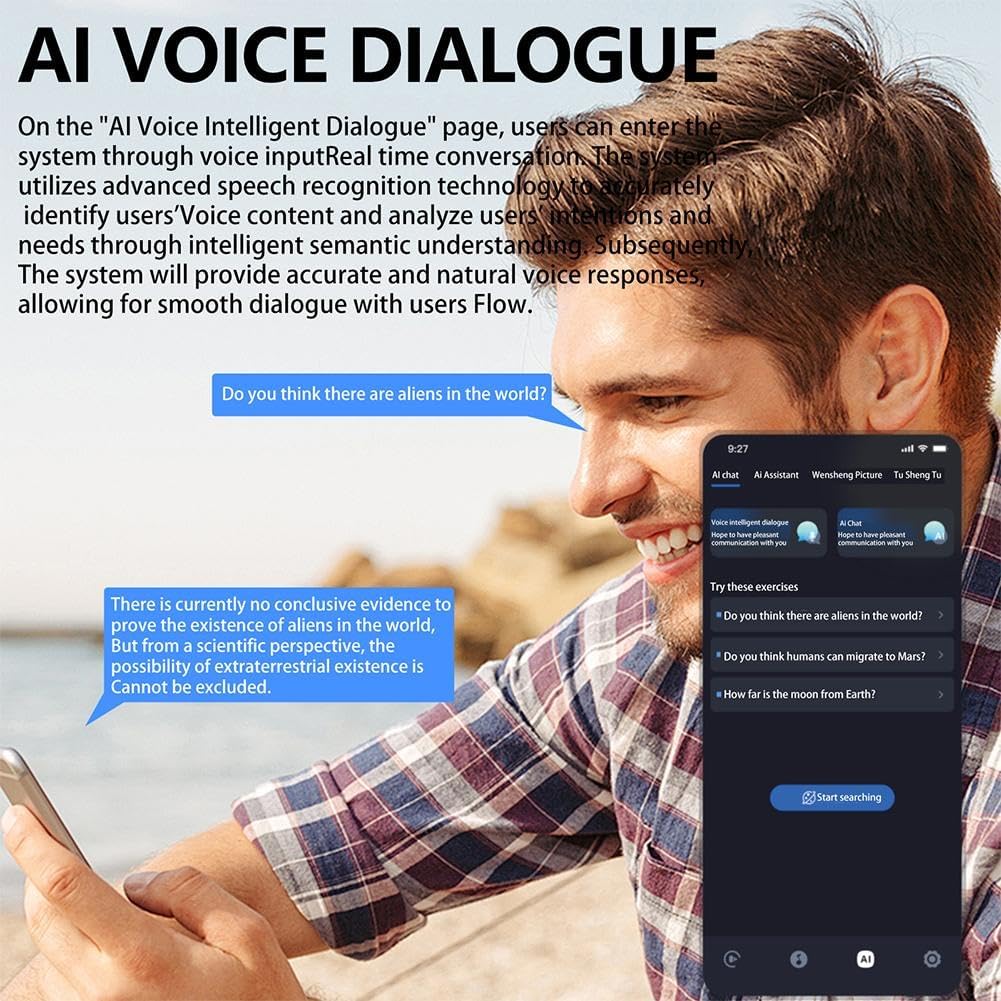
ചിത്രം: ഒരു ഉപയോക്താവ് അവരുടെ സ്മാർട്ട്ഫോണിലെ AI വോയ്സ് ഡയലോഗ് സവിശേഷതയുമായി സംവദിക്കുന്നു, സംസാരിക്കുന്ന ചോദ്യങ്ങൾ മനസ്സിലാക്കാനും അവയ്ക്ക് മറുപടി നൽകാനുമുള്ള സിസ്റ്റത്തിന്റെ കഴിവ് പ്രകടമാക്കുന്നു.
5.3 മൾട്ടി-ഫംഗ്ഷൻ AI ആപ്പ് സവിശേഷതകൾ
സൃഷ്ടി, ഓഫീസ്, പഠനം, നിയമം തുടങ്ങിയ വിവിധ സാഹചര്യങ്ങളിലായി 200-ലധികം ആപ്ലിക്കേഷനുകൾ AI ആപ്പിൽ ഉൾപ്പെടുന്നു.
- റെക്കോർഡിംഗും എഴുത്തും: വോയ്സ് റെക്കോർഡിംഗിനും ട്രാൻസ്ക്രിപ്ഷനും അല്ലെങ്കിൽ കോപ്പിറൈറ്റിംഗ് പോലുള്ള ടെക്സ്റ്റ് ഉള്ളടക്കം സൃഷ്ടിക്കുന്നതിനും ആപ്പ് ഉപയോഗിക്കുക.
- ചിത്ര ജനറേഷൻ: AI അൽഗോരിതങ്ങൾ അടിസ്ഥാനമാക്കി ചിത്രങ്ങൾ സൃഷ്ടിക്കുന്നതിന് കീവേഡുകൾ നൽകുക.
- ലളിതമായ സംഗീത തലമുറ: ആപ്പിനുള്ളിൽ അടിസ്ഥാന സംഗീത സൃഷ്ടി പ്രവർത്തനങ്ങൾ പര്യവേക്ഷണം ചെയ്യുക.
- AI ചാറ്റ്: വിവിധ ജോലികൾക്കും വിവരങ്ങൾക്കുമായി സംഭാഷണാത്മക AI-യിൽ ഏർപ്പെടുക.

ചിത്രം: AI ഇമേജ് ജനറേഷൻ ഇന്റർഫേസ് പ്രദർശിപ്പിക്കുന്ന ഒരു സ്മാർട്ട്ഫോൺ സ്ക്രീൻ, അവിടെ ഉപയോക്താക്കൾക്ക് വിഷ്വൽ ഉള്ളടക്കം സൃഷ്ടിക്കാൻ കീവേഡുകൾ ഇൻപുട്ട് ചെയ്യാൻ കഴിയും.
5.4 സംഗീത പ്ലേബാക്കും കോളുകളും
ഓഡിയോ, കോളുകൾക്കായി ഇയർബഡുകൾ സ്റ്റാൻഡേർഡ് ബ്ലൂടൂത്ത് ഹെഡ്ഫോണുകളായും പ്രവർത്തിക്കുന്നു.
- സംഗീത പ്ലേബാക്ക്: ജോടിയാക്കിക്കഴിഞ്ഞാൽ, നിങ്ങളുടെ ഉപകരണത്തിൽ നിന്ന് സംഗീതം പ്ലേ ചെയ്യുക. പ്ലേ/താൽക്കാലികമായി നിർത്താനോ, ട്രാക്കുകൾ ഒഴിവാക്കാനോ, വോളിയം ക്രമീകരിക്കാനോ ഇയർബഡുകളിലെ ടച്ച് നിയന്ത്രണങ്ങൾ ഉപയോഗിക്കുക (ലഭ്യമെങ്കിൽ, കൃത്യമായ നിയന്ത്രണങ്ങൾക്കായി നിർദ്ദിഷ്ട ഉൽപ്പന്ന ഡോക്യുമെന്റേഷൻ കാണുക).
- കോളുകൾ ചെയ്യുക/സ്വീകരിക്കുക: ഒരു കോൾ വരുമ്പോൾ, ഇയർബഡിൽ (പിന്തുണയുണ്ടെങ്കിൽ) ടാപ്പ് ചെയ്തോ നിങ്ങളുടെ ഫോൺ വഴിയോ മറുപടി നൽകുക. സാധാരണ രീതിയിൽ സംസാരിക്കുക, നിങ്ങളുടെ ശബ്ദം ഇയർബഡിന്റെ മൈക്രോഫോൺ കേൾക്കും.

ചിത്രം: AI HY-Y16 ഇയർബഡ് ധരിച്ച ഒരാൾ, വയർലെസ് ഓഡിയോയ്ക്കും ആശയവിനിമയത്തിനും അതിന്റെ ഉപയോഗം പ്രദർശിപ്പിക്കുന്നു.

ചിത്രം: AI HY-Y16 ഇയർബഡ് ധരിച്ച ഒരു സ്ത്രീ, showcasinഉൽപ്പന്നത്തിന്റെ രൂപകൽപ്പനയും ദൈനംദിന ഉപയോഗത്തിന് അനുയോജ്യവുമാണ്.
6. പരിപാലനം
- വൃത്തിയാക്കൽ: മൃദുവായതും ഉണങ്ങിയതും ലിന്റ് രഹിതവുമായ തുണി ഉപയോഗിച്ച് ഇയർബഡുകളും ചാർജിംഗ് കെയ്സും പതിവായി തുടയ്ക്കുക. അബ്രാസീവ് ക്ലീനറുകൾ ഉപയോഗിക്കരുത് അല്ലെങ്കിൽ വെള്ളത്തിൽ മുക്കരുത്.
- സംഭരണം: ഉപയോഗത്തിലില്ലാത്തപ്പോൾ, ഇയർബഡുകൾ ചാർജിംഗ് കേസിൽ സൂക്ഷിക്കുക, അതുവഴി അവയെ സംരക്ഷിക്കുകയും ചാർജ്ജ് ചെയ്ത് നിലനിർത്തുകയും ചെയ്യുക. നേരിട്ടുള്ള സൂര്യപ്രകാശത്തിൽ നിന്നും ഉയർന്ന താപനിലയിൽ നിന്നും അകന്ന് തണുത്തതും വരണ്ടതുമായ സ്ഥലത്ത് സൂക്ഷിക്കുക.
- ബാറ്ററി കെയർ: ബാറ്ററി ലൈഫ് വർദ്ധിപ്പിക്കാൻ, ഇയർബഡുകൾ പൂർണ്ണമായും ഡിസ്ചാർജ് ചെയ്യുന്നതും കേസ് ഇടയ്ക്കിടെ ചാർജ് ചെയ്യുന്നതും ഒഴിവാക്കുക. തുടർച്ചയായ ഉപയോഗത്തിലല്ലെങ്കിൽ പോലും അവ പതിവായി ചാർജ് ചെയ്യുക.
7. പ്രശ്നപരിഹാരം
| പ്രശ്നം | സാധ്യമായ പരിഹാരം |
|---|---|
| ഇയർബഡുകൾ ജോടിയാക്കുന്നില്ല. |
|
| ഇയർബഡുകളിൽ നിന്ന് ശബ്ദമൊന്നുമില്ല. |
|
| വിവർത്തനം പ്രവർത്തിക്കുന്നില്ല അല്ലെങ്കിൽ കൃത്യമല്ല. |
|
| ചാർജിംഗ് കേസ് ചാർജ് ചെയ്യുന്നില്ല. |
|
8 സ്പെസിഫിക്കേഷനുകൾ
| ഫീച്ചർ | വിശദാംശങ്ങൾ |
|---|---|
| മോഡൽ | ഹൈ-വൈ16 |
| ബ്ലൂടൂത്ത് പതിപ്പ് | 5.4 |
| ഹെഡ്ഫോൺ ബാറ്ററി ശേഷി | ഇയർബഡിന് 40mAh (x2) |
| ചാർജിംഗ് ബിൻ ശേഷി | 200mAh |
| പിന്തുണയ്ക്കുന്ന ഭാഷകൾ | 144 (AI ആപ്പ് വഴി) |
| പ്രവർത്തനങ്ങൾ | തത്സമയ വിവർത്തനം, AI വോയ്സ് ഡയലോഗ്, മ്യൂസിക് പ്ലേബാക്ക്, കോൾ ഫംഗ്ഷൻ, AI ആപ്പ് സവിശേഷതകൾ (റെക്കോർഡിംഗ്, റൈറ്റിംഗ്, പിക്ചർ ജനറേഷൻ, മ്യൂസിക് ജനറേഷൻ) |
9. വാറൻ്റിയും പിന്തുണയും
മെറ്റീരിയലുകളിലെയും വർക്ക്മാൻഷിപ്പിലെയും പിഴവുകൾക്കെതിരെ നിർമ്മാതാവിന്റെ ഒരു സ്റ്റാൻഡേർഡ് വാറണ്ടി ഈ ഉൽപ്പന്നത്തോടൊപ്പമുണ്ട്. വാറണ്ടിയുടെ നിർദ്ദിഷ്ട കാലാവധിയും നിബന്ധനകളും പ്രദേശത്തെയും റീട്ടെയിലറെയും ആശ്രയിച്ച് വ്യത്യാസപ്പെടാം. വാറണ്ടി ക്ലെയിമുകൾക്കായി നിങ്ങളുടെ വാങ്ങിയതിന്റെ തെളിവ് സൂക്ഷിക്കുക.
സാങ്കേതിക പിന്തുണ, ട്രബിൾഷൂട്ടിംഗ് സഹായം, അല്ലെങ്കിൽ വാറന്റി അന്വേഷണങ്ങൾ എന്നിവയ്ക്കായി, ദയവായി റീട്ടെയിലറെയോ നിർമ്മാതാവിന്റെയോ ഉപഭോക്തൃ സേവനവുമായി ബന്ധപ്പെടുക. കോൺടാക്റ്റ് വിവരങ്ങൾ സാധാരണയായി ഉൽപ്പന്ന പാക്കേജിംഗിലോ റീട്ടെയിലറുടെയോ വിലാസത്തിൽ കാണാം. webസൈറ്റ്.
കുറിപ്പ്: ഉൽപ്പന്നത്തിന്റെ അനധികൃത ഡിസ്അസംബ്ലിംഗ് അല്ലെങ്കിൽ പരിഷ്ക്കരണം വാറന്റി അസാധുവാക്കിയേക്കാം.