
ആമുഖം
Thank you for choosing the Irfora Multifunction Bamboo 12-Digit Calculator. This eco-friendly calculator combines classic design with modern functionality, featuring a durable bamboo casing and dual power source. This manual provides essential information for setting up, operating, and maintaining your calculator to ensure optimal performance.

ചിത്രം 1: മുൻഭാഗം view of the Irfora Bamboo Calculator, showcasing its natural bamboo finish and large LCD display.
1. സജ്ജീകരണം
1.1 അൺപാക്കിംഗ്
Carefully remove the calculator from its packaging. Inspect the device for any signs of damage. Retain the packaging for future storage or transport.
1.2 പവർ ചെയ്യുന്നു
The calculator features a dual power system: solar and button battery. It automatically switches between power sources for efficient operation.
- സൗരോർജ്ജം: Place the calculator in a well-lit area. The solar panel will convert light into energy, powering the device.
- ബാറ്ററി പവർ: In low-light conditions, the calculator will automatically switch to button battery power.
- കാൽക്കുലേറ്റർ ഓണാക്കാൻ, ON/C/CE or AC താക്കോൽ.

ചിത്രം 2: കോണാകൃതിയിലുള്ളത് view of the Irfora Bamboo Calculator, showing the solar panel and LCD display.
2. പ്രവർത്തന നിർദ്ദേശങ്ങൾ
The calculator features 29 large, comfortable keys with carved numbers that are designed not to fade over time.
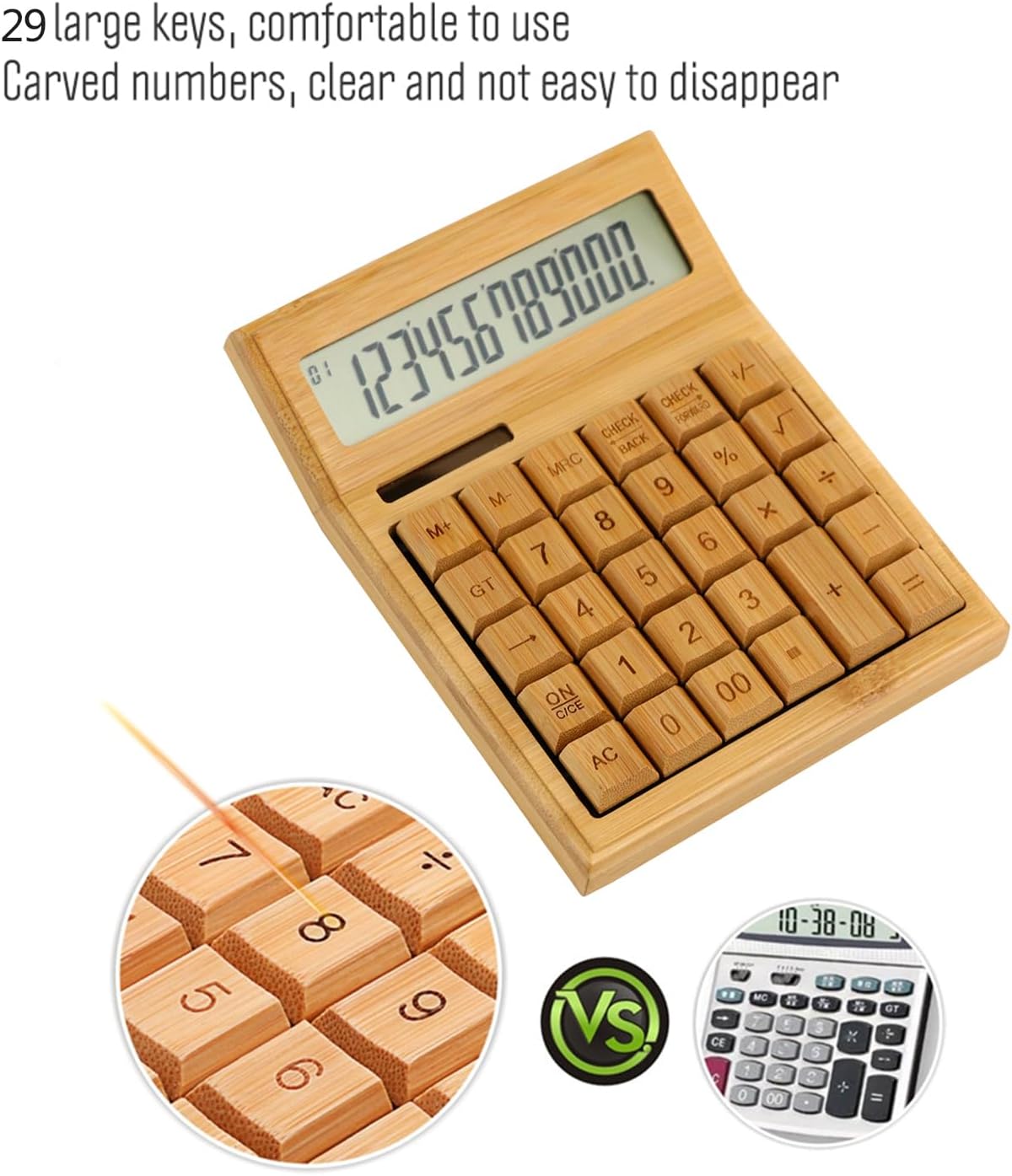
ചിത്രം 3: ക്ലോസപ്പ് view highlighting the large, carved bamboo keys for comfortable and durable use.
2.1 അടിസ്ഥാന ഗണിത പ്രവർത്തനങ്ങൾ
Perform standard calculations using the following keys:
- + (കൂടാതെ)
- - (ഒഴിവാക്കൽ)
- × (ഗുണനം)
- ÷ (ഡിവിഷൻ)
- = (തുല്യം)
2.2 മെമ്മറി പ്രവർത്തനങ്ങൾ
The calculator includes memory functions for complex calculations:
- M+: പ്രദർശിപ്പിച്ച മൂല്യം മെമ്മറിയിലേക്ക് ചേർക്കുന്നു.
- M-: മെമ്മറിയിൽ നിന്ന് പ്രദർശിപ്പിച്ച മൂല്യം കുറയ്ക്കുന്നു.
- എം.ആർ.സി: Recalls the memory value. Pressing twice clears the memory.
2.3 പ്രത്യേക പ്രവർത്തനങ്ങൾ
- % (ശതമാനംtage): Calculates percentages.
- √ (Square Root): Calculates the square root of the displayed number.
- +/- (Sign Change): Changes the sign of the displayed number (positive to negative, or vice versa).
- AC (All Clear): Clears all entries and memory.
- ON/C/CE (On/Clear Entry): Turns on the calculator. When on, clears the last entry. Pressing twice clears all entries.

Figure 4: A hand demonstrating the use of the calculator for daily tasks.
2.4 ഓട്ടോമാറ്റിക് പവർ ഓഫ്
To conserve energy, the calculator will automatically power off after approximately 12 minutes of inactivity. Press ON/C/CE or AC അത് വീണ്ടും ഓണാക്കാൻ.
3. പരിപാലനം
3.1 വൃത്തിയാക്കൽ
കാൽക്കുലേറ്റർ വൃത്തിയാക്കാൻ, മൃദുവായതും ഉണങ്ങിയതുമായ ഒരു തുണി ഉപയോഗിച്ച് ഉപരിതലം സൌമ്യമായി തുടയ്ക്കുക. കഠിനമായ അഴുക്കിന്, അല്പം damp തുണി ഉപയോഗിക്കാം, പക്ഷേ ഉപകരണത്തിനുള്ളിൽ ഈർപ്പം പ്രവേശിക്കുന്നില്ലെന്ന് ഉറപ്പാക്കുക. കഠിനമായ രാസവസ്തുക്കളോ അബ്രസിവ് ക്ലീനറുകളോ ഉപയോഗിക്കുന്നത് ഒഴിവാക്കുക.
3.2 സംഭരണം
Store the calculator in a cool, dry place away from direct sunlight and extreme temperatures. Prolonged exposure to direct sunlight can affect the bamboo finish.
3.3 ബാറ്ററി മാറ്റിസ്ഥാപിക്കൽ
The calculator uses a button battery (type not specified, typically AG10 or LR1130). If the display becomes dim or unresponsive in low light, the battery may need replacement. Consult a qualified technician or refer to the product packaging for specific battery type and replacement instructions. Improper battery replacement can damage the device.
4. പ്രശ്നപരിഹാരം
| പ്രശ്നം | സാധ്യമായ കാരണം | പരിഹാരം |
|---|---|---|
| ഡിസ്പ്ലേ ശൂന്യമോ മങ്ങിയതോ ആണ്. | സൗരോർജ്ജത്തിന് ആവശ്യത്തിന് വെളിച്ചമില്ല, അല്ലെങ്കിൽ ബാറ്ററി കുറവാണ്. | Move the calculator to a brighter area. If the problem persists, the button battery may need replacement. |
| കാൽക്കുലേറ്റർ ഓണാകുന്നില്ല. | No power, or device is in auto-off mode. | Ensure adequate light for solar power. Press ON/C/CE or AC. If still unresponsive, replace the button battery. |
| തെറ്റായ കണക്കുകൂട്ടൽ ഫലങ്ങൾ. | Incorrect key input, or temporary internal error. | അമർത്തുക AC to clear all entries and restart the calculation. Double-check your input. |
5 സ്പെസിഫിക്കേഷനുകൾ
- ബ്രാൻഡ്: ഇർഫോറ
- മോഡൽ: LAKJPOS0867
- ഡിസ്പ്ലേ: 12-അക്ക ലാർജ് എൽസിഡി
- ഊർജ്ജ സ്രോതസ്സ്: Dual Power (Solar & Button Battery)
- കീകൾ: 29 Bamboo Keys with Carved Numbers
- പ്രവർത്തനങ്ങൾ: Basic Arithmetic, Square Root, Percentage, Memory (M+, M-, MRC), Sign Change
- ഓട്ടോ പവർ ഓഫ്: ഏകദേശം 12 മിനിറ്റ് നിഷ്ക്രിയത്വം
- ഉൽപ്പന്ന അളവുകൾ: 19 x 14 x 4 സെ.മീ (ഏകദേശം 7.5 x 5.5 x 1.6 ഇഞ്ച്)
- ഉൽപ്പന്ന ഭാരം: 295 ഗ്രാം (ഏകദേശം 0.65 പൗണ്ട്)
6. വാറൻ്റിയും പിന്തുണയും
For warranty information and customer support, please refer to the documentation included with your purchase or contact your retailer. Keep your proof of purchase for any warranty claims.
കൂടുതൽ സഹായത്തിന്, ദയവായി സന്ദർശിക്കുക Irfora brand page on Amazon.co.jp.