
എയർ31
Air31 TWS Wireless Earbuds User Manual
മോഡൽ: എയർ31
ആമുഖം
Thank you for choosing the Air31 TWS Wireless Earbuds. These earbuds are designed to provide a seamless and high-quality audio experience with the convenience of true wireless technology. This manual will guide you through the setup, operation, and maintenance of your new earbuds to ensure optimal performance and longevity.
ഉൽപ്പന്ന സവിശേഷതകൾ
- വയർലെസ് സ്വാതന്ത്ര്യം: Experience true wireless audio with Bluetooth 5.2 connectivity for seamless streaming.
- ദീർഘകാല ബാറ്ററി: Enjoy up to 4-5 hours of continuous playtime on a single charge.
- കോംപാക്റ്റ് ഡിസൈൻ: Sleek and lightweight earbuds for comfortable all-day wear.
- അവബോധജന്യമായ നിയന്ത്രണങ്ങൾ: Built-in touch controls for effortless music playback and call management.
- സൗകര്യപ്രദമായ ചാർജിംഗ്: USB Type-C charging case for quick and easy power-ups on the go.
ബോക്സിൽ എന്താണുള്ളത്
Upon opening your Air31 TWS Wireless Earbuds package, you should find the following items:
- Air31 TWS Wireless Earbuds (Left and Right)
- ചാർജിംഗ് കേസ്
- യുഎസ്ബി ടൈപ്പ്-സി ചാർജിംഗ് കേബിൾ
- ഉപയോക്തൃ മാനുവൽ (ഈ പ്രമാണം)
സജ്ജീകരണ ഗൈഡ്
1. ഇയർബഡുകളും കേസും ചാർജ് ചെയ്യുന്നു
Before first use, fully charge the earbuds and the charging case. The charging case provides power to the earbuds when they are stored inside.
- രണ്ട് ഇയർബഡുകളും ചാർജിംഗ് കേസിൽ വയ്ക്കുക. അവ അവയുടെ സ്ലോട്ടുകളിൽ ശരിയായി സ്ഥാപിച്ചിട്ടുണ്ടെന്ന് ഉറപ്പാക്കുക.
- യുഎസ്ബി ടൈപ്പ്-സി ചാർജിംഗ് കേബിൾ കേസിലെ ചാർജിംഗ് പോർട്ടിലേക്കും മറ്റേ അറ്റം ഒരു യുഎസ്ബി പവർ സ്രോതസ്സിലേക്കും (ഉദാ: വാൾ അഡാപ്റ്റർ, കമ്പ്യൂട്ടർ യുഎസ്ബി പോർട്ട്) ബന്ധിപ്പിക്കുക.
- The digital display on the charging case will indicate the battery level. A full charge takes approximately 1.5 hours.
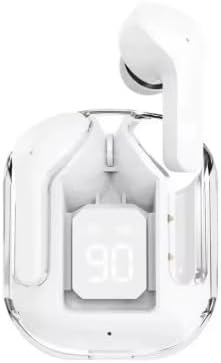
Image: Air31 TWS Wireless Earbuds in their charging case, displaying the current battery percentage. The clear case design allows visibility of the earbuds and the digital battery indicator.
2. നിങ്ങളുടെ ഉപകരണവുമായി ജോടിയാക്കുന്നു
The Air31 earbuds utilize Bluetooth 5.2 for a stable and efficient connection.
- ഇയർബഡുകൾ ചാർജ് ചെയ്തിട്ടുണ്ടെന്നും ചാർജിംഗ് കെയ്സിനുള്ളിൽ വച്ചിട്ടുണ്ടെന്നും ഉറപ്പാക്കുക.
- Open the charging case lid. The earbuds will automatically enter pairing mode, indicated by a flashing light on the earbuds (if applicable, refer to product specific light indicators).
- നിങ്ങളുടെ ഉപകരണത്തിൽ (സ്മാർട്ട്ഫോൺ, ടാബ്ലെറ്റ്, കമ്പ്യൂട്ടർ), ബ്ലൂടൂത്ത് ക്രമീകരണങ്ങളിലേക്ക് പോകുക.
- ഇതിനായി തിരയുക available devices. You should see "Air31" or a similar name appear in the list.
- Select "Air31" to connect. Once connected, a voice prompt will confirm the successful pairing, and the indicator lights on the earbuds will turn off or change.

Image: The Air31 earbuds and their transparent charging case, illustrating their sleek design. Beside them, a smartphone screen shows Bluetooth settings, indicating the process of connecting to a device.
കുറിപ്പ്: Once paired, the earbuds will automatically connect to the last paired device when removed from the case, provided Bluetooth is enabled on the device.
പ്രവർത്തന നിർദ്ദേശങ്ങൾ
The Air31 earbuds feature intuitive touch controls for easy management of your audio and calls.
ടച്ച് നിയന്ത്രണങ്ങൾ:
| ആക്ഷൻ | ഫംഗ്ഷൻ |
|---|---|
| ഒറ്റ ടാപ്പ് (ഇടത്/വലത് ഇയർബഡ്) | സംഗീതം പ്ലേ ചെയ്യുക/താൽക്കാലികമായി നിർത്തുക, കോൾ സ്വീകരിക്കുക/അവസാനിപ്പിക്കുക |
| ഡബിൾ ടാപ്പ് (വലത് ഇയർബഡ്) | അടുത്ത ട്രാക്ക് |
| ഡബിൾ ടാപ്പ് (ഇടത് ഇയർബഡ്) | മുമ്പത്തെ ട്രാക്ക് |
| ട്രിപ്പിൾ ടാപ്പ് (വലത് ഇയർബഡ്) | വോളിയം കൂട്ടുക |
| ട്രിപ്പിൾ ടാപ്പ് (ഇടത് ഇയർബഡ്) | വോളിയം ഡൗൺ |
| ദീർഘനേരം അമർത്തുക (2 സെക്കൻഡ്) | വോയ്സ് അസിസ്റ്റന്റ് (സിരി, ഗൂഗിൾ അസിസ്റ്റന്റ്) സജീവമാക്കുക |
| Long Press (3 seconds during call) | ഇൻകമിംഗ് കോൾ നിരസിക്കുക |

Image: A user demonstrating the comfortable fit of the Air31 earbuds. The image also highlights key battery performance metrics, including playtime and charging case capacity.
മെയിൻ്റനൻസ്
Proper maintenance will extend the lifespan of your Air31 TWS Wireless Earbuds.
- വൃത്തിയാക്കൽ: Regularly clean the earbuds and charging case with a soft, dry, lint-free cloth. Do not use abrasive cleaners or solvents. For earwax buildup, gently clean the earbud mesh with a dry cotton swab.
- സംഭരണം: ഉപയോഗത്തിലില്ലാത്തപ്പോൾ, പൊടിയിൽ നിന്നും കേടുപാടുകളിൽ നിന്നും സംരക്ഷിക്കാൻ ഇയർബഡുകൾ അവയുടെ ചാർജിംഗ് കേസിൽ സൂക്ഷിക്കുക. നേരിട്ടുള്ള സൂര്യപ്രകാശത്തിൽ നിന്നും കടുത്ത താപനിലയിൽ നിന്നും മാറി തണുത്തതും വരണ്ടതുമായ സ്ഥലത്ത് സൂക്ഷിക്കുക.
- ബാറ്ററി കെയർ: ബാറ്ററിയുടെ ആരോഗ്യം നിലനിർത്താൻ, ഇയർബഡുകൾ പൂർണ്ണമായും ഡിസ്ചാർജ് ചെയ്യുന്നതും കേസ് ഇടയ്ക്കിടെ ചാർജ് ചെയ്യുന്നതും ഒഴിവാക്കുക. തുടർച്ചയായ ഉപയോഗത്തിലല്ലെങ്കിൽ പോലും അവ പതിവായി ചാർജ് ചെയ്യുക.
- ജല പ്രതിരോധം: The Air31 earbuds are വാട്ടർ റെസിസ്റ്റൻ്റ് അല്ല. Avoid exposure to water, sweat, rain, or any liquids to prevent damage.
ട്രബിൾഷൂട്ടിംഗ്
If you encounter issues with your Air31 TWS Wireless Earbuds, refer to the following common solutions:
ഇയർബഡുകൾ ജോടിയാക്കുകയോ ബന്ധിപ്പിക്കുകയോ ചെയ്യുന്നില്ല:
- രണ്ട് ഇയർബഡുകളും ചാർജ്ജ് ചെയ്തിട്ടുണ്ടെന്ന് ഉറപ്പാക്കുക.
- നിങ്ങളുടെ ഉപകരണത്തിൽ ബ്ലൂടൂത്ത് പ്രവർത്തനക്ഷമമാക്കിയിട്ടുണ്ടെന്ന് ഉറപ്പാക്കുക.
- ഇയർബഡുകൾ ചാർജിംഗ് കെയ്സിലേക്ക് തിരികെ വയ്ക്കുക, ലിഡ് അടയ്ക്കുക, കുറച്ച് നിമിഷങ്ങൾ കാത്തിരിക്കുക, തുടർന്ന് പെയറിംഗ് മോഡിൽ വീണ്ടും പ്രവേശിക്കാൻ ലിഡ് വീണ്ടും തുറക്കുക.
- Forget "Air31" from your device's Bluetooth settings and try pairing again.
- Ensure your device is within the Bluetooth range (32.8 feet / 10 meters).
ഒരു ഇയർബഡ് മാത്രമേ പ്രവർത്തിക്കുന്നുള്ളൂ:
- രണ്ട് ഇയർബഡുകളും ചാർജിംഗ് കെയ്സിലേക്ക് തിരികെ വയ്ക്കുക, ലിഡ് അടയ്ക്കുക, തുടർന്ന് അത് വീണ്ടും തുറക്കുക. ഇത് പലപ്പോഴും അവയെ വീണ്ടും സമന്വയിപ്പിക്കുന്നു.
- രണ്ട് ഇയർബഡുകളും ചാർജ് ചെയ്തിട്ടുണ്ടോയെന്ന് പരിശോധിക്കുക.
- Try resetting the earbuds (refer to specific product instructions if a reset procedure is available, otherwise, a full charge and re-pairing often works).
ശബ്ദമില്ല അല്ലെങ്കിൽ കുറഞ്ഞ ശബ്ദം:
- Increase the volume on both your device and using the earbud touch controls.
- ഇയർബഡുകൾ നിങ്ങളുടെ ഉപകരണവുമായി ശരിയായി ബന്ധിപ്പിച്ചിട്ടുണ്ടെന്ന് ഉറപ്പാക്കുക.
- Check for any obstructions in the earbud mesh and clean if necessary.
ചാർജിംഗ് കേസ് ചാർജുചെയ്യുന്നില്ല:
- യുഎസ്ബി ടൈപ്പ്-സി കേബിൾ കേസിലേക്കും പവർ സ്രോതസ്സിലേക്കും സുരക്ഷിതമായി ബന്ധിപ്പിച്ചിട്ടുണ്ടെന്ന് ഉറപ്പാക്കുക.
- മറ്റൊരു USB കേബിളോ പവർ അഡാപ്റ്ററോ പരീക്ഷിക്കുക.
- ചാർജിംഗ് പോർട്ടിൽ എന്തെങ്കിലും അവശിഷ്ടങ്ങൾ ഉണ്ടോ എന്ന് പരിശോധിക്കുക.
സ്പെസിഫിക്കേഷനുകൾ
| ഫീച്ചർ | വിശദാംശങ്ങൾ |
|---|---|
| മോഡലിൻ്റെ പേര് | എയർ31 |
| കണക്റ്റിവിറ്റി ടെക്നോളജി | ബ്ലൂടൂത്ത് |
| വയർലെസ് കമ്മ്യൂണിക്കേഷൻ ടെക്നോളജി | ബ്ലൂടൂത്ത് |
| ബ്ലൂടൂത്ത് പതിപ്പ് | 5.2 |
| ബ്ലൂടൂത്ത് ശ്രേണി | 32.8 അടി (10 മീറ്റർ) |
| ഉൾപ്പെടുത്തിയ ഘടകങ്ങൾ | ഇയർബഡുകൾ |
| മെറ്റീരിയൽ | പ്ലാസ്റ്റിക് |
| ഉൽപ്പന്നത്തിൻ്റെ പ്രത്യേക ഉപയോഗങ്ങൾ | വയർലെസ് ഓഡിയോ |
| ചാർജിംഗ് സമയം | 1.5 മണിക്കൂർ |
| ഉൽപ്പന്നത്തിനുള്ള ശുപാർശിത ഉപയോഗങ്ങൾ | സംഗീതം, കോളിംഗ് |
| അനുയോജ്യമായ ഉപകരണങ്ങൾ | ബ്ലൂടൂത്ത് പ്രവർത്തനക്ഷമമാക്കിയ ഉപകരണങ്ങൾ |
| നിയന്ത്രണ തരം | ടച്ച് നിയന്ത്രണം |
| കേബിൾ സവിശേഷത | ടൈപ്പ്-സി ചാർജിംഗ് |
| ജല പ്രതിരോധ നില | വാട്ടർ റെസിസ്റ്റൻ്റ് അല്ല |
| യൂണിറ്റ് എണ്ണം | 2.0 എണ്ണം |
| ചെവി പ്ലേസ്മെൻ്റ് | ചെവിയിൽ |
| ഫോം ഫാക്ടർ | ചെവിയിൽ |
| ശബ്ദ നിയന്ത്രണം | ഒന്നുമില്ല |
| ഓഡിയോ ഡ്രൈവർ തരം | ഡൈനാമിക് ഡ്രൈവർ |
| കെയ്സ് ബാറ്ററിയുടെ ശരാശരി ആയുസ്സ് | 120 Hours (standby) |
| ഇനത്തിൻ്റെ ഭാരം | 2.11 ഔൺസ് |
| നിർമ്മാതാവ് | Shenzhen HYX Electronic |
വാറൻ്റിയും പിന്തുണയും
For warranty information and customer support, please refer to the product packaging or contact the retailer from whom you purchased the Air31 TWS Wireless Earbuds. Keep your proof of purchase for any warranty claims.
For further assistance or inquiries, please visit the manufacturer's official webസൈറ്റ് അല്ലെങ്കിൽ അവരുടെ ഉപഭോക്തൃ സേവന വിഭാഗവുമായി ബന്ധപ്പെടുക.
Ask a question about this manual
Ask about setup, troubleshooting, compatibility, parts, safety, or missing instructions. Manuals+ will review the question and use this page’s manual context to help answer it.