
TECSUN S-8800
TECSUN S-8800 Multi-conversion AM/FM/LW/SW/SSB Radio Receiver User Manual
മോഡൽ: എസ്-8800
1. ആമുഖം
The TECSUN S-8800 is a versatile multi-conversion radio receiver designed for optimal reception across AM, FM, LW, SW, and SSB bands. It incorporates advanced High-IF analog circuits, triple AM conversion, and DSP decoding technology to deliver superior audio performance. This manual provides comprehensive instructions for setting up, operating, and maintaining your S-8800 receiver.
2. പാക്കേജ് ഉള്ളടക്കം
താഴെ പട്ടികപ്പെടുത്തിയിരിക്കുന്ന എല്ലാ ഇനങ്ങളും നിങ്ങളുടെ പാക്കേജിൽ ഉൾപ്പെടുത്തിയിട്ടുണ്ടോയെന്ന് ദയവായി പരിശോധിക്കുക:
- TECSUN S-8800 Radio Receiver
- USB-MiniUSB Cable
- 2 x 18650 ലി-അയൺ ബാറ്ററികൾ
- റിമോട്ട് കൺട്രോൾ
- 2 x AAA ബാറ്ററികൾ (റിമോട്ട് കൺട്രോളിനായി)
- BNC Antenna Adapter
- ഉപയോക്തൃ മാനുവൽ (ഈ പ്രമാണം)
3. ഉൽപ്പന്നം കഴിഞ്ഞുview
Familiarize yourself with the main components and controls of your TECSUN S-8800 radio receiver.

Figure 3.1: TECSUN S-8800 radio receiver and its remote control.
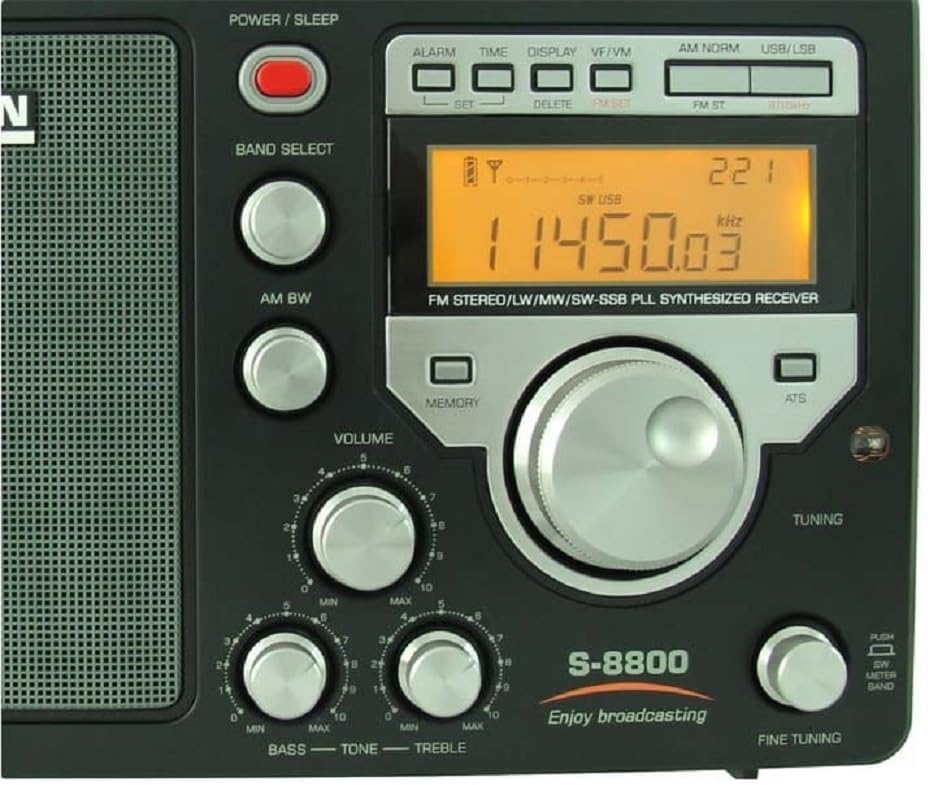
Figure 3.2: Front panel with display, tuning knob, and audio controls.

ചിത്രം 3.3: വശം view illustrating headphone, line-out, and external antenna connections.

Figure 3.4: Rear panel with FM/SW BNC, AM/GND antenna terminals, and MiniUSB charging port.
4. സജ്ജീകരണം
4.1. വൈദ്യുതി വിതരണം
- ബാറ്ററി ഇൻസ്റ്റാളേഷൻ: Open the battery compartment cover on the rear of the radio. Insert the two 18650 Li-ion batteries, ensuring correct polarity as indicated inside the compartment. Close the cover securely.
- AC Power / Charging: Connect the supplied USB-MiniUSB cable to the radio's MiniUSB port (DC 5V/1A) and a compatible USB power adapter (not included) or a computer's USB port. The radio can operate while charging.
4.2. Antenna Connections
- ആന്തരിക ആന്റിന: For FM and SW reception, extend the telescopic antenna fully. For AM (MW) and LW reception, the radio utilizes an internal ferrite bar antenna.
- ബാഹ്യ ആൻ്റിനകൾ:
- FM/SW: Connect an external FM or SW antenna to the BNC (50 Ohm) connector on the side of the radio. Use the provided BNC adapter if necessary.
- രാവിലെ/വെള്ളിയാഴ്ച: For improved AM/LW reception, connect an external AM antenna to the AM + GND (500 Ohm) terminals on the rear panel.
4.3. ഓഡിയോ putട്ട്പുട്ട്
- ഹെഡ്ഫോണുകൾ: Connect 3.5mm stereo headphones to the 'STEREO VIA EARPHONE' jack for private listening.
- ലൈൻ: ട്ട്: Use the RCA (LEFT+RIGHT) line-out ports to connect the radio to an external ampലൈഫ്ഫയർ അല്ലെങ്കിൽ റെക്കോർഡിംഗ് ഉപകരണം.
5. പ്രവർത്തന നിർദ്ദേശങ്ങൾ
5.1. പവർ ഓൺ/ഓഫ്
അമർത്തുക പവർ/ഉറക്കം button located on the top right of the front panel to turn the radio on or off.
5.2. ബാൻഡ് തിരഞ്ഞെടുക്കൽ
അമർത്തുക ബാൻഡ് തിരഞ്ഞെടുക്കുക button repeatedly to cycle through the available frequency bands: FM, AM (MW), LW, SW, and SSB.
5.3. ട്യൂണിംഗ് മോഡുകൾ
- Rotary Tuning Knob: Rotate the large central tuning knob to adjust the frequency.
- ഡയറക്ട് ഫ്രീക്വൻസി എൻട്രി: Using the remote control, enter the desired frequency directly using the number pad.
- AutoScan (ATS): അമർത്തുക എ.ടി.എസ് button to automatically scan and store available stations within the current band into memory.
- സ്വമേധയാലുള്ള ട്യൂണിംഗ്: ഉപയോഗിക്കുക +/- buttons (if available on remote/front panel) for step-by-step frequency adjustments.
- ശരിയാക്കുക: സമർപ്പിത ഉപയോഗിക്കുക ശരിയാക്കുക knob for precise frequency adjustments, particularly useful for SSB reception.
5.4. Frequency Steps
The radio supports various tuning steps depending on the band:
- FM: 10 KHz / 100 KHz
- LW: 1 KHz / 9 KHz
- MW: 1 KHz / 9-10 KHz
- SW: 1 KHz / 5 KHz
5.5. മെമ്മറി പ്രവർത്തനങ്ങൾ
The S-8800 can store up to 650 stations (FM 100, LW 100, MW 100, SW 250, SSB 100).
- സ്റ്റോർ സ്റ്റേഷൻ: ആവശ്യമുള്ള സ്റ്റേഷനിലേക്ക് ട്യൂൺ ചെയ്യുക, തുടർന്ന് അമർത്തിപ്പിടിക്കുക മെമ്മറി button until the display confirms storage.
- Recall Station: അമർത്തുക മെമ്മറി button briefly, then use the tuning knob or number pad on the remote to select a stored memory location.
5.6. SSB (Single Side Band) Operation
- Select the SSB band using the ബാൻഡ് തിരഞ്ഞെടുക്കുക ബട്ടൺ.
- ഉപയോഗിക്കുക USB/LSB switch to select either Upper Side Band (USB) or Lower Side Band (LSB).
- Adjust the dedicated ശരിയാക്കുക controller (± 10 Hz) for clear voice reception.
5.7. ഓഡിയോ നിയന്ത്രണങ്ങൾ
- വോളിയം: ഉപയോഗിച്ച് ഓഡിയോ ഔട്ട്പുട്ട് ലെവൽ ക്രമീകരിക്കുക വോളിയം മുട്ട്.
- ബാസ്/ട്രെബിൾ: സമർപ്പിത ഉപയോഗിക്കുക ബാസ്സ് ഒപ്പം ട്രെബിൾ knobs to adjust the audio tone to your preference.
5.8. ഡിസ്പ്ലേയും ബാക്ക്ലൈറ്റും
The LCD display shows the current frequency, time, and other operational information. Press the ഡിസ്പ്ലേ button to activate the backlight or set it to stay on. A visual signal meter indicates the strength of the received signal.
5.9. Alarm and Sleep Timer
- അലാറം: Set an alarm to automatically turn on the radio at a specified time. Refer to the display controls for setting the alarm time.
- സ്ലീപ്പ് ടൈമർ: The radio can be set to automatically turn off after a period ranging from 1 to 120 minutes.
5.10. ലോക്ക് ഫംഗ്ഷൻ
അമർത്തുക ലോക്ക് ചെയ്യുക button to disable all controls and prevent accidental changes to settings. Press it again to unlock.
6. പരിപാലനം
6.1. വൃത്തിയാക്കൽ
Wipe the radio with a soft, dry cloth. Do not use abrasive cleaners, solvents, or strong chemicals, as these may damage the finish or internal components.
6.2. ബാറ്ററി പരിചരണം
If the radio will not be used for an extended period, remove the 18650 Li-ion batteries from the main unit and the AAA batteries from the remote control to prevent leakage and damage.
6.3. സംഭരണം
Store the radio in a cool, dry place, away from direct sunlight, high humidity, and extreme temperatures. Protect it from dust and physical impact.
7. പ്രശ്നപരിഹാരം
If you encounter issues with your TECSUN S-8800, please refer to the following common problems and solutions:
- ശക്തിയില്ല:
- Ensure the 18650 Li-ion batteries are correctly installed and fully charged.
- Verify the USB-MiniUSB cable is properly connected for AC power or charging.
- സ്ഥിരീകരിക്കുക പവർ/ഉറക്കം ബട്ടൺ അമർത്തി.
- മോശം സ്വീകരണം:
- Fully extend the telescopic antenna for FM/SW bands.
- Try connecting an external antenna to the appropriate BNC or AM/GND terminals.
- Adjust the radio's position or location to minimize interference.
- For AM/LW, rotate the radio to optimize the internal ferrite bar antenna's reception.
- പരിശോധിക്കുക ആർഎഫ് സെൻസിറ്റിവിറ്റി switch (DX/Local) for optimal signal handling.
- ശബ്ദമില്ല:
- പരിശോധിക്കുക വോളിയം നില.
- Ensure headphones are not connected if expecting sound from the internal speaker.
- Verify that the correct band and frequency are selected.
- SSB Distortion:
- ശ്രദ്ധാപൂർവ്വം ക്രമീകരിക്കുക ശരിയാക്കുക knob for clear voice reception.
- Ensure the correct USB/LSB mode is selected for the signal you are trying to receive.
8 സ്പെസിഫിക്കേഷനുകൾ
| മോഡൽ | TECSUN S-8800 |
| ആവൃത്തി ശ്രേണികൾ | FM: 64/76/87.5-108 MHz MW (AM): 522-1620 KHz LW: 100-519 KHz SW: 1711-29999 KHz |
| ട്യൂണിംഗ് ഘട്ടങ്ങൾ | FM: 10 KHz / 100 KHz LW: 1 KHz / 9 KHz MW: 1 KHz / 9-10 KHz SW: 1 KHz / 5 KHz |
| ട്യൂണിംഗ് മോഡുകൾ | Direct Frequency Entry, AutoScan, Manual, Rotary Knob |
| മെമ്മറി പ്രീസെറ്റുകൾ | 650 (FM 100, LW 100, MW 100, SW 250, SSB 100) |
| SSB | USB/LSB with ±10 Hz Fine Tuning |
| ഓഡിയോ | ക്ലാസ് എബി Amplifier, Ultra-dynamic Full-range Speaker, Bass/Treble Controls |
| പവർ ഉറവിടം | 2 x 18650 Li-ion Batteries (included), MiniUSB DC 5V/1A for charging |
| കണക്ഷനുകൾ | FM/SW Antenna: BNC (50 Ohm) AM Antenna: AM + GND (500 Ohm) Headphone Output: 3.5mm Stereo Jack Line Output: RCA (Left + Right) |
| പ്രദർശിപ്പിക്കുക | Backlit LCD with Signal Meter |
| പ്രത്യേക സവിശേഷതകൾ | Triple Conversion, PLL Digital Synthesized, DSP Decoding, Remote Control, Alarm, Sleep Timer, Lock Function |
| അളവുകൾ | 27 x 17 x 9 സെ.മീ (ഏകദേശം) |
| ഭാരം | 1.5 kg (with batteries, approximately) |
| നിർമ്മാതാവ് | JETFON |
| മാതൃരാജ്യം | ഹോങ്കോംഗ് |
9. വാറൻ്റി വിവരങ്ങൾ
This product is covered by a standard manufacturer's warranty. Please refer to the warranty card included in your package or contact your retailer for specific terms and conditions regarding warranty coverage and service. Keep your purchase receipt as proof of purchase.
10. ഉപഭോക്തൃ പിന്തുണ
For technical assistance, troubleshooting, or service inquiries, please contact your local dealer or the point of purchase. When contacting support, please have your product model (S-8800) and purchase details readily available for faster service.
Ask a question about this manual
Ask about setup, troubleshooting, compatibility, parts, safety, or missing instructions. Manuals+ will review the question and use this page’s manual context to help answer it.