
ആമുഖം
Welcome to your new RadioShack BT Headphones. This manual provides essential information for the proper setup, operation, and maintenance of your headphones. Please read these instructions carefully before use to ensure optimal performance and longevity of your device.
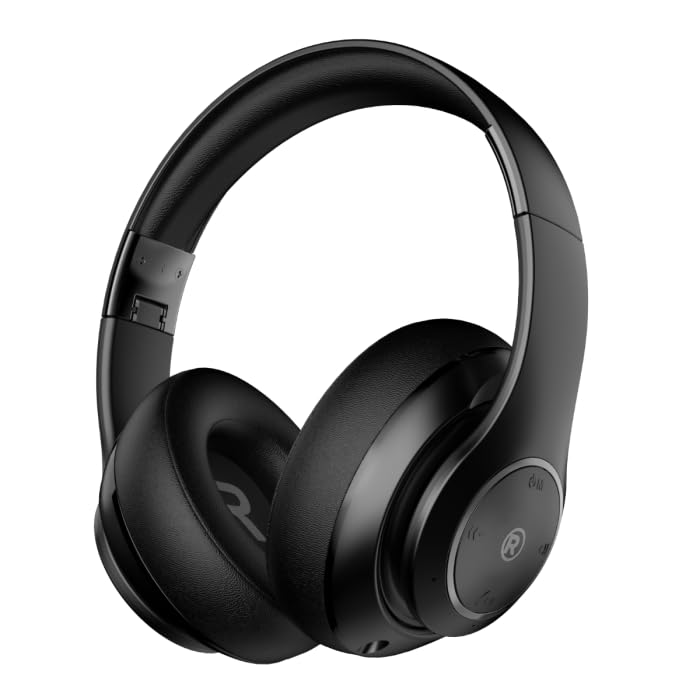
ഒരു ഫ്രണ്ട്-ആംഗിൾ view of the black RadioShack BT Headphones, showcasing their over-ear design and cushioned earcups.
ബോക്സിൽ എന്താണുള്ളത്
നിങ്ങളുടെ പാക്കേജിൽ എല്ലാ ഇനങ്ങളും ഉണ്ടെന്ന് ഉറപ്പാക്കുക:
- RadioShack BT Headphones
- ചാർജിംഗ് കേബിൾ
- ഓക്സിലറി ഓഡിയോ കേബിൾ
- ഉപയോക്തൃ മാനുവൽ
This video demonstrates the unboxing process of the RadioShack BT Headphones, showing the contents included in the package.
ഉൽപ്പന്ന സവിശേഷതകൾ
The RadioShack BT Headphones are designed for an enhanced audio experience with convenience and durability.
- വിപുലീകരിച്ച കളിസമയം: Enjoy up to 30 hours of uninterrupted music.
- ബിൽറ്റ്-ഇൻ മൈക്രോഫോൺ: Features a built-in microphone for clear and convenient calling functions.
- അഡ്വാൻസ്ഡ് ബ്ലൂടൂത്ത് 5.4: Equipped with Bluetooth version 5.4 for seamless and stable wireless connectivity.
- ഉയർന്ന നിലവാരമുള്ള ശബ്ദം: 40mm drivers deliver rich, immersive sound with excellent sensitivity and impedance.
- മടക്കാവുന്ന ഡിസൈൻ: Compact and foldable design for easy portability and storage.

An informational graphic highlighting the built-in microphone, 400mAh battery capacity, and Bluetooth 5.4 compatibility of the headphones.
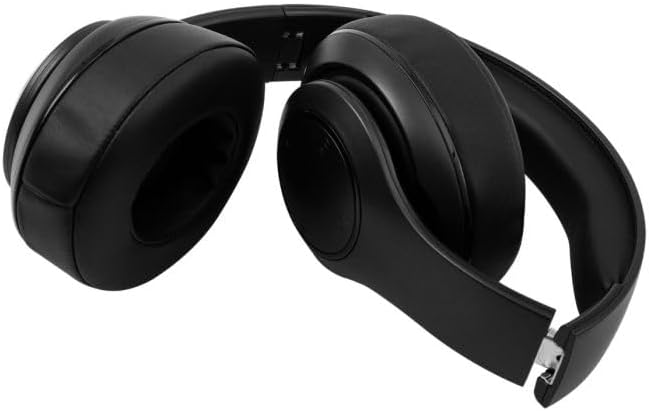
The RadioShack BT Headphones folded for compact storage and portability.
ഈ വീഡിയോ ഒരു സംക്ഷിപ്ത വിവരണം നൽകുന്നുview of the RadioShack Over-the-Head Earphones, showcasing their design and use.
സജ്ജമാക്കുക
ഹെഡ്ഫോണുകൾ ചാർജ് ചെയ്യുന്നു
- നൽകിയിരിക്കുന്ന USB ചാർജിംഗ് കേബിൾ ഹെഡ്ഫോണുകളിലെ ചാർജിംഗ് പോർട്ടുമായി ബന്ധിപ്പിക്കുക.
- USB കേബിളിന്റെ മറ്റേ അറ്റം അനുയോജ്യമായ ഒരു USB പവർ സ്രോതസ്സിലേക്ക് (ഉദാ: കമ്പ്യൂട്ടർ, വാൾ അഡാപ്റ്റർ) പ്ലഗ് ചെയ്യുക.
- ചാർജ് ചെയ്യുമ്പോൾ LED ഇൻഡിക്കേറ്റർ പ്രകാശിക്കുകയും പൂർണ്ണമായി ചാർജ് ചെയ്യുമ്പോൾ അത് ഓഫാകുകയോ നിറം മാറുകയോ ചെയ്യും.
- ഒരു ഫുൾ ചാർജ് 30 മണിക്കൂർ വരെ പ്ലേടൈം നൽകുന്നു.
ബ്ലൂടൂത്ത് വഴി ജോടിയാക്കുന്നു
- ഹെഡ്ഫോണുകൾ പൂർണ്ണമായും ചാർജ്ജ് ചെയ്തിട്ടുണ്ടെന്ന് ഉറപ്പാക്കുക.
- ജോടിയാക്കൽ മോഡ് സൂചിപ്പിക്കുന്ന LED ഇൻഡിക്കേറ്റർ നീലയും ചുവപ്പും നിറങ്ങളിൽ മിന്നുന്നതുവരെ ഹെഡ്ഫോണുകളിലെ പവർ ബട്ടൺ അമർത്തിപ്പിടിക്കുക.
- നിങ്ങളുടെ ഉപകരണത്തിൽ (സ്മാർട്ട്ഫോൺ, ടാബ്ലെറ്റ്, കമ്പ്യൂട്ടർ), ബ്ലൂടൂത്ത് പ്രവർത്തനക്ഷമമാക്കി ലഭ്യമായ ഉപകരണങ്ങൾക്കായി തിരയുക.
- Select "RadioShack BT Headphones" from the list of found devices.
- Once connected, the LED indicator will show a solid blue light or flash blue slowly.
പ്രവർത്തന നിർദ്ദേശങ്ങൾ
പവർ ഓൺ/ഓഫ്
- പവർ ഓൺ: LED ഇൻഡിക്കേറ്റർ പ്രകാശിക്കുന്നത് വരെ ഏകദേശം 3 സെക്കൻഡ് നേരത്തേക്ക് പവർ ബട്ടൺ അമർത്തിപ്പിടിക്കുക.
- പവർ ഓഫ്: LED ഇൻഡിക്കേറ്റർ ഓഫാകുന്നതുവരെ ഏകദേശം 3 സെക്കൻഡ് നേരത്തേക്ക് പവർ ബട്ടൺ അമർത്തിപ്പിടിക്കുക.
സംഗീത പ്ലേബാക്ക്
- പ്ലേ/താൽക്കാലികമായി നിർത്തുക: മൾട്ടി-ഫംഗ്ഷൻ ബട്ടൺ ഒരിക്കൽ അമർത്തുക.
- അടുത്ത ട്രാക്ക്: വോളിയം അപ്പ് ബട്ടൺ അമർത്തിപ്പിടിക്കുക.
- മുമ്പത്തെ ട്രാക്ക്: വോളിയം ഡൗൺ ബട്ടൺ അമർത്തിപ്പിടിക്കുക.
കോൾ മാനേജുമെന്റ്
- ഉത്തരം/അവസാന കോൾ: മൾട്ടി-ഫംഗ്ഷൻ ബട്ടൺ ഒരിക്കൽ അമർത്തുക.
- കോൾ നിരസിക്കുക: മൾട്ടി-ഫംഗ്ഷൻ ബട്ടൺ 2 സെക്കൻഡ് അമർത്തിപ്പിടിക്കുക.
- അവസാന നമ്പർ വീണ്ടും ഡയൽ ചെയ്യുക: മൾട്ടി-ഫംഗ്ഷൻ ബട്ടൺ ഇരട്ട-അമർത്തുക.
വോളിയം നിയന്ത്രണം
- വോളിയം കൂട്ടുക: വോളിയം അപ്പ് ബട്ടൺ അമർത്തുക.
- വോളിയം താഴേക്ക്: വോളിയം ഡൗൺ ബട്ടൺ അമർത്തുക.
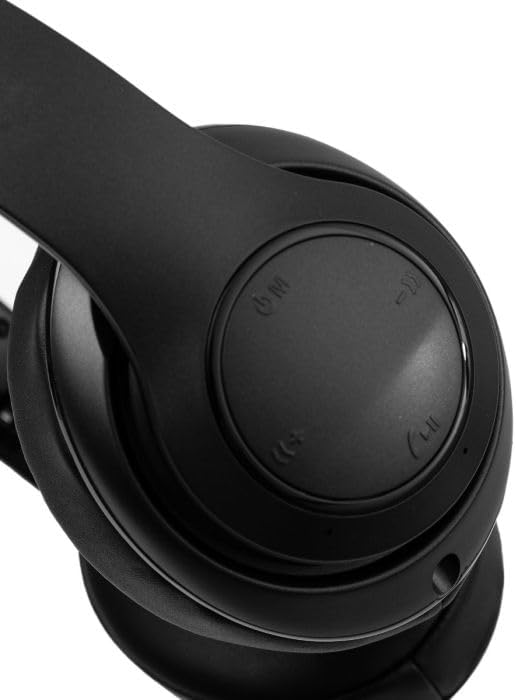
ഒരു ക്ലോസപ്പ് view of the right earcup, showing the integrated control buttons for power, volume, and playback.
മെയിൻ്റനൻസ്
വൃത്തിയാക്കൽ
- മൃദുവായതും ഉണങ്ങിയതുമായ തുണി ഉപയോഗിച്ച് ഹെഡ്ഫോണുകൾ തുടയ്ക്കുക.
- ഉരച്ചിലുകളുള്ള ക്ലീനറുകളോ ലായകങ്ങളോ ഉപയോഗിക്കരുത്.
- ചാർജിംഗ് പോർട്ട് പൊടിയും അവശിഷ്ടങ്ങളും ഇല്ലാതെ സൂക്ഷിക്കുക.
സംഭരണം
- നേരിട്ടുള്ള സൂര്യപ്രകാശത്തിൽ നിന്നും കടുത്ത താപനിലയിൽ നിന്നും മാറി തണുത്തതും വരണ്ടതുമായ സ്ഥലത്ത് ഹെഡ്ഫോണുകൾ സൂക്ഷിക്കുക.
- ദീർഘനേരം ഉപയോഗിക്കാത്തപ്പോൾ, ബാറ്ററി ലൈഫ് സംരക്ഷിക്കുന്നതിന് മൂന്ന് മാസത്തിലൊരിക്കലെങ്കിലും ഹെഡ്ഫോണുകൾ ചാർജ് ചെയ്യുക.
ട്രബിൾഷൂട്ടിംഗ്
| ഇഷ്യൂ | സാധ്യമായ പരിഹാരം |
|---|---|
| ഹെഡ്ഫോണുകൾ ഓണാകുന്നില്ല | ഹെഡ്ഫോണുകൾ ചാർജ് ചെയ്തിട്ടുണ്ടെന്ന് ഉറപ്പാക്കുക. ഒരു പവർ സ്രോതസ്സിലേക്ക് കണക്റ്റ് ചെയ്ത് വീണ്ടും ശ്രമിക്കുക. |
| ഉപകരണവുമായി ജോടിയാക്കാൻ കഴിയില്ല | Ensure headphones are in pairing mode (flashing blue/red LED). Turn off and on Bluetooth on your device. Move closer to the device. |
| ശബ്ദമോ കുറഞ്ഞ വോളിയമോ ഇല്ല | Check volume levels on both headphones and connected device. Ensure headphones are properly paired. Try reconnecting. |
| ഇടവിട്ടുള്ള കണക്ഷൻ | Reduce distance between headphones and device. Avoid obstacles. Ensure no other devices are interfering with the Bluetooth signal. |
സ്പെസിഫിക്കേഷനുകൾ
| ഫീച്ചർ | വിശദാംശങ്ങൾ |
|---|---|
| ബ്രാൻഡ് | റേഡിയോഷാക്ക് |
| മോഡൽ നമ്പർ | 3304403-പി.ആർ.എൻ.ടി. |
| നിറം | കറുപ്പ് |
| ചെവി പ്ലേസ്മെൻ്റ് | ചെവിയിൽ |
| ഫോം ഫാക്ടർ | ചെവിക്ക് മുകളിൽ |
| ശബ്ദ നിയന്ത്രണം | സജീവ നോയ്സ് റദ്ദാക്കൽ |
| ബ്ലൂടൂത്ത് പതിപ്പ് | 5.4 |
| ബാറ്ററി ശരാശരി ആയുസ്സ് | 30 മണിക്കൂർ |
| ഫ്രീക്വൻസി റേഞ്ച് | 20Hz - 20,000Hz |
| ഓഡിയോ ഡ്രൈവർ തരം | ഡൈനാമിക് ഡ്രൈവർ |
| ബിൽറ്റ്-ഇൻ മീഡിയ | കേബിൾ |
| എൻക്ലോഷർ മെറ്റീരിയൽ | പ്ലാസ്റ്റിക് |
| ഇനത്തിൻ്റെ ഭാരം | 0.34 കിലോഗ്രാം |
| ജല പ്രതിരോധ നില | വാട്ടർപ്രൂഫ് |
| അനുയോജ്യമായ ഉപകരണങ്ങൾ | Smartphones, Laptops, Desktops, Tablets, Televisions, Smart Speakers |
വാറൻ്റിയും പിന്തുണയും
വാറൻ്റി വിവരങ്ങൾ
These RadioShack BT Headphones come with a 6 മാസ വാറൻ്റി വാങ്ങിയ തീയതി മുതൽ. സാധാരണ ഉപയോഗത്തിലുള്ള നിർമ്മാണ വൈകല്യങ്ങൾക്ക് ഈ വാറന്റി പരിരക്ഷ നൽകുന്നു. ദുരുപയോഗം, അപകടങ്ങൾ, അനധികൃത പരിഷ്കാരങ്ങൾ, അല്ലെങ്കിൽ സാധാരണ തേയ്മാനം എന്നിവ മൂലമുണ്ടാകുന്ന നാശനഷ്ടങ്ങൾക്ക് ഇത് പരിരക്ഷ നൽകുന്നില്ല.
ഉപഭോക്തൃ പിന്തുണ
For technical assistance, warranty claims, or further inquiries, please contact RadioShack customer support through their official website or the retailer where the product was purchased. Please have your model number (3304403-PRNT) and proof of purchase ready.
You can visit the official RadioShack store for more information: RadioShack Store on Amazon