
ആമുഖം
The MiBOXER TRI-C1 AC Triac Dimmer is engineered to provide versatile and reliable control over dimmable AC lighting systems. It integrates both RF wireless technology and traditional push-button operation, offering flexible control options for various lighting environments.

ചിത്രം 1: മുൻഭാഗം view of the MiBOXER TRI-C1 Dimmer, showing input/output terminals and branding.
പ്രധാന സവിശേഷതകൾ
- Triac Dimming Technology: Designed for dimmable AC lighting systems, providing smooth and flicker-free dimming performance.
- RF Wireless Control: Operates with MiBOXER 2.4GHz remotes, enabling convenient wireless dimming from up to 30 meters away.
- പുഷ്-ബട്ടൺ പ്രവർത്തനം: Retains traditional push-button control, allowing local dimming without requiring a remote.
- വിശാലമായ അനുയോജ്യത: Works with a variety of dimmable AC lighting fixtures, including LED, halogen, and incandescent bulbs.
- Smooth Dimming Range: Offers precise control of brightness from 0% to 100%.
- മെമ്മറി പ്രവർത്തനം: Recalls the last lighting setting when powered on.
- ഊർജ്ജ കാര്യക്ഷമത: കുറഞ്ഞ ഊർജ്ജ ഉപഭോഗത്തിനായി ഒപ്റ്റിമൈസ് ചെയ്തു.
- എളുപ്പമുള്ള ഇൻസ്റ്റാളേഷൻ: Simplified wiring for quick setup.
ഉൽപ്പന്നം കഴിഞ്ഞുview
The TRI-C1 dimmer features a compact design for easy integration. Below are detailed views of the device and its dimensions.

ചിത്രം 2: കോണാകൃതിയിലുള്ളത് view of the TRI-C1 Dimmer, highlighting input and output terminals.

Figure 3: Dimensions of the TRI-C1 Dimmer (49mm x 49mm x 25mm).

Figure 4: Packaging dimensions of the TRI-C1 Dimmer (52mm x 52mm x 29mm).
സജ്ജീകരണവും ഇൻസ്റ്റാളേഷനും
Proper installation is crucial for the safe and effective operation of the TRI-C1 dimmer. Always ensure power is disconnected before beginning installation.
വയറിംഗ് ഡയഗ്രം

Figure 5: Connection diagram for the TRI-C1 Dimmer with a push switch and a dimmable LED light. Input terminals are L (Live) and N (Neutral), output terminals are L1 (Load) and N (Neutral).
കണക്ഷൻ ഘട്ടങ്ങൾ:
- Ensure the main power supply is turned off at the circuit breaker.
- Connect the AC input (Live and Neutral) to the "INPUT" terminals (L and N) on the dimmer.
- Connect the dimmable light fixture to the "OUTPUT" terminals (L1 and N) on the dimmer.
- For push-button control, connect the push switch to the S1 and S2 terminals. S1 and S2 are for push dimming functionality.
- എല്ലാ കണക്ഷനുകളും സുരക്ഷിതവും ഇൻസുലേറ്റ് ചെയ്തതുമാണെന്ന് ഉറപ്പാക്കുക.
ഇൻസ്റ്റലേഷൻ
The TRI-C1 dimmer is designed to fit into standard bottom boxes with a depth exceeding 50mm.
Figure 6: Installation diagram showing the dimmer fitting into a standard electrical box. Ensure the box depth is over 50mm.
After wiring, carefully place the dimmer into the electrical box, ensuring no wires are pinched. Secure the dimmer and install the cover plate.
പ്രവർത്തന നിർദ്ദേശങ്ങൾ
Push Dimmable Control
The TRI-C1 supports stepless dimming via a connected push switch, ensuring no screen flickering.

Figure 7: Illustration of push switch operation for dimming.
- ഒരു ക്ലിക്ക്: Short press the push switch to turn lights on/off.
- ലോംഗ് പ്രസ്സ്: Press and hold the push switch to increase or decrease brightness. Release and press again to change dimming direction.
RF റിമോട്ട് കൺട്രോൾ
The dimmer can be controlled wirelessly using a MiBOXER 2.4G remote control (sold separately). The control distance is up to 30 meters.
- Refer to your MiBOXER 2.4G remote control's manual for pairing instructions.
- Once paired, you can adjust brightness, turn lights on/off, and potentially set scenes depending on the remote model.
ബ്രേക്കർ മോഡ്
In Breaker Mode, the dimmer functions solely as an on/off switch and cannot dim the light. This mode is activated by specific settings or wiring configurations.

Figure 8: Illustration of the dimmer operating in Breaker Mode (On/Off functionality only).
Smartphone App and Third-Party Voice Control
For smartphone app control and integration with third-party voice assistants (like Amazon Alexa or Google Assistant), a MiBOXER 2.4GHz gateway is required (sold separately).
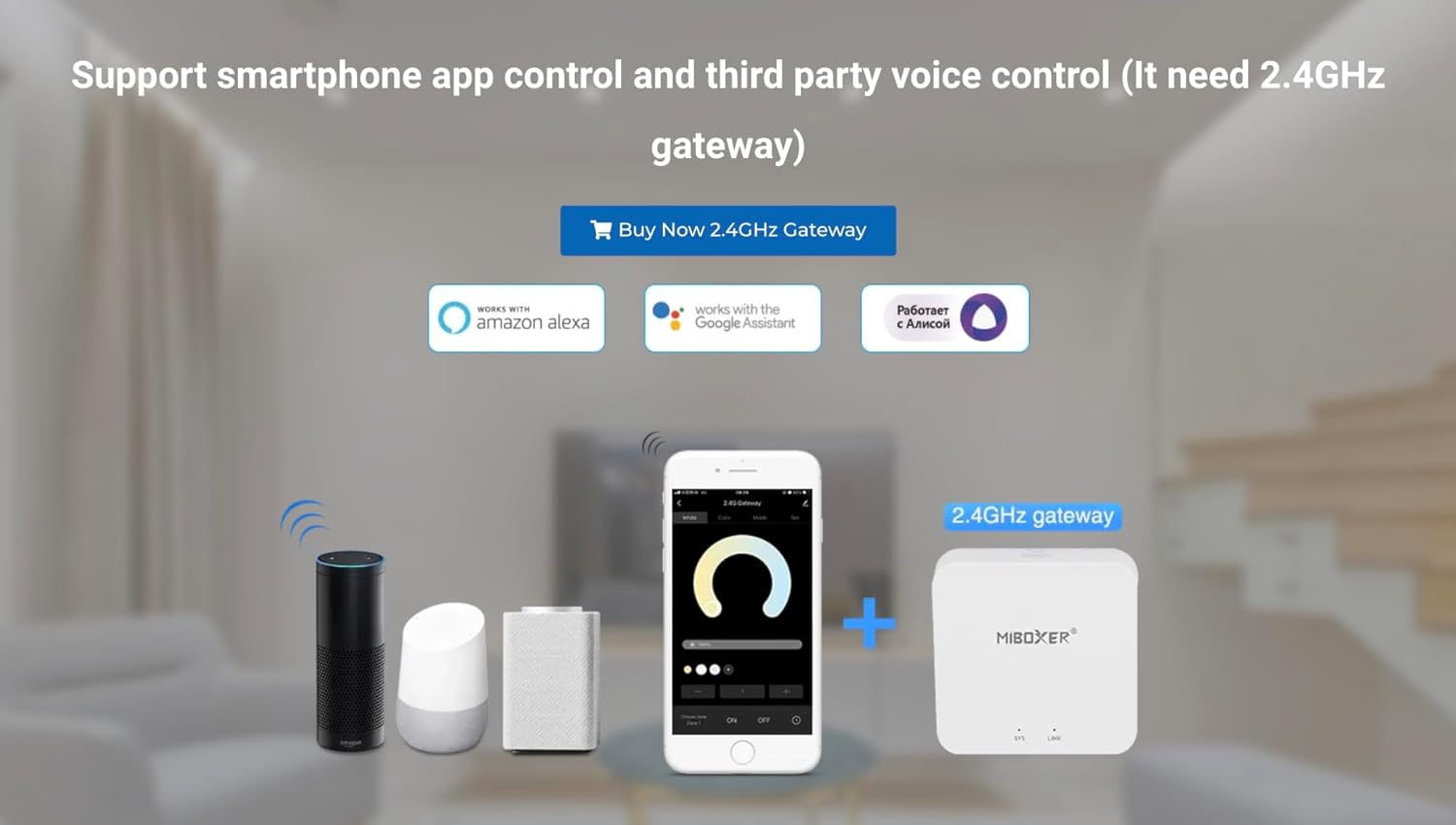
Figure 9: Diagram showing the TRI-C1 dimmer integrated with a 2.4GHz gateway for smartphone app and voice control.
Once the gateway is set up and connected to your home network, you can add the TRI-C1 dimmer to the MiBOXER app and link it to your preferred voice assistant for smart home integration.
സുരക്ഷാ, സംരക്ഷണ സവിശേഷതകൾ
The TRI-C1 dimmer incorporates features to ensure safe and reliable operation.

Figure 10: Visual representation of Trailing Edge (ELV) phase-cut technology and Overheat/Load Protection.
- Trailing Edge (ELV) Phase-Cut Technology: This technology ensures smooth and stable dimming performance, especially with LED loads, by cutting the trailing edge of the AC waveform.
- Overheat / Load Protection: The dimmer is equipped with internal mechanisms to detect and protect against overheating and excessive load conditions, enhancing safety and product longevity.
മെയിൻ്റനൻസ്
The MiBOXER TRI-C1 dimmer requires minimal maintenance. To ensure optimal performance and longevity:
- ഉപകരണം വൃത്തിയായും പൊടിയില്ലാതെയും സൂക്ഷിക്കുക. വൃത്തിയാക്കാൻ മൃദുവായതും ഉണങ്ങിയതുമായ തുണി ഉപയോഗിക്കുക.
- ഉരച്ചിലുകളുള്ള ക്ലീനറുകളോ ലായകങ്ങളോ ഉപയോഗിക്കരുത്.
- Ensure proper ventilation around the installed dimmer to prevent heat buildup.
- അമിതമായ ഈർപ്പം അല്ലെങ്കിൽ തീവ്രമായ ഊഷ്മാവിൽ ഉപകരണം തുറന്നുകാട്ടുന്നത് ഒഴിവാക്കുക.
ട്രബിൾഷൂട്ടിംഗ്
If you encounter issues with your TRI-C1 dimmer, refer to the following common troubleshooting steps:
- Light not turning on/off: Check all wiring connections to ensure they are secure. Verify that the main power supply is active.
- വെളിച്ചം മങ്ങുന്നില്ല: Ensure the connected light fixture is dimmable. Check if the dimmer is in "Breaker Mode" (on/off only). Verify proper connection of the push switch or successful pairing with the RF remote.
- മിന്നുന്ന വിളക്കുകൾ: This may indicate an incompatible bulb or an overloaded circuit. Ensure your bulbs are compatible with Triac dimmers and that the total wattage does not exceed the dimmer's maximum load capacity.
- റിമോട്ട് കൺട്രോൾ പ്രവർത്തിക്കുന്നില്ല: Check the remote's battery. Re-pair the remote with the dimmer according to the remote's instructions. Ensure you are within the 30-meter control range.
- അമിത ചൂടാക്കൽ: If the dimmer feels excessively hot, immediately disconnect power. Check for overloaded circuits or insufficient ventilation.
If problems persist, contact MiBOXER customer support for further assistance.
സ്പെസിഫിക്കേഷനുകൾ
| ഫീച്ചർ | വിശദാംശങ്ങൾ |
|---|---|
| മോഡൽ നമ്പർ | TRI-C1 |
| ഇൻപുട്ട് വോളിയംtage | AC100-240V 50 / 60Hz |
| ഔട്ട്പുട്ട് | AC100-240V 1.36A (Max) |
| പരമാവധി ലോഡ് | 150W @110V; 300W @220V |
| പ്രവർത്തന താപനില | -10~40°C |
| നിയന്ത്രണ രീതി | RF 2.4G, Push Dim |
| RF Control Distance | 30മീ |
| അളവുകൾ (L x W x H) | 49mm x 49mm x 25mm (ഏകദേശം 1.93 x 1.93 x 0.98 ഇഞ്ച്) |
| ഇനത്തിൻ്റെ ഭാരം | 2.29 ഔൺസ് |
| നിർമ്മാതാവ് | മിബോക്സർ |
| ആദ്യ തീയതി ലഭ്യമാണ് | നവംബർ 22, 2024 |
ബോക്സിൽ എന്താണുള്ളത്
ഉൽപ്പന്ന പാക്കേജിൽ സാധാരണയായി ഇവ ഉൾപ്പെടുന്നു:
- 1 x MiBOXER TRI-C1 AC Triac RF+Push Dimmer
Note: Remote controls, gateways, and light fixtures are sold separately.
വാറൻ്റിയും പിന്തുണയും
MiBOXER products are designed for reliability and performance. For information regarding product warranty, please refer to the specific warranty terms provided at the time of purchase or contact your retailer.
For technical support, troubleshooting assistance, or general inquiries, please visit the official MiBOXER store or contact their customer service department.
MiBOXER Store: https://www.amazon.com/stores/shopnowwithMiBOXER/page/0E0B0084-8D1C-47CE-90EC-8C251EF3DDF2