
TRIUMPHKEY X66
TRIUMPHKEY X66 Computer Desk with Drawers and Shelves User Manual
Model: X66 | Brand: TRIUMPHKEY
1. ആമുഖം
Thank you for choosing the TRIUMPHKEY X66 Computer Desk. This desk is designed to provide a functional and organized workspace with its integrated drawers and multi-level shelving. This manual provides essential information for assembly, operation, maintenance, and troubleshooting to ensure safe and efficient use of your new desk.

ചിത്രം 1: കഴിഞ്ഞുview of the TRIUMPHKEY X66 Computer Desk. This image displays the desk's overall design, including the integrated shelving unit and three storage drawers.
2 സുരക്ഷാ വിവരങ്ങൾ
- അസംബ്ലിക്കും ഉപയോഗത്തിനും മുമ്പ് എല്ലാ നിർദ്ദേശങ്ങളും ശ്രദ്ധാപൂർവ്വം വായിക്കുക.
- എല്ലാ ചെറിയ ഭാഗങ്ങളും പാക്കേജിംഗ് വസ്തുക്കളും കുട്ടികളിൽ നിന്ന് അകറ്റി നിർത്തുക.
- പോറലുകൾ ഉണ്ടാകാതിരിക്കാൻ മൃദുവായതും വൃത്തിയുള്ളതുമായ ഒരു പ്രതലത്തിൽ മേശ കൂട്ടിച്ചേർക്കുക.
- ഉപയോഗിക്കുന്നതിന് മുമ്പ് എല്ലാ സ്ക്രൂകളും ഫാസ്റ്റനറുകളും സുരക്ഷിതമായി മുറുക്കിയിട്ടുണ്ടെന്ന് ഉറപ്പാക്കുക. ഇടയ്ക്കിടെ പരിശോധിച്ച് ആവശ്യാനുസരണം വീണ്ടും മുറുക്കുക.
- Do not overload shelves or drawers beyond their capacity.
- മേശപ്പുറത്ത് നിൽക്കുന്നതോ ഇരിക്കുന്നതോ ഒഴിവാക്കുക.
- അസംബ്ലിക്ക് നൽകിയിരിക്കുന്ന ഹാർഡ്വെയർ മാത്രം ഉപയോഗിക്കുക.
3. പാക്കേജ് ഉള്ളടക്കം
Before beginning assembly, verify that all components are present and undamaged. If any parts are missing or damaged, please contact customer service.
- ഡെസ്ക് ടേബിൾടോപ്പ്
- മെറ്റൽ ഫ്രെയിം ഘടകങ്ങൾ
- Shelf boards (upper and lower)
- ഡ്രോയർ ഘടകങ്ങൾ (മുൻവശങ്ങൾ, വശങ്ങൾ, പിൻഭാഗങ്ങൾ, അടിഭാഗം)
- ഡ്രോയർ സ്ലൈഡുകൾ
- Assembly hardware (screws, bolts, dowels, Allen wrench)
- ഇൻസ്ട്രക്ഷൻ മാനുവൽ
4. സജ്ജീകരണവും അസംബ്ലിയും
Assembly typically requires two people. Follow the illustrated instructions provided in your package. The general steps are outlined below:
4.1 Identify Components
Familiarize yourself with the different parts of the desk. Refer to the diagram below for key components.
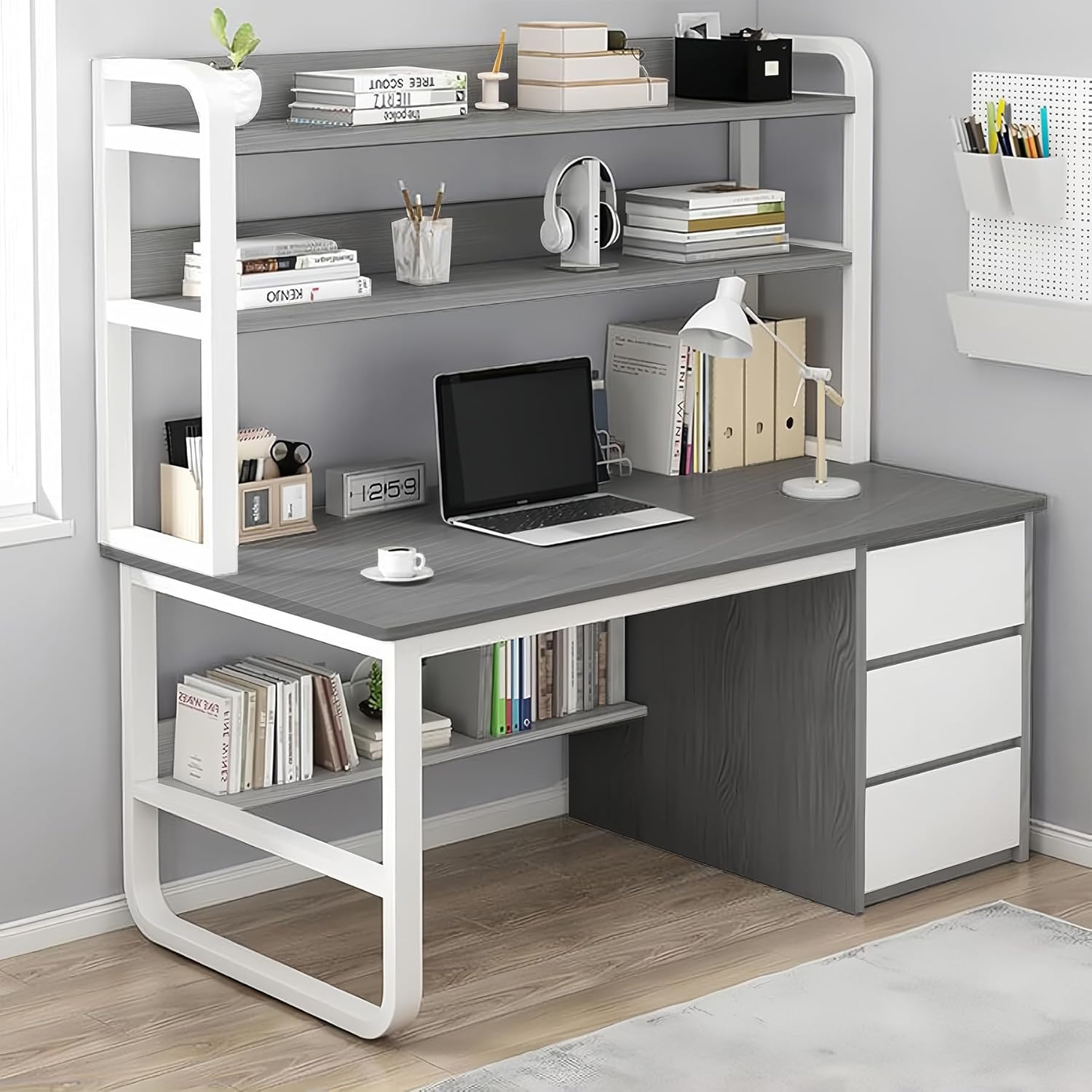
Image 2: Key components of the desk. This diagram highlights the stable frame, thick tubes, fixed steel elements, shelves, spacious desktop, rounded edges, and three large drawers.
4.2 ഫ്രെയിം കൂട്ടിച്ചേർക്കുക
Begin by connecting the metal frame components. Ensure all connections are secure but do not fully tighten screws until the entire frame is assembled to allow for minor adjustments.
4.3 Attach the Desktop
Carefully place the desktop onto the assembled frame and secure it using the provided hardware. Ensure the desktop is aligned correctly.

Image 3: Desk sections including the large countertop, two-level storage shelf, bottom shelf, and three large drawers.
4.4 ഷെൽഫുകൾ ഇൻസ്റ്റാൾ ചെയ്യുക
Mount the upper and lower shelf boards to the designated frame sections. The upper shelves provide two levels of storage, while the lower shelf is integrated beneath the desktop.
4.5 Assemble and Install Drawers
Assemble the three drawers according to the instructions, ensuring the drawer slides are correctly installed. Then, insert the assembled drawers into their respective compartments on the right side of the desk.

Image 4: Comparison showing the desk with three drawers on the left and a desk without drawers on the right, emphasizing the storage capacity provided by the drawers.
4.6 അന്തിമ മുറുക്കൽ
Once all components are in place and aligned, fully tighten all screws and fasteners. Ensure the desk is stable and level.
5. പ്രവർത്തന നിർദ്ദേശങ്ങൾ
The TRIUMPHKEY X66 Computer Desk is designed for versatile use in home offices, studies, or gaming setups.
- ഡെസ്ക്ടോപ്പ് ഉപരിതലം: The spacious desktop (100x50 cm) accommodates computer monitors, laptops, and other work essentials.
- മുകളിലെ അലമാരകൾ: Utilize the two-level upper shelving unit for organizing books, decorative items, or office supplies.
- താഴത്തെ ഷെൽഫ്: The integrated lower shelf provides additional storage for books or accessories, keeping them within easy reach.
- സ്റ്റോറേജ് ഡ്രോയറുകൾ: The three deep drawers on the right side are ideal for storing documents, stationery, and personal items, helping to maintain a tidy workspace.

Image 5: The desk in an operational setting, showcasing its capacity to hold a laptop, books, and various office accessories on its shelves and desktop.
6. പരിപാലനം
- വൃത്തിയാക്കൽ: മേശയുടെ പ്രതലങ്ങൾ മൃദുവായ, ഡി-ടച്ച് ഉപയോഗിച്ച് തുടയ്ക്കുക.amp തുണി. ഫിനിഷിന് കേടുവരുത്തുന്ന കഠിനമായ രാസവസ്തുക്കളോ ഉരച്ചിലുകളുള്ള ക്ലീനറുകളോ ഒഴിവാക്കുക.
- പൊടിയിടൽ: അടിഞ്ഞുകൂടുന്നത് തടയാൻ എല്ലാ പ്രതലങ്ങളിലും പതിവായി പൊടി തുടയ്ക്കുക.
- ഹാർഡ്വെയർ പരിശോധന: എല്ലാ സ്ക്രൂകളും ഫാസ്റ്റനറുകളും ഇറുകിയതായി ഉറപ്പാക്കാൻ ഇടയ്ക്കിടെ പരിശോധിക്കുക. സ്ഥിരത നിലനിർത്താൻ ആവശ്യമെങ്കിൽ വീണ്ടും മുറുക്കുക.
- ചോർച്ച: വസ്തുക്കൾക്ക് കറയോ കേടുപാടുകളോ ഉണ്ടാകാതിരിക്കാൻ ചോർച്ച ഉടനടി വൃത്തിയാക്കുക.
7. പ്രശ്നപരിഹാരം
- മേശ ഇളകിയിരിക്കുന്നു: Ensure all screws and bolts are fully tightened. Check that the desk is on a level surface. Adjust leg levelers if present.
- ഡ്രോയറുകൾ സുഗമമായി സ്ലൈഡ് ചെയ്യുന്നില്ല: Check that drawer slides are correctly installed and free of obstructions. Ensure the drawer components are assembled squarely.
- Parts missing during assembly: Double-check the package contents against the parts list. If parts are genuinely missing, contact customer support.
8 സ്പെസിഫിക്കേഷനുകൾ
| ഫീച്ചർ | വിശദാംശങ്ങൾ |
|---|---|
| ബ്രാൻഡ് | ട്രയംഫ്കി |
| മോഡൽ നമ്പർ | X66 |
| ഉൽപ്പന്ന അളവുകൾ (D x W x H) | 19.69"D x 39.37"W x 57.87"H (50cm D x 100cm W x 147cm H) |
| നിറം | ചാരനിറം |
| മെറ്റീരിയൽ തരം | Metal Density Board |
| ഡ്രോയറുകളുടെ എണ്ണം | 3 |
| ഷെൽഫുകളുടെ എണ്ണം | 2 (upper two-level shelf, 1 lower shelf) |
| ഡെസ്ക് ഡിസൈൻ | സംഭരണത്തോടുകൂടിയ കമ്പ്യൂട്ടർ ഡെസ്ക് |
| ശുപാർശ ചെയ്യുന്ന ഉപയോഗങ്ങൾ | Drafting, Gaming, Working, Writing |

Image 6: Dimensional drawing of the desk, showing measurements in centimeters for width, depth, and height, as well as individual shelf and drawer dimensions.
9. വാറൻ്റിയും പിന്തുണയും
For warranty information or customer support, please refer to the documentation included with your purchase or contact TRIUMPHKEY customer service. If you have any doubts during assembly, you can contact our customer service and we will provide you with a solution within 24 hours.
Ask a question about this manual
Ask about setup, troubleshooting, compatibility, parts, safety, or missing instructions. Manuals+ will review the question and use this page’s manual context to help answer it.