
1. ഓവർview
The UeeVii CPE850 Gigabit Wireless Bridge is an outdoor 5.8GHz device designed for extending network connectivity over long distances. It supports both point-to-point and point-to-multipoint configurations, making it suitable for connecting remote buildings, surveillance systems, and other outdoor network applications. With a built-in 16dBi antenna, it offers a transmission range of up to 5 kilometers (3.1 miles) in barrier-free environments and supports data transfer rates up to 1200Mbps between bridges, with a maximum achievable network speed of 450Mbps. The device is powered via 24V Power over Ethernet (PoE) for simplified installation.

Figure 1: UeeVii CPE850 Wireless Bridge long-range transmission capability.
2. പാക്കേജ് ഉള്ളടക്കം
താഴെ ലിസ്റ്റ് ചെയ്തിരിക്കുന്ന എല്ലാ ഇനങ്ങളും നിങ്ങളുടെ പാക്കേജിൽ ഉൾപ്പെടുത്തിയിട്ടുണ്ടെന്ന് ഉറപ്പാക്കുക. ഏതെങ്കിലും ഇനങ്ങൾ നഷ്ടപ്പെട്ടിട്ടുണ്ടെങ്കിലോ കേടായിട്ടുണ്ടെങ്കിലോ, ദയവായി ഉപഭോക്തൃ പിന്തുണയുമായി ബന്ധപ്പെടുക.
- 2 x CPE850 Wireless Bridge Units
- 2 x 24V/1000Mbps PoE Adapters
- 2 x 3FT Test Network Cables
- 2 x Metal Ties for mounting
- 1 x ഉപയോക്തൃ മാനുവൽ

Figure 2: Package contents of the UeeVii CPE850 Wireless Bridge.
3. ഉൽപ്പന്ന ഘടകങ്ങൾ
Each UeeVii CPE850 unit features the following components:
- ഗിഗാബിറ്റ് RJ45 പോർട്ടുകൾ: Two Ethernet ports for network connection. One port supports 100Mbps, and the other supports 1000Mbps. For optimal performance, connect to the 1000Mbps port.
- ഡിജിറ്റൽ ട്യൂബ് ഡിസ്പ്ലേ: Shows the current channel or pairing status.
- AB ബട്ടൺ: Used for setting the device as Master (A) or Slave (B) during pairing.
- റീസെറ്റ് ബട്ടൺ: ഫാക്ടറി റീസെറ്റിനായി.
- പവർ സൂചകം: പവർ സ്റ്റാറ്റസ് സൂചിപ്പിക്കുന്നു.
- WLAN Signal Lights: Multiple LEDs indicating wireless signal strength.

ചിത്രം 3: വിശദമായി view of CPE850 ports and controls.

Figure 4: Indicator lights on the CPE850 unit.
4. സജ്ജീകരണ ഗൈഡ്
4.1 Initial Power-On and Connection
- Connect one end of a network cable to the PoE port of the PoE adapter.
- Connect the other end of the network cable to either LAN1 or LAN2 port on the CPE850 unit. Ensure a secure connection.
- Plug the PoE adapter into a power outlet. The power indicator on the CPE850 unit should light up.
- Repeat these steps for the second CPE850 unit.
4.2 Pairing the Wireless Bridges (Point-to-Point)
The CPE850 units are typically pre-paired from the factory. If re-pairing is necessary or for new setups, follow these steps:
- Power on both CPE850 units as described in Section 4.1.
- On one CPE850 unit, use the A-B button to set its digital tube display to "A" (Master mode).
- On the second CPE850 unit, use the A-B button to set its digital tube display to "B" (Slave mode).
- Ensure both units are set to the same channel. Use the channel selection buttons (if available, otherwise default is usually fine for initial pairing) to match the channel number displayed on the digital tube.
- Place the two units within close proximity (e.g., on a table).
- Wait approximately one minute for the units to establish a connection. The WLAN signal lights on both units should illuminate, indicating successful pairing.
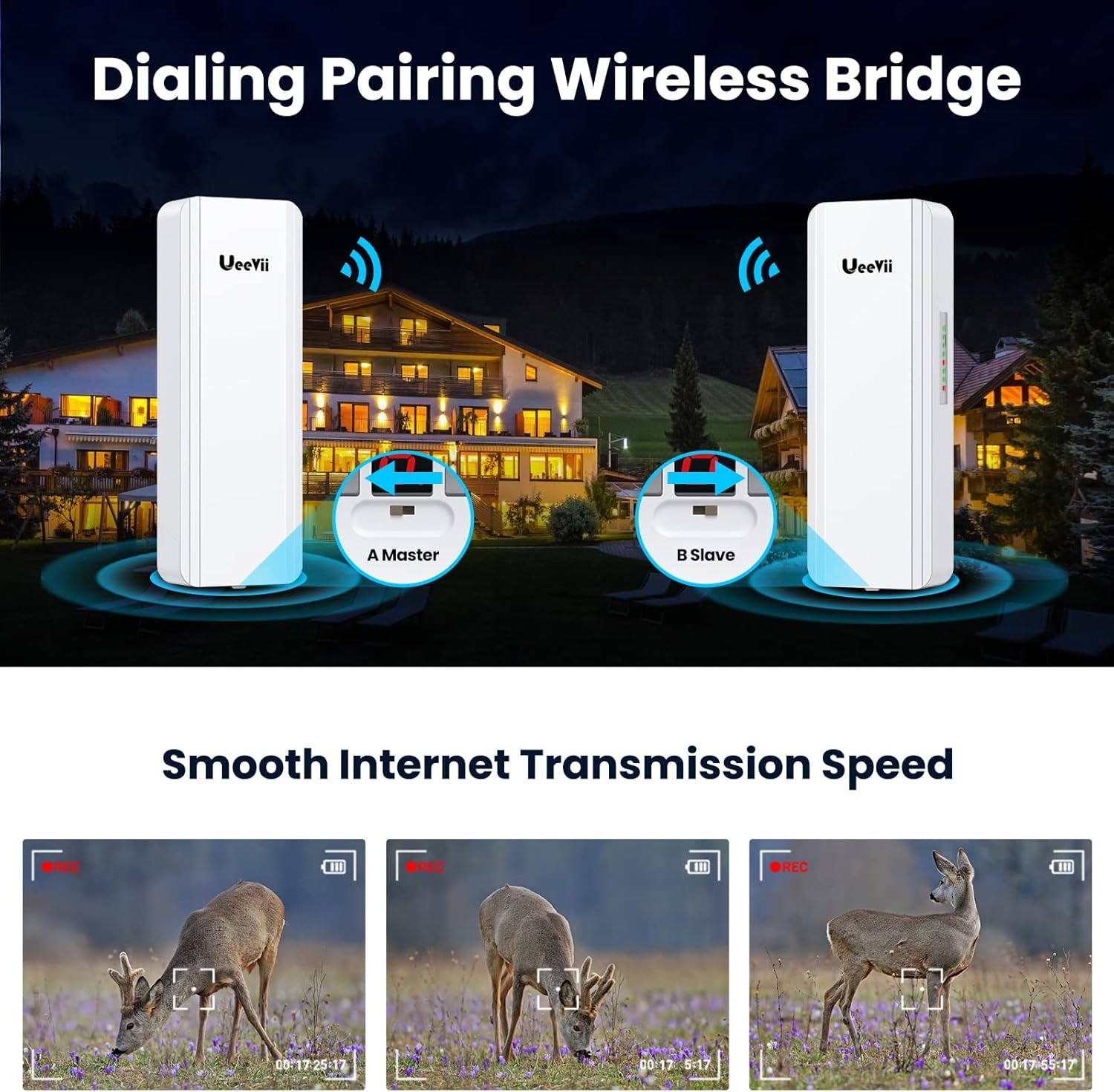
Figure 5: Dialing pairing process for Master and Slave units.
Video 1: Step-by-step guide on how to pair UeeVii CPE850 wireless bridges.
4.3 ഫിസിക്കൽ ഇൻസ്റ്റലേഷൻ
After successful pairing, install the units in their desired outdoor locations. Ensure a clear line of sight between the Master and Slave units for optimal performance. Use the provided metal ties to secure the units to poles or other suitable structures.

ചിത്രം 6: ഉദാample of outdoor installation using metal ties.
5. പ്രവർത്തന നിർദ്ദേശങ്ങൾ
5.1 Point-to-Point Network Extension
To extend your network to a second building (e.g., barn, garage, shop):
- Connect the Master CPE unit to your main router or network switch using a network cable.
- Connect the Slave CPE unit to a router, computer, or other network device in the remote building.
- Ensure both CPE units are powered via their respective PoE adapters.
- The network connection should now be extended wirelessly between the two locations.

Figure 7: Point-to-point network extension diagram.
5.2 Extending IP Camera Surveillance Range
The CPE850 can also be used to extend the range of IP camera surveillance systems:
- Connect the Master CPE unit to your DVR/NVR or network switch that manages the surveillance system.
- Connect the Slave CPE unit to the IP camera(s) or a network switch connected to the cameras in the remote area.
- Ensure both CPE units are powered via their respective PoE adapters.
- This setup allows for wireless transmission of video data from remote cameras to your central monitoring system.

Figure 8: Point-to-point camera monitoring range extension.
5.3 Point-to-Multipoint Configuration
For connecting multiple remote locations to a single central point, configure one CPE850 as a Master and multiple CPE850 units as Slaves. Each Slave unit will connect to the Master, extending the network to various secondary buildings or surveillance points.

Figure 9: Point-to-multipoint camera monitoring range extension.
വീഡിയോ 2: കഴിഞ്ഞുview of UeeVii Gigabit Outdoor Point to Point WiFi Bridge CPE850 applications, including network and surveillance extension.
6. പരിപാലനം
The UeeVii CPE850 is designed for outdoor use and is weatherproof. To ensure optimal performance and longevity:
- പതിവ് പരിശോധന: Periodically check the physical condition of the units and cables for any signs of wear, damage, or loose connections.
- വ്യക്തമായ കാഴ്ച രേഖ: Ensure that there are no new obstructions (e.g., growing trees, new buildings) blocking the line of sight between the units, as this can degrade signal quality.
- വൃത്തിയാക്കൽ: Gently clean the exterior of the units with a soft, damp cloth if dirt or debris accumulates. Do not use harsh chemicals or abrasive materials.
- ഫേംവെയർ അപ്ഡേറ്റുകൾ: നിർമ്മാതാവ് പരിശോധിക്കുക webഏറ്റവും പുതിയ സവിശേഷതകളും സുരക്ഷാ മെച്ചപ്പെടുത്തലുകളും ഉപയോഗിച്ച് ഉപകരണം പ്രവർത്തിക്കുന്നുണ്ടെന്ന് ഉറപ്പാക്കാൻ ലഭ്യമായ ഏതെങ്കിലും ഫേംവെയർ അപ്ഡേറ്റുകൾക്കായി സൈറ്റ്.

Figure 10: Weatherproof design of the CPE850.
7. പ്രശ്നപരിഹാരം
- ശക്തിയില്ല:
- Ensure the PoE adapter is securely plugged into a working power outlet.
- Verify the network cable is correctly connected from the PoE adapter's PoE port to the CPE unit.
- Pairing Failure / No Signal:
- Confirm both units are powered on.
- Check that one unit is set to "A" (Master) and the other to "B" (Slave) using the A-B button.
- രണ്ട് യൂണിറ്റുകളും ഒരേ ചാനലിലേക്ക് സജ്ജീകരിച്ചിട്ടുണ്ടെന്ന് ഉറപ്പാക്കുക.
- Ensure there is a clear line of sight between the units and they are within range.
- If issues persist, try resetting both units to factory defaults using the reset button and re-attempt pairing.
- കുറഞ്ഞ നെറ്റ്വർക്ക് വേഗത:
- Ensure network cables are connected to the 1000Mbps port on the CPE units for optimal speed.
- Check for obstructions in the line of sight between the units.
- Verify signal strength using the WLAN signal lights on the units. Adjust alignment if necessary.
- മറ്റ് 5.8GHz ഉപകരണങ്ങളിൽ നിന്നുള്ള ഇടപെടൽ കുറയ്ക്കുക.
- Automatic Re-pairing after Power Restoration:
The CPE850 is designed to automatically re-establish its connection after a power outage, provided the previous pairing settings are intact.
8 സ്പെസിഫിക്കേഷനുകൾ
| ഫീച്ചർ | വിശദാംശങ്ങൾ |
|---|---|
| ബ്രാൻഡ് | UeeVii |
| മോഡലിൻ്റെ പേര് | CPE850 |
| പ്രത്യേക ഫീച്ചർ | കാലാവസ്ഥാ പ്രതിരോധം |
| ഫ്രീക്വൻസി ബാൻഡ് ക്ലാസ് | സിംഗിൾ-ബാൻഡ് (5.8GHz) |
| വയർലെസ് കമ്മ്യൂണിക്കേഷൻ സ്റ്റാൻഡേർഡ് | 802.11എ, 802.11എസി, 802.11എൻ |
| അനുയോജ്യമായ ഉപകരണങ്ങൾ | Personal Computer, Router, Security Camera, Smartphone, Starlink |
| ശുപാർശ ചെയ്യുന്ന ഉപയോഗങ്ങൾ | Outdoor network extension |
| കണക്റ്റിവിറ്റി ടെക്നോളജി | ഇഥർനെറ്റ്, വൈ-ഫൈ |
| നിറം | വെള്ള |
| ആൻ്റിന സ്ഥാനം | ഔട്ട്ഡോർ |
| ആൻ്റിന തരം | Fixed, 16dBi Directional |
| ഓപ്പറേറ്റിംഗ് സിസ്റ്റം | റൂട്ടർഒഎസ് |
| സുരക്ഷാ പ്രോട്ടോക്കോൾ | WPS, WPA2, WPA3 |
| തുറമുഖങ്ങളുടെ എണ്ണം | 2 (RJ45) |
| Data Transfer Rate (between bridges) | 1200 Mbps വരെ |
| Maximum Achievable Network Speed | 450 Mbps |
| വാല്യംtage | 24 Volts (PoE) |
| കവറേജ് | Up to 5 kilometers (barrier-free) |
| Wi-Fi ജനറേഷൻ | വൈഫൈ 5 |
| Router Network Type | പാലം |
9. വാറൻ്റിയും പിന്തുണയും
For warranty information, technical support, or further assistance with your UeeVii CPE850 Wireless Bridge, please refer to the official UeeVii webസൈറ്റിൽ ബന്ധപ്പെടുക അല്ലെങ്കിൽ അവരുടെ ഉപഭോക്തൃ സേവനവുമായി നേരിട്ട് ബന്ധപ്പെടുക. വാറന്റി ക്ലെയിമുകൾക്കായി നിങ്ങളുടെ വാങ്ങൽ രസീത് സൂക്ഷിക്കുക.
UeeVii Official Store: സ്റ്റോർ സന്ദർശിക്കുക