
ആമുഖം
This manual provides detailed instructions for the installation, operation, and maintenance of your AZDOME GS63Pro Dash Cam. Please read this manual thoroughly before using the product to ensure proper function and safety. Keep this manual for future reference.
പാക്കേജ് ഉള്ളടക്കം
താഴെ ലിസ്റ്റ് ചെയ്തിരിക്കുന്ന എല്ലാ ഇനങ്ങളും നിങ്ങളുടെ പാക്കേജിൽ ഉൾപ്പെടുത്തിയിട്ടുണ്ടെന്ന് ഉറപ്പാക്കുക:
- AZDOME GS63Pro 4K Dash Cam (Front Camera)

Image: The main 4K dash camera unit.
- 1080P Rear Camera (with 6m/20ft cable)

Image: The rear camera unit with its connecting cable.
- ഇരട്ട യുഎസ്ബി കാർ ചാർജർ
- 360° 3M Sticky Mount
- 360° സക്ഷൻ മൗണ്ട്
- Type-C Charging Cable (3.5m/12ft)
- കേബിൾ ക്ലിപ്പുകൾ (x5)
- ഇൻസ്റ്റലേഷൻ ടൂൾ
- Electrostatic Stickers (2 Large, 2 Small)
- ഉപയോക്തൃ മാനുവൽ
ഉൽപ്പന്നം കഴിഞ്ഞുview
Main Unit (Front Camera)
The front camera features a 2.4-inch LCD screen, lens, and control buttons. It records in 4K UHD resolution.
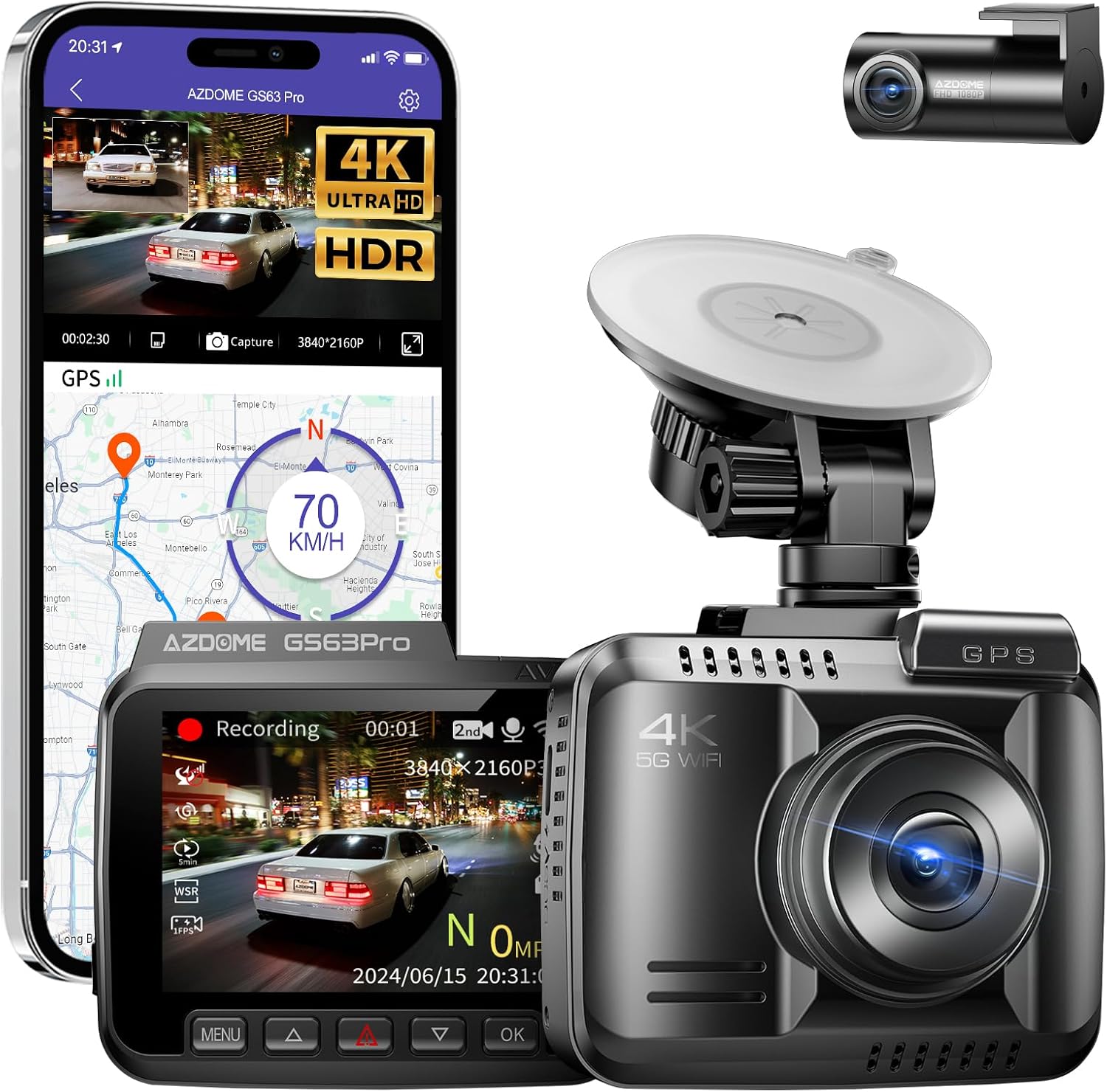
ചിത്രം: മുൻഭാഗം view of the AZDOME GS63Pro dash camera, showing the lens and screen.
പിൻ ക്യാമറ
The rear camera provides 1080P FHD recording and connects to the main unit via a cable.
Image: The compact rear camera unit.
പ്രധാന സവിശേഷതകൾ
- Integrated 128GB eMMC Storage: Eliminates the need for an external SD card, providing stable and reliable recording.
- Dual Recording (4K Front + 1080P Rear): വ്യക്തവും വിശദവുമായ foo പകർത്തുന്നുtage from both front and rear views.

Image: Illustration showing simultaneous 4K front and 1080P rear recording.
- HDR/WDR Technology: Enhances image quality in varying light conditions, especially for night vision, using an advanced 4-megapixel OS04A10 image sensor.

Image: Comparison of normal and HDR/WDR enhanced night vision footage.
- 5.8GHz വൈഫൈ കണക്റ്റിവിറ്റി: Allows seamless connection to the AZDOME app on your smartphone for viewing, playback, downloading, and sharing videos.

Image: Diagram illustrating 5.8GHz WiFi connection to a smartphone app for control and data transfer.
- അന്തർനിർമ്മിത ജിപിഎസ്: Records accurate route and speed information, viewable via the AZDOME app player.

Image: Screenshot of the AZDOME app showing GPS route tracking on a map.
- 24 മണിക്കൂർ പാർക്കിംഗ് നിരീക്ഷണം: (Requires optional hardwire kit) Detects impacts via G-sensor and records automatically. Supports time-lapse recording.

Image: Benefits of the AZDOME OBD hardwire kit for parking monitoring, including intelligent recognition and low voltagഇ നിരീക്ഷണം.
- കോംപാക്റ്റ് ഡിസൈൻ: Minimizes obstruction of driver's view.
സജ്ജമാക്കുക
1. Initial Power-On and Language Settings
- Connect the dash cam to a power source using the provided car charger.
- ഉപകരണം യാന്ത്രികമായി ഓണാകും.
- On the screen, select your preferred language (e.g., English).
- Set the correct time zone (e.g., GMT+9 for Japan).
- തീയതിയും സമയവും ക്രമീകരിക്കുക.
Note: Before permanent installation, it is recommended to test the main unit and rear camera by connecting them to power to ensure they function correctly.
2. ഡാഷ് കാം മൌണ്ട് ചെയ്യുന്നു
Choose a mounting location on your windshield that does not obstruct your view. Clean the windshield surface thoroughly before applying the mount.
- സക്ഷൻ മൗണ്ട് ഉപയോഗിച്ച്: Attach the suction mount to the windshield and secure the dash cam.
- Using the 3M Sticky Mount: Apply an electrostatic sticker to the windshield first, then attach the 3M sticky mount to the sticker. This allows for easier removal without leaving residue.

ചിത്രം: ഉദാample of the dash cam mounted on a windshield.
3. Installing the Rear Camera
Mount the rear camera on the rear windshield. Route the rear camera cable neatly along the car's interior trim to the front dash cam unit. Use the provided cable clips and installation tool to hide the cable.

Image: Illustration of routing the rear camera cable.
4. പവർ കണക്ഷൻ
Connect the Type-C charging cable to the dash cam and plug the dual USB car charger into your vehicle's cigarette lighter socket. The dash cam will power on and begin recording automatically when the vehicle starts.
പ്രവർത്തന നിർദ്ദേശങ്ങൾ
അടിസ്ഥാന റെക്കോർഡിംഗ്
- യാന്ത്രിക റെക്കോർഡിംഗ്: The dash cam starts recording automatically when powered on.
- ലൂപ്പ് റെക്കോർഡിംഗ്: The device records in continuous loops, overwriting the oldest files when the storage is full. Important files can be locked to prevent overwriting.
- ജി-സെൻസർ: In case of a sudden impact or collision, the G-sensor automatically locks the current recording to prevent it from being overwritten.
മെനു നാവിഗേഷൻ
Use the buttons on the dash cam to navigate through the menu options. The specific button functions (Menu, Up, Down, OK) are typically labeled on the device or explained in the quick start guide.
- വീഡിയോ മിഴിവ്: Adjust front and rear camera resolutions.
- ലൂപ്പ് റെക്കോർഡിംഗ് ദൈർഘ്യം: Set the length of each video segment (e.g., 1, 3, 5 minutes).
- ജി-സെൻസർ സെൻസിറ്റിവിറ്റി: ആഘാത കണ്ടെത്തലിന്റെ സംവേദനക്ഷമത ക്രമീകരിക്കുക.
- എക്സ്പോഷർ കോമ്പൻസേഷൻ: Fine-tune brightness levels.
- തീയതി/സമയം സെൻ്റ്amp: Enable or disable the date and time display on recordings.
Using the AZDOME App (5.8GHz WiFi)
- Download the "AZDOME" app from the App Store (iOS) or Google Play Store (Android).

Image: Screenshot showing the AZDOME app interface and download options.
- നിങ്ങളുടെ സ്മാർട്ട്ഫോണിൽ വൈഫൈ ഓണാക്കുക.
- On the dash cam, enable WiFi (refer to the dash cam's menu).
- Connect your smartphone to the dash cam's WiFi network (SSID: AZDOME-GS63Pro-XXXX, Password: 12345678).
- Open the AZDOME app to view തത്സമയംtage, റെക്കോർഡ് ചെയ്ത വീഡിയോകൾ പ്ലേബാക്ക് ചെയ്യുക, ഡൗൺലോഡ് ചെയ്യുക files to your phone, or share them.
The 5.8GHz WiFi offers faster download speeds compared to 2.4GHz.
ജിപിഎസ് പ്രവർത്തനം
The built-in GPS module automatically records your driving route and speed. This data can be viewed using the AZDOME app player on your smartphone or computer.
Parking Monitoring (Optional)
To enable 24-hour parking monitoring, an optional hardwire kit (AZDOME OBD Hardwire Kit) is required. This kit provides continuous power to the dash cam after the engine is turned off, protecting against various risks.
- G-Sensor Detection: If an impact is detected while parked, the dash cam will automatically power on and record a short video, then lock the file.
- ചലനം കണ്ടെത്തൽ: The dash cam can be set to record when motion is detected in front of the vehicle.
- സമയദൈർഘ്യ റെക്കോർഡിംഗ്: Records continuously at a low frame rate (e.g., 1 frame per second) to save storage space while covering a long period.
Image: Benefits of the AZDOME OBD hardwire kit for parking monitoring, including intelligent recognition and low voltagഇ നിരീക്ഷണം.

Image: Diagram showing multiple protection features of the hardwire kit, such as safety protection, input short circuit protection, and output overvoltagഇ സംരക്ഷണം.
ADAS (Advanced Driver-Assistance System)
The GS63Pro may include ADAS features to enhance driving safety. These typically include:
- പാത പുറപ്പെടൽ മുന്നറിയിപ്പ്: Alerts you if your vehicle drifts out of its lane.
- ഫോർവേഡ് കൂട്ടിയിടി മുന്നറിയിപ്പ്: മുന്നിലുള്ള വാഹനവുമായി കൂട്ടിയിടിക്കാനുള്ള സാധ്യതയെക്കുറിച്ച് മുന്നറിയിപ്പ് നൽകുന്നു.
- Pedestrian Collision Warning: Alerts you to potential collisions with pedestrians.

Image: Visual representation of ADAS features: lane departure warning, forward collision warning, and pedestrian collision warning.
മെയിൻ്റനൻസ്
- വൃത്തിയാക്കൽ: Use a soft, dry cloth to clean the camera lens and screen. Avoid using abrasive cleaners or solvents.
- ഫേംവെയർ അപ്ഡേറ്റുകൾ: Periodically check the AZDOME official website for firmware updates to ensure optimal performance and new features.
- ഡാറ്റ ബാക്കപ്പ്: Regularly download important video files to your computer or cloud storage to prevent loss.
- താപനില: Avoid exposing the dash cam to extreme temperatures (hot or cold) for extended periods, as this can affect battery life and device performance.
ട്രബിൾഷൂട്ടിംഗ്
| പ്രശ്നം | സാധ്യമായ കാരണം / പരിഹാരം |
|---|---|
| ഡാഷ് ക്യാം പവർ ഓൺ ചെയ്യുന്നില്ല. |
|
| റെക്കോർഡിംഗ് അപ്രതീക്ഷിതമായി നിലയ്ക്കുന്നു. |
|
| വീഡിയോ footage മങ്ങിയതോ അവ്യക്തമോ ആണ്. |
|
| ആപ്പിലെ വൈഫൈ കണക്ഷൻ പ്രശ്നങ്ങൾ. |
|
| Parking monitoring not working. |
|
സ്പെസിഫിക്കേഷനുകൾ
| ഫീച്ചർ | വിശദാംശങ്ങൾ |
|---|---|
| ബ്രാൻഡ് | അസ്ഡോം |
| മോഡലിൻ്റെ പേര് | GS63Pro |
| വീഡിയോ റെസല്യൂഷൻ | Front: 4K (3840x2160P), Rear: 1080P |
| ആന്തരിക സംഭരണം | 128GB eMMC |
| കണക്റ്റിവിറ്റി | 5.8G വൈഫൈ, ജിപിഎസ് |
| പ്രത്യേക സവിശേഷതകൾ | HDR/WDR, App Control, Night Vision, G-Sensor, Parking Monitor (optional hardwire kit required) |
| ഫീൽഡ് View | 150 ഡിഗ്രി |
| സ്ക്രീൻ വലിപ്പം | 2.4 ഇഞ്ച് എൽസിഡി |
| അപ്പേർച്ചർ | F1.8 |
| അളവുകൾ (D x W x H) | 4 x 8 x 7 സെ.മീ |
| ഭാരം | 150 ഗ്രാം |
വാറൻ്റിയും പിന്തുണയും
The AZDOME GS63Pro Dash Cam comes with a 12 മാസത്തെ നിർമ്മാതാവിന്റെ വാറന്റി വാങ്ങിയ തീയതി മുതൽ. സാധാരണ ഉപയോഗത്തിലുള്ള മെറ്റീരിയലുകളിലെയും വർക്ക്മാൻഷിപ്പുകളിലെയും വൈകല്യങ്ങൾ ഈ വാറന്റി ഉൾക്കൊള്ളുന്നു.
For technical support, troubleshooting assistance, or warranty claims, please contact AZDOME customer service through their official website or the retailer where you purchased the product. Please have your purchase receipt and product model number ready when contacting support.
കൂടുതൽ വിവരങ്ങൾക്ക്, സന്ദർശിക്കുക AZDOME ഔദ്യോഗിക സ്റ്റോർ.