
RadioShack Home Projector
റേഡിയോഷാക്ക് ഹോം പ്രൊജക്ടർ ഉപയോക്തൃ മാനുവൽ
Model: Home Projector (ASIN: B0DP1GFG9L)
1. ആമുഖം
This manual provides essential instructions for the safe and efficient operation of your RadioShack Home Projector. Please read this manual thoroughly before using the device and retain it for future reference.
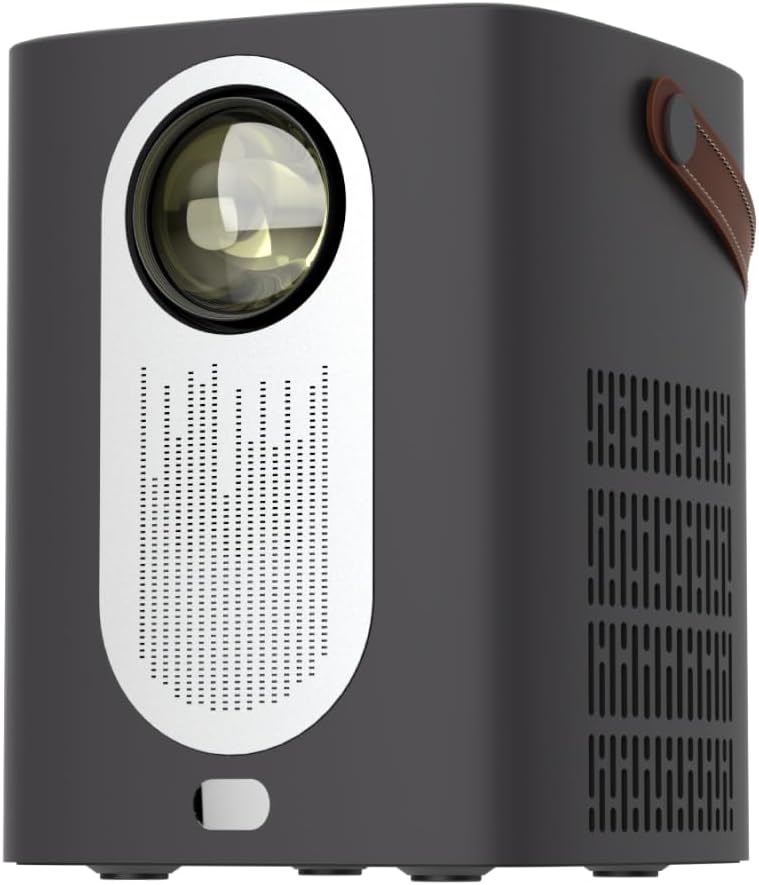
ചിത്രം 1.1: മുൻഭാഗം view of the RadioShack Home Projector, showcasing its lens and speaker grille.
2. പാക്കേജ് ഉള്ളടക്കം
പാക്കേജിൽ എല്ലാ ഇനങ്ങളും ഉണ്ടെന്ന് ഉറപ്പാക്കുക:
- 1 x RadioShack Home Projector
- 1 x റിമോട്ട് കൺട്രോൾ
- 1 x പവർ കേബിൾ
- 1 x ഉപയോക്തൃ മാനുവൽ (ഈ പ്രമാണം)

Image 2.1: Illustration of the package contents, including the projector, remote control, power cable, and user manual.
3. ഉൽപ്പന്നം കഴിഞ്ഞുview
3.1 പ്രധാന സവിശേഷതകൾ
- ഉയർന്ന മിഴിവുള്ള ഡിസ്പ്ലേ: Supports full HD resolution for clear and detailed images.
- Bright and Long-Lasting: Features impressive brightness and a durable light source.
- ബഹുമുഖ കണക്റ്റിവിറ്റി: Includes Bluetooth, WiFi, Android Miracast, and iOS Cast for streaming.
- മെച്ചപ്പെടുത്തി Viewing: Digital focus and keystone correction for optimal image alignment.
- ഒതുക്കമുള്ളതും പോർട്ടബിൾ: Lightweight design with a handle for easy transport.
3.2. പോർട്ടുകളും നിയന്ത്രണങ്ങളും
Familiarize yourself with the projector's input/output ports and controls.

ചിത്രം 3.1: പിൻഭാഗം view of the projector showing USB input for media playback, AV input for DVD players, and HDMI input for various devices like video game consoles, streaming sticks, cell phones, tablets, and laptops.

ചിത്രം 3.2: വശം view illustrating the compact dimensions (approximately 7 inches tall, 5.3 inches wide) and the integrated leather handle for portability.
4. സജ്ജീകരണ ഗൈഡ്
4.1. പ്രാരംഭ പവർ ഓൺ
- പ്രൊജക്ടറിലേക്കും അനുയോജ്യമായ ഒരു പവർ ഔട്ട്ലെറ്റിലേക്കും പവർ കേബിൾ ബന്ധിപ്പിക്കുക.
- Press the power button located on the top of the projector or on the remote control to turn on the device. The indicator light will illuminate.
- The RadioShack logo will appear on the projection surface, indicating successful power-on.
Video 4.1: A short demonstration showing the unboxing, connecting the power cable, powering on the projector, and the initial display of the RadioShack logo.
4.2. Placement and Focus
- Place the projector on a stable, flat surface, ensuring the lens is unobstructed.
- Adjust the distance from the projection surface (wall or screen) to achieve the desired image size.
- Use the digital focus adjustment (refer to the remote control or on-screen menu) to sharpen the image.
- Utilize keystone correction if the image appears trapezoidal, to achieve a rectangular projection.
5. പ്രവർത്തന നിർദ്ദേശങ്ങൾ
5.1. ഉപകരണങ്ങൾ ബന്ധിപ്പിക്കുന്നു
പ്രൊജക്ടർ ഒന്നിലധികം ഇൻപുട്ട് ഉറവിടങ്ങളെ പിന്തുണയ്ക്കുന്നു:
- എച്ച്ഡിഎംഐ: Connect devices such as laptops, gaming consoles, streaming boxes, or Blu-ray players using an HDMI cable. Select HDMI as the input source from the projector's menu.
- USB: Insert a USB drive to play compatible video or audio files. Select USB as the input source.
- ഓഫ്: Connect older devices like DVD players using an AV cable. Select AV as the input source.
- ബ്ലൂടൂത്ത്: Pair with Bluetooth audio devices for wireless sound output.
- WiFi / Casting: Connect to a Wi-Fi network to enable Android Miracast or iOS Cast for screen mirroring from compatible smartphones and tablets.

Image 5.1: A couple enjoying content projected by the RadioShack Home Projector, demonstrating its use in a home cinema setting.
5.2. വിദൂര നിയന്ത്രണ പ്രവർത്തനങ്ങൾ
The included remote control allows for convenient operation:
- ശക്തി: പ്രൊജക്ടർ ഓൺ/ഓഫ് ചെയ്യുക.
- ഉറവിടം: Select input sources (HDMI, USB, AV, etc.).
- നാവിഗേഷൻ: Arrow keys to navigate menus, OK button to confirm.
- വോളിയം: ഓഡിയോ ഔട്ട്പുട്ട് ലെവൽ ക്രമീകരിക്കുക.
- ഫോക്കസ്/കീസ്റ്റോൺ: Access digital focus and keystone correction settings.

Image 5.2: The RadioShack Home Projector placed on a table next to its remote control, ready for use.
6. പരിപാലനം
- ലെൻസ് വൃത്തിയാക്കൽ: പ്രൊജക്ടർ ലെൻസ് സൌമ്യമായി തുടയ്ക്കാൻ ഒപ്റ്റിക്കൽ ലെൻസുകൾക്കായി പ്രത്യേകം രൂപകൽപ്പന ചെയ്ത മൃദുവായ, ലിന്റ് രഹിത തുണി ഉപയോഗിക്കുക. ഉരച്ചിലുകളുള്ള വസ്തുക്കളോ കഠിനമായ രാസവസ്തുക്കളോ ഒഴിവാക്കുക.
- പുറം വൃത്തിയാക്കൽ: മൃദുവായതും ഉണങ്ങിയതുമായ തുണി ഉപയോഗിച്ച് പ്രൊജക്ടറിന്റെ പുറംഭാഗം തുടയ്ക്കുക. ലിക്വിഡ് ക്ലീനറുകൾ ഉപകരണത്തിൽ നേരിട്ട് ഉപയോഗിക്കരുത്.
- വെൻ്റിലേഷൻ: പ്രൊജക്ടറിന്റെ വെന്റിലേഷൻ ഓപ്പണിംഗുകൾ പൊടിയിൽ നിന്നും തടസ്സങ്ങളിൽ നിന്നും മുക്തമാണെന്ന് ഉറപ്പാക്കുക, അങ്ങനെ അമിതമായി ചൂടാകുന്നത് തടയുക.
- സംഭരണം: ദീർഘനേരം ഉപയോഗിക്കാത്തപ്പോൾ, പ്രൊജക്ടർ തണുത്തതും വരണ്ടതുമായ സ്ഥലത്ത് സൂക്ഷിക്കുക, നേരിട്ടുള്ള സൂര്യപ്രകാശത്തിൽ നിന്നും കടുത്ത താപനിലയിൽ നിന്നും അകറ്റി നിർത്തുക.
7. പ്രശ്നപരിഹാരം
| പ്രശ്നം | സാധ്യമായ കാരണം | പരിഹാരം |
|---|---|---|
| ചിത്രമൊന്നും പ്രദർശിപ്പിച്ചിട്ടില്ല | Power cable disconnected; incorrect input source selected; lens cap on. | Check power connection; select correct input source (HDMI, USB, AV); remove lens cap. |
| ചിത്രം മങ്ങിയതാണ് | ഫോക്കസ് ക്രമീകരിച്ചിട്ടില്ല; പ്രൊജക്ടർ സ്ക്രീനിൽ നിന്ന് വളരെ അടുത്താണ്/അകലെയാണ്. | Adjust digital focus; reposition projector for optimal distance. |
| ശബ്ദമില്ല | Volume too low; external audio device not connected/paired; incorrect audio output selected. | Increase volume; ensure Bluetooth device is paired or wired audio is connected; check audio output settings. |
| റിമോട്ട് കൺട്രോൾ പ്രവർത്തിക്കുന്നില്ല | Batteries depleted; obstruction between remote and projector. | Replace remote control batteries; ensure clear line of sight to the projector's IR receiver. |
8 സ്പെസിഫിക്കേഷനുകൾ
- ബ്രാൻഡ്: റേഡിയോഷാക്ക്
- മോഡൽ: Home Projector (ASIN: B0DP1GFG9L)
- ഡിസ്പ്ലേ റെസല്യൂഷൻ: 1280 x 720 (Supports Full HD)
- കണക്റ്റിവിറ്റി ടെക്നോളജി: AV, HDMI, USB, Bluetooth, WiFi (Android Miracast, iOS Cast)
- പ്രത്യേക സവിശേഷതകൾ: Portable, Digital Focus, Keystone Correction
- ശുപാർശ ചെയ്യുന്ന ഉപയോഗം: ഹോം സിനിമ
- ഉൽപ്പന്ന അളവുകൾ: 5.31 x 5.31 x 7.09 ഇഞ്ച്
- ഇനത്തിൻ്റെ ഭാരം: 3.91 പൗണ്ട്

Image 8.1: The projector displaying content, highlighting its support for full HD resolution and high-quality sound.
9. വാറൻ്റിയും പിന്തുണയും
For warranty information and technical support, please refer to the official RadioShack webസൈറ്റിൽ ബന്ധപ്പെടുക അല്ലെങ്കിൽ അവരുടെ ഉപഭോക്തൃ സേവനവുമായി ബന്ധപ്പെടുക. വാങ്ങിയതിന്റെ തെളിവായി നിങ്ങളുടെ വാങ്ങൽ രസീത് സൂക്ഷിക്കുക.
ഓൺലൈൻ പിന്തുണ: www.റേഡിയോഷാക്ക്.കോം
Ask a question about this manual
Ask about setup, troubleshooting, compatibility, parts, safety, or missing instructions. Manuals+ will review the question and use this page’s manual context to help answer it.