
Mini 3D Hologram Cube Display
GeekMagic Mini 3D Hologram Cube Display User Manual
Smart Weather Station & Digital Clock
ആമുഖം
The GeekMagic Mini 3D Hologram Cube Display is a versatile desktop device that combines a digital clock, smart weather station, and customizable display. It features a unique transparent design and WiFi connectivity to provide real-time weather information, time, date, and indoor temperature. This manual provides essential information for setting up, operating, and maintaining your device.

Image: The GeekMagic Mini 3D Hologram Cube Display, showcasing its transparent, black, and white color options, presented in a lifestyle setting with individuals exchanging gifts.
ഉൽപ്പന്നം കഴിഞ്ഞുview
The device is compact and designed for desktop use. It features a transparent casing (for the transparent model) allowing visibility of internal components, enhancing its aesthetic appeal. Key functions include time display, date display, indoor temperature monitoring, and real-time weather updates via WiFi.

ചിത്രം: മുൻഭാഗം view of the transparent model, highlighting its display screen and "GeekMagic" branding.

ചിത്രം: മുൻഭാഗം view of the black model, showing its textured finish and "GeekMagic" branding.
സജ്ജമാക്കുക
- അൺബോക്സിംഗ്: Carefully remove the device from its packaging. Ensure all components are present: the GeekMagic Mini 3D Hologram Cube Display unit and its power cable.
- പവർ കണക്ഷൻ: Connect the provided power cable to the device's power input port. Plug the other end into a standard electrical outlet. The device should power on automatically.
- പ്രാരംഭ ബൂട്ട്-അപ്പ്: Allow a few moments for the device to boot up. The display will typically show a welcome screen or a prompt for WiFi setup.
- വൈഫൈ കോൺഫിഗറേഷൻ:
- Follow the on-screen instructions to connect to your local WiFi network. This usually involves selecting your network name (SSID) and entering the password using the device's controls (if any) or a companion mobile application (if applicable, check product packaging for app details).
- A stable WiFi connection is crucial for real-time weather updates and accurate time synchronization.
- പ്ലേസ്മെൻ്റ്: Place the device on a stable, flat surface indoors, away from direct sunlight or extreme temperatures to ensure accurate temperature readings and optimal display visibility.
പ്രവർത്തന നിർദ്ദേശങ്ങൾ
Once set up, the GeekMagic Mini 3D Hologram Cube Display operates largely automatically, displaying relevant information. Specific functions are detailed below:
- സമയ പ്രദർശനം: The device automatically synchronizes with network time via WiFi, ensuring accurate time display.
- തീയതി പ്രദർശനം: The current date is displayed alongside the time.
- കാലാവസ്ഥ വിവരം: Real-time weather data, including temperature and conditions, is retrieved via WiFi. Ensure your location settings are correctly configured (if prompted during setup or via app) for accurate local weather.
- ഇൻഡോർ താപനില: The device features an internal sensor to display the current indoor temperature.
- Customizable Display (Photo Album/GIF Animation): The device supports customizable content such as photo albums or GIF animations. Refer to the specific instructions provided with your product or via the companion mobile application for details on uploading and managing custom content. This feature allows for personalization of your display.
മെയിൻ്റനൻസ്
Proper maintenance ensures the longevity and optimal performance of your GeekMagic Mini 3D Hologram Cube Display.
- വൃത്തിയാക്കൽ: Use a soft, dry, lint-free cloth to gently wipe the display screen and the device's exterior. Avoid using abrasive cleaners, solvents, or aerosol sprays, as these can damage the plastic material and display.
- പൊടി നീക്കം: Regularly dust the device to prevent accumulation, especially around vents or openings, to ensure proper airflow if applicable.
- പരിസ്ഥിതി വ്യവസ്ഥകൾ: Keep the device in a dry environment. Avoid exposure to excessive humidity, direct water, or extreme temperatures.
- പവർ ഓഫ്: If storing the device for an extended period, disconnect it from the power source.
ട്രബിൾഷൂട്ടിംഗ്
| പ്രശ്നം | സാധ്യമായ കാരണം | പരിഹാരം |
|---|---|---|
| ഉപകരണം പവർ ഓണാക്കുന്നില്ല. | വൈദ്യുതി ഇല്ല; കേബിൾ തകരാറിലാണ്. | Ensure the power cable is securely connected to both the device and the power outlet. Try a different outlet. |
| No weather information or incorrect time. | No WiFi connection; incorrect location settings. | Check WiFi connection status. Reconfigure WiFi if necessary. Verify location settings in the device's settings or companion app. Ensure your router is functioning correctly. |
| ഡിസ്പ്ലേ മങ്ങിയതോ വായിക്കാൻ കഴിയാത്തതോ ആണ്. | Ambient light too bright; display settings. | Move the device away from direct bright light. Check if there are brightness settings that can be adjusted (refer to product-specific controls or app). |
| Custom content (photos/GIFs) not displaying. | തെറ്റാണ് file format; upload error; storage full. | Ensure content is in the supported format and resolution. Re-attempt upload. Check available storage on the device if applicable. Consult the companion app for specific content management instructions. |
സ്പെസിഫിക്കേഷനുകൾ
- ഉൽപ്പന്നത്തിൻ്റെ പേര്: GeekMagic Mini 3D Hologram Cube Display
- മോഡൽ: Mini 3D Hologram Cube Display (Transparent variant: B0DP289TFY)
- ഉൽപ്പന്ന വലുപ്പം: ഏകദേശം 3.5 x 3.1 x 3.8 സെ.മീ (1.4 x 1.2 x 1.5 ഇഞ്ച്)
- മെറ്റീരിയൽ: പ്ലാസ്റ്റിക്
- നിറം: Transparent (other variants available: Black, White)
- ഡിസ്പ്ലേ തരം: ഡിജിറ്റൽ
- കണക്റ്റിവിറ്റി: വൈഫൈ
- ഉപയോഗം: ഇൻഡോർ
- പ്രവർത്തന രീതി: Manual (for initial setup/configuration)
- മൗണ്ടിംഗ് തരം: ടേബിൾടോപ്പ്
- ഊർജ്ജ സ്രോതസ്സ്: Wired (No batteries included for operation)
- മാതൃരാജ്യം: ചൈന
- ആദ്യം ലഭ്യമായത്: നവംബർ 26, 2024
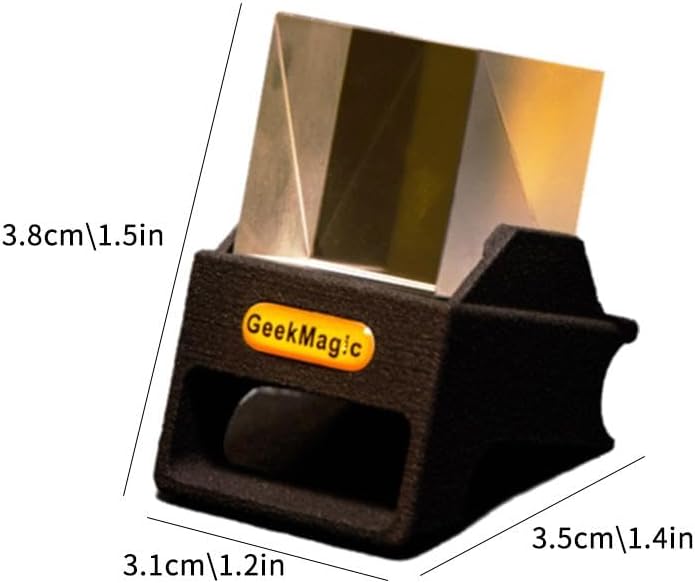
Image: Dimensional diagram of the device, illustrating its compact size.
വാറൻ്റി വിവരങ്ങൾ
This product is typically covered by a standard manufacturer's warranty against defects in materials and workmanship. The specific duration and terms of the warranty may vary. Please retain your proof of purchase for warranty claims. For detailed warranty information, refer to the documentation included with your product or contact the seller directly.
Note: Warranty terms are subject to the policies of the seller and manufacturer.
ഉപഭോക്തൃ പിന്തുണ
If you encounter any issues or have questions regarding your GeekMagic Mini 3D Hologram Cube Display that are not covered in this manual, please contact the seller or manufacturer for assistance. When contacting support, please have your product model and purchase information ready.
For general inquiries or to report a problem, you may refer to the contact information provided on the product packaging or the online retailer's support page where the product was purchased.
Ask a question about this manual
Ask about setup, troubleshooting, compatibility, parts, safety, or missing instructions. Manuals+ will review the question and use this page’s manual context to help answer it.