
1. ആമുഖം
This manual provides comprehensive instructions for the installation, operation, and maintenance of the DS-2CE19H8T-AIT3ZF TurboHD 5MP Outdoor Ultra Low-Light Bullet Analog Camera. This high-performance surveillance camera is designed for outdoor use, offering superior image quality and advanced features for various security applications.
Key features include a 5MP High-Performance CMOS sensor, up to 2560 x 1944 resolution, a 2.7 mm to 13.5 mm motorized varifocal lens for flexible viewing angles, and EXIR 2.0 technology providing an infrared range of up to 260 feet (80 meters) for clear night vision. The camera also boasts 130dB True WDR (Wide Dynamic Range) and 3D Digital Noise Reduction (DNR) for optimal image capture in challenging lighting conditions, and is IP67 rated for weather resistance.
2 സുരക്ഷാ വിവരങ്ങൾ
- ഇൻസ്റ്റാളേഷനും പ്രവർത്തനത്തിനും മുമ്പ് എല്ലാ നിർദ്ദേശങ്ങളും ശ്രദ്ധാപൂർവ്വം വായിക്കുക.
- Ensure the power supply meets the camera's requirements to prevent damage.
- ക്യാമറ വേർപെടുത്താനോ പരിഷ്കരിക്കാനോ ശ്രമിക്കരുത്. എല്ലാ സേവനങ്ങളും യോഗ്യതയുള്ള ഉദ്യോഗസ്ഥരെ ഏൽപ്പിക്കുക.
- അനധികൃത പ്രവേശനം തടയുന്നതിന് ക്യാമറ സുരക്ഷിതമായ ഒരു സ്ഥലത്ത് സ്ഥാപിക്കുക അല്ലെങ്കിൽ ടി.ampഎറിംഗ്.
- Avoid pointing the camera directly at strong light sources, as this may affect image quality and potentially damage the sensor.
- Clean the camera lens with a soft, dry cloth. Do not use harsh chemicals or abrasive cleaners.
3. പാക്കേജ് ഉള്ളടക്കം
Please check the package contents upon unpacking. If any items are missing or damaged, contact your supplier immediately.
- DS-2CE19H8T-AIT3ZF Bullet Analog Camera (1 unit)
- മൗണ്ടിംഗ് സ്ക്രൂകളും വാൾ പ്ലഗുകളും
- ഇൻസ്റ്റലേഷൻ ടെംപ്ലേറ്റ് (ഉൾപ്പെടുത്തിയിട്ടുണ്ടെങ്കിൽ)
- ദ്രുത ആരംഭ ഗൈഡ് (ഈ പ്രമാണം പൂർണ്ണ മാനുവലായി പ്രവർത്തിക്കുന്നു)
- Power Adapter (may be sold separately)
4. സജ്ജീകരണവും ഇൻസ്റ്റാളേഷനും
The DS-2CE19H8T-AIT3ZF camera is designed for outdoor use and features an IP67 weather resistance rating, making it suitable for various environmental conditions.
4.1 ക്യാമറ കഴിഞ്ഞുview
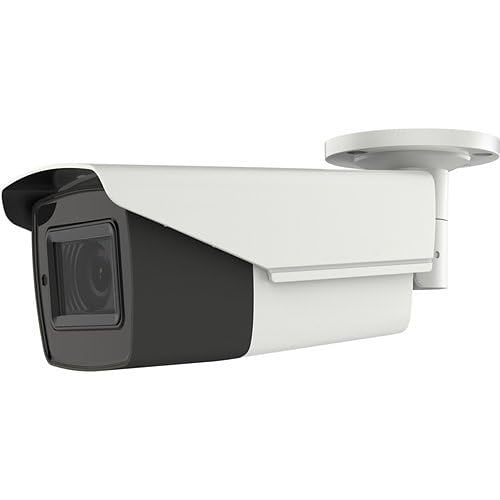
An image showing the DS-2CE19H8T-AIT3ZF 5MP Outdoor Ultra Low-Light Bullet Analog Camera. The camera is white and black, with a cylindrical body and an integrated mounting bracket. The lens is visible at the front.
4.2 മ ing ണ്ടിംഗ് സ്ഥാനം
Choose a suitable mounting location that provides the desired viewing angle and coverage. The camera supports ceiling mount installation. Ensure the mounting surface is strong enough to support the camera's weight. Consider factors such as lighting conditions, potential obstructions, and proximity to power and video cables.
4.3 ഇൻസ്റ്റലേഷൻ ഘട്ടങ്ങൾ
- മൗണ്ടിംഗ് ഉപരിതലം തയ്യാറാക്കുക: Use the provided installation template (if available) to mark the drilling holes on the wall or ceiling.
- തുളകൾ: Drill pilot holes at the marked positions. Insert wall plugs if mounting on masonry.
- Secure the Camera Base: Attach the camera's mounting base to the surface using the supplied screws.
- കേബിളുകൾ ബന്ധിപ്പിക്കുക:
- Connect the coaxial video cable from the camera to your Digital Video Recorder (DVR). The camera supports TVI/AHD/CVI/CVBS multiprotocol output.
- Connect the power cable to the camera's power input and to a suitable power source.
- ക്യാമറ ആംഗിൾ ക്രമീകരിക്കുക: Loosen the adjustment screws on the camera bracket to position the camera for the desired field of view. Tighten the screws once the angle is set.
- Focus and Zoom (Varifocal Lens): The 2.7 mm to 13.5 mm motorized varifocal lens allows for remote adjustment of zoom and focus. This can typically be done through the DVR's OSD (On-Screen Display) menu via Up-the-Coax control.
5. ക്യാമറ പ്രവർത്തിപ്പിക്കുക
Once installed and connected to a compatible DVR, the DS-2CE19H8T-AIT3ZF camera will begin transmitting video.
5.1 Video Output and Recording
The camera provides a 5MP high-definition analog output. Ensure your DVR supports 5MP resolution for optimal viewing and recording quality. Refer to your DVR's manual for instructions on viewing live feeds, configuring recording schedules, and playing back recorded footage.
5.2 വിപുലമായ സവിശേഷതകൾ
- Motorized Varifocal Lens: Adjust the focal length (zoom) and focus remotely via the DVR's OSD menu. This allows for fine-tuning the field of view without physically accessing the camera.
- EXIR 2.0 Technology & Smart IR: The camera's EXIR 2.0 technology provides powerful infrared illumination up to 260 ft (80 m) for clear night vision. Smart IR automatically adjusts the intensity of the infrared LEDs to prevent overexposure of objects closer to the camera.
- 130dB True WDR: Wide Dynamic Range technology balances extremely bright and dark areas in the same scene, ensuring clear images even in high-contrast lighting conditions.
- 3D Digital Noise Reduction (DNR): Reduces image noise, especially in low-light conditions, resulting in clearer and sharper video.
- Multiprotocol Output: The camera supports TVI, AHD, CVI, and CVBS video formats, making it compatible with a wide range of DVRs. The output format can typically be switched via the OSD menu or a physical switch on the camera/cable (refer to specific product documentation).
6. പരിപാലനം
നിങ്ങളുടെ ക്യാമറയുടെ ദീർഘായുസ്സും മികച്ച പ്രകടനവും ഉറപ്പാക്കാൻ പതിവ് അറ്റകുറ്റപ്പണികൾ സഹായിക്കുന്നു.
- വൃത്തിയാക്കൽ: Periodically clean the camera's lens and housing with a soft, lint-free cloth. For stubborn dirt, a slightly damp cloth can be used, followed by a dry cloth. Do not use abrasive cleaners, solvents, or strong detergents.
- കേബിൾ പരിശോധന: Regularly inspect all cables for signs of wear, damage, or corrosion. Ensure connections are secure.
- ഫേംവെയർ അപ്ഡേറ്റുകൾ: നിർമ്മാതാവ് പരിശോധിക്കുക website for any available firmware updates. Firmware updates can improve performance, add new features, or fix bugs. Follow the update instructions carefully.
- പരിസ്ഥിതി പരിശോധനകൾ: Ensure the camera's mounting remains secure and that no new obstructions are blocking its field of view.
7. പ്രശ്നപരിഹാരം
നിങ്ങളുടെ ക്യാമറയിൽ പ്രശ്നങ്ങൾ നേരിടുകയാണെങ്കിൽ, താഴെ പറയുന്ന പൊതുവായ പ്രശ്നങ്ങളും പരിഹാരങ്ങളും പരിശോധിക്കുക.
| പ്രശ്നം | സാധ്യമായ കാരണം | പരിഹാരം |
|---|---|---|
| വീഡിയോ ഔട്ട്പുട്ട് ഇല്ല | No power; Loose video cable; Incorrect video format; DVR incompatibility | Check power connection; Secure video cable; Ensure camera output matches DVR input (TVI/AHD/CVI/CVBS); Verify DVR supports 5MP resolution. |
| Poor image quality (blurry/grainy) | Lens dirty; Incorrect focus; Low light conditions; Interference | Clean lens; Adjust focus using OSD; Ensure adequate lighting or rely on IR; Check cable quality and connections. |
| രാത്രി കാഴ്ച പ്രവർത്തിക്കുന്നില്ല | IR LEDs faulty; Insufficient power; Smart IR settings | Check power supply; Verify IR settings in OSD; Contact support if LEDs are not illuminating. |
| Motorized lens not responding | No Up-the-Coax control; DVR incompatibility; Cable issue | Ensure DVR supports Up-the-Coax control; Check coaxial cable for damage; Refer to DVR manual for OSD access. |
8 സ്പെസിഫിക്കേഷനുകൾ
Detailed technical specifications for the DS-2CE19H8T-AIT3ZF camera:
- മോഡലിൻ്റെ പേര്: HX-BL19H8TA3
- സെൻസർ: 5MP High-Performance CMOS
- വീഡിയോ ക്യാപ്ചർ റെസല്യൂഷൻ: 2560 x 1944 വരെ
- ലെൻസ്: 2.7 mm to 13.5 mm Motorized Varifocal Lens
- IR ശ്രേണി: Up to 260 ft (80 m) with EXIR 2.0 technology
- ചലനാത്മക ശ്രേണി: 130dB ട്രൂ WDR
- ശബ്ദം കുറയ്ക്കൽ: 3D Digital Noise Reduction (DNR)
- കണക്റ്റിവിറ്റി ടെക്നോളജി: Wired (Coaxial)
- Output Protocols: TVI/AHD/CVI/CVBS (Multiprotocol Output)
- നിയന്ത്രണം: Up-the-Coax control capability
- ഇൻഡോർ/ഔട്ട്ഡോർ ഉപയോഗം: ഔട്ട്ഡോർ
- കാലാവസ്ഥ പ്രതിരോധം: IP67 റേറ്റുചെയ്തത്
- മൗണ്ടിംഗ് തരം: സീലിംഗ് മൗണ്ട്
- ശക്തി: DC 12V (Power adapter typically sold separately; check product label for exact requirements)
- അളവുകൾ: ഏകദേശം 6 x 6 x 6 ഇഞ്ച്
- നിർമ്മാതാവ്: ഹൈക്വിഷൻ
9. വാറൻ്റിയും പിന്തുണയും
For specific warranty information, please refer to the warranty card included with your product or contact the retailer from whom you purchased the camera. Warranty terms and conditions may vary by region and seller.
For technical support, troubleshooting assistance beyond this manual, or inquiries about replacement parts, please contact your product supplier or the manufacturer's official support channels.