
1. ഉൽപ്പന്നം കഴിഞ്ഞുview
This user manual provides essential information for the proper use and care of your protective case designed specifically for the Acer Iconia A10-21 Tablet running Android 14. This case offers comprehensive protection, enhanced usability, and a comfortable experience for your device.
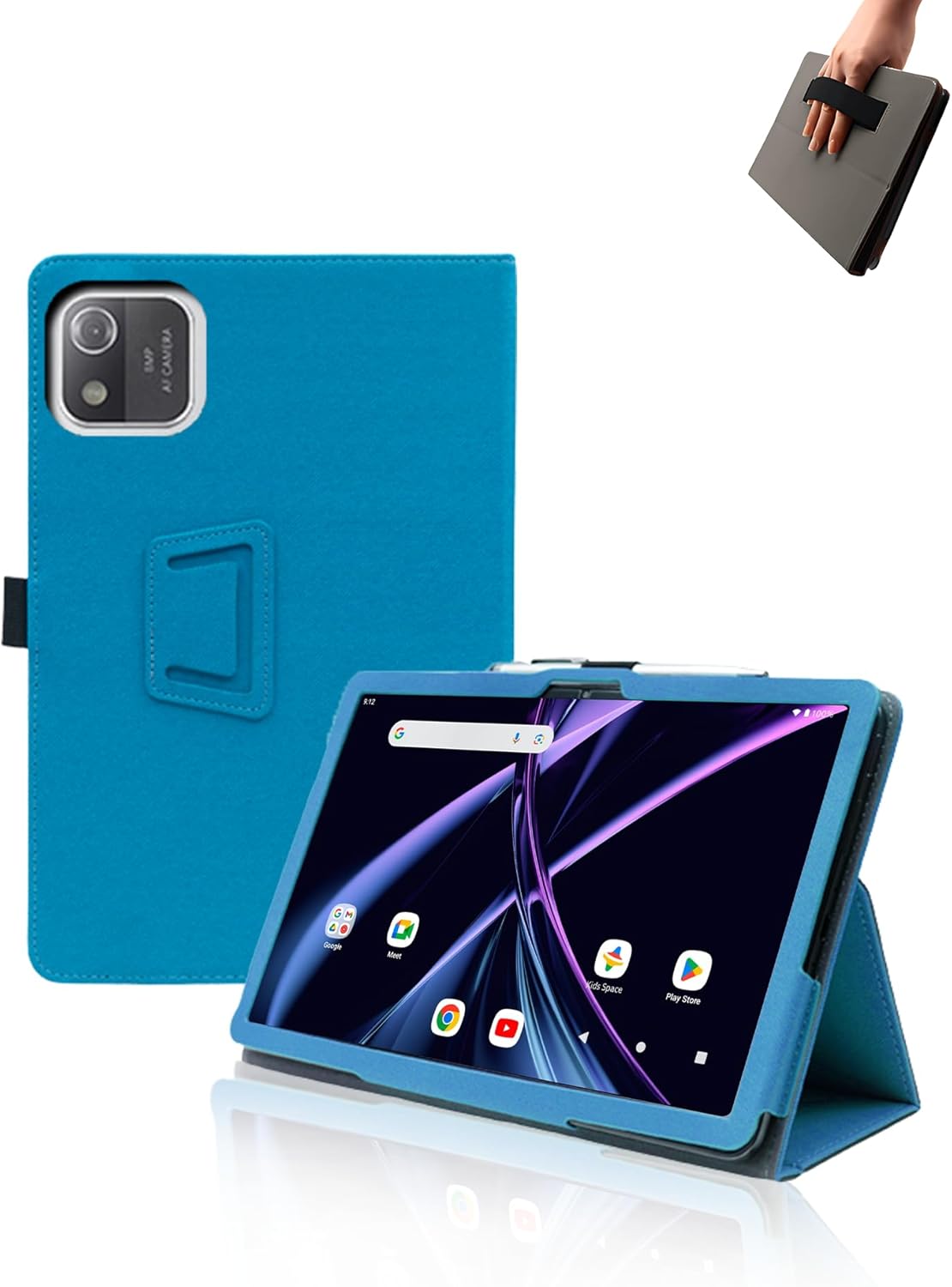
ചിത്രം 1: ഓവർview of the Acer Iconia A10-21 Tablet Case, highlighting its design and features.
The case is crafted from high-quality faux leather, providing a comfortable and skin-friendly feel while ensuring durability. Its slim design offers full protection without adding excessive bulk, making it ideal for daily use, travel, and various activities.
2. സജ്ജീകരണവും ഇൻസ്റ്റാളേഷനും
This case is exclusively designed for the Acer Iconia A10-21 Tablet (New Android 14). It is not compatible with other tablet models. Please ensure your device matches this model for a proper fit.
- നിങ്ങളുടെ ടാബ്ലെറ്റ് തയ്യാറാക്കുക: Ensure your Acer Iconia A10-21 Tablet is clean and free of dust or debris.
- ടാബ്ലെറ്റ് ഇടുക: Gently align your tablet with the case's frame. Carefully push the tablet into the case, ensuring all corners and edges are securely seated within the protective shell. The case is designed for easy installation and removal without scratching the tablet.
- ഫിറ്റ് പരിശോധിക്കുക: Once inserted, check that all ports, buttons, and the camera are accessible through the precise cutouts of the case.
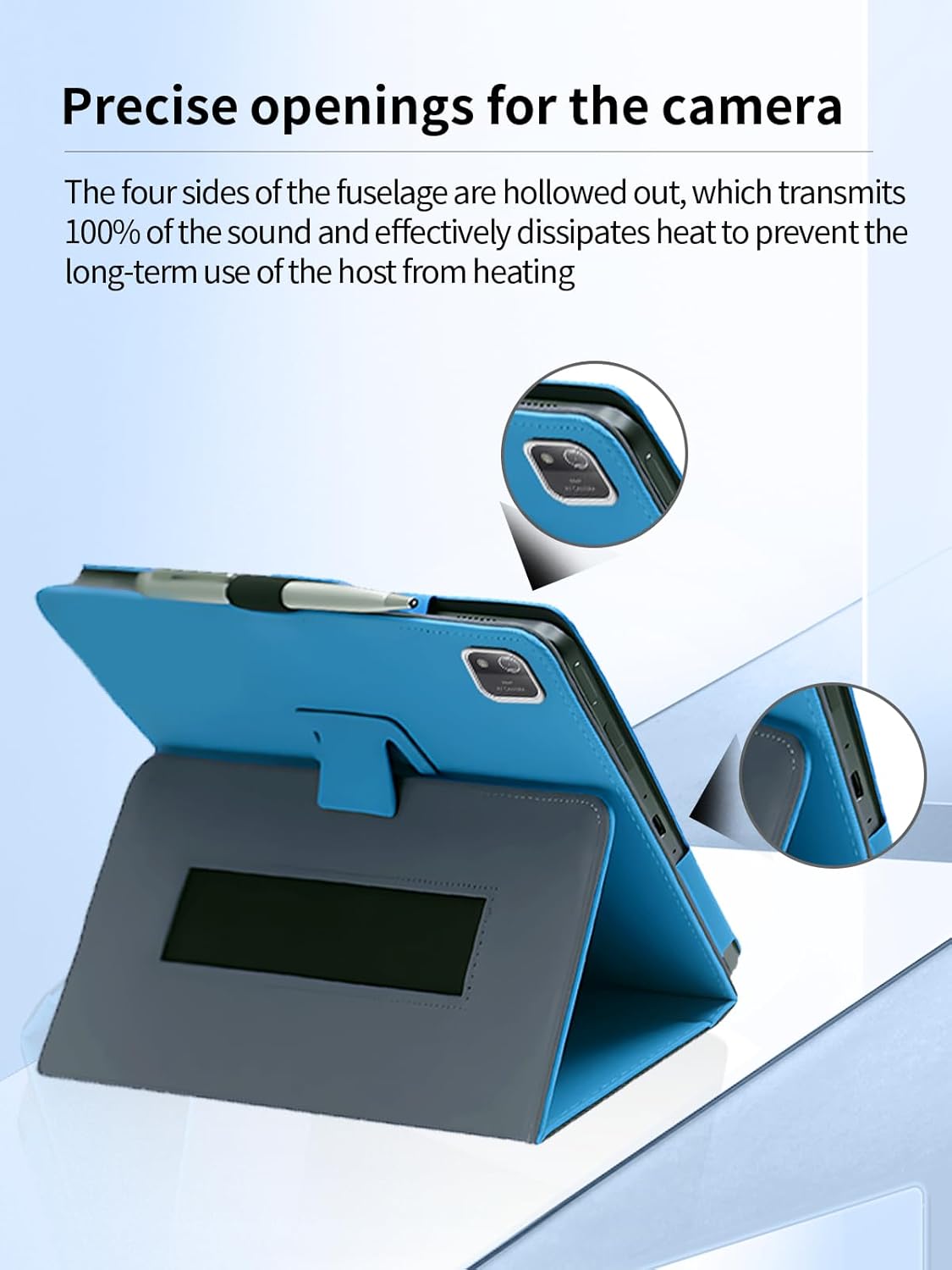
Figure 2: Precise openings ensure full access to tablet features and effective heat dissipation.
The case is designed to wrap the entire tablet, providing comprehensive protection against drops and impacts, minimizing the risk of damage to your device.

Figure 3: The case provides full wrap-around protection to prevent damage from accidental drops.
3. Operating the Case Features
3.1 Stand Function
The case features a versatile stand function, offering two distinct viewing angles to enhance your tablet experience for various activities.
- 65° Viewഇൻ ആംഗിൾ: Ideal for watching movies, video calls, or general viewing, providing a comfortable upright position.
- 30° Typing Angle: Perfect for typing, drawing, or browsing, offering a more ergonomic low-angle position.

Figure 4: The case offers two convenient viewഒപ്റ്റിമൽ സൗകര്യത്തിനായി കോണുകൾ.
3.2 Hand Strap Function
A built-in soft hand strap is integrated into the case, providing a secure and comfortable grip. This feature is particularly useful for holding the device during outdoor activities, while traveling, or when using it with children, reducing the risk of accidental drops.

Figure 5: The integrated hand strap provides a secure and comfortable grip.

Figure 6: The case enhances productivity and portability for various tasks.
4. പരിപാലനവും പരിചരണവും
To ensure the longevity and appearance of your tablet case, follow these maintenance guidelines:
- വൃത്തിയാക്കൽ: The high-quality faux leather material is easy to clean. Use a soft, damp cloth to wipe away dust and light stains. Avoid harsh chemicals or abrasive cleaners.
- കറ പ്രതിരോധം: The material is resistant to oil and stains, making it easy to maintain its pristine condition.
- ഈട്: The case is designed to be wear-resistant and not easily deform, even with regular use.
- ജല പ്രതിരോധം: Please note that this case is വാട്ടർ റെസിസ്റ്റൻ്റ് അല്ല. Avoid exposing it to water or excessive moisture.

Figure 7: Key material properties for easy maintenance and durability.
5. പ്രശ്നപരിഹാരം
If you encounter any issues with your tablet case, please refer to the following common solutions:
- കേസ് യോജിക്കുന്നില്ല: This case is specifically designed for the Acer Iconia A10-21 Tablet (New Android 14). If it does not fit, please verify your tablet's model number. This case is not compatible with other tablet models.
- Difficulty Inserting/Removing Tablet: Ensure you are aligning the tablet correctly. The material is flexible but requires gentle, firm pressure for insertion. Do not force the tablet into the case.
- Ports/Buttons Not Accessible: Double-check that the tablet is fully seated within the case and aligned with all cutouts.
6 സ്പെസിഫിക്കേഷനുകൾ
| മോഡൽ നമ്പർ | ഐക്കോണിയ എ10-21 |
| അനുയോജ്യമായ ഉപകരണങ്ങൾ | Acer Iconia A10-21 |
| മെറ്റീരിയൽ | വ്യാജമായത് |
| നിറം | ഇളം നീല |
| ഫോം ഫാക്ടർ | കേസ് |
| പ്രത്യേക സവിശേഷതകൾ | Slim Fit, Hand Strap, Stand Function |
| ഇനത്തിൻ്റെ ഭാരം | 5.9 ഔൺസ് |
| പാക്കേജ് അളവുകൾ | 9.84 x 7.76 x 0.91 ഇഞ്ച് |
| ജല പ്രതിരോധ നില | വാട്ടർ റെസിസ്റ്റൻ്റ് അല്ല |
| നിർമ്മാതാവ് | UYRUREL |
7. വാറൻ്റിയും പിന്തുണയും
We are committed to providing high-quality after-sales service for your product. If you encounter any problems with your case or its packaging, please do not hesitate to contact us.
Our customer support team aims to provide a satisfactory solution within 24 hours of your inquiry. For assistance, please refer to the contact information provided with your purchase or on the product's retail page.