
1. ആമുഖം
വാങ്ങിയതിന് നന്ദി.asing the Generic L018 Projector. This portable projector is designed to deliver a high-quality home theater experience with its Native 1080P resolution, 650 ANSI Lumens brightness, and 4K support. Featuring Android 11, Wi-Fi 6, Bluetooth 5.2, and automatic keystone correction and focus, it offers versatile entertainment options for various environments, including bedrooms, home theaters, outdoor settings, and gaming.

Figure 1.1: The L018 Projector, showcasing its compact design and included remote control. The projected image highlights its visual capabilities.

Figure 1.2: Versatile applications of the L018 Projector, suitable for gaming, bedroom viewing, dedicated home theaters, and outdoor movie nights.
2 പ്രധാനപ്പെട്ട സുരക്ഷാ വിവരങ്ങൾ
പ്രൊജക്ടർ ഉപയോഗിക്കുന്നതിന് മുമ്പ് എല്ലാ സുരക്ഷാ നിർദ്ദേശങ്ങളും ശ്രദ്ധാപൂർവ്വം വായിക്കുക. ഭാവിയിലെ റഫറൻസിനായി ഈ മാനുവൽ സൂക്ഷിക്കുക.
- l ചെയ്യുമ്പോൾ പ്രൊജക്ടർ ലെൻസിലേക്ക് നേരിട്ട് നോക്കരുത്amp ഓണാണ്. തിളക്കമുള്ള വെളിച്ചം കണ്ണിന് കേടുപാടുകൾ വരുത്തിയേക്കാം.
- ശരിയായ വായുസഞ്ചാരം ഉറപ്പാക്കുക. വായുസഞ്ചാര ദ്വാരങ്ങൾ തടയരുത്.
- തീയോ വൈദ്യുതാഘാതമോ തടയാൻ പ്രൊജക്ടർ മഴയിലോ ഈർപ്പത്തിലോ തുറന്നുകാട്ടരുത്.
- നിർമ്മാതാവ് വ്യക്തമാക്കിയ അറ്റാച്ച്മെൻ്റുകൾ/ആക്സസറികൾ മാത്രം ഉപയോഗിക്കുക.
- ഇടിമിന്നൽ ഉണ്ടാകുമ്പോഴോ ദീർഘനേരം ഉപയോഗിക്കാതിരിക്കുമ്പോഴോ പ്രൊജക്ടർ പ്ലഗ് ഊരിവയ്ക്കുക.
- എല്ലാ സേവനങ്ങളും യോഗ്യതയുള്ള സേവന ഉദ്യോഗസ്ഥർക്ക് റഫർ ചെയ്യുക.
3. പാക്കേജ് ഉള്ളടക്കം
നിങ്ങളുടെ പാക്കേജിൽ എല്ലാ ഇനങ്ങളും ഉണ്ടെന്ന് ഉറപ്പാക്കുക:
- Generic L018 Projector
- റിമോട്ട് കൺട്രോൾ
- പവർ അഡാപ്റ്റർ (വ്യക്തമായി പട്ടികപ്പെടുത്തിയിട്ടില്ല, പക്ഷേ പ്രവർത്തനത്തിനായി സൂചിപ്പിച്ചിരിക്കുന്നു)
- ഉപയോക്തൃ മാനുവൽ (ഈ പ്രമാണം)
4. ഉൽപ്പന്നം കഴിഞ്ഞുview
Familiarize yourself with the components of your L018 Projector.

Figure 4.1: Key features and components of the L018 Projector, highlighting its advanced capabilities.
4.1. ഇൻ്റർഫേസുകൾ
The projector includes various ports for connectivity:
- USB പോർട്ട്: USB സംഭരണ ഉപകരണങ്ങൾ ബന്ധിപ്പിക്കുന്നതിന്.
- എച്ച്ഡിഎംഐ പോർട്ട്: For connecting external video sources like laptops, gaming consoles, or Blu-ray players.
- ഓഡിയോ ഔട്ട്പുട്ട്: ബാഹ്യ സ്പീക്കറുകളോ ഹെഡ്ഫോണുകളോ ബന്ധിപ്പിക്കുന്നതിന്.
- പവർ ഇൻപുട്ട്: പവർ അഡാപ്റ്റർ ബന്ധിപ്പിക്കുന്നതിന്.
5. സജ്ജീകരണം
5.1. പ്ലേസ്മെന്റ്
The L018 Projector features a 360° removable adjustable stand, allowing for flexible placement and projection angles. You can easily rotate and tilt the projector to achieve the perfect viewing angle on a wall, ceiling, or screen.
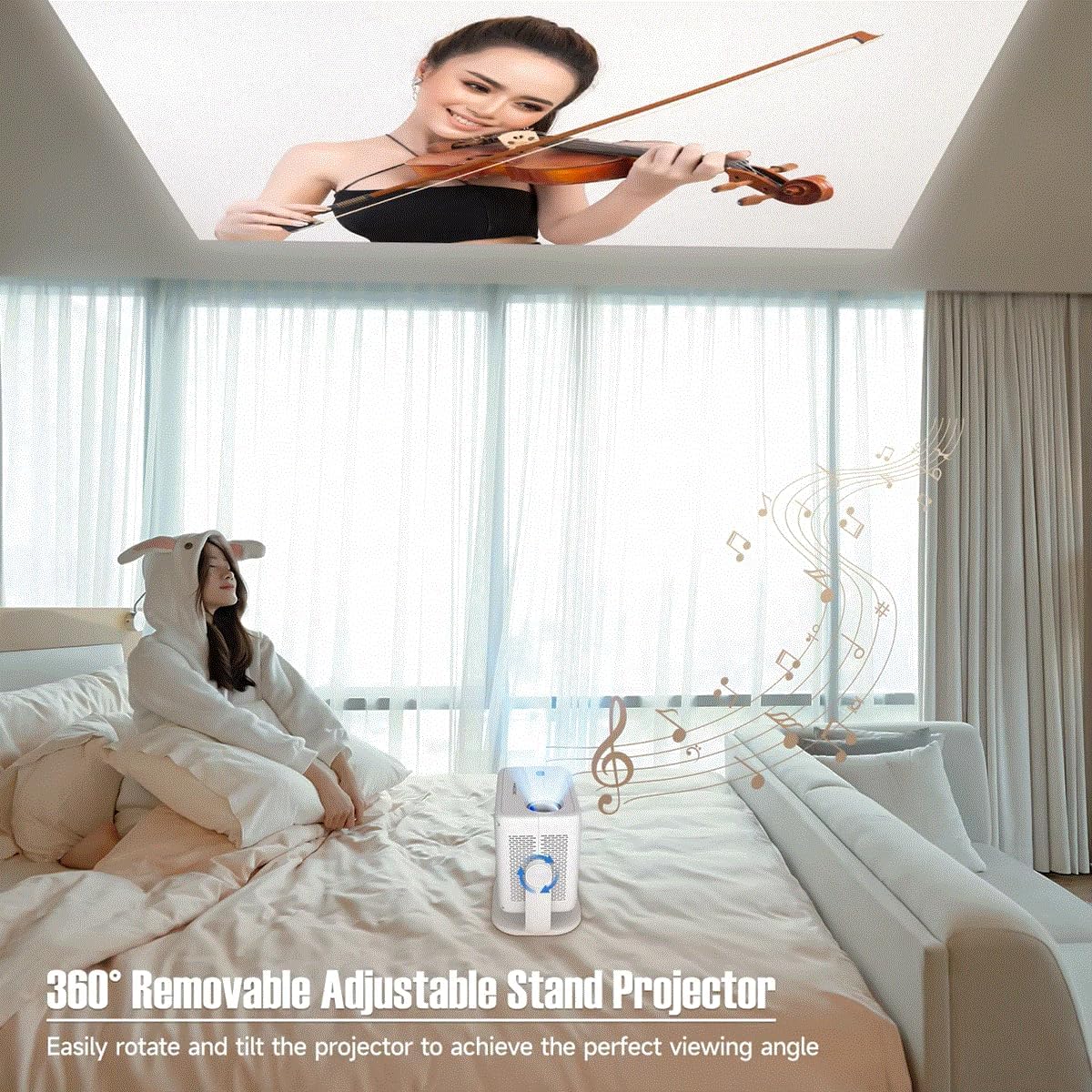
Figure 5.1: The projector's adjustable stand enables projection onto various surfaces, including ceilings, for comfortable viewing.
5.2. പവർ കണക്ഷൻ
- പ്രൊജക്ടറിന്റെ പവർ ഇൻപുട്ട് പോർട്ടിലേക്ക് പവർ അഡാപ്റ്റർ ബന്ധിപ്പിക്കുക.
- അനുയോജ്യമായ ഒരു ഇലക്ട്രിക്കൽ ഔട്ട്ലെറ്റിലേക്ക് പവർ അഡാപ്റ്റർ പ്ലഗ് ചെയ്യുക.
5.3. പ്രാരംഭ പവർ ഓൺ
Press the power button on the projector or the remote control to turn on the device. The projector will automatically perform keystone correction and focus.
6. പ്രവർത്തന നിർദ്ദേശങ്ങൾ
Video 6.1: This video demonstrates key features of the L018 Projector, including its 360° adjustable stand, automatic focus and keystone correction, projection throw distance capabilities, integrated Bluetooth 5.2 Hi-Fi stereo speaker, 1080P native resolution with 4K support, and wireless screen mirroring functionality.
6.1. Auto Keystone Correction & Focus
The L018 Projector features automatic keystone correction and focus. This means the image will automatically adjust to be rectangular and sharp, even if the projector is placed at an angle. This process typically takes only 2 seconds.
Figure 6.1: The projector automatically corrects image distortion and focuses for a clear picture.
6.2. Image Adjustment (Zoom In & Zoom Out)
You can easily adjust the image size from 50% to 100% without physically moving the projector. After using this function, it may be necessary to slightly move the projector for the auto-focus and keystone correction to re-engage and optimize the image.
6.3. വയർലെസ് സ്ക്രീൻ മിററിംഗ്
Seamlessly cast content from your phone, tablet, or laptop to the projector. The built-in Android 11 system and high-performing Allwinner H713 Chip ensure a smooth mirroring experience.

Figure 6.2: The projector delivers sharp and detailed images with high brightness and contrast.
6.4. കണക്റ്റിവിറ്റി
- Dual-band WiFi 6 (2.4G+5G): Provides ultra-fast and stable connection for streaming and online content without delay.
- ബ്ലൂടൂത്ത് 5.2: Connect external Bluetooth speakers or headphones for an enhanced audio experience.
- HDMI & USB: Wired connectivity options for various devices.

Figure 6.3: The benefits of Dual-band WiFi 6 for fast and stable streaming.
6.5. ശബ്ദം
The projector is equipped with a built-in Hi-Fi Stereo Speaker, allowing you to enjoy an immersive sound experience directly from the device. For private listening or enhanced audio, connect external speakers or headphones via Bluetooth 5.2 or the audio output port.
6.6. പ്രൊജക്ഷൻ മോഡുകൾ
The projector offers three distinct projection modes to suit your viewing needs:
- സ്റ്റാൻഡേർഡ് മോഡ്: Balanced settings for general viewing.
- ഹൈലൈറ്റ് മോഡ്: Increases brightness for clearer visibility in brighter environments.
- ഊർജ്ജ സംരക്ഷണ മോഡ്: Reduces power consumption, ideal for extended viewing or when battery life is a concern.
7. പരിപാലനം
നിങ്ങളുടെ പ്രൊജക്ടറിന്റെ ദീർഘായുസ്സും മികച്ച പ്രകടനവും ഉറപ്പാക്കാൻ പതിവ് അറ്റകുറ്റപ്പണികൾ സഹായിക്കുന്നു.
- ലെൻസ് ക്ലീനിംഗ്: ഒപ്റ്റിക്കൽ ലെൻസുകൾക്കായി പ്രത്യേകം രൂപകൽപ്പന ചെയ്ത മൃദുവായ, ലിന്റ് രഹിത തുണി ഉപയോഗിക്കുക. അബ്രസീവ് ക്ലീനറുകളോ ലായകങ്ങളോ ഉപയോഗിക്കരുത്.
- വെന്റിലേഷൻ പോർട്ടുകൾ: Periodically check and clean the ventilation openings to prevent dust buildup, which can lead to overheating. Use a soft brush or compressed air.
- ബാഹ്യ ശുചീകരണം: പ്രൊജക്ടറിന്റെ പുറംഭാഗം മൃദുവായതും ഉണങ്ങിയതുമായ തുണി ഉപയോഗിച്ച് തുടയ്ക്കുക. കഠിനമായ അടയാളങ്ങൾക്ക്, അല്പം ഡി.amp തുണി ഉപയോഗിക്കാം, തുടർന്ന് ഉണങ്ങിയ തുടയ്ക്കാം.
- സംഭരണം: ദീർഘനേരം ഉപയോഗിക്കാത്തപ്പോൾ, പ്രൊജക്ടർ തണുത്തതും വരണ്ടതുമായ സ്ഥലത്ത് സൂക്ഷിക്കുക, നേരിട്ടുള്ള സൂര്യപ്രകാശത്തിൽ നിന്നും കടുത്ത താപനിലയിൽ നിന്നും അകറ്റി നിർത്തുക.
8. പ്രശ്നപരിഹാരം
നിങ്ങളുടെ പ്രൊജക്ടറിൽ പ്രശ്നങ്ങൾ നേരിടുകയാണെങ്കിൽ, ഇനിപ്പറയുന്ന പൊതുവായ പ്രശ്നങ്ങളും പരിഹാരങ്ങളും പരിശോധിക്കുക:
| പ്രശ്നം | സാധ്യമായ കാരണം | പരിഹാരം |
|---|---|---|
| പവർ ഇല്ല | Power cable not connected; Power outlet issue. | പവർ കേബിൾ സുരക്ഷിതമായി ബന്ധിപ്പിച്ചിട്ടുണ്ടെന്ന് ഉറപ്പാക്കുക. മറ്റൊരു ഔട്ട്ലെറ്റ് പരീക്ഷിക്കുക. |
| ചിത്രമില്ല | Input source not selected; Cable connection issue; Lens cap on. | Select correct input source. Check HDMI/USB cable connections. Remove lens cap. |
| മങ്ങിയ ചിത്രം | Out of focus; Projector moved after zoom adjustment. | Allow auto-focus to re-engage (slight movement may help). Ensure projector is within optimal throw distance. |
| വികലമായ ചിത്രം (ട്രപസോയിഡ്) | പ്രൊജക്ടർ സ്ക്രീനിന് ലംബമല്ല. | Auto keystone correction should fix this. If not, slightly adjust projector position. |
| ശബ്ദമില്ല | Volume too low; Muted; External audio device not connected/selected. | Increase volume. Unmute. Check Bluetooth connection or external audio cable. |
| വയർലെസ് മിററിംഗ് പ്രശ്നങ്ങൾ | Network instability; Device compatibility. | Ensure both devices are on the same Wi-Fi network. Restart both devices. Check device compatibility. |
9 സ്പെസിഫിക്കേഷനുകൾ
| ഫീച്ചർ | വിവരണം |
|---|---|
| ബ്രാൻഡ് നാമം | ജനറിക് |
| ഇനം മോഡൽ നമ്പർ | L018 പ്രൊജക്ടർ |
| വർണ്ണ നാമം | വെള്ള |
| പ്രത്യേക സവിശേഷതകൾ | 360° Removable Adjustable Stand Projector, BT5.2 & Hl-Fl Stereo Speaker, Ultra-fast connection Dual-band WiFi6 (2.4G+5G), High-Performing Processor Allwinner H713 Chip |
| ശുപാർശ ചെയ്യുന്ന ഉപയോഗങ്ങൾ | വിദ്യാഭ്യാസം, ഹോം സിനിമ, ഗെയിമിംഗ്, ബിസിനസ്സ് |
| കണക്റ്റിവിറ്റി ടെക്നോളജി | ബ്ലൂടൂത്ത്, Wi-Fi, USB, HDMI |
| ഡിസ്പ്ലേ റെസല്യൂഷൻ | 1920 x 1080 (നേറ്റീവ് 1080P, 4K പിന്തുണയ്ക്കുന്നു) |
| ANSI ല്യൂമെൻസ് | 650 ANSI |
| പ്രൊജക്റ്റഡ് ഡൈമൻഷൻ | 30-300 ഇഞ്ച് |
| പ്രകാശ സ്രോതസ്സ് | എൽഇഡി |
| സ്ക്രീൻ സ്കെയിൽ | 16:09 |
| കോൺട്രാസ്റ്റ് റേഷ്യോ | 10,001:1-20,000:1 |
| കീസ്റ്റോൺ തിരുത്തൽ | യാന്ത്രിക തിരുത്തൽ |
| ഓപ്പറേറ്റിംഗ് സിസ്റ്റം | ആൻഡ്രോയിഡ് 11 |
| പ്രോസസ്സർ | Allwinner H713 Chip |
| ബ്ലൂടൂത്ത് | BT5.2 |
| ബിൽറ്റ്-ഇൻ സ്പീക്കർ | അതെ |
| റിമോട്ട് കൺട്രോളർ | അതെ |
| Projection Throw Ratio | 1.2:1 |
10. വാറൻ്റിയും പിന്തുണയും
For warranty information and customer support, please refer to the documentation provided at the time of purchase or contact the manufacturer directly. Keep your purchase receipt as proof of purchase.
For technical assistance or further inquiries, please visit the official Generic brand webസൈറ്റ് അല്ലെങ്കിൽ അവരുടെ ഉപഭോക്തൃ സേവനവുമായി ബന്ധപ്പെടുക.