
DS-2FP2020
DS-2FP2020 Hi-Fi External Security Microphone User Manual
Model: DS-2FP2020 | Brand: Generic
1. ആമുഖം
This manual provides comprehensive instructions for the installation, operation, and maintenance of the DS-2FP2020 Hi-Fi External Security Microphone. Please read this manual thoroughly before using the product to ensure proper functionality and safety.
The DS-2FP2020 is an external microphone engineered for high-fidelity audio capture in various surveillance and recording applications. Its omnidirectional pickup pattern and robust design make it suitable for environments requiring clear and wide-area sound monitoring.
2 പ്രധാന സവിശേഷതകൾ
- High sensitivity omnidirectional capacitor microphone for effective sound capture.
- Clear and natural sound pickup from all directions, covering an area of 70m² with a 360° pickup pattern.
- Built-in protection against lightning, reverse polarity, and electrostatic discharge for enhanced durability.
- Compliant with EU CE standards and US FCC certification for safety and performance.
- RoHS compliant, ensuring adherence to environmental standards.
3. പാക്കേജ് ഉള്ളടക്കം
പാക്കേജ് തുറക്കുമ്പോൾ എല്ലാ ഇനങ്ങളും നിലവിലുണ്ടെന്നും നല്ല നിലയിലാണെന്നും ദയവായി പരിശോധിക്കുക:
- 1 x DS-2FP2020 Hi-Fi External Security Microphone
If any components are missing or damaged, please contact your supplier immediately.
4. ഉൽപ്പന്നം കഴിഞ്ഞുview
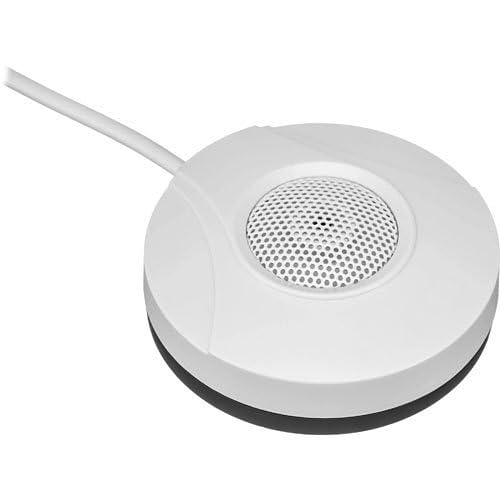
Figure 1: DS-2FP2020 Hi-Fi External Security Microphone. This image shows the compact, white, circular microphone unit with a central perforated grille for audio input and an attached cable for connectivity.
5. സജ്ജീകരണവും ഇൻസ്റ്റാളേഷനും
Follow these steps for proper installation of the DS-2FP2020 microphone:
- വൈദ്യുതി വിതരണം: Connect the microphone to a stable 12VDC power source. Ensure the power supply meets the microphone's requirements (25mA consumption).
- ഓഡിയോ ഔട്ട്പുട്ട്: Connect the audio output of the microphone to the audio input of your recording device, CCTV system, or amplifier. The microphone features a 600W output.
- പ്ലേസ്മെൻ്റ്: Position the microphone in the desired area for audio capture. Due to its omnidirectional pickup pattern, central placement within the target area (up to 70m²) is recommended for optimal sound coverage. Avoid placing it near sources of excessive noise or vibration.
- കേബിൾ മാനേജുമെന്റ്: Securely route the microphone cable to prevent accidental disconnections or damage.
6. പ്രവർത്തന നിർദ്ദേശങ്ങൾ
Once installed, the DS-2FP2020 microphone operates automatically when powered on. It is designed for continuous audio monitoring.
- ഓഡിയോ മോണിറ്ററിംഗ്: Ensure your connected recording device or CCTV system is configured to receive and record audio from the microphone's input.
- ശബ്ദ നിലവാരം: The microphone provides a signal-to-noise ratio of 60dB, delivering clear audio. Adjust the input sensitivity on your recording device if necessary to optimize sound levels.
- പാരിസ്ഥിതിക പരിഗണനകൾ: While the microphone has built-in protections, avoid exposing it to extreme temperatures, direct water, or corrosive substances to maintain performance.
7. പരിപാലനം
The DS-2FP2020 microphone requires minimal maintenance to ensure long-term performance.
- വൃത്തിയാക്കൽ: Gently wipe the exterior of the microphone with a soft, dry cloth. Do not use liquid cleaners or abrasive materials.
- കേബിൾ പരിശോധന: Periodically check the power and audio cables for any signs of wear, cuts, or damage. Replace damaged cables immediately.
- പരിസ്ഥിതി സംരക്ഷണം: Ensure the microphone is not exposed to conditions beyond its operating specifications, such as excessive humidity or dust, which could affect internal components.
8. പ്രശ്നപരിഹാരം
If you encounter issues with your DS-2FP2020 microphone, refer to the following common problems and solutions:
| പ്രശ്നം | സാധ്യമായ കാരണം | പരിഹാരം |
|---|---|---|
| ഓഡിയോ ഔട്ട്പുട്ട് ഇല്ല | No power; Incorrect connection; Recording device issue | Verify 12VDC power supply is connected and active. Check audio cable connections to both microphone and recording device. Ensure recording device input is selected and functioning. |
| താഴ്ന്നതോ വികലമായതോ ആയ ഓഡിയോ | Microphone too far from sound source; Incorrect input sensitivity on recording device; Environmental noise | Relocate microphone closer to the sound source. Adjust input gain/sensitivity on your recording device. Minimize background noise in the environment. |
| ഇടയ്ക്കിടെയുള്ള ഓഡിയോ | Loose cable connection; Faulty cable | Check all cable connections for tightness. Replace audio or power cables if they appear damaged. |
ഈ പരിഹാരങ്ങൾ പരീക്ഷിച്ചതിനുശേഷവും പ്രശ്നം നിലനിൽക്കുകയാണെങ്കിൽ, ദയവായി ഉപഭോക്തൃ പിന്തുണയുമായി ബന്ധപ്പെടുക.
9 സ്പെസിഫിക്കേഷനുകൾ
| പരാമീറ്റർ | മൂല്യം |
|---|---|
| മോഡൽ | DS-2FP2020 |
| ബ്രാൻഡ് | ജനറിക് |
| നിർമ്മാതാവ് | ഹൈക്വിഷൻ |
| ശുപാർശ ചെയ്യുന്ന ഉപയോഗങ്ങൾ | Video Recording, Speech |
| കവറേജ് ഏരിയ | 70m² |
| പിക്കപ്പ് പാറ്റേൺ | 360° ഓമ്നിഡയറക്ഷണൽ |
| സിഗ്നൽ-ടു-നോയിസ് റേഷ്യോ (എസ്എൻആർ) | 60dB |
| ഔട്ട്പുട്ട് | 600W |
| വൈദ്യുതി വിതരണം | 12VDC |
| വൈദ്യുതി ഉപഭോഗം | 25mA |
| സർട്ടിഫിക്കേഷനുകൾ | EU CE, US FCC, RoHS Compliant |
| സംരക്ഷണങ്ങൾ | Lightning, Reverse Polarity, Electrostatic Discharge |
10. വാറൻ്റിയും പിന്തുണയും
For warranty information and technical support, please refer to the documentation provided by your retailer or contact the manufacturer, Hikvision, directly. Keep your purchase receipt as proof of purchase for any warranty claims.
കൂടുതൽ സഹായത്തിനോ അന്വേഷണങ്ങൾക്കോ, ദയവായി ഉദ്യോഗസ്ഥനെ സന്ദർശിക്കുക website of the brand or contact their customer service department.
Ask a question about this manual
Ask about setup, troubleshooting, compatibility, parts, safety, or missing instructions. Manuals+ will review the question and use this page’s manual context to help answer it.