
1. ആമുഖം
This manual provides essential information for setting up, operating, and maintaining your GMKtec Mini PC G10. Please read these instructions carefully before using the device to ensure optimal performance and longevity.
2. പാക്കേജ് ഉള്ളടക്കം
പാക്കേജിൽ എല്ലാ ഇനങ്ങളും ഉണ്ടെന്ന് ഉറപ്പാക്കുക:
- GMKtec Nucbox G10 Mini PC
- പവർ അഡാപ്റ്ററും കേബിളും
- HDMI കേബിൾ
- VESA Mount and Screws
- ഉപയോക്തൃ മാനുവൽ

Image: Contents of the GMKtec Mini PC G10 package, including the mini PC, power adapter, HDMI cable, VESA mount, and user manual.
3. ഉൽപ്പന്നം കഴിഞ്ഞുview and Interfaces
The GMKtec Mini PC G10 features a compact design with a variety of ports for connectivity. Familiarize yourself with the available interfaces:
ഫ്രണ്ട് പാനൽ:
- 1x CTIA Audio Jack
- 2x USB 3.2 (5Gbps) പോർട്ടുകൾ
- 1x പവർ ബട്ടൺ
പിൻ പാനൽ:
- 1x USB-C Power Input (PD Only)
- 1x USB-C (Full-function: DisplayPort, Data, Power Delivery)
- 1x USB 2.0 പോർട്ട്
- 1x 2.5G Gigabit Ethernet (LAN) Port
- 1x HDMI 2.1 (4K@60Hz) Port
- 1x DisplayPort 1.4 (4K@60Hz)
- 1x കെൻസിംഗ്ടൺ ലോക്ക് സ്ലോട്ട്

ചിത്രം: വിശദമായത് view of the front and rear ports of the GMKtec Mini PC G10, illustrating USB, HDMI, DisplayPort, Ethernet, and power connections.
4. സജ്ജീകരണം
Follow these steps to set up your GMKtec Mini PC G10:
- ഡിസ്പ്ലേയിലേക്ക് കണക്റ്റുചെയ്യുക: Connect your monitor(s) to the Mini PC using the HDMI, DisplayPort, or USB-C (DisplayPort Alt Mode) outputs. The device supports up to three displays simultaneously.
- പെരിഫറലുകൾ ബന്ധിപ്പിക്കുക: നിങ്ങളുടെ കീബോർഡ്, മൗസ്, മറ്റ് യുഎസ്ബി ഉപകരണങ്ങൾ എന്നിവ ലഭ്യമായ യുഎസ്ബി പോർട്ടുകളിലേക്ക് പ്ലഗ് ഇൻ ചെയ്യുക.
- നെറ്റ്വർക്ക് കണക്ഷൻ: For a wired connection, connect an Ethernet cable to the 2.5G LAN port. For wireless, ensure Wi-Fi is enabled in the operating system settings after initial boot.
- പവർ ഓൺ: Connect the power adapter to the Mini PC's USB-C power input and then to a power outlet. Press the power button on the front panel to turn on the device.
- പ്രാരംഭ സജ്ജീകരണം: Windows 11 Pro സജ്ജീകരണം പൂർത്തിയാക്കാൻ ഓൺ-സ്ക്രീൻ നിർദ്ദേശങ്ങൾ പാലിക്കുക.
5. ഓപ്പറേറ്റിംഗ് സിസ്റ്റം
The GMKtec Mini PC G10 comes pre-installed with വിൻഡോസ് 11 പ്രോ. It is also compatible with Windows 10 and various Linux distributions.
Windows 11 Pro Features:
- Enhanced security features.
- BitLocker device encryption.
- Remote Desktop capabilities.
- Domain Join and Group Policy management.
Ensure your operating system is regularly updated for security and performance improvements.
6. പ്രകടനവും സംഭരണവും
The Mini PC G10 is designed for efficient daily computing and light gaming, featuring robust components for smooth operation.
പ്രോസസ്സർ:
ഒരു കൊണ്ട് സജ്ജീകരിച്ചിരിക്കുന്നു AMD Ryzen 5 3500U Processor, a 64-bit quad-core CPU with 8 threads, based on AMD's 12nm Zen+ architecture. It offers a base frequency of 2.1 GHz and a boost frequency of up to 3.7 GHz, with a TDP of 15W (configurable up to 35W for higher performance).
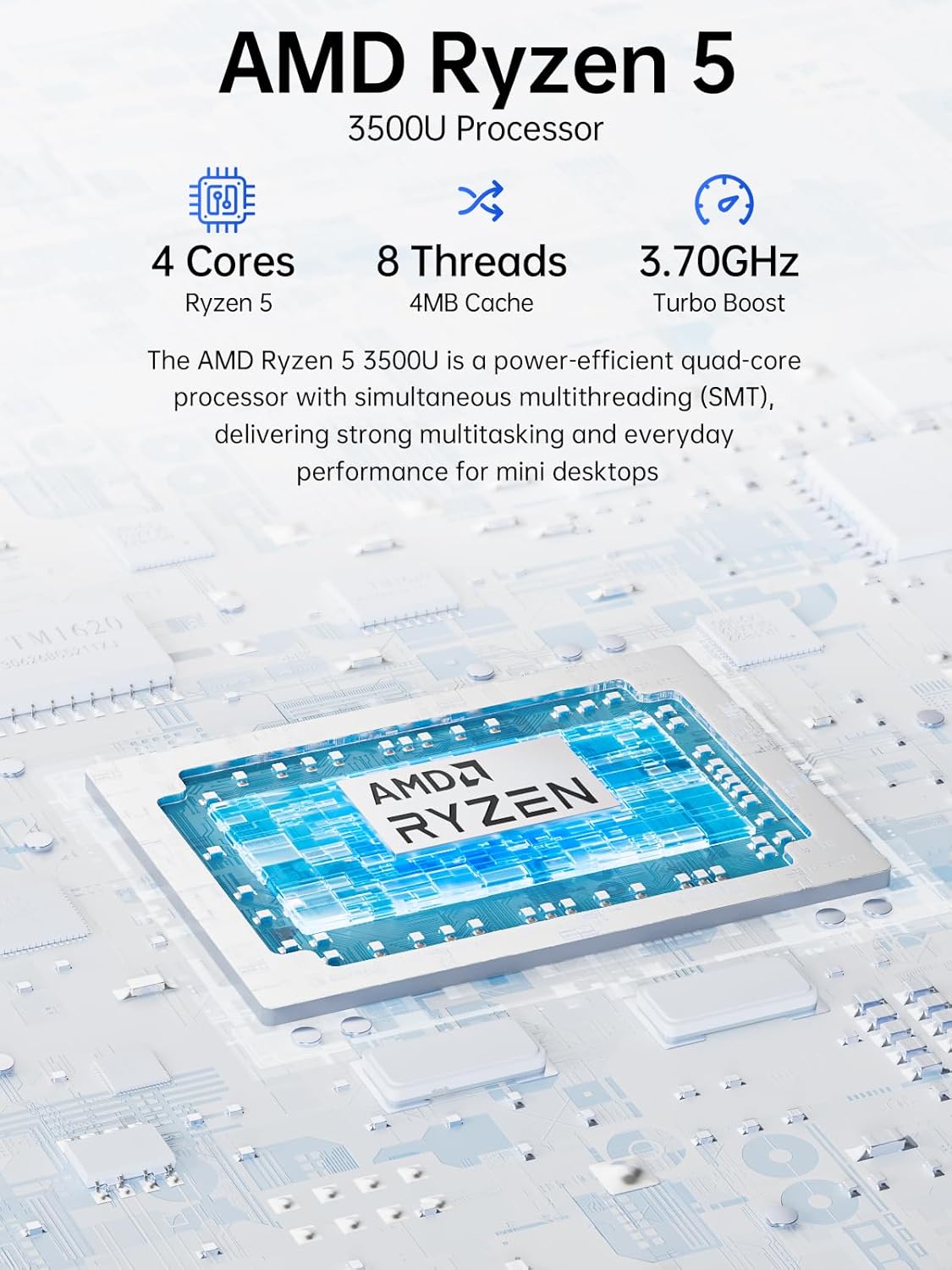
Image: Visual representation of the AMD Ryzen 5 3500U processor, highlighting its 4 cores, 8 threads, 4MB cache, and 3.70GHz turbo boost.
ഗ്രാഫിക്സ്:
സംയോജിപ്പിച്ചത് റേഡിയൻ വേഗ 8 ഗ്രാഫിക്സ് (up to 1.2 GHz) provides capable performance for video editing, multimedia playback, and casual gaming.
മെമ്മറി (റാം):
സിസ്റ്റം ഉൾപ്പെടുന്നു 16GB of DDR4 SO-DIMM dual-channel RAM (2 x 8GB). The memory is expandable up to 32GB.
സംഭരണം:
സവിശേഷതകൾ എ 1TB PCIe 3.0 x4 NVMe SSD, offering significantly faster data transfer speeds (up to 3500 MB/s) compared to traditional SATA SSDs. This results in quicker boot times, faster application loading, and smoother file കൈമാറ്റങ്ങൾ.
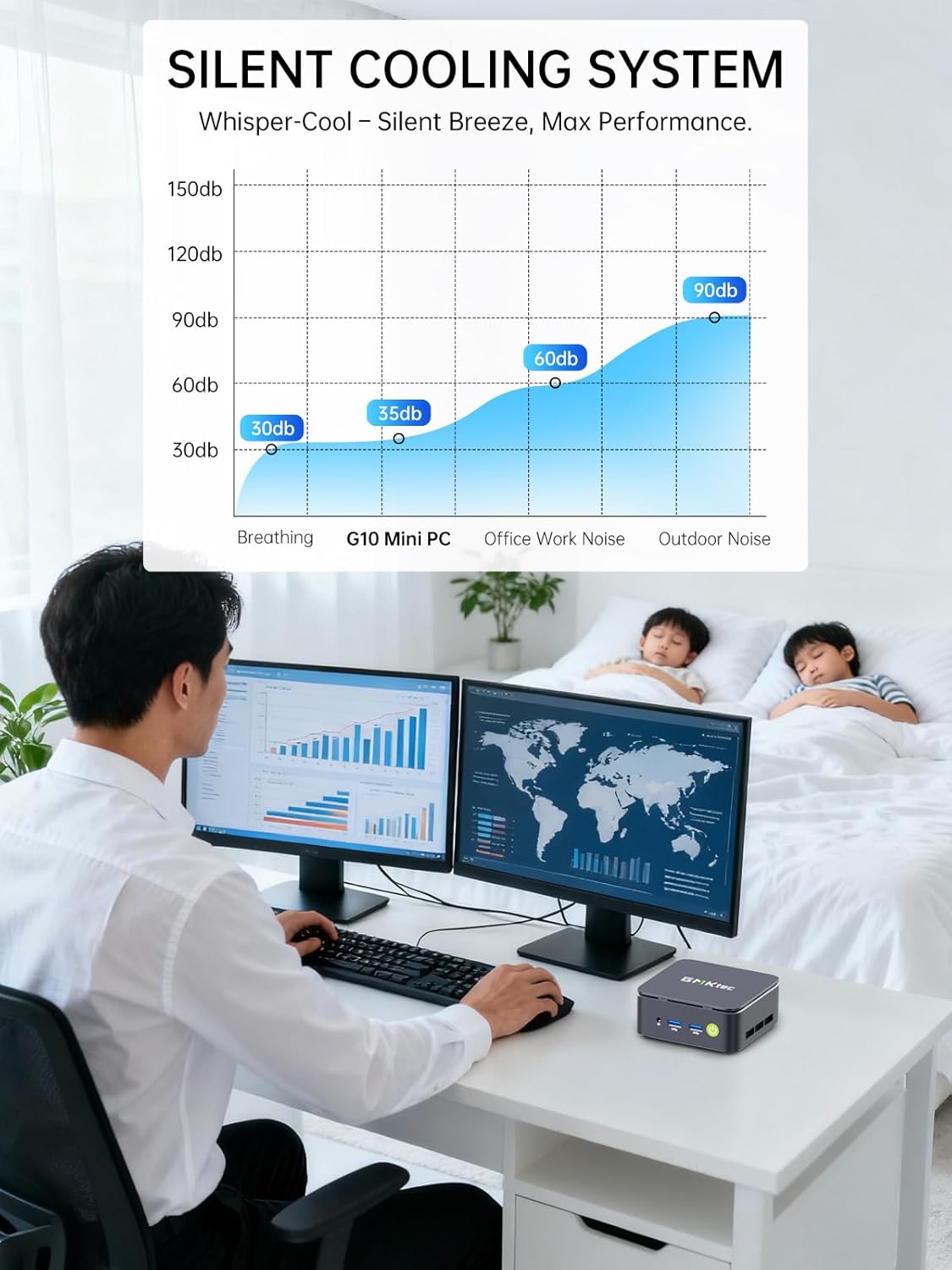
Image: Comparison illustrating the speed advantage of PCIe 3.0 NVMe SSDs (up to 3500 MB/s) over SATA SSDs (up to 550 MB/s).
സംഭരണ വിപുലീകരണം:
The Mini PC G10 is equipped with two M.2 2280 PCIe 3.0 slots, allowing for storage expansion up to 16TB (with 2 x 8TB SSDs, not included).

Image: Diagram showing the dual SO-DIMM DDR4 slots for RAM expansion up to 64GB and two M.2 2280 SSD slots for storage expansion up to 16TB.
7. ഡിസ്പ്ലേ കോൺഫിഗറേഷൻ
The GMKtec Mini PC G10 supports a triple display setup, allowing for enhanced productivity and immersive multimedia experiences.
- Connect up to three monitors simultaneously using the HDMI 2.1, DisplayPort 1.4, and full-function USB-C ports.
- All display outputs support 4K resolution at 60Hz.

Image: An illustration of a triple monitor setup connected to the Mini PC, demonstrating its multi-display capability for a productive workspace.
8. കണക്റ്റിവിറ്റി
The Mini PC G10 offers versatile connectivity options for both wired and wireless networks and peripherals.
- Wi-Fi 5: Provides fast wireless internet access.
- ബ്ലൂടൂത്ത് 5.0: കീബോർഡുകൾ, മൗസുകൾ, ഹെഡ്ഫോണുകൾ തുടങ്ങിയ വയർലെസ് പെരിഫറലുകൾ ബന്ധിപ്പിക്കുന്നതിന്.
- 2.5 Gigabit Ethernet: An ultra-fast wired network connection for high-speed data transfer and low-latency applications.

Image: A visual representation of the Mini PC connected wirelessly via Wi-Fi and Bluetooth, and wired via 2.5GbE Ethernet, highlighting its comprehensive connectivity.
9. Silent Cooling System
The GMKtec Mini PC G10 incorporates a silent turbo cooling fan designed to maintain optimal operating temperatures while minimizing noise output. This ensures stable performance even under load.

ചിത്രം: പൊട്ടിത്തെറിച്ച ഒരു view of the Mini PC G10 showing the internal silent turbo cooling fan and its airflow path.
10. പരിപാലനം
നിങ്ങളുടെ മിനി പിസിയുടെ ദീർഘായുസ്സും മികച്ച പ്രകടനവും ഉറപ്പാക്കാൻ പതിവ് അറ്റകുറ്റപ്പണികൾ സഹായിക്കുന്നു.
- വൃത്തിയാക്കൽ: Periodically clean the exterior of the Mini PC with a soft, dry cloth. Use compressed air to clear dust from ventilation openings. Ensure the device is powered off and unplugged before cleaning.
- സോഫ്റ്റ്വെയർ അപ്ഡേറ്റുകൾ: നിങ്ങളുടെ ഓപ്പറേറ്റിംഗ് സിസ്റ്റവും ഡ്രൈവറുകളും ഏറ്റവും പുതിയ പതിപ്പുകളിലേക്ക് അപ്ഡേറ്റ് ചെയ്ത് നിലനിർത്തുക. ഇത് സുരക്ഷ, സ്ഥിരത, പ്രകടനം എന്നിവ മെച്ചപ്പെടുത്തുന്നു.
- വെൻ്റിലേഷൻ: Ensure the Mini PC is placed in a well-ventilated area and that its vents are not obstructed. Proper airflow is crucial for cooling.
- സ്റ്റോറേജ് മാനേജ്മെന്റ്: അനാവശ്യമായവ നീക്കം ചെയ്തുകൊണ്ട് നിങ്ങളുടെ സംഭരണം പതിവായി കൈകാര്യം ചെയ്യുക. files and applications to maintain optimal SSD performance.
11. പ്രശ്നപരിഹാരം
If you encounter issues with your GMKtec Mini PC G10, refer to the following common troubleshooting steps:
No Power / System Not Starting:
- പവർ അഡാപ്റ്റർ മിനി പിസിയിലേക്കും പ്രവർത്തിക്കുന്ന ഒരു പവർ ഔട്ട്ലെറ്റിലേക്കും സുരക്ഷിതമായി ബന്ധിപ്പിച്ചിട്ടുണ്ടെന്ന് ഉറപ്പാക്കുക.
- മറ്റൊരു ഉപകരണം പ്ലഗ് ഇൻ ചെയ്ത് പവർ ഔട്ട്ലെറ്റ് പ്രവർത്തനക്ഷമമാണെന്ന് ഉറപ്പാക്കുക.
- പവർ ബട്ടൺ ശക്തമായി അമർത്തുക.
ഡിസ്പ്ലേ ഔട്ട്പുട്ട് ഇല്ല:
- Check that the HDMI, DisplayPort, or USB-C cable is securely connected to both the Mini PC and the monitor.
- മോണിറ്റർ ഓണാക്കിയിട്ടുണ്ടെന്നും ശരിയായ ഇൻപുട്ട് ഉറവിടത്തിലേക്ക് സജ്ജീകരിച്ചിട്ടുണ്ടെന്നും ഉറപ്പാക്കുക.
- ലഭ്യമെങ്കിൽ മറ്റൊരു ഡിസ്പ്ലേ കേബിളോ മോണിറ്ററോ പരീക്ഷിച്ചുനോക്കൂ.
No Wi-Fi / Bluetooth Connection:
- Check if Wi-Fi or Bluetooth is enabled in the Windows settings.
- മിനി പിസിയും നിങ്ങളുടെ റൂട്ടർ/മോഡവും പുനരാരംഭിക്കുക.
- ഡ്രൈവർമാർ അപ് ടു ഡേറ്റ് ആണെന്ന് ഉറപ്പാക്കുക.
മന്ദഗതിയിലുള്ള പ്രകടനം:
- പശ്ചാത്തലത്തിൽ പ്രവർത്തിക്കുന്ന അനാവശ്യ ആപ്ലിക്കേഷനുകൾ അടയ്ക്കുക.
- SSD-യിൽ മതിയായ സംഭരണ സ്ഥലം ഉണ്ടോ എന്ന് പരിശോധിക്കുക.
- Ensure the Mini PC is well-ventilated to prevent thermal throttling.
- ക്ഷുദ്രവെയറുകൾക്കോ വൈറസുകൾക്കോ വേണ്ടി ഒരു സിസ്റ്റം സ്കാൻ പ്രവർത്തിപ്പിക്കുക.
If these steps do not resolve the issue, please contact GMKtec customer support.
12 സ്പെസിഫിക്കേഷനുകൾ
Detailed technical specifications for the GMKtec Mini PC G10:
| ഫീച്ചർ | സ്പെസിഫിക്കേഷൻ |
|---|---|
| ബ്രാൻഡ് | ജിഎംകെടെക് |
| മോഡൽ | Nucbox G10 |
| ഓപ്പറേറ്റിംഗ് സിസ്റ്റം | വിൻഡോസ് 11 പ്രോ |
| സിപിയു മോഡൽ | AMD Ryzen 5 3500U |
| സിപിയു വേഗത | 2.1 GHz (Boost up to 3.7 GHz) |
| പ്രോസസ്സറുകളുടെ എണ്ണം | 4 (8 Threads) |
| ഗ്രാഫിക്സ് കോപ്രൊസസർ | Radeon Vega 8 |
| RAM Installed | 16 GB DDR4 |
| പരമാവധി RAM വലുപ്പം | 64 ജിബി |
| RAM Speed | 2400 MHz |
| സംഭരണ ശേഷി | 1 TB SSD (PCIe 3.0 x4 NVMe) |
| സംഭരണ വിപുലീകരണം | 2x M.2 2280 PCIe 3.0 slots (up to 16TB total) |
| വീഡിയോ ഔട്ട്പുട്ട് ഇൻ്റർഫേസ് | HDMI 2.1, DisplayPort 1.4, USB-C (DP Alt Mode) |
| പരമാവധി ഡിസ്പ്ലേ റെസല്യൂഷൻ | 3840 x 2160 (4K) @ 60Hz |
| വയർലെസ് ടെക്നോളജി | വൈ-ഫൈ 5 (802.11ac), ബ്ലൂടൂത്ത് 5.0 |
| വയർഡ് കണക്റ്റിവിറ്റി | 2.5 ജിഗാബൈറ്റ് ഇഥർനെറ്റ് |
| USB പോർട്ടുകൾ | 2x USB 3.2, 1x USB 2.0, 1x USB-C (full-function) |
| ഓഡിയോ ഔട്ട്പുട്ട് | 1x CTIA Audio Jack |
| പവർ ഇൻപുട്ട് | USB-C (PD) |
| മോഡൽ വർഷം | 2023 |
13. വാറൻ്റിയും പിന്തുണയും
GMKtec provides comprehensive warranty and support for your Mini PC G10.
- വാറൻ്റി: Each Mini PC comes with a limited 3-year warranty from the date of purchase. This includes replacement during the first year and repair services for the subsequent two years, covering design and manufacturing defects.
- ഉപഭോക്തൃ പിന്തുണ: For any inquiries or technical assistance, you can contact GMKtec's professional after-sales team.
ബന്ധപ്പെടാനുള്ള വിവരങ്ങൾ:
- ആമസോൺ പിന്തുണ: Log in to your Amazon account, navigate to "Your Orders," and select "Ask Product Question" for direct assistance.
- വിൽപ്പനാനന്തര ഇമെയിൽ: എന്ന വിലാസത്തിലേക്ക് ഒരു ഇമെയിൽ അയയ്ക്കുക eu-cs@gmktec.com for 24/7 customer support.

Image: Details on GMKtec's warranty and support, including contact methods for Amazon support and the after-sales email address.