
ആമുഖം
This manual provides detailed instructions for the KZZI Z98 Wireless Mechanical Keyboard. It covers setup, operation, maintenance, and troubleshooting to ensure optimal performance and user experience. Please read this manual thoroughly before using your keyboard.
ബോക്സിൽ എന്താണുള്ളത്
- Z98 Wireless Mechanical Keyboard
- കീക്യാപ് പുള്ളർ
- Replacement Switch (4 pieces)
- USB കേബിൾ
- പൊടി കവർ
ഉൽപ്പന്നം കഴിഞ്ഞുview
The KZZI Z98 keyboard features a 90% layout, smart display, multi-mode connectivity, and hot-swappable switches for a customizable and efficient typing experience.
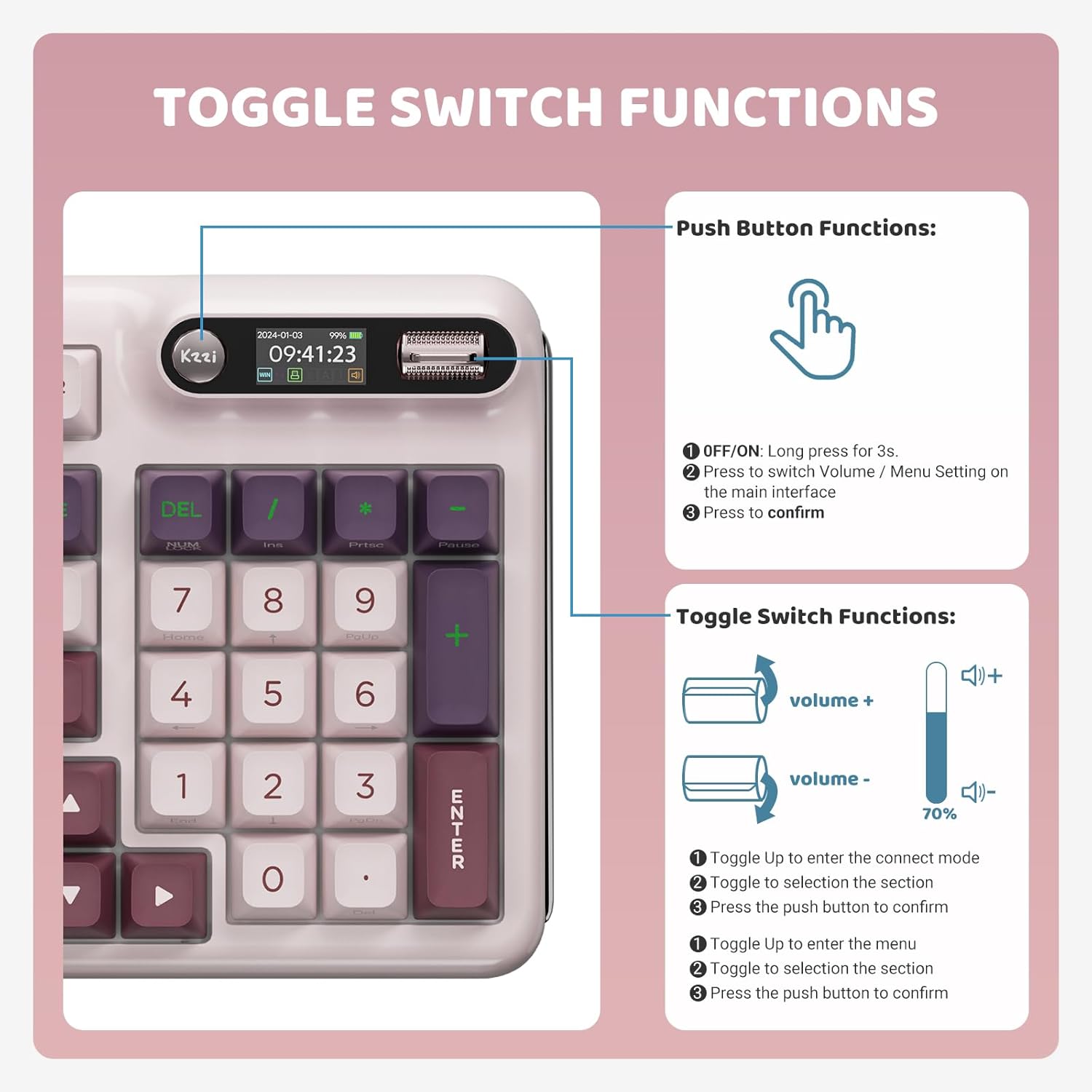
Image: KZZI Z98 Wireless Mechanical Keyboard showcasing അതിന്റെ പൂർണ്ണ ലേഔട്ടും RGB ലൈറ്റിംഗും.
സജ്ജീകരണ നിർദ്ദേശങ്ങൾ
1. വയർഡ് കണക്ഷൻ (USB-C)
- കീബോർഡിൽ USB-C പോർട്ട് കണ്ടെത്തുക.
- നൽകിയിരിക്കുന്ന USB-C കേബിൾ കീബോർഡിലേക്കും മറ്റേ അറ്റം നിങ്ങളുടെ കമ്പ്യൂട്ടറിന്റെ USB പോർട്ടിലേക്കും ബന്ധിപ്പിക്കുക.
- നിങ്ങളുടെ സിസ്റ്റം കീബോർഡ് യാന്ത്രികമായി തിരിച്ചറിയും.
2. 2.4GHz വയർലെസ് കണക്ഷൻ
- Remove the 2.4GHz USB receiver from its storage slot on the keyboard.
- നിങ്ങളുടെ കമ്പ്യൂട്ടറിൽ ലഭ്യമായ USB പോർട്ടിലേക്ക് USB റിസീവർ പ്ലഗ് ചെയ്യുക.
- On the keyboard's smart display, use the knob to navigate to the connection settings and select the 2.4GHz mode. The display will show "2.4G Linking" and then "2.4G Success!" upon successful connection.

Image: The KZZI Z98 keyboard highlighting its three connection modes: Bluetooth 5.0, 2.4GHz wireless, and USB-C wired.
3. ബ്ലൂടൂത്ത് 5.0 കണക്ഷൻ
- On the keyboard's smart display, use the knob to navigate to the connection settings and select one of the Bluetooth channels (BT1, BT2, or BT3). The display will show "BT Linking".
- നിങ്ങളുടെ ഉപകരണത്തിൽ (പിസി, ലാപ്ടോപ്പ്, ടാബ്ലെറ്റ്, സ്മാർട്ട്ഫോൺ), ബ്ലൂടൂത്ത് പ്രവർത്തനക്ഷമമാക്കി പുതിയ ഉപകരണങ്ങൾക്കായി തിരയുക.
- Select "Kzzi-Z98" from the list of available devices to pair. The keyboard display will show "BT Success!" once paired.
- The keyboard can store up to three different Bluetooth devices, allowing for seamless switching.
Video: Demonstrates the triple-mode connection process for the KZZI Z98 keyboard, including wired, 2.4GHz, and Bluetooth setup.
പ്രവർത്തന നിർദ്ദേശങ്ങൾ
1. Smart Display & Knob Functions
The integrated smart display and three-way knob provide quick access to keyboard settings and system information.
- പുഷ് ബട്ടൺ പ്രവർത്തനങ്ങൾ:
- Press for 3 seconds to turn the keyboard ON/OFF.
- Press to switch between Volume control and Menu settings on the main interface.
- Press to confirm a selection within the menu.
- സ്വിച്ച് ഫംഗ്ഷനുകൾ ടോഗിൾ ചെയ്യുക:
- Toggle up/down to adjust volume or navigate through menu options.
- Toggle up to enter the connect mode, then toggle to select a section, and press the push button to confirm.
- Toggle up to enter the menu, then toggle to select a section, and press the push button to confirm.

Image: Detailed diagram illustrating the functions of the toggle switch and push button on the KZZI Z98 keyboard's smart display.

Image: The smart digital screen of the KZZI Z98 keyboard showing different display options including Home, GIF image display, System Connection, RGB Mode & Color, RGB Brightness/Speed, and Volume.
2. RGB ലൈറ്റിംഗ് ഇഷ്ടാനുസൃതമാക്കൽ
The keyboard features 16.8 million RGB backlit keys with various effects.
- Use the smart display and knob to navigate to the RGB settings.
- Adjust brightness, speed, and select from 18 default lighting effects.
- Utilize the software for advanced customization, including 'Music Syncing' mode.

Image: The KZZI Z98 keyboard illuminated with 16.8 million RGB backlighting, demonstrating various color possibilities.
3. സോഫ്റ്റ്വെയർ ഇഷ്ടാനുസൃതമാക്കൽ
Advanced customization options are available through the dedicated software.
- Download the KZZI Z98 software from the official KZZI webസൈറ്റ്.
- സോഫ്റ്റ്വെയർ ഇനിപ്പറയുന്നവയ്ക്ക് ഉപയോഗിക്കുക:
- Customize GIFs for the smart display.
- Program complex keyboard macros.
- Fine-tune RGB lighting effects.
- Enable 'Music Syncing' mode for dynamic lighting.

Image: A computer screen displaying the KZZI keyboard software, illustrating options for 18 RGB lighting effects, music audio visualizer effects, and macro recording and editing.
4. ഹോട്ട്-സ്വാപ്പബിൾ സ്വിച്ചുകൾ
The KZZI Z98 supports hot-swappable 3-pin/5-pin switches, allowing for easy customization without soldering.
- ആവശ്യമുള്ള കീക്യാപ്പ് ശ്രദ്ധാപൂർവ്വം നീക്കം ചെയ്യാൻ നൽകിയിരിക്കുന്ന കീക്യാപ്പ് പുള്ളർ ഉപയോഗിക്കുക.
- Use the switch puller (not included, but commonly available) to gently remove the switch from the PCB.
- Align the pins of the new switch with the holes on the PCB and press firmly until it clicks into place. Ensure the pins are not bent.
- കീക്യാപ്പ് മാറ്റിസ്ഥാപിക്കുക.

ചിത്രം: ഒരു ക്ലോസ്-അപ്പ് view of the KZZI Z98 keyboard's hot-swappable slotted PCB, demonstrating how switches can be easily removed and replaced.
വീഡിയോ: കഴിഞ്ഞുview of the KZZI Z98 Wireless Mechanical Keyboard, demonstrating features such as the smart display, connection modes, hot-swappable switches, and RGB lighting effects.
മെയിൻ്റനൻസ്
Proper maintenance ensures the longevity and performance of your KZZI Z98 keyboard.
- വൃത്തിയാക്കൽ: Use a soft, dry cloth to wipe the keyboard surface. For deeper cleaning, remove keycaps with the provided puller and use compressed air to clear debris from between switches.
- ബാറ്ററി കെയർ: To maximize battery life, avoid fully discharging the keyboard frequently. Charge the 3750mAh battery when the low battery indicator appears on the smart display.
- സംഭരണം: When not in use, store the keyboard in a cool, dry place, ideally covered with the provided dust cover to prevent dust accumulation.

ചിത്രം: ഒരു ആന്തരികം view of the KZZI Z98 keyboard, highlighting its massive 3750mAh battery for ultra-long lasting life.
ട്രബിൾഷൂട്ടിംഗ്
If you encounter issues with your KZZI Z98 keyboard, refer to the following common solutions:
- കീബോർഡ് പ്രതികരിക്കുന്നില്ല:
- കീബോർഡ് ഓണാക്കിയിട്ടുണ്ടെന്ന് ഉറപ്പാക്കുക.
- Check the battery level on the smart display and charge if necessary.
- Verify the connection mode (wired, 2.4GHz, or Bluetooth) is correctly selected and established.
- 2.4GHz-ന്, USB റിസീവർ സുരക്ഷിതമായി പ്ലഗ് ഇൻ ചെയ്തിട്ടുണ്ടെന്ന് ഉറപ്പാക്കുക.
- For Bluetooth, ensure your device's Bluetooth is enabled and the keyboard is paired.
- RGB ലൈറ്റിംഗ് പ്രവർത്തിക്കുന്നില്ല/തെറ്റാണ്:
- Check RGB settings via the smart display or software.
- Ensure the keyboard is not in a low-power mode that disables RGB.
- രജിസ്റ്റർ ചെയ്യാത്ത കീകൾ:
- Remove the keycap and switch to check for any obstructions or bent pins. Re-seat or replace the switch if needed.
- കീബോർഡ് ഫേംവെയർ കാലികമാണെന്ന് ഉറപ്പാക്കുക.
- Smart Display Not Functioning:
- കീബോർഡ് പുനരാരംഭിക്കുക.
- Ensure the keyboard has sufficient power.
സ്പെസിഫിക്കേഷനുകൾ
| ഫീച്ചർ | വിശദാംശങ്ങൾ |
|---|---|
| മോഡൽ നമ്പർ | Z98 |
| കണക്റ്റിവിറ്റി ടെക്നോളജി | Bluetooth 5.0, 2.4GHz RF, USB-C Wired |
| ലേഔട്ട് | 90% (94 കീകൾ) |
| സ്വിച്ചുകൾ | Hot-Swappable Linear Switches (3-pin/5-pin support) |
| കീകാപ്പുകൾ | Double-Shot PBT, DSA-height |
| ബാക്ക്ലൈറ്റിംഗ് | 16.8 Million RGB, Customizable |
| ബാറ്ററി ശേഷി | 3750mAh |
| ബാറ്ററി ലൈഫ് (ഏകദേശം) | 20 days (non-RGB), 5 days (with RGB, 6 hours daily use) |
| പ്രത്യേക സവിശേഷതകൾ | Smart Display & Knob, Gasket Mount, Sound-absorbing layers, Software Customization (GIFs, Macros, Music Syncing) |
| അനുയോജ്യമായ ഉപകരണങ്ങൾ | PC, Laptop, Gaming Console, Smart TV, Tablet |
| ഇനത്തിൻ്റെ ഭാരം | 3 പൗണ്ട് |
| പാക്കേജ് അളവുകൾ | 17.13 x 8.03 x 2.05 ഇഞ്ച് |
വാറൻ്റിയും പിന്തുണയും
The KZZI Z98 Wireless Mechanical Keyboard comes with a standard manufacturer's warranty. Please refer to the warranty card included with your product for specific terms and conditions. For technical support, troubleshooting assistance, or warranty claims, please contact KZZI customer service through their official webസൈറ്റ് അല്ലെങ്കിൽ നിങ്ങളുടെ ഉൽപ്പന്ന പാക്കേജിംഗിൽ നൽകിയിരിക്കുന്ന ബന്ധപ്പെടാനുള്ള വിവരങ്ങൾ.