
1. ആമുഖം
വാങ്ങിയതിന് നന്ദി.asing the VILTROX AF 35mm F1.7 X-Mount lens. This high-performance autofocus prime lens is designed for Fujifilm X-mount mirrorless cameras, offering a bright f/1.7 aperture for excellent low-light performance and creative depth of field control. This manual provides essential information for the proper use, maintenance, and care of your lens.
2. സുരക്ഷാ മുൻകരുതലുകൾ
- Do not look directly at the sun or other strong light sources through the lens, as this can cause permanent eye damage.
- Keep the lens away from water and moisture to prevent damage to electronic components.
- Avoid exposing the lens to extreme temperatures or rapid temperature changes.
- Do not attempt to disassemble or repair the lens yourself. Contact authorized service personnel for assistance.
- കുട്ടികൾക്ക് ലഭ്യമാകാതെ സൂക്ഷിക്കുക.
3. പാക്കേജ് ഉള്ളടക്കം
നിങ്ങളുടെ പാക്കേജിൽ എല്ലാ ഇനങ്ങളും ഉണ്ടെന്ന് ഉറപ്പാക്കുക:
- VILTROX AF 35mm F1.7 X-Mount Lens
- ഫ്രണ്ട് ലെൻസ് ക്യാപ്
- പിൻ ലെൻസ് തൊപ്പി
- ലെൻസ് ഹുഡ്
- ലെൻസ് പ ch ച്ച്
- നിർദ്ദേശ മാനുവൽ (ഈ പ്രമാണം)
- വാറൻ്റി കാർഡ്

ചിത്രം 3.1: പാക്കേജ് ഉള്ളടക്കം
4. ഉൽപ്പന്നം കഴിഞ്ഞുview
The VILTROX AF 35mm F1.7 X-Mount lens is a compact and lightweight prime lens designed for Fujifilm APS-C cameras. It offers a versatile 53mm equivalent focal length (in 35mm format) and a wide f/1.7 aperture.

Figure 4.1: VILTROX AF 35mm F1.7 X-Mount Lens with Hood

Figure 4.2: VILTROX AF 35mm F1.7 X-Mount Lens Front View
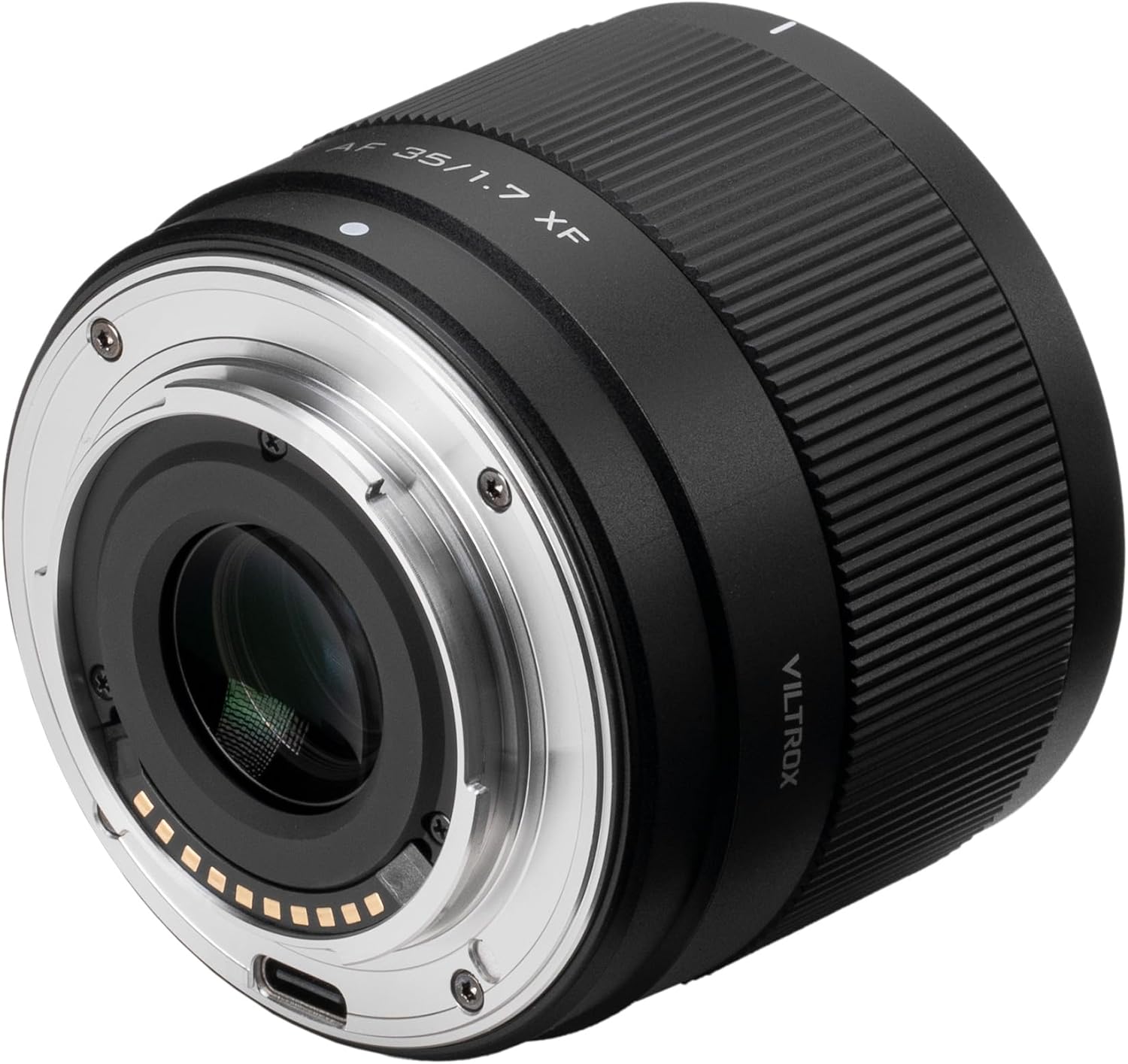
Figure 4.3: VILTROX AF 35mm F1.7 X-Mount Lens Rear View USB-C പോർട്ട് ഉള്ളത്
5. സജ്ജീകരണം
5.1 നിങ്ങളുടെ ക്യാമറയിൽ ലെൻസ് ഘടിപ്പിക്കൽ
- നിങ്ങളുടെ ക്യാമറ ഓഫാണെന്ന് ഉറപ്പാക്കുക.
- Remove the rear lens cap from the VILTROX lens and the body cap from your camera.
- Align the white index mark on the lens barrel with the corresponding index mark on your camera's lens mount.
- ക്യാമറ മൗണ്ടിലേക്ക് ലെൻസ് തിരുകുക, അത് സ്ഥലത്ത് ക്ലിക്ക് ചെയ്യുന്നത് വരെ ഘടികാരദിശയിൽ തിരിക്കുക. ലെൻസിനെ ബലമായി അമർത്തരുത്.

Figure 5.1: Lens Mounted on a Fujifilm Camera
5.2 ലെൻസ് ഹുഡ് ഘടിപ്പിക്കൽ
The included lens hood helps to block stray light, reducing flare and ghosting, and provides physical protection for the front element.
- Align the mark on the lens hood with the mark on the front of the lens.
- Gently push the hood onto the lens and rotate it clockwise until it locks into place.
5.3 ഫേംവെയർ അപ്ഡേറ്റുകൾ
The lens features a USB-C port for firmware updates. Regularly checking for and installing the latest firmware ensures optimal performance and compatibility with new camera models.
- Visit the official VILTROX webഏറ്റവും പുതിയ ഫേംവെയറിനും അപ്ഡേറ്റ് നിർദ്ദേശങ്ങൾക്കുമുള്ള സൈറ്റ്.
- Connect the lens to your computer using a USB-C cable.
- Follow the on-screen instructions provided by the firmware update tool.

Figure 5.2: USB-C Port for Firmware Updates
6. ഓപ്പറേഷൻ
6.1 ഓട്ടോഫോക്കസ് (AF)
This lens is equipped with an STM motor for fast, precise, and quiet autofocus performance. It supports various AF modes available on your Fujifilm camera.
- സിംഗിൾ AF (AF-S): Ideal for stationary subjects. Focus locks when the shutter button is half-pressed.
- തുടർച്ചയായ AF (AF-C): Suitable for moving subjects. Focus continuously adjusts as long as the shutter button is half-pressed.
- മാനുവൽ ഫോക്കസ് (MF): ഫോക്കസ് സ്വമേധയാ ക്രമീകരിക്കുന്നതിന് ലെൻസിലെ ഫോക്കസ് റിംഗ് തിരിക്കുക.
The lens also features low focus breathing, which minimizes changes in the angle of view when adjusting focus, beneficial for video recording.
6.2 അപ്പർച്ചർ നിയന്ത്രണം
The large f/1.7 maximum aperture allows for excellent performance in low-light conditions and provides a shallow depth of field for creating pleasing background blur (bokeh). Aperture can be controlled via your camera's settings.
6.3 Focal Length and Perspective
With a 35mm focal length (53mm equivalent on APS-C), this lens offers a natural perspective similar to the human eye, making it versatile for portraits, street photography, landscapes, and general-purpose shooting.
6.4 കുറഞ്ഞ ഫോക്കസിംഗ് ദൂരം
The lens has a minimum focusing distance of 0.33 meters (33cm), allowing for close-up shots with detailed subjects.

Figure 6.1: Key Features of the Lens
7. പരിപാലനം
7.1 ലെൻസ് വൃത്തിയാക്കൽ
- ലെൻസിന്റെ പ്രതലത്തിൽ നിന്ന് പൊടിയും അയഞ്ഞ കണികകളും നീക്കം ചെയ്യാൻ ഒരു ബ്ലോവർ ബ്രഷ് ഉപയോഗിക്കുക.
- വിരലടയാളങ്ങൾക്കോ പാടുകൾക്കോ, ഒപ്റ്റിക്സിനായി പ്രത്യേകം രൂപകൽപ്പന ചെയ്ത വൃത്തിയുള്ളതും മൃദുവായതുമായ മൈക്രോഫൈബർ തുണി ഉപയോഗിക്കുക, അതോടൊപ്പം ചെറിയ അളവിൽ ലെൻസ് ക്ലീനിംഗ് ലായനിയും ഉപയോഗിക്കുക. ലെൻസിൽ നേരിട്ട് പുരട്ടാതെ, തുണിയിൽ ലായനി പുരട്ടുക.
- Clean the lens body with a soft, dry cloth. Do not use organic solvents.
7.2 സംഭരണം
- When not in use, attach both front and rear lens caps.
- Store the lens in a cool, dry, and well-ventilated area, away from direct sunlight and chemicals.
- If storing for extended periods, consider using a dehumidifying agent to prevent mold and mildew growth.
8. പ്രശ്നപരിഹാരം
| പ്രശ്നം | സാധ്യമായ കാരണം | പരിഹാരം |
|---|---|---|
| ക്യാമറയ്ക്ക് ലെൻസ് തിരിച്ചറിയാൻ കഴിയുന്നില്ല. | Improper mounting; dirty contacts; outdated firmware. | Re-mount the lens securely; clean lens and camera contacts with a dry cloth; update lens firmware. |
| ഓട്ടോഫോക്കസ് മന്ദഗതിയിലാണ് അല്ലെങ്കിൽ കൃത്യമല്ല. | Low light conditions; subject lacks contrast; camera AF settings. | Use adequate lighting; focus on areas with good contrast; check camera AF mode and settings. |
| ചിത്രങ്ങൾ അവ്യക്തമാണ് | തെറ്റായ ഫോക്കസ്; ക്യാമറ കുലുക്കം; വൃത്തികെട്ട ലെൻസ് ഘടകം. | Ensure proper focus; use a faster shutter speed or tripod; clean the lens. |
| Lens hood does not attach securely | തെറ്റായ വിന്യാസം. | Ensure the alignment marks on the hood and lens are matched before twisting to lock. |
9 സ്പെസിഫിക്കേഷനുകൾ
| ഫീച്ചർ | വിശദാംശങ്ങൾ |
|---|---|
| ബ്രാൻഡ് | വിൽട്രോക്സ് |
| മോഡൽ നമ്പർ | AF 35mm F1.7 XF |
| ഫോക്കൽ ലെങ്ത് | 35mm (APS-C-യിൽ 53mm തത്തുല്യം) |
| പരമാവധി അപ്പേർച്ചർ | f/1.7 |
| മിനിമം അപ്പർച്ചർ | f/16 |
| ലെൻസ് തരം | സ്റ്റാൻഡേർഡ് പ്രൈം ലെൻസ് |
| അനുയോജ്യമായ മൗണ്ടിംഗുകൾ | ഫ്യൂജിഫിലിം എക്സ് |
| ഒപ്റ്റിക്കൽ ഡിസൈൻ | 11 elements in 9 groups (including 2 HR, 1 ED, 1 ASPH elements) |
| ഓട്ടോഫോക്കസ് മോട്ടോർ | STM (സ്റ്റെപ്പിംഗ് മോട്ടോർ) |
| ഏറ്റവും കുറഞ്ഞ ഫോക്കസിംഗ് ദൂരം | 0.33m (1.08 അടി) |
| ഫിൽട്ടർ വലുപ്പം | 52 മി.മീ |
| അളവുകൾ (വ്യാസം x നീളം) | Approximately 64mm x 54.7mm (2.5 x 2.15 inches) |
| ഇനത്തിൻ്റെ ഭാരം | Approximately 170g (0.37 lbs) |
| ഫേംവെയർ അപ്ഡേറ്റ് പോർട്ട് | USB-C |

Figure 9.1: Optical Design and MTF Chart

Figure 9.2: Lens Dimensions

Figure 9.3: Lens Weight
10. വാറൻ്റിയും പിന്തുണയും
VILTROX products are covered by a limited warranty. Please refer to the warranty card included in your package for specific terms and conditions. For technical support, service, or inquiries, please contact VILTROX customer service through their official webനിങ്ങൾ ഉൽപ്പന്നം വാങ്ങിയ സൈറ്റ് അല്ലെങ്കിൽ റീട്ടെയിലർ.
VILTROX Official Webസൈറ്റ്: www.viltrox.com