
Wanneton M9-1
Wanneton M9-1 Rechargeable Wireless Walkie Talkies User Manual
മോഡൽ: M9-1
1. ആമുഖം
This manual provides detailed instructions for the proper use and maintenance of your Wanneton M9-1 Rechargeable Wireless Walkie Talkies. Please read this manual thoroughly before operating the device to ensure optimal performance and safety.
ബോക്സിൽ എന്താണുള്ളത്
- 1X Walkie Talkie
- 1X Battery
- 1X Belt Clip
- 1X Charging Head (Power Adapter)
- 1X Charging Cable (USB Type-C)
- 1 എക്സ് നിർദ്ദേശ മാനുവൽ
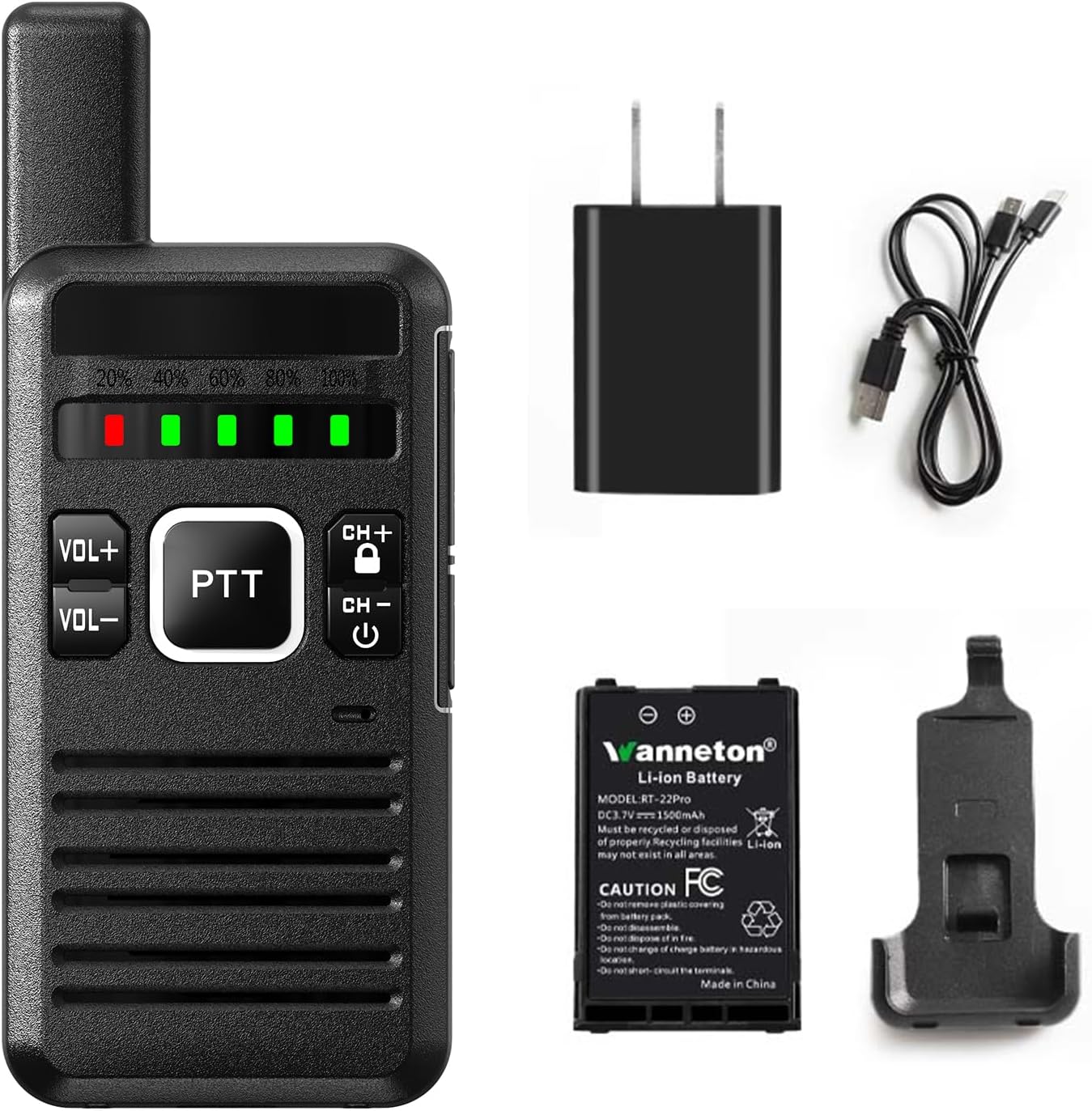
Figure 1: Package Contents of the Wanneton M9-1 Walkie Talkie.
2. ഉൽപ്പന്നം കഴിഞ്ഞുview
Familiarize yourself with the components and controls of your Wanneton M9-1 walkie talkie.

Figure 2: Labeled Diagram of the Wanneton M9-1 Walkie Talkie.
പ്രധാന ഘടകങ്ങൾ:
- ആൻ്റിന: സിഗ്നൽ പ്രക്ഷേപണത്തിനും സ്വീകരണത്തിനും.
- പവർ/വോളിയം സ്വിച്ച്: Rotates to turn the device on/off and adjust volume.
- Battery Bar Display: നിലവിലെ ബാറ്ററി നില സൂചിപ്പിക്കുന്നു.
- ഹെഡ്ഫോൺ ജാക്ക്: ബാഹ്യ ഓഡിയോ ആക്സസറികൾ ബന്ധിപ്പിക്കുന്നതിന്.
- Channel+/Channel Lock Button: Used to change channels and lock/unlock controls.
- USB Type-C Charging Socket: ഉപകരണം ചാർജ് ചെയ്യുന്നതിനായി.
- MIC: വോയ്സ് ഇൻപുട്ടിനുള്ള മൈക്രോഫോൺ.
- സ്പീക്കർ: ഓഡിയോ ഔട്ട്പുട്ടിനായി.
- PTT (പുഷ്-ടു-ടോക്ക്) ബട്ടൺ: അയയ്ക്കാൻ അമർത്തിപ്പിടിക്കുക, സ്വീകരിക്കാൻ വിടുക.
- Volume +/- Keys: സ്പീക്കർ വോളിയം ക്രമീകരിക്കുന്നു.
3. സജ്ജീകരണം
3.1 ബാറ്ററി ഇൻസ്റ്റാളേഷൻ
- വാക്കി ടോക്കി ഓഫാക്കിയിട്ടുണ്ടെന്ന് ഉറപ്പാക്കുക.
- ഉപകരണത്തിന്റെ പിൻഭാഗത്ത് ബാറ്ററി കമ്പാർട്ട്മെന്റ് കണ്ടെത്തുക.
- Insert the provided Lithium-Ion battery, ensuring the contacts align correctly.
- ബാറ്ററി കമ്പാർട്ട്മെൻ്റ് കവർ സുരക്ഷിതമായി അടയ്ക്കുക.
3.2 ബാറ്ററി ചാർജ് ചെയ്യുന്നു
The walkie talkie uses a rechargeable 1500mAh Li-ion battery. Charge the device before first use and whenever the battery indicator shows low power.
- Connect the USB Type-C charging cable to the charging socket on the side of the walkie talkie.
- Connect the other end of the USB cable to the charging head (power adapter) and plug it into a standard wall outlet, or connect it to a computer or power bank.
- The battery indicator lights will show charging status. A full charge is indicated when all lights are green.
- ചാർജിംഗ് പൂർത്തിയായിക്കഴിഞ്ഞാൽ ചാർജർ വിച്ഛേദിക്കുക.

Figure 3: Charging the Wanneton M9-1 Walkie Talkie.
3.3 ബെൽറ്റ് ക്ലിപ്പ് അറ്റാച്ചുചെയ്യുന്നു
The innovative clip design allows for easy attachment and detachment without tools.
- വാക്കി ടോക്കിയുടെ പിൻഭാഗത്തുള്ള നിയുക്ത സ്ലോട്ടുകളുമായി ബെൽറ്റ് ക്ലിപ്പ് വിന്യസിക്കുക.
- Slide the clip until it securely locks into place.
- To remove, press the release tab (if present) and slide the clip off.

Figure 4: Attaching the Belt Clip for Hands-free Use.
4. പ്രവർത്തന നിർദ്ദേശങ്ങൾ
4.1 പവർ ഓൺ/ഓഫ്, വോളിയം ക്രമീകരണം
- To power on, rotate the Power/Volume switch clockwise until you hear a click and the device powers on.
- To power off, rotate the Power/Volume switch counter-clockwise until you hear a click and the device powers off.
- Adjust the volume by rotating the Power/Volume switch further clockwise (increase) or counter-clockwise (decrease). Alternatively, use the dedicated VOL+ and VOL- buttons.

Figure 5: Clear Sound Quality and Volume Control.
4.2 പ്രക്ഷേപണവും സ്വീകരണവും (PTT)
- ട്രാൻസ്മിറ്റ് ചെയ്യാൻ, PTT (പുഷ്-ടു-ടോക്ക്) ബട്ടൺ അമർത്തിപ്പിടിക്കുക. മൈക്രോഫോണിൽ വ്യക്തമായി സംസാരിക്കുക.
- ട്രാൻസ്മിറ്റ് നിർത്തി റിസീവ് മോഡിലേക്ക് മടങ്ങാൻ PTT ബട്ടൺ വിടുക.
4.3 ചാനൽ തിരഞ്ഞെടുക്കൽ
Use the CH+ and CH- buttons to cycle through the available channels. Ensure all parties are on the same channel for communication.
4.4 VOX ഫംഗ്ഷൻ (ഹാൻഡ്സ്-ഫ്രീ പ്രവർത്തനം)
The VOX (Voice Operated Exchange) function allows you to transmit without pressing the PTT button. When VOX is enabled, the radio will automatically transmit when it detects your voice.
- Access the device menu to enable or disable VOX.
- Adjust VOX sensitivity levels as needed to prevent accidental transmissions or missed voice activation.
4.5 Scrambling Function
The scrambling function encrypts your voice transmission to enhance privacy. Only other radios with the scrambling function enabled and set to the same code can understand your communication.
- Enable or disable scrambling through the device menu.
4.6 സ്കാനിംഗ് ഫംഗ്ഷൻ
The scanning function allows the radio to automatically scan through channels to detect active transmissions.
- Activate scanning via the device menu. The radio will stop on an active channel and resume scanning after a short period of inactivity.
4.7 വയർലെസ് ഫ്രീക്വൻസി കോപ്പി
This feature allows you to easily clone frequencies from other walkie talkie brands without needing to know the exact frequency, ensuring compatibility.

Figure 6: Wireless Frequency Copy in Action.
4.8 മറ്റ് പ്രവർത്തനങ്ങൾ
The M9-1 walkie talkie includes additional features accessible through the device menu:
- സ്വകാര്യതാ കോഡുകൾ: Utilize 260 privacy codes to minimize interference from other users.
- ഡീകോഡിംഗ് പ്രവർത്തനം: For receiving scrambled transmissions.
- കുറഞ്ഞ ബാറ്ററി ഓർമ്മപ്പെടുത്തൽ: Alerts you when the battery is low.
- പവർ-സേവിംഗ് മോഡ്: നിഷ്ക്രിയമായ സമയങ്ങളിൽ ബാറ്ററി ലൈഫ് വർദ്ധിപ്പിക്കുന്നു.
- Wide/Narrowband: Adjusts channel bandwidth for specific communication needs.

ചിത്രം 7: ഓവർview of Wanneton M9-1 Features.
5. പരിപാലനം
5.1 വൃത്തിയാക്കൽ
- സോഫ്റ്റ്, ഡി ഉപയോഗിച്ച് ഉപകരണം തുടയ്ക്കുകamp തുണി. കഠിനമായ രാസവസ്തുക്കളോ ഉരച്ചിലുകളുള്ള ക്ലീനറുകളോ ഉപയോഗിക്കരുത്.
- ചാർജിംഗ് പോർട്ട് പൊടിയും അവശിഷ്ടങ്ങളും ഇല്ലാത്തതാണെന്ന് ഉറപ്പാക്കുക.
5.2 ബാറ്ററി കെയർ
- ബാറ്ററി ഇടയ്ക്കിടെ പൂർണ്ണമായും ഡിസ്ചാർജ് ചെയ്യുന്നത് ഒഴിവാക്കുക.
- ദീർഘനേരം ഉപയോഗിക്കാത്തപ്പോൾ, ഉപകരണവും ബാറ്ററിയും തണുത്തതും വരണ്ടതുമായ സ്ഥലത്ത് സൂക്ഷിക്കുക.
- അങ്ങേയറ്റത്തെ താപനിലയിലേക്ക് ബാറ്ററി തുറന്നുകാട്ടരുത്.
6. പ്രശ്നപരിഹാരം
| പ്രശ്നം | സാധ്യമായ കാരണം | പരിഹാരം |
|---|---|---|
| ശക്തിയില്ല | Battery discharged; Battery not installed correctly; Device faulty. | Charge the battery; Reinstall the battery; Contact customer support. |
| കൈമാറാനോ സ്വീകരിക്കാനോ കഴിയില്ല | Wrong channel; Out of range; Battery low; Antenna damaged. | Verify channel settings; Move closer to other radios; Charge battery; Inspect antenna. |
| മോശം ഓഡിയോ നിലവാരം | Low volume; Interference; Out of range; Speaker/MIC obstructed. | Adjust volume; Move away from interference sources; Move closer; Clear obstructions. |
| Frequency copy not working | Source radio too far; Incorrect procedure. | Ensure radios are close; Follow frequency copy instructions carefully. |
7 സ്പെസിഫിക്കേഷനുകൾ
| ഫീച്ചർ | വിശദാംശങ്ങൾ |
|---|---|
| ബ്രാൻഡ് | Wanneton |
| മോഡൽ നമ്പർ | M9-1 |
| ഇനത്തിൻ്റെ ഭാരം | 1 പൗണ്ട് |
| ഉൽപ്പന്ന അളവുകൾ | 0.8 x 2 x 6.2 ഇഞ്ച് |
| ബാറ്ററി തരം | 1 ലിഥിയം അയൺ ബാറ്ററി ആവശ്യമാണ് (1500mAh) |
| നിറം | കറുപ്പ് |
| ചാനലുകളുടെ എണ്ണം | 16 |
| പ്രത്യേക സവിശേഷതകൾ | One-key decoding copy frequency, Battery Saver Mode, Lightweight, Keypad Lock, Emergency Alarm |
| ഫ്രീക്വൻസി റേഞ്ച് | UHF |
| പരമാവധി സംസാര ശ്രേണി | 30 മൈൽ (ഒപ്റ്റിമൽ സാഹചര്യങ്ങളിൽ) |
| വാല്യംtage | 3.7 വോൾട്ട് (DC) |
| ജല പ്രതിരോധ നില | വെള്ളത്തെ പ്രതിരോധിക്കുന്ന |
8. വാറൻ്റിയും പിന്തുണയും
8.1 വാറൻ്റി വിവരങ്ങൾ
Please note that the product specifications indicate 'NO' for warranty. For specific details regarding any implied warranties or consumer rights, please refer to your point of purchase or local consumer protection laws.
8.2 ഉപഭോക്തൃ പിന്തുണ
Wanneton provides lifetime after-sales service for the quality of their walkie talkies. If you have any questions, concerns, or require assistance with your M9-1 device, please contact our dedicated customer support team. Refer to the contact information provided with your purchase or visit the official Wanneton webപിന്തുണാ ഓപ്ഷനുകൾക്കായുള്ള സൈറ്റ്.
Ask a question about this manual
Ask about setup, troubleshooting, compatibility, parts, safety, or missing instructions. Manuals+ will review the question and use this page’s manual context to help answer it.