
DOOGEE Blade10 Power
DOOGEE Blade10 Power Rugged Smartphone User Manual
Model: Blade10 Power
1. ഉൽപ്പന്നം കഴിഞ്ഞുview
The DOOGEE Blade10 Power is a robust and high-performance rugged smartphone designed for durability and extended use. It features a massive 10,300mAh battery, ample storage, a high-resolution camera system, and a vibrant display, all encased in a military-grade durable body.

മുന്നിലും പിന്നിലും view of the DOOGEE Blade10 Power Rugged Smartphone, highlighting its design and key specifications on the screen.

The DOOGEE Blade10 Power, showcasing its ultra-light weight (326g), ultra-thin body (15.8mm), and height (174mm).
2. ബോക്സിൽ എന്താണുള്ളത്?
Upon opening your DOOGEE Blade10 Power package, you should find the following items:
- 1 x DOOGEE Blade10 Power Rugged Smartphone
- 1 x ടൈപ്പ്-സി യുഎസ്ബി കേബിൾ
- 1 x ചാർജർ
- 1 x Screen-printed Protective Film (Pre-applied)
- 1 x Anti-explosion film
- 1 x മാനുവൽ

An organized display of all items included in the DOOGEE Blade10 Power retail packaging.
3. സജ്ജീകരണ ഗൈഡ്
3.1 ഉപകരണം ചാർജ് ചെയ്യുന്നു
Before first use, fully charge your DOOGEE Blade10 Power. Connect the provided Type-C USB cable to the phone's charging port and the other end to the charger. Plug the charger into a power outlet. The phone supports 18W fast charging.

Illustration of the DOOGEE Blade10 Power connected to its charger, emphasizing its 10300mAh battery and 18W fast charging capability.
3.2. സിം കാർഡും TF കാർഡും ഇൻസ്റ്റാൾ ചെയ്യൽ
The Blade10 Power features a triple card slot, allowing for two Nano-SIM cards and one TF (microSD) card simultaneously. Locate the SIM tray on the side of the device. Use the provided SIM ejector tool to open the tray. Carefully place your Nano-SIM cards and TF card into their respective slots, ensuring correct orientation. Gently push the tray back into the phone until it clicks into place.

വിശദമായി view of the triple card slot, showing dedicated spaces for two Nano-SIM cards and one TF card.
3.3. പ്രാരംഭ പവർ ഓണും സജ്ജീകരണവും
Press and hold the power button until the DOOGEE logo appears. Follow the on-screen prompts to complete the initial setup, including language selection, Wi-Fi connection, Google account login, and security settings.
4. നിങ്ങളുടെ സ്മാർട്ട്ഫോൺ പ്രവർത്തിപ്പിക്കുക
4.1. ഡിസ്പ്ലേയും നാവിഗേഷനും
The 6.6-inch HD+ IPS display with a 90Hz refresh rate provides smooth visuals and responsive touch. Navigate the Android 14 interface using gestures or on-screen navigation buttons. The 380 nits brightness ensures visibility even in direct sunlight.
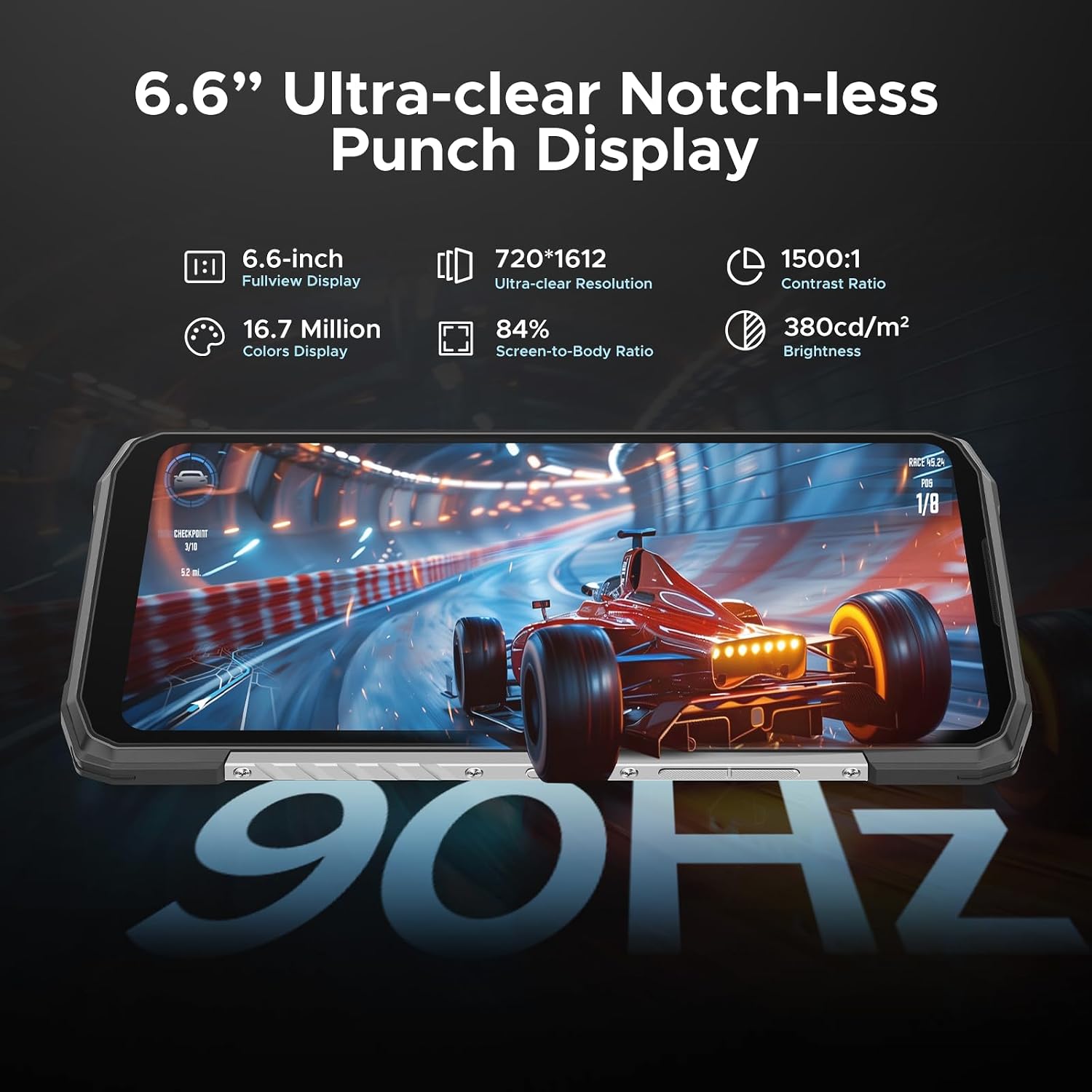
The 6.6-inch HD+ IPS display of the Blade10 Power, highlighting its 90Hz refresh rate for smooth interactions.
4.2. ക്യാമറ പ്രവർത്തനങ്ങൾ
The Blade10 Power is equipped with a 50MP AI main camera and an 8MP front camera. Open the Camera app to access various modes:
- HDR: വെല്ലുവിളി നിറഞ്ഞ ലൈറ്റിംഗിൽ സന്തുലിതമായ എക്സ്പോഷറിനായി ഡൈനാമിക് റേഞ്ച് മെച്ചപ്പെടുത്തുന്നു.
- പ്രോ മോഡ്: Offers manual control over settings like ISO, white balance, and shutter speed.
- പനോരമ: Captures wide-angle scenes by stitching multiple photos together.
- AI ക്യാമറ: Intelligently recognizes scenes and optimizes settings for best results.

Close-up of the 50MP AI main camera system on the rear of the DOOGEE Blade10 Power.

Visual representation of various camera modes available, including Panorama, Portrait Mode, Pro Mode, and HDR Mode.
4.3. സുരക്ഷാ സവിശേഷതകൾ
Unlock your device quickly and securely using:
- Side-mounted Fingerprint Recognition: Register your fingerprint for quick access.
- ഫേസ് അൺലോക്ക്: ഉപകരണം അൺലോക്ക് ചെയ്യാൻ നിങ്ങളുടെ മുഖം ഉപയോഗിക്കുക.

Illustrations demonstrating the Face Recognition and Side Fingerprint Recognition features for secure device access.
4.4. കണക്റ്റിവിറ്റി
The Blade10 Power offers robust connectivity options:
- NFC: For contactless payments (e.g., Google Pay) and quick pairing with other NFC-enabled devices.
- ജിപിഎസ്: Built-in GPS for accurate navigation and location services.
- ബ്ലൂടൂത്ത് 5.0: For connecting wireless accessories like headphones and speakers.
- Wi-Fi 6E: അതിവേഗ വയർലെസ് ഇന്റർനെറ്റ് ആക്സസിനായി.
5. പരിപാലനവും ഈടും
The DOOGEE Blade10 Power is built to withstand harsh environments, meeting MIL-STD-810H standards and IP68/IP69K certifications. This means it is:
- ഡ്രോപ്പ് പ്രൂഫ്: Can survive drops from up to 1.5 meters.
- വാട്ടർപ്രൂഫ്: Submersible in water for up to 30 minutes.
- പൊടി പ്രതിരോധം: Completely protected against dust ingress.

Visual demonstration of the phone's drop-proof, dust-proof, and waterproof capabilities, highlighting its IP68/IP69K and MIL-STD-810H ratings.
5.1. വൃത്തിയാക്കലും പരിചരണവും
To maintain your device, wipe it with a soft, damp cloth. Avoid using harsh chemicals or abrasive materials. Ensure all ports are dry before charging or connecting accessories, especially after exposure to water.
6. പ്രശ്നപരിഹാരം
6.1. പൊതുവായ പ്രശ്നങ്ങളും പരിഹാരങ്ങളും
- ഉപകരണം ഓണാക്കുന്നില്ല: ബാറ്ററി ചാർജ്ജ് ചെയ്തിട്ടുണ്ടെന്ന് ഉറപ്പാക്കുക. ചാർജറുമായി കണക്റ്റ് ചെയ്ത് കുറച്ച് മിനിറ്റ് കാത്തിരുന്ന് വീണ്ടും പവർ ഓൺ ചെയ്യാൻ ശ്രമിക്കുക.
- മോശം നെറ്റ്വർക്ക് സിഗ്നൽ: Check SIM card installation. Move to an area with better network coverage.
- Apps crashing or slow performance: Close background apps. Clear app cache. Restart the device. Ensure sufficient storage space.
- ചാർജിംഗ് പ്രശ്നങ്ങൾ: Verify the cable and charger are properly connected and undamaged. Try a different power outlet.
6.2. ഫാക്ടറി റീസെറ്റ്
പ്രശ്നങ്ങൾ നിലനിൽക്കുകയാണെങ്കിൽ, ഒരു ഫാക്ടറി റീസെറ്റ് ആവശ്യമായി വന്നേക്കാം. മുന്നറിയിപ്പ്: ഇത് നിങ്ങളുടെ ഫോണിലെ എല്ലാ ഡാറ്റയും മായ്ക്കും. തുടരുന്നതിന് മുമ്പ് പ്രധാനപ്പെട്ട ഡാറ്റ ബാക്കപ്പ് ചെയ്യുക. ക്രമീകരണങ്ങൾ > സിസ്റ്റം > റീസെറ്റ് ഓപ്ഷനുകൾ > എല്ലാ ഡാറ്റയും മായ്ക്കുക (ഫാക്ടറി റീസെറ്റ്) എന്നതിലേക്ക് പോകുക.
7 സ്പെസിഫിക്കേഷനുകൾ
| ഫീച്ചർ | സ്പെസിഫിക്കേഷൻ |
|---|---|
| മോഡലിൻ്റെ പേര് | Blade10 Power |
| ഓപ്പറേറ്റിംഗ് സിസ്റ്റം | ആൻഡ്രോയിഡ് 14 |
| ഡിസ്പ്ലേ വലിപ്പം | 6.6 ഇഞ്ച് |
| ഡിസ്പ്ലേ റെസല്യൂഷൻ | 1280 x 720 (എച്ച്ഡി+) |
| റാം | 24 ജിബി (16 ജിബി ഫിസിക്കൽ + 8 ജിബി വെർച്വൽ) |
| ആന്തരിക സംഭരണം | 256 ജിബി |
| വികസിപ്പിക്കാവുന്ന സംഭരണം | TF കാർഡ് വഴി 2TB വരെ |
| ബാറ്ററി ശേഷി | 10300 mAh |
| പ്രധാന ക്യാമറ | 50 MP AI Camera |
| മുൻ ക്യാമറ | 8 എം.പി |
| ഈട് | IP68/IP69K, MIL-STD-810H |
| കണക്റ്റിവിറ്റി | Bluetooth 5.0, NFC, Wi-Fi 6E, GPS |
| സിം പിന്തുണ | ഡ്യുവൽ സിം (നാനോ-സിം) |
| ഇനത്തിൻ്റെ ഭാരം | 1.27 പൗണ്ട് |
| അളവുകൾ | 7.64 x 4.09 x 2.24 ഇഞ്ച് |
8. വാറൻ്റിയും പിന്തുണയും
8.1. വാറൻ്റി വിവരങ്ങൾ
Your DOOGEE Blade10 Power comes with a 2-വർഷ പരിമിത വാറൻ്റി. Please retain your proof of purchase for warranty claims. For detailed terms and conditions, refer to the warranty card included in your package or visit the official DOOGEE webസൈറ്റ്.
8.2. ഉപഭോക്തൃ പിന്തുണ
For any questions, technical assistance, or support, DOOGEE offers 24/7 One-on-One Online Support. You can also benefit from a 30 ദിവസത്തെ മണി ബാക്ക് ഗ്യാരണ്ടിയും സൗജന്യ റിട്ടേണും. For further assistance, please visit the official DOOGEE support channels:
- Official DOOGEE Webസൈറ്റ്: www.doogee.cc
- ആമസോൺ സ്റ്റോർ: DOOGEE Amazon Store
Ask a question about this manual
Ask about setup, troubleshooting, compatibility, parts, safety, or missing instructions. Manuals+ will review the question and use this page’s manual context to help answer it.