
T100
T100 Car Stereo Android 14 User Manual
Model: T100 CAR ANDROID-14
1. ആമുഖം
Welcome to the user manual for your new T100 Car Stereo Android 14 system. This advanced multimedia system is designed to provide a superior in-car entertainment and navigation experience. Featuring a 9-inch high-definition touchscreen, a powerful quad-core processor, and extensive connectivity options, it transforms your driving experience. Please read this manual thoroughly before installation and operation to ensure proper use and to maximize the features of your device.
2 സുരക്ഷാ വിവരങ്ങൾ
Always prioritize safety. Improper installation or operation can lead to serious injury or damage.
- Do not attempt to operate the unit or view videos while driving. Distracted driving is dangerous and illegal.
- Ensure professional installation to avoid electrical shorts or damage to your vehicle's electrical system.
- യൂണിറ്റ് വെള്ളത്തിൽ നിന്നും അമിതമായ ഈർപ്പത്തിൽ നിന്നും അകറ്റി നിർത്തുക.
- Do not disassemble or modify the unit. This will void the warranty and may cause damage.
- നിർദ്ദിഷ്ട പവർ കേബിളുകളും അനുബന്ധ ഉപകരണങ്ങളും മാത്രം ഉപയോഗിക്കുക.
3. പാക്കേജ് ഉള്ളടക്കം
താഴെ പറയുന്ന ഇനങ്ങൾക്കായി ബോക്സ് ചെക്ക് ചെയ്യുക:
- T100 Car Stereo Android 14 Unit (9-inch screen)
- 2 x USB Flash Drive Cables
- RC Cables (RCA audio/video cables)
- Camera Support Cable
- പ്രധാന പവർ പ്ലഗ്
- ജിപിഎസ് ആൻ്റിന

Image: The retail packaging of the T100 Car Stereo, showing the unit and its key features.
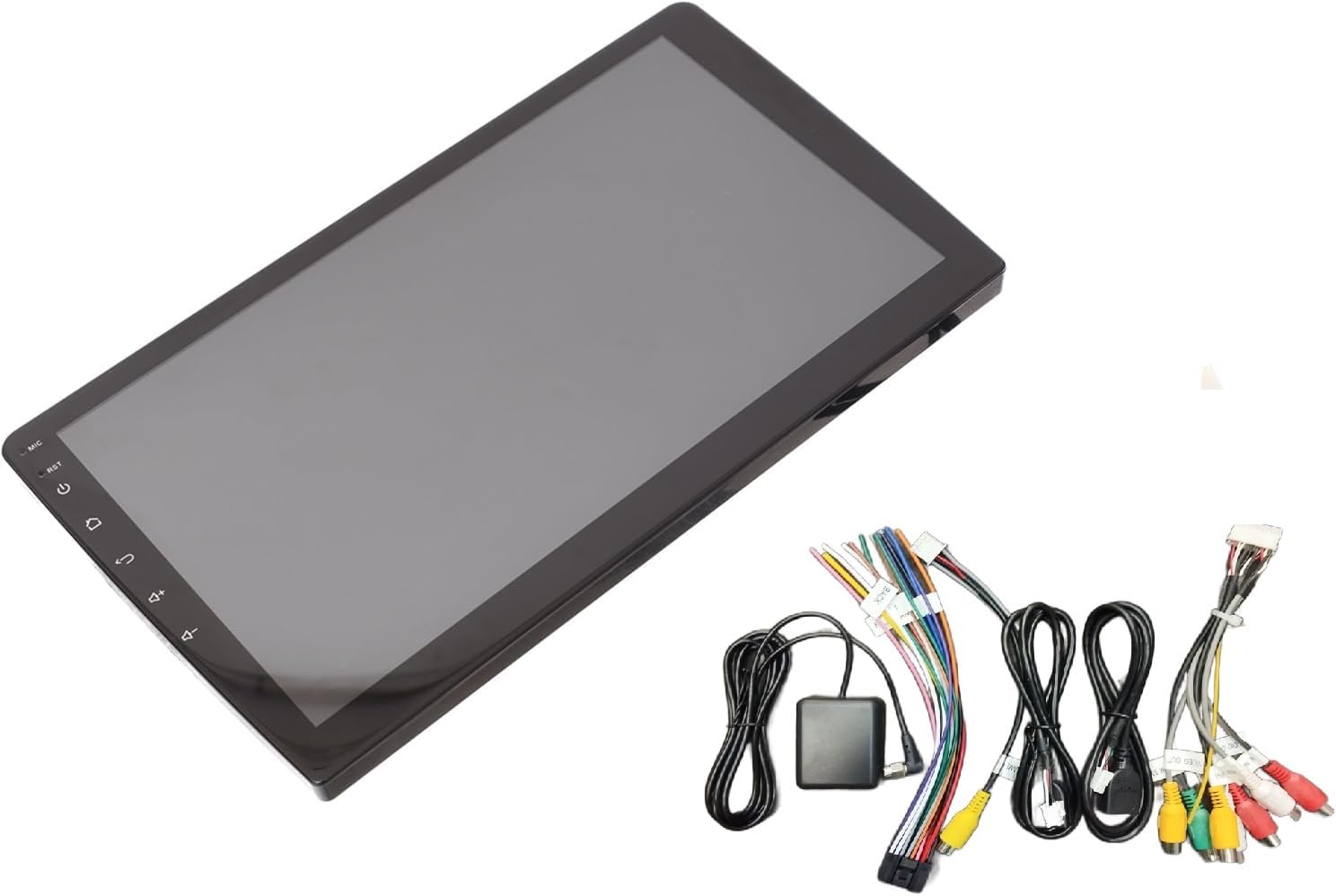
Image: The T100 Car Stereo unit displayed alongside its various connection cables and GPS antenna.
4. സജ്ജീകരണവും ഇൻസ്റ്റാളേഷനും
Installation of the T100 Car Stereo requires technical knowledge and should ideally be performed by a qualified professional. Incorrect wiring can damage the unit or your vehicle.
4.1 പ്രീ-ഇൻസ്റ്റലേഷൻ ചെക്ക്ലിസ്റ്റ്
- ഇൻസ്റ്റാളേഷൻ ആരംഭിക്കുന്നതിന് മുമ്പ് നിങ്ങളുടെ വാഹനത്തിന്റെ ബാറ്ററി വിച്ഛേദിച്ചിട്ടുണ്ടെന്ന് ഉറപ്പാക്കുക.
- Verify compatibility with your vehicle's dashboard and wiring harness.
- Gather necessary tools (wire strippers, crimpers, screwdrivers, electrical tape).
4.2 വയറിംഗ് ഡയഗ്രം (പൊതുവായത്)
Refer to the wiring diagram provided with your unit for specific connections. Common connections include:
- ശക്തി: ACC (ignition), B+ (constant 12V), GND (ground).
- സ്പീക്കറുകൾ: Connect to appropriate speaker outputs (Front L/R, Rear L/R).
- ആൻ്റിന: Connect FM antenna.
- ജിപിഎസ് ആന്റിന: Connect the GPS antenna and mount it in a location with clear sky view.
- USB പോർട്ടുകൾ: Connect the provided USB cables for external devices.
- ക്യാമറ ഇൻപുട്ട്: പിൻഭാഗം ബന്ധിപ്പിക്കുക view or 360-degree camera input.
- സ്റ്റിയറിംഗ് വീൽ നിയന്ത്രണം: Connect SWC wires if your vehicle supports it.

Image: The back of the T100 Car Stereo, showing various input and output ports for power, speakers, USB, and other accessories.

Image: A collection of cables included with the T100 Car Stereo, such as USB cables, RCA cables, and the GPS antenna.
4.3 യൂണിറ്റ് മൌണ്ട് ചെയ്യുന്നു
Securely mount the T100 unit into your vehicle's dashboard using the appropriate mounting brackets. Ensure it is firmly in place to prevent vibration and damage.
5. പ്രവർത്തന നിർദ്ദേശങ്ങൾ
The T100 Car Stereo runs on Android 14, offering a familiar and intuitive user interface.
5.1 അടിസ്ഥാന പ്രവർത്തനം
- പവർ ഓൺ/ഓഫ്: Press and hold the power button (usually on the left side of the screen) to turn the unit on or off. A short press typically mutes/unmutes or puts the screen to sleep.
- വോളിയം നിയന്ത്രണം: Use the on-screen volume controls or integrated steering wheel controls.
- ഹോം ബട്ടണ്: പ്രധാന Android ഹോം സ്ക്രീനിലേക്ക് മടങ്ങുന്നു.
- ബാക്ക് ബട്ടൺ: മുമ്പത്തെ സ്ക്രീനിലേക്കോ മെനുവിലേക്കോ തിരികെ നാവിഗേറ്റ് ചെയ്യുന്നു.
- റീസെറ്റ് ബട്ടൺ: A small pinhole reset button (RST) is available for system reboots if needed. Use a thin object to press it.

ചിത്രം: മുൻഭാഗം view of the T100 Car Stereo, highlighting its large 9-inch touchscreen and side control buttons.
5.2 കണക്റ്റിവിറ്റി
- ബ്ലൂടൂത്ത്: Go to Settings > Bluetooth to pair with your smartphone for hands-free calling and audio streaming.
- വൈഫൈ: Connect to a Wi-Fi hotspot (e.g., from your phone) via Settings > Wi-Fi to access online features like Google Maps, YouTube, and the Play Store.
- CarPlay / Android Auto: Connect your smartphone via USB for wired connection, or wirelessly if supported by your phone and the unit. Follow on-screen prompts for setup.
5.3 മൾട്ടിമീഡിയ പ്ലേബാക്ക്
- യുഎസ്ബി പ്ലേബാക്ക്: Insert a USB flash drive into one of the USB ports to play audio or video files.
- എഫ്എം റേഡിയോ: Access the FM Radio application to scan for and save radio stations.
- ഓൺലൈൻ സ്ട്രീമിംഗ്: Use pre-installed apps like YouTube or download others from the Play Store for online content.
5.4 നാവിഗേഷൻ
The unit comes with built-in GPS and supports various navigation applications. Connect to Wi-Fi to download maps or use online navigation services like Google Maps.
5.5 ക്യാമറ പിന്തുണ
ഒരു പിൻഭാഗമാണെങ്കിൽ view or 360-degree camera is connected, the display will automatically switch to the camera view when reversing or when the camera app is opened.
5.6 OBD2 Dongle Support
Connect a compatible OBD2 dongle (sold separately) via Bluetooth to monitor vehicle diagnostics and performance data through dedicated apps.
6. സവിശേഷതകൾ കഴിഞ്ഞുview
- 9 ഇഞ്ച് എച്ച്ഡി ടച്ച്സ്ക്രീൻ: വ്യക്തമായ ദൃശ്യങ്ങളും പ്രതികരണശേഷിയുള്ള ടച്ച് നിയന്ത്രണവും നൽകുന്നു.
- ആൻഡ്രോയിഡ് 14 ഒഎസ്: Access to a wide range of Android applications via the Google Play Store.
- ക്വാഡ്-കോർ പ്രോസസർ: Ensures smooth performance and fast app loading.
- 2GB RAM / 32GB ROM: Sufficient memory for multitasking and storing apps/media.
- High-Power Audio Output with Tosheba IC: Delivers clear and powerful sound quality.
- സ്റ്റിയറിംഗ് വീൽ നിയന്ത്രണ സംയോജനം: Allows safe control of media and calls without taking hands off the wheel.
- Wired & Wireless CarPlay / Android Auto: Seamless smartphone integration for navigation, music, and communication.
- Built-in WiFi & Bluetooth: For internet connectivity, hands-free calls, and audio streaming.
- 360-degree Camera Support: Enhances parking and driving safety with comprehensive views.
- ഇരട്ട USB പോർട്ടുകൾ: യുഎസ്ബി ഉപകരണങ്ങൾ ബന്ധിപ്പിക്കുന്നതിനും ചാർജ് ചെയ്യുന്നതിനും.
- FM Radio & GPS Navigation: Standard features for entertainment and guidance.
- Motherboard Protection Circuits: Ensures reliable and durable performance.
- ഇഷ്ടാനുസൃതമാക്കാവുന്ന തീമുകൾ: 12 unique themes to personalize your user interface.
- ബിൽറ്റ്-ഇൻ മൈക്രോഫോൺ: For clear hands-free calls and voice commands.
7. പരിപാലനം
- വൃത്തിയാക്കൽ: Use a soft, dry cloth to clean the screen and unit. Do not use abrasive cleaners or solvents.
- സോഫ്റ്റ്വെയർ അപ്ഡേറ്റുകൾ: Periodically check for system updates via Wi-Fi in the settings menu to ensure optimal performance and access to new features.
- തീവ്രമായ താപനില ഒഴിവാക്കുക: Do not expose the unit to extreme heat or cold, as this can affect its performance and lifespan.
8. പ്രശ്നപരിഹാരം
| പ്രശ്നം | സാധ്യമായ കാരണം | പരിഹാരം |
|---|---|---|
| യൂണിറ്റ് പവർ ഓണാക്കുന്നില്ല. | വൈദ്യുതി കണക്ഷൻ ഇല്ല; ഫ്യൂസ് പൊട്ടി; തെറ്റായ വയറിംഗ്. | Check power cables and fuse. Verify wiring connections. |
| ശബ്ദമില്ല. | ശബ്ദം വളരെ കുറവാണ്; മ്യൂട്ട് സജീവമാക്കി; സ്പീക്കർ വയറുകൾ വിച്ഛേദിച്ചു. | Increase volume. Check mute status. Verify speaker connections. |
| Bluetooth/Wi-Fi not connecting. | Device not in pairing mode; Incorrect password; Signal interference. | Ensure device is discoverable. Re-enter password. Move closer to hotspot. |
| ടച്ച്സ്ക്രീൻ പ്രതികരിക്കുന്നില്ല. | System freeze. | Press the RST (reset) button with a thin object. |
| GPS സിഗ്നൽ ദുർബലമാണ് അല്ലെങ്കിൽ നഷ്ടപ്പെട്ടു. | GPS ആന്റിന തടസ്സപ്പെട്ടിരിക്കുന്നു അല്ലെങ്കിൽ അനുചിതമായി സ്ഥാപിച്ചിരിക്കുന്നു. | ജിപിഎസ് ആന്റിനയ്ക്ക് വ്യക്തമായ ഒരു രേഖ ഉണ്ടെന്ന് ഉറപ്പാക്കുക view ആകാശത്തിന്റെ. ആന്റിന കണക്ഷൻ പരിശോധിക്കുക. |
പ്രശ്നങ്ങൾ നിലനിൽക്കുകയാണെങ്കിൽ, ദയവായി ഉപഭോക്തൃ പിന്തുണയെയോ യോഗ്യതയുള്ള ഒരു ടെക്നീഷ്യനെയോ ബന്ധപ്പെടുക.
9 സ്പെസിഫിക്കേഷനുകൾ
- നിർമ്മാതാവ്: എസ്എച്ച്എസ്
- മോഡൽ: T100 CAR ANDROID-14
- ഓപ്പറേറ്റിംഗ് സിസ്റ്റം: ആൻഡ്രോയിഡ് 14
- സ്ക്രീൻ വലിപ്പം: 9 ഇഞ്ച്
- സ്ക്രീൻ റെസല്യൂഷൻ: HD
- പ്രോസസ്സർ: ക്വാഡ്-കോർ
- റാം: 2 ജിബി
- ആന്തരിക സംഭരണം (ROM): 32 ജിബി
- ഓഡിയോ putട്ട്പുട്ട് മോഡ്: സ്റ്റീരിയോ
- കണക്റ്റിവിറ്റി: ബ്ലൂടൂത്ത്, വൈ-ഫൈ, യു.എസ്.ബി
- പ്രത്യേക സവിശേഷതകൾ: CarPlay, Android Auto, GPS Navigation, FM Radio, 360-degree Camera Support, OBD2 Dongle Support, Steering Wheel Control, Built-in Microphone, Motherboard Protection Circuits, Customizable Themes.
- മൗണ്ടിംഗ് തരം: ഡാഷ്ബോർഡ് മ .ണ്ട്
- ഇനത്തിൻ്റെ ഭാരം: 1 കിലോഗ്രാം
- ഷിപ്പിംഗ് അളവുകൾ: 29 x 19 x 10 സെ.മീ
- മാതൃരാജ്യം: ചൈന
10. വാറൻ്റിയും പിന്തുണയും
മെറ്റീരിയലുകളിലെയും വർക്ക്മാൻഷിപ്പിലെയും പിഴവുകൾക്കെതിരെ നിർമ്മാതാവിന്റെ ഒരു സ്റ്റാൻഡേർഡ് വാറണ്ടി ഈ ഉൽപ്പന്നത്തോടൊപ്പമുണ്ട്. വാറന്റി കാലയളവ് സാധാരണയായി വാങ്ങിയ തീയതി മുതൽ ആരംഭിക്കുന്നു. വാറന്റി ക്ലെയിമുകൾക്കായി നിങ്ങളുടെ വാങ്ങിയതിന്റെ തെളിവ് സൂക്ഷിക്കുക.
സാങ്കേതിക പിന്തുണ, ട്രബിൾഷൂട്ടിംഗ് സഹായം, അല്ലെങ്കിൽ വാറന്റി അന്വേഷണങ്ങൾ എന്നിവയ്ക്കായി, വിൽപ്പനക്കാരനെയോ നിർമ്മാതാവിനെയോ നേരിട്ട് ബന്ധപ്പെടുക. നിർദ്ദിഷ്ട കോൺടാക്റ്റ് വിവരങ്ങൾക്ക് നിങ്ങളുടെ വാങ്ങൽ ഡോക്യുമെന്റേഷൻ പരിശോധിക്കുക.
Extended warranty options may be available from third-party providers. Please check with your retailer for details.
Ask a question about this manual
Ask about setup, troubleshooting, compatibility, parts, safety, or missing instructions. Manuals+ will review the question and use this page’s manual context to help answer it.