
മോൺസ്റ്റർ ഓപ്പൺ ഇയർ AC330
മോൺസ്റ്റർ ഓപ്പൺ ഇയർ ഹെഡ്ഫോണുകൾ AC330 യൂസർ മാനുവൽ
മോഡൽ: ഓപ്പൺ ഇയർ AC330 | ബ്രാൻഡ്: മോൺസ്റ്റർ
1. ആമുഖം
Thank you for choosing the Monster Open Ear Headphones AC330. These wireless earbuds are designed to provide a comfortable listening experience while keeping you aware of your surroundings. Featuring Bluetooth 5.4 technology, 14.2mm customized drivers for Pure Monster Sound, and an IPX5 water-resistant rating, they are ideal for daily use, workouts, and on-the-go activities. This manual will guide you through the setup, operation, and maintenance of your new headphones.

ചിത്രം: മോൺസ്റ്റർ ഓപ്പൺ ഇയർ AC330 ഹെഡ്ഫോണുകൾ, ഷോasing both earbuds and their unique circular rotating charging case.
2. ബോക്സിൽ എന്താണുള്ളത്?
എല്ലാ ഇനങ്ങളും ഉണ്ടെന്ന് ഉറപ്പാക്കാൻ പാക്കേജ് ഉള്ളടക്കങ്ങൾ പരിശോധിക്കുക:
- Monster Open Ear AC330 Headphone × 2 (Left and Right Earbuds)
- ചാർജ്ജ് കേസ് × 1
- ടൈപ്പ്-സി ചാർജിംഗ് കേബിൾ × 1
- Silicone Lanyard × 1
- ദ്രുത ആരംഭ ഗൈഡ് × 1

Image: A visual representation of all items included in the Monster Open Ear AC330 product package.
3. സജ്ജീകരണം
3.1 ഹെഡ്ഫോണുകളും കേസും ചാർജ് ചെയ്യുന്നു
Before first use, fully charge the headphones and the charging case. The charging case provides additional battery life for on-the-go charging.
- നൽകിയിരിക്കുന്ന ടൈപ്പ്-സി ചാർജിംഗ് കേബിൾ കേസിലെ ചാർജിംഗ് പോർട്ടിലേക്കും ഒരു യുഎസ്ബി പവർ സ്രോതസ്സിലേക്കും ബന്ധിപ്പിക്കുക.
- കേസിലെ ഇൻഡിക്കേറ്റർ ലൈറ്റുകൾ ചാർജിംഗ് നില കാണിക്കും.
- ഇയർബഡുകൾ ചാർജിംഗ് കെയ്സിൽ വയ്ക്കുക. അവ സ്വയമേവ ചാർജ് ചെയ്യാൻ തുടങ്ങും.
A single charge provides up to 8 hours of playtime, and the charging case extends this to a total of 24 hours.

Image: The Monster Open Ear AC330 earbuds and charging case, highlighting their impressive battery life of 8 hours on a single charge and 24 hours with the case.
3.2 ബ്ലൂടൂത്ത് ജോടിയാക്കൽ
നിങ്ങളുടെ ഉപകരണവുമായി മോൺസ്റ്റർ ഓപ്പൺ ഇയർ AC330 ഹെഡ്ഫോണുകൾ ജോടിയാക്കാൻ ഈ ഘട്ടങ്ങൾ പാലിക്കുക:
- ഇയർബഡുകൾ ചാർജ് ചെയ്തിട്ടുണ്ടെന്നും ചാർജിംഗ് കെയ്സിനുള്ളിലാണെന്നും ഉറപ്പാക്കുക.
- ചാർജിംഗ് കേസ് തുറക്കുക. ഇയർബഡുകൾ സ്വയമേവ ജോടിയാക്കൽ മോഡിലേക്ക് പ്രവേശിക്കും.
- നിങ്ങളുടെ ഉപകരണത്തിൽ (സ്മാർട്ട്ഫോൺ, ടാബ്ലെറ്റ് മുതലായവ), ബ്ലൂടൂത്ത് ക്രമീകരണങ്ങളിലേക്ക് പോകുക.
- ഇതിനായി തിരയുക ലഭ്യമായ ഉപകരണങ്ങൾ തിരഞ്ഞെടുത്ത് "മോൺസ്റ്റർ ഓപ്പൺ ഇയർ AC330"ലിസ്റ്റിൽ നിന്ന്.
- Once connected, you will hear a confirmation tone, and the device will show "Connected".
The latest Bluetooth 5.4 technology ensures faster pairing and a stable connection.

Image: A smartphone displaying its Bluetooth settings, showing the "Monster Open Ear AC330" as a connected device, alongside the earbuds and charging case.
3.3 ഹെഡ്ഫോണുകൾ ധരിക്കൽ
The Open Ear design and ergonomic ear hooks provide a secure and comfortable fit, allowing you to stay aware of your surroundings.
- ചാർജിംഗ് കെയ്സിൽ നിന്ന് ഇയർബഡുകൾ എടുക്കുക.
- Place the ear hook behind your ear, ensuring the speaker part is positioned comfortably near your ear canal without entering it.
- Lightly twist the earbuds until they feel comfortable and secure. The lightweight design (only 7g per earbud) ensures minimal pressure.

Image: A woman wearing the Monster Open Ear AC330 headphones, illustrating how the open-ear design sits comfortably and securely.

Image: A step-by-step visual guide demonstrating the correct way to wear the Monster Open Ear AC330 earbuds for optimal comfort and stability.
4. പ്രവർത്തന നിർദ്ദേശങ്ങൾ
The Monster Open Ear AC330 headphones feature intuitive touch controls on each earbud. Refer to the following table for common operations:

Image: A comprehensive diagram illustrating the touch control gestures for the Monster Open Ear AC330 earbuds, detailing functions like play/pause, voice assistant, track navigation, call management, and volume adjustment.
| ആക്ഷൻ | നിയന്ത്രണം | ഫംഗ്ഷൻ |
|---|---|---|
| Double Click (L/R) | ടച്ച് സെൻസർ | സംഗീതം പ്ലേ ചെയ്യുക/താൽക്കാലികമായി നിർത്തുക |
| 2 സെക്കൻഡ് (L/R) പിടിക്കുക | ടച്ച് സെൻസർ | വോയ്സ് അസിസ്റ്റൻ്റ് സജീവമാക്കുക |
| Triple Click (L) | ടച്ച് സെൻസർ | മുൻ ഗാനം |
| Triple Click (R) | ടച്ച് സെൻസർ | അടുത്ത ഗാനം |
| Double Click (L/R) | ടച്ച് സെൻസർ | കോളിന് ഉത്തരം നൽകുക |
| 2 സെക്കൻഡ് (L/R) പിടിക്കുക | ടച്ച് സെൻസർ | ഹാംഗ് അപ്പ് കോൾ |
| Single Click (L) | ടച്ച് സെൻസർ | വോളിയം ഡൗൺ |
| Single Click (R) | ടച്ച് സെൻസർ | വോളിയം കൂട്ടുക |
5. പരിപാലനം
Proper maintenance will extend the lifespan of your Monster Open Ear AC330 headphones.
5.1 വൃത്തിയാക്കൽ
- ഇയർബഡുകളും ചാർജിംഗ് കെയ്സും വൃത്തിയാക്കാൻ മൃദുവായതും ഉണങ്ങിയതും ലിന്റ് രഹിതവുമായ തുണി ഉപയോഗിക്കുക.
- അബ്രാസീവ് ക്ലീനറുകൾ, ആൽക്കഹോൾ, കെമിക്കൽ ലായകങ്ങൾ എന്നിവ ഉപയോഗിക്കരുത്.
- Gently wipe any dust or debris from the charging contacts on both the earbuds and the case.
5.2 ജല പ്രതിരോധം (IPX5)
The headphones are rated IPX5 water resistant, meaning they can withstand splashes of water and sweat. They are not designed for submersion in water.
- Do not rinse the earbuds under running water.
- If they get wet from sweat or rain, wipe them dry before placing them back in the charging case to prevent damage to the charging contacts.
- Avoid using them in saunas, steam rooms, or during water sports.

Image: The Monster Open Ear AC330 headphones shown with water splashes, illustrating their IPX5 water resistance, suitable for workouts and light rain.
5.3 സംഭരണം
ഉപയോഗത്തിലില്ലാത്തപ്പോൾ, പൊടിയിൽ നിന്നും കേടുപാടുകളിൽ നിന്നും സംരക്ഷിക്കാൻ ഹെഡ്ഫോണുകൾ അവയുടെ ചാർജിംഗ് കേസിൽ സൂക്ഷിക്കുക.
6. പ്രശ്നപരിഹാരം
If you encounter issues with your Monster Open Ear AC330 headphones, try the following solutions:
| പ്രശ്നം | സാധ്യമായ കാരണം | പരിഹാരം |
|---|---|---|
| ഹെഡ്ഫോണുകൾ ഓണാക്കുന്നില്ല. | കുറഞ്ഞ ബാറ്ററി. | Place earbuds in the charging case and charge the case fully. |
| ഉപകരണവുമായി ജോടിയാക്കാൻ കഴിയില്ല. | ഉപകരണത്തിൽ ബ്ലൂടൂത്ത് ഓഫാണ്; ഇയർബഡുകൾ ജോടിയാക്കൽ മോഡിൽ അല്ല; ഇടപെടൽ. |
|
| ശബ്ദമില്ല അല്ലെങ്കിൽ കുറഞ്ഞ ശബ്ദമില്ല. | ശബ്ദം വളരെ കുറവാണ്; ഇയർബഡുകൾ ശരിയായി സ്ഥാപിച്ചിട്ടില്ല; കണക്ഷൻ പ്രശ്നം. |
|
| ചാർജിംഗ് കേസ് ചാർജ് ചെയ്യുന്നില്ല. | കേബിളിലോ പവർ സ്രോതസ്സിലോ തകരാറ്. | Try a different Type-C cable and a different USB power adapter. |
7 സ്പെസിഫിക്കേഷനുകൾ
Key technical specifications for the Monster Open Ear AC330 headphones:
- മോഡലിൻ്റെ പേര്: ഇയർ AC330 തുറക്കുക
- കണക്റ്റിവിറ്റി ടെക്നോളജി: വയർലെസ്സ് (ബ്ലൂടൂത്ത് 5.4)
- ഓഡിയോ ഡ്രൈവർ വലിപ്പം: 14.2 മില്ലിമീറ്റർ
- ബാറ്ററി ലൈഫ് (ഇയർബഡുകൾ): 8 മണിക്കൂർ വരെ
- ചാർജിംഗ് കെയ്സുള്ള മൊത്തം കളിസമയം: 24 മണിക്കൂർ വരെ
- ജല പ്രതിരോധ നില: IPX5 (വാട്ടർ റെസിസ്റ്റൻ്റ്)
- ഫ്രീക്വൻസി ശ്രേണി: 20 ഹെർട്സ് - 20,000 ഹെർട്സ്
- നിയന്ത്രണ രീതി: Remote (Touch Sensor)
- ചെവി സ്ഥാപിക്കൽ: തുറന്ന ചെവി
- ഇനത്തിൻ്റെ ഭാരം: 6.4 ഔൺസ് (ആകെ പാക്കേജ്)
- ഉൾപ്പെടുത്തിയ ഘടകങ്ങൾ: Protective Case, Type-C Charging Cable, Silicone Lanyard, Quick Start Guide
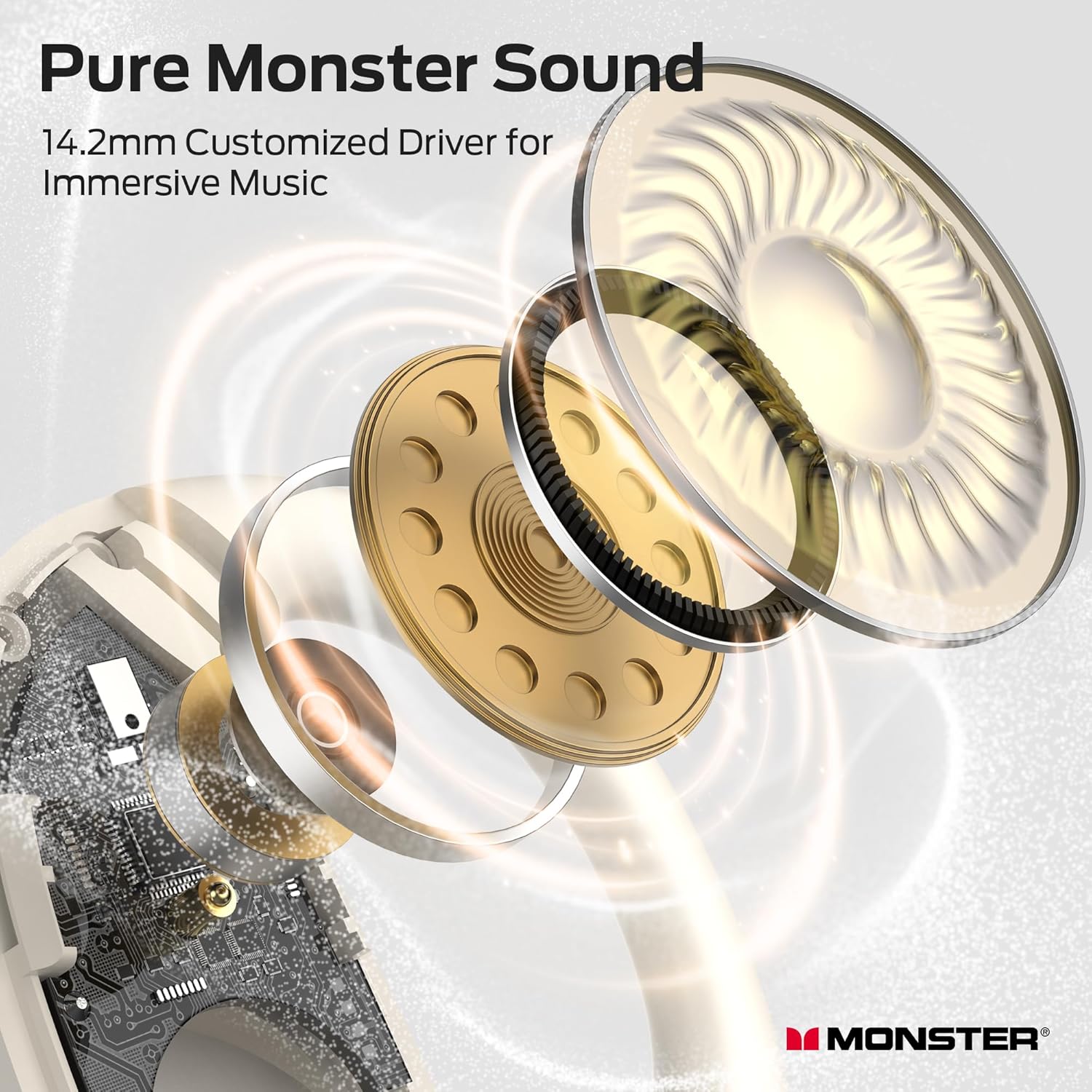
Image: An intricate exploded diagram showcasing the 14.2mm customized driver and other internal components of the Monster Open Ear AC330, illustrating its audio engineering.
8. വാറൻ്റിയും പിന്തുണയും
For warranty information and customer support, please refer to the documentation included with your product or visit the official Monster webസൈറ്റ്. നിങ്ങൾക്ക് സന്ദർശിക്കാനും കഴിയും ആമസോണിലെ മോൺസ്റ്റർ സ്റ്റോർ കൂടുതൽ ഉൽപ്പന്ന വിശദാംശങ്ങൾക്കും പിന്തുണാ ഉറവിടങ്ങൾക്കും.
If you require further assistance, please contact Monster customer service directly.
Ask a question about this manual
Ask about setup, troubleshooting, compatibility, parts, safety, or missing instructions. Manuals+ will review the question and use this page’s manual context to help answer it.