
ആമുഖം
The ARCTIC Liquid Freezer III Pro 420 A-RGB is an all-in-one (AIO) CPU liquid cooler designed for high-performance computing systems. It features a 420mm radiator with three 140mm A-RGB fans, a PWM-controlled pump, and an integrated VRM fan to ensure optimal thermal management for your CPU and surrounding components. This manual provides detailed instructions for installation, operation, maintenance, and troubleshooting to help you maximize the performance and longevity of your cooler.

Image: The ARCTIC Liquid Freezer III Pro 420 A-RGB AIO CPU Cooler, showcasing its three large A-RGB fans and the pump/cold plate assembly.
സുരക്ഷാ വിവരങ്ങൾ
- ഇൻസ്റ്റാളേഷൻ അല്ലെങ്കിൽ അറ്റകുറ്റപ്പണികൾ നടത്തുന്നതിന് മുമ്പ് നിങ്ങളുടെ കമ്പ്യൂട്ടറിൽ നിന്ന് എല്ലായ്പ്പോഴും വൈദ്യുതി വിച്ഛേദിക്കുക.
- ഘടകങ്ങൾക്ക് കേടുപാടുകൾ സംഭവിക്കാതിരിക്കാൻ ശ്രദ്ധയോടെ കൈകാര്യം ചെയ്യുക.
- ഇലക്ട്രോസ്റ്റാറ്റിക് ഡിസ്ചാർജ് (ഇഎസ്ഡി) തടയുന്നതിന് ശരിയായ ഗ്രൗണ്ടിംഗ് ഉറപ്പാക്കുക.
- കുട്ടികൾക്കും വളർത്തുമൃഗങ്ങൾക്കും ലഭ്യമാകാതെ സൂക്ഷിക്കുക.
- സീൽ ചെയ്ത ലിക്വിഡ് കൂളിംഗ് ലൂപ്പ് തുറക്കാനോ പരിഷ്ക്കരിക്കാനോ ശ്രമിക്കരുത്.
- Verify case compatibility before installation, paying close attention to radiator and fan dimensions.
പാക്കേജ് ഉള്ളടക്കം
The ARCTIC Liquid Freezer III Pro 420 A-RGB package includes the following components:
- Liquid Freezer III 420 A-RGB AIO CPU Cooler (pre-assembled with fans and pump)
- Mounting hardware for AMD AM5/AM4 and Intel LGA1851/1700 sockets
- ARCTIC MX-6 thermal paste (pre-applied or included in tube)
- ഉപയോക്തൃ മാനുവൽ (ഈ പ്രമാണം)
സ്പെസിഫിക്കേഷനുകൾ
| ഫീച്ചർ | വിശദാംശങ്ങൾ |
|---|---|
| മോഡൽ നമ്പർ | ACFRE00185A |
| കൂളർ തരം | All-in-One (AIO) Liquid CPU Cooler |
| റേഡിയേറ്റർ വലുപ്പം | 420 mm (38 mm thick) |
| ഫാൻ തരം | 3 x 140 mm ARCTIC P14 Pro A-RGB Fans |
| ഫാൻ വേഗത | 400-2500 RPM (PWM controlled) |
| എയർ ഫ്ലോ | 110 CFM (186 m³ / h) |
| സ്റ്റാറ്റിക് പ്രഷർ | 5.2 മി.മീ. H₂O |
| ശബ്ദ നില | 1 സോണുകൾ |
| പമ്പ് തരം | PWM പമ്പ് |
| വിആർഎം ഫാൻ | Integrated, PWM controlled |
| അനുയോജ്യത | AMD AM5/AM4, Intel LGA1851/1700 (with Contact Frame) |
| ഉൽപ്പന്ന അളവുകൾ (L x W x H) | 18.03 x 5.43 x 2.68 ഇഞ്ച് (458 x 138 x 68 മിമി) |
| ഭാരം | 5.2 പൗണ്ട് (2.36 കി.ഗ്രാം) |
| പവർ കണക്റ്റർ | 4-പിൻ |
| വാല്യംtage | 12 വോൾട്ട് |
| വാട്ട്tage | 4.2 W |
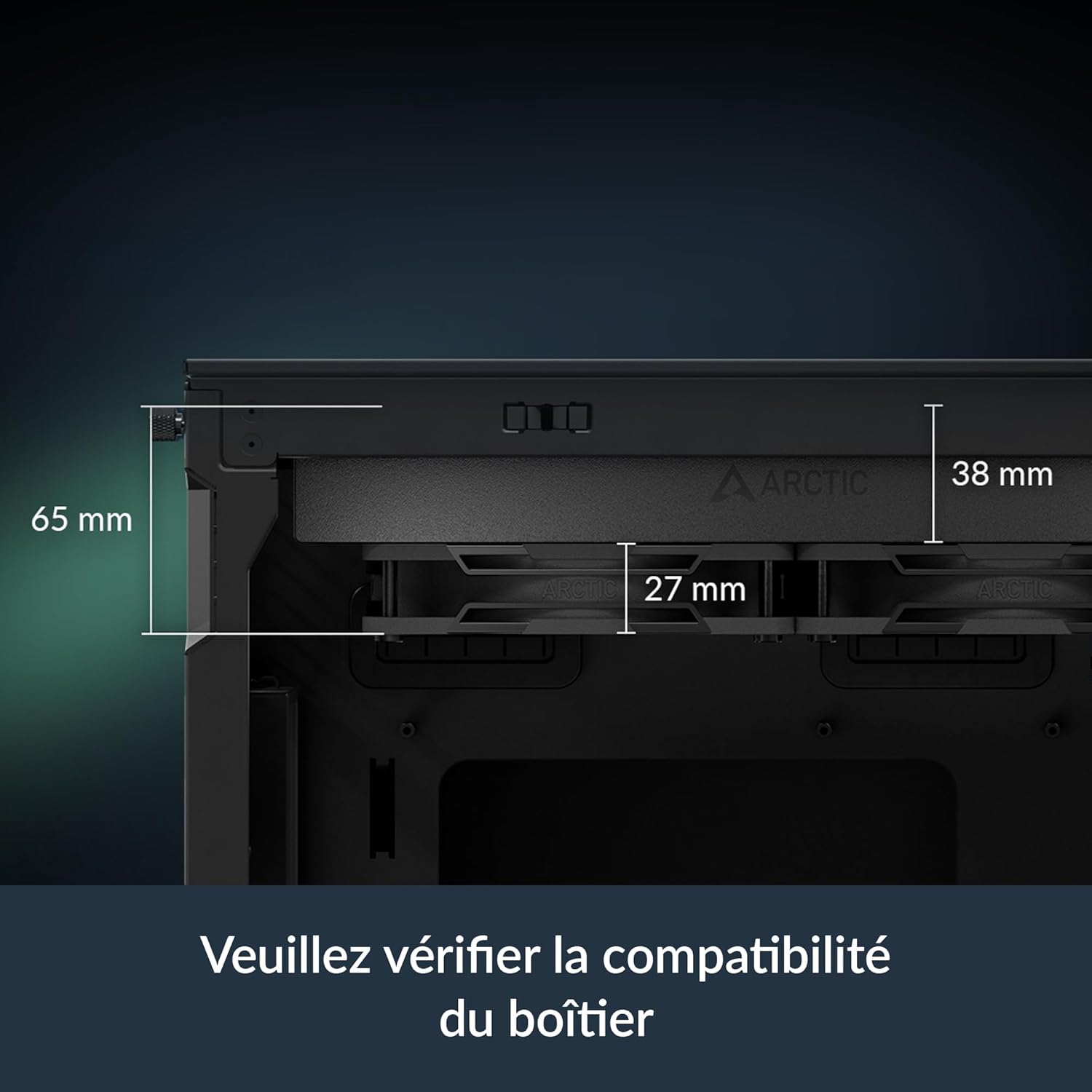
Image: Diagram illustrating the dimensions of the radiator (38mm thick) and the total height with fans (65mm), emphasizing the need to check case compatibility.
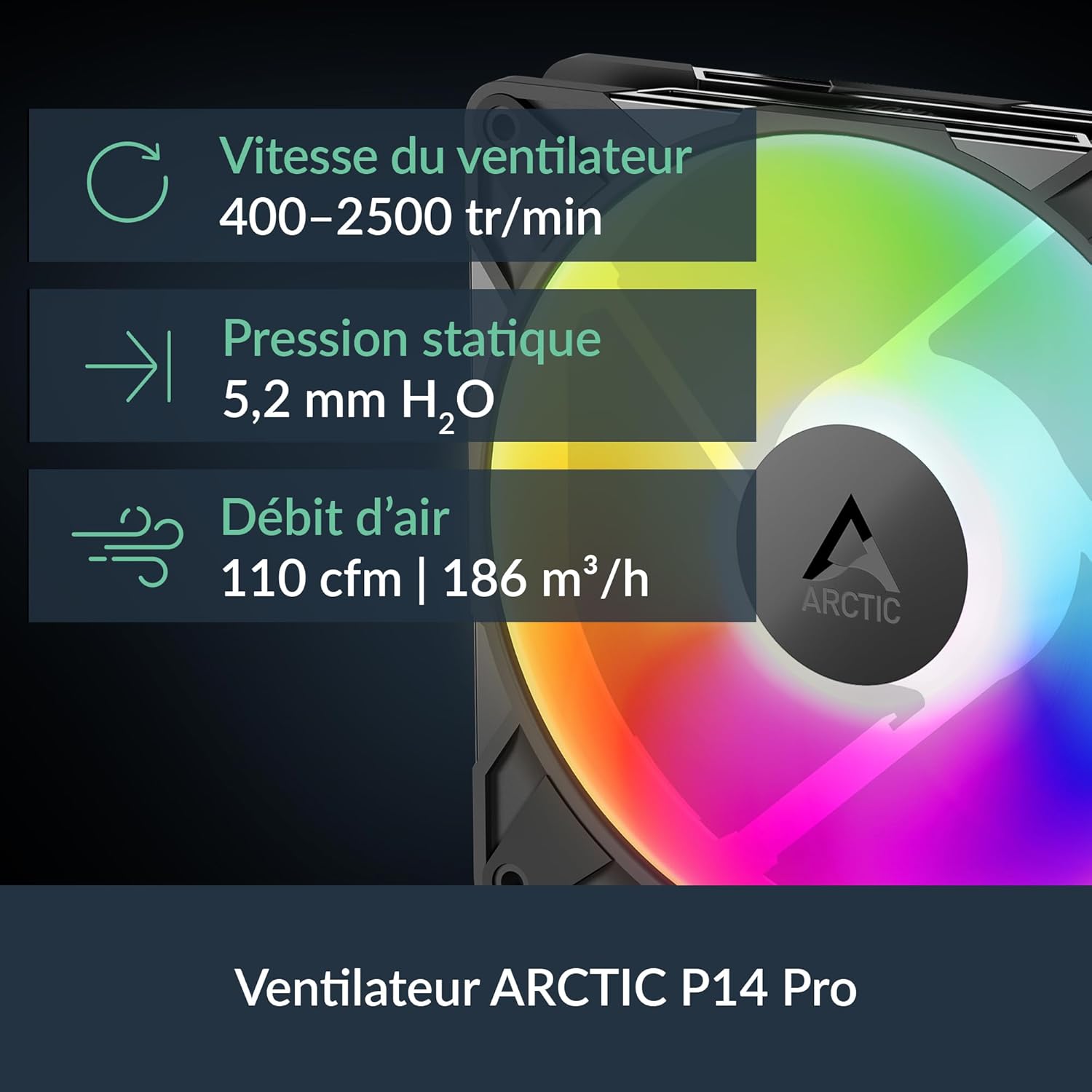
Image: Visual representation of the ARCTIC P14 Pro fan, highlighting its key specifications: fan speed (400-2500 RPM), static pressure (5.2 mm H₂O), and airflow (110 CFM).
സജ്ജീകരണ ഗൈഡ്
Follow these steps for proper installation of your ARCTIC Liquid Freezer III Pro 420 A-RGB cooler. It is highly recommended to consult your motherboard and PC case manuals for specific instructions related to fan headers, mounting points, and clearance.
1. നിങ്ങളുടെ സിസ്റ്റം തയ്യാറാക്കുക
- നിങ്ങളുടെ കമ്പ്യൂട്ടർ ഓഫ് ചെയ്ത് എല്ലാ കേബിളുകളും വിച്ഛേദിക്കുക.
- Open your PC case and remove any existing CPU cooler. Clean the CPU surface thoroughly to remove old thermal paste.
- Ensure your PC case has adequate clearance for the 420mm radiator (18.03 x 5.43 x 2.68 inches or 458 x 138 x 68 mm).
2. മൗണ്ടിംഗ് ഹാർഡ്വെയർ ഇൻസ്റ്റാൾ ചെയ്യുക
The Liquid Freezer III Pro 420 A-RGB supports both AMD and Intel platforms. Use the appropriate mounting hardware for your CPU socket.
For Intel LGA1851/1700:
- Install the provided Intel contact frame onto your motherboard. This optimizes contact pressure for better thermal performance and CPU longevity.
- Secure the backplate and standoffs according to the instructions provided with the cooler.
AMD AM5/AM4 ന്:
- Utilize the native offset mounting design. This shifts the cold plate center towards the CPU hotspot for more efficient heat transfer.
- Attach the appropriate AMD mounting brackets and secure the backplate and standoffs.

Image: Diagram illustrating the native offset mounting for AMD AM5 and Intel LGA1851, showing how the cold plate is positioned over the CPU hotspot for optimal heat transfer.

ചിത്രം: ക്ലോസ്-അപ്പ് view of the Intel LGA1851/1700 contact frame, demonstrating how it improves contact and pressure distribution on the CPU.

Image: Illustration of applying thermal paste to the CPU, ensuring even coverage for efficient heat transfer.
3. Mount the Radiator and Pump
- Carefully position the radiator in your chosen mounting location (e.g., top of the case). Secure it using the provided screws.
- Align the pump/cold plate assembly with the CPU and gently lower it onto the CPU, ensuring the pre-applied thermal paste makes full contact.
- Secure the pump/cold plate assembly to the mounting hardware using the provided screws. Tighten screws in a cross pattern until snug.
4. കേബിളുകൾ ബന്ധിപ്പിക്കുക
The Liquid Freezer III features integrated cable management, simplifying connections.
- Connect the single All-In-One 4-pin PWM cable from the cooler to your motherboard's CPU_FAN or AIO_PUMP header. This cable controls the pump, radiator fans, and VRM fan.
- For A-RGB lighting, connect the A-RGB cable to a compatible 3-pin 5V A-RGB header on your motherboard.
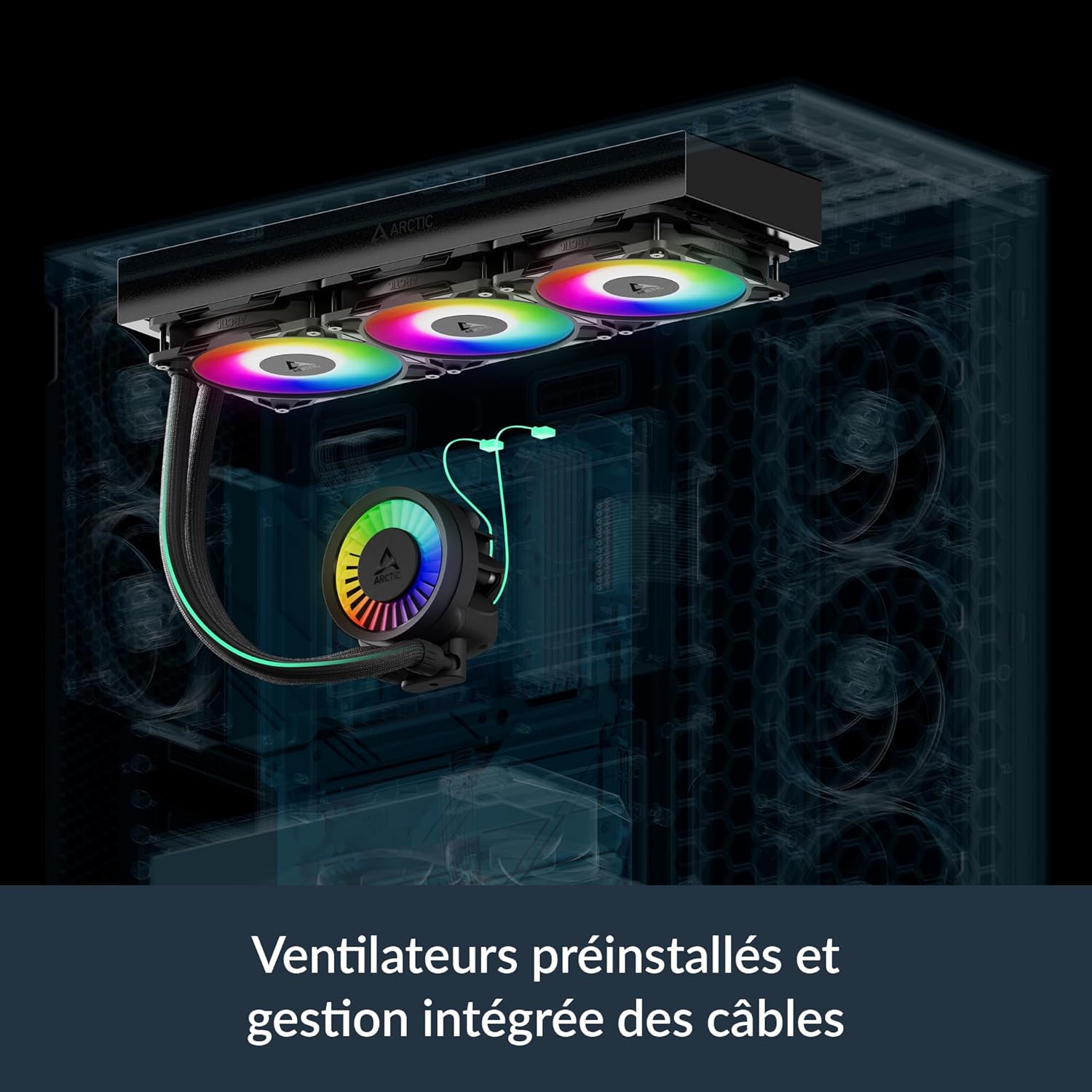
Image: Illustration showing the pre-installed fans and the integrated cable management system, where PWM cables are routed within the hose sleeving for a cleaner build.

Image: Diagram showing the various cable connections for the VRM fan, radiator fans, and pump, highlighting the simplified All-In-One connection option.
പ്രവർത്തന നിർദ്ദേശങ്ങൾ
Fan and Pump Control (PWM)
The ARCTIC Liquid Freezer III Pro 420 A-RGB utilizes Pulse Width Modulation (PWM) for dynamic control of fan and pump speeds. This allows your motherboard to adjust cooling performance based on CPU temperature, optimizing for both cooling efficiency and noise levels.
- ബയോസ്/യുഇഎഫ്ഐ സജ്ജീകരണങ്ങൾ: Access your motherboard's BIOS/UEFI settings to configure fan curves. It is recommended to set the CPU_FAN header to PWM mode and adjust the fan curve to your preference. A more aggressive curve will provide better cooling under load, while a less aggressive curve will result in quieter operation at lower temperatures.
- Integrated VRM Fan: The integrated VRM fan is also PWM-controlled and helps to cool the voltage regulator modules on your motherboard, ensuring stable performance, especially during overclocking.

Image: Bar chart comparing VRM temperatures with Liquid Freezer III Pro, Liquid Freezer II, and without active ventilation, demonstrating the effectiveness of the integrated VRM fan.

Image: Performance comparison charts showing CPU temperatures for Intel and AMD processors under full load and normalized noise levels, highlighting the cooler's efficiency.
A-RGB Lighting Control
The A-RGB fans and pump head feature individually addressable LEDs, allowing for customizable lighting effects.
- മദർബോർഡ് സോഫ്റ്റ്വെയർ: Control the A-RGB lighting using your motherboard's RGB synchronization software (e.g., ASUS Aura Sync, GIGABYTE RGB Fusion, MSI Mystic Light Sync, ASRock Polychrome Sync). Ensure the A-RGB cable is connected to the correct 3-pin 5V A-RGB header.
- Third-Party Controllers: If your motherboard does not have a compatible A-RGB header, you may use a separate A-RGB controller (not included) to manage the lighting effects.
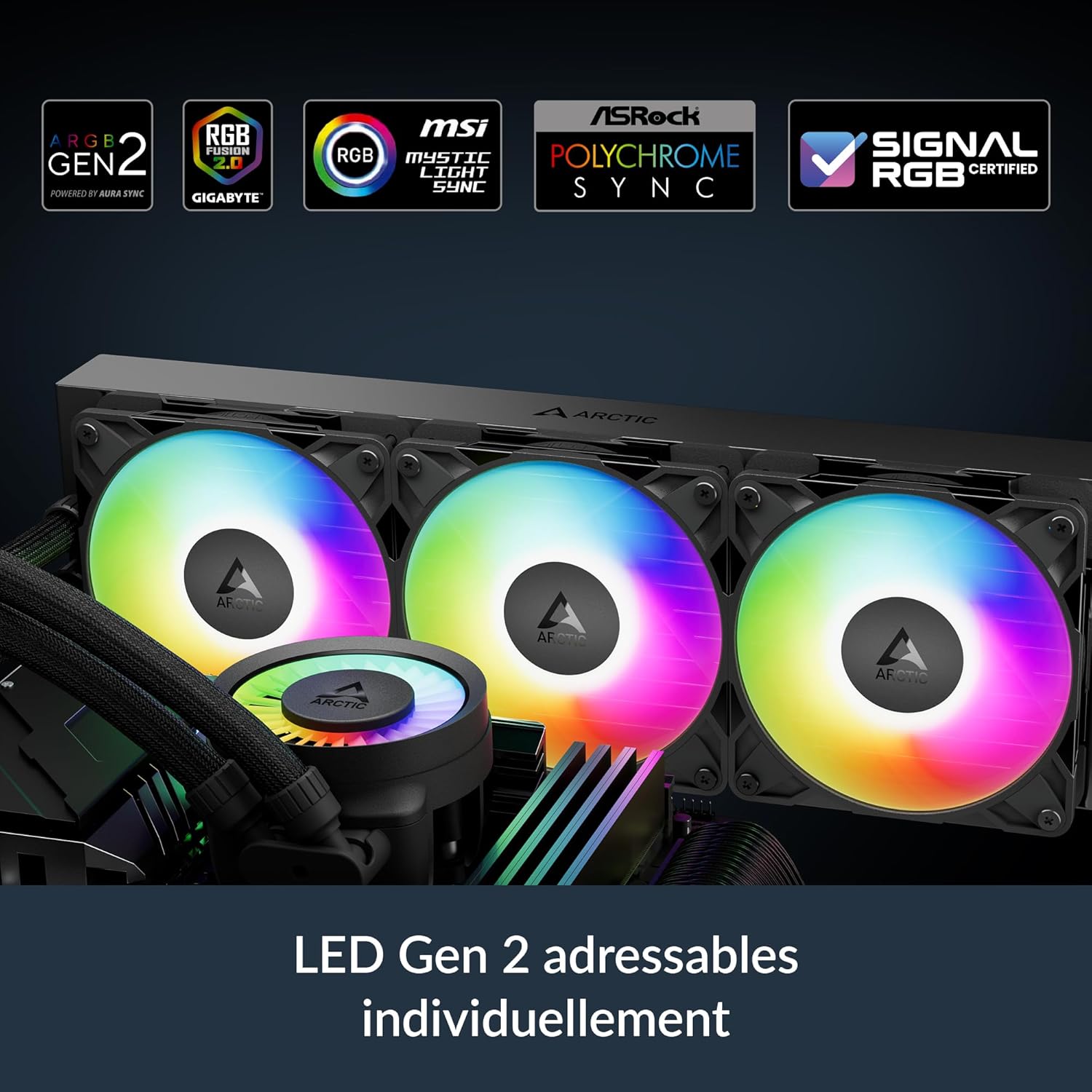
Image: Close-up of the pump head and fans displaying vibrant, individually addressable RGB lighting, indicating compatibility with various motherboard RGB software.
മെയിൻ്റനൻസ്
Regular maintenance ensures optimal performance and longevity of your Liquid Freezer III Pro 420 A-RGB cooler.
- പൊടി വൃത്തിയാക്കൽ: Periodically clean dust from the radiator fins and fan blades using compressed air or a soft brush. Ensure fans are not spinning during cleaning to prevent damage.
- തെർമൽ പേസ്റ്റ്: While the pre-applied thermal paste is high quality, consider reapplying fresh thermal paste if you ever remove the cold plate from the CPU for maintenance or upgrades.
- Liquid Loop: The liquid cooling loop is sealed and requires no refilling or maintenance. Do not attempt to open it.
ട്രബിൾഷൂട്ടിംഗ്
| പ്രശ്നം | സാധ്യമായ കാരണം | പരിഹാരം |
|---|---|---|
| ഉയർന്ന സിപിയു താപനിലകൾ | Improper cold plate contact, insufficient thermal paste, dust buildup on radiator, incorrect fan curve settings. | Re-seat cooler, reapply thermal paste, clean radiator/fans, adjust fan curves in BIOS/UEFI. |
| ഫാനുകൾ/പമ്പ് കറങ്ങുന്നില്ല | Loose or incorrect cable connection, disabled fan header in BIOS. | Check all 4-pin PWM connections, ensure CPU_FAN header is enabled and set to PWM. |
| A-RGB Lighting Not Working | Incorrect A-RGB header connection, incompatible motherboard software, faulty A-RGB header. | Verify 3-pin 5V A-RGB connection, ensure motherboard software is updated and configured correctly. |
| അമിതമായ ശബ്ദം | Fans running at high RPM, pump noise, loose components, air bubbles in loop (rare). | Adjust fan curves for quieter operation, ensure all screws are tightened, gently tilt case to dislodge air bubbles. |
| ശാരീരികക്ഷമതാ പ്രശ്നങ്ങൾ | Case not compatible with 420mm radiator or thick radiator/fan combo. | Verify case specifications for radiator support before purchase. Some cases may require modifications or may not be compatible. |
വാറൻ്റി
The ARCTIC Liquid Freezer III Pro 420 A-RGB is covered by a 6 വർഷത്തെ പരിമിത വാറൻ്റി from the date of purchase. This warranty covers defects in materials and workmanship under normal use. Please retain your proof of purchase for warranty claims. The warranty does not cover damage resulting from improper installation, accident, abuse, misuse, natural disaster, or unauthorized modification.
Image: The product box displaying the "6 Years Warranty" logo, indicating the extended warranty period for the cooler.
പിന്തുണ
For technical support, warranty claims, or further assistance, please visit the official ARCTIC webസൈറ്റ് അല്ലെങ്കിൽ അവരുടെ ഉപഭോക്തൃ സേവനവുമായി ബന്ധപ്പെടുക:
- ARCTIC Official Webസൈറ്റ്: www.arctic.ac
- റഫർ ചെയ്യുക webനിങ്ങളുടെ പ്രദേശത്തെ ബന്ധപ്പെടാനുള്ള വിവരങ്ങൾക്കായി സൈറ്റ് സന്ദർശിക്കുക.