
ആമുഖം
This document serves as the instruction manual for the Generic Replacement Remote Control, designed for various Furrion TV models including FEHD19S0N, FEFD22S0A, and FEFS55F7A LCD LED HDTVs. This remote is a dedicated replacement and aims to provide essential control functions for your television, projector, or audio/video players.
It is important to note that as a replacement unit, some advanced or specific functions present on your original remote control may not be available or fully supported by this replacement. This remote is tested for functionality before dispatch to ensure stable performance and a farther transmitting distance.
Key features include: no programming or setup required (simply install batteries), durable ABS material construction, and sensitive, low power consumption operation.
ഉൽപ്പന്നം കഴിഞ്ഞുview

ചിത്രം 1: മുൻഭാഗം view of the replacement remote control. This image displays the full layout of the remote, including the power button, numerical keypad, navigation buttons, volume and channel controls, and various function buttons for TV, projector, and audio/video players.
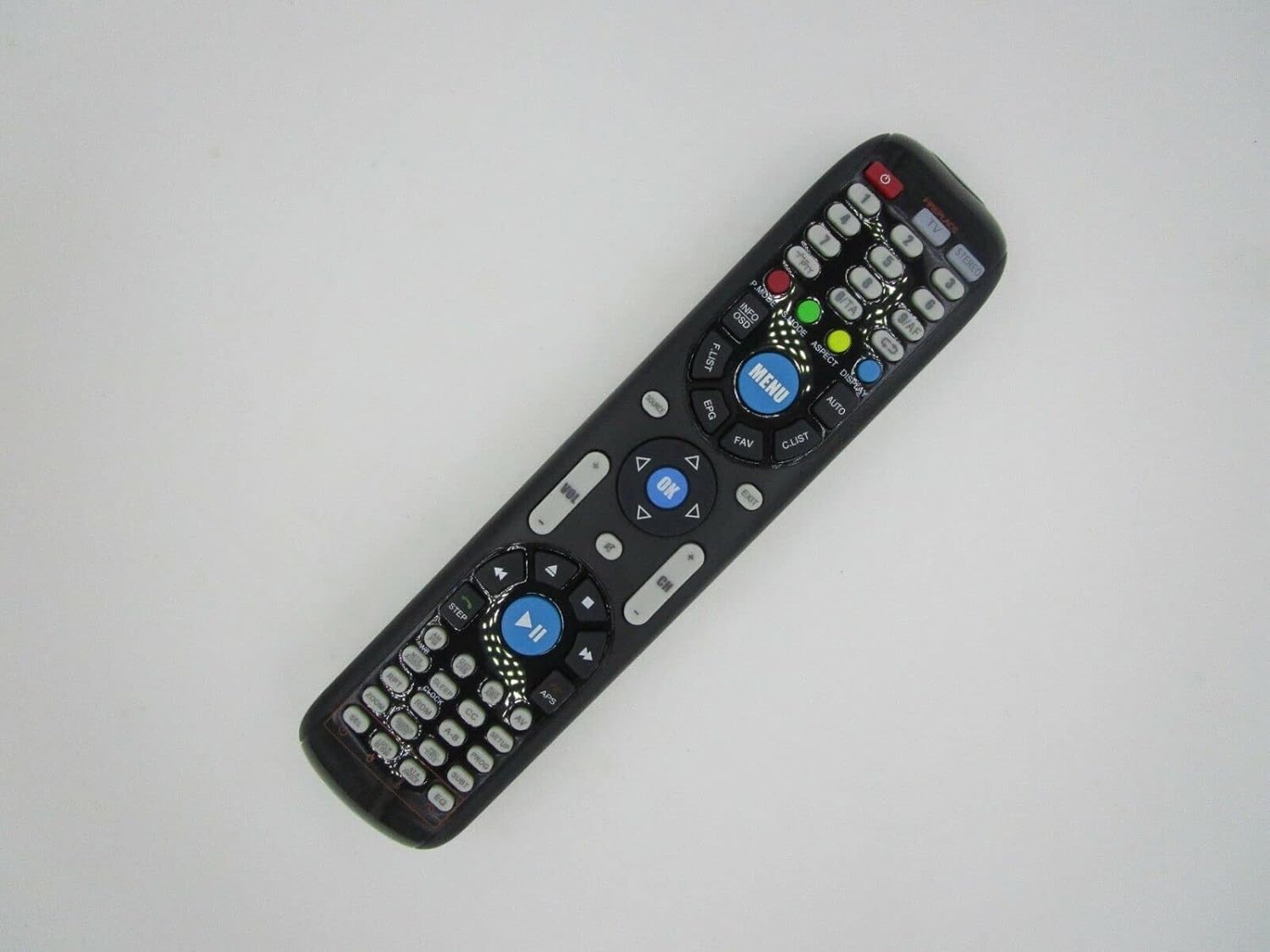
ചിത്രം 2: കോണാകൃതിയിലുള്ളത് view of the replacement remote control. This perspective highlights the ergonomic shape and the arrangement of buttons from a slightly elevated side angle, providing a better sense of its physical form.

ചിത്രം 3: ക്ലോസപ്പ് view of the central buttons on the replacement remote control. This detailed image focuses on the MENU, OK, navigation (up, down, left, right), volume, and channel buttons, along with playback controls, illustrating their labels and layout for easy identification.
സജ്ജമാക്കുക
ബാറ്ററി ഇൻസ്റ്റാളേഷൻ
This remote control requires batteries for operation, which are not included in the package. Please ensure you have the correct type and quantity of batteries before proceeding.
- റിമോട്ട് കൺട്രോളിന്റെ പിൻഭാഗത്ത് ബാറ്ററി കമ്പാർട്ട്മെന്റ് കണ്ടെത്തുക.
- സ്ലൈഡ് ബാറ്ററി കമ്പാർട്ട്മെന്റ് കവർ തുറക്കുക.
- Insert the new batteries, ensuring the positive (+) and negative (-) terminals align correctly with the markings inside the compartment.
- ബാറ്ററി കമ്പാർട്ട്മെൻ്റ് കവർ സുരക്ഷിതമായി അടയ്ക്കുക.
Important: Do not mix old and new batteries or different types of batteries. This can lead to reduced performance or battery leakage.
പ്രാരംഭ ഉപയോഗം
This replacement remote control is designed for immediate use with compatible models. No programming or complex setup is required. Once batteries are correctly installed, the remote should be ready to operate your device.
പ്രവർത്തന നിർദ്ദേശങ്ങൾ
Point the remote control directly at the infrared (IR) receiver on your television or compatible device. Ensure there are no obstructions between the remote and the device.
അടിസ്ഥാന പ്രവർത്തനങ്ങൾ
- പവർ ബട്ടൺ: ഉപകരണം ഓണാക്കുകയോ ഓഫാക്കുകയോ ചെയ്യുന്നു.
- Numerical Keypad (0-9): Used for direct channel input or other numerical selections.
- വോളിയം കൂട്ടുക/താഴ്ത്തുക (VOL +/-): ഓഡിയോ വോളിയം ക്രമീകരിക്കുന്നു.
- ചാനൽ മുകളിലേക്കും/താഴേക്കും (CH +/-): ടെലിവിഷൻ ചാനൽ മാറ്റുന്നു.
- നിശബ്ദ ബട്ടൺ: ഓഡിയോ മ്യൂട്ട് ഓൺ/ഓഫ് ടോഗിൾ ചെയ്യുന്നു.
- മെനു ബട്ടൺ: Accesses the device's main menu.
- നാവിഗേഷൻ ബട്ടണുകൾ (മുകളിലേക്ക്, താഴേക്ക്, ഇടത്, വലത്): Used to navigate through menus and options.
- ശരി/നൽകുക ബട്ടൺ: മെനുകളിലെ തിരഞ്ഞെടുപ്പുകൾ സ്ഥിരീകരിക്കുന്നു.
- ഉറവിടം/ഇൻപുട്ട് ബട്ടൺ: Cycles through available input sources (e.g., HDMI, AV).
- പ്ലേബാക്ക് നിയന്ത്രണങ്ങൾ (പ്ലേ ചെയ്യുക, താൽക്കാലികമായി നിർത്തുക, നിർത്തുക, റിവൈൻഡ് ചെയ്യുക, ഫാസ്റ്റ് ഫോർവേഡ് ചെയ്യുക): For controlling media playback on compatible devices.
Please note that the functionality of specific buttons may vary slightly depending on the model of your television or device. As a replacement remote, some advanced or smart TV functions may not be supported.
മെയിൻ്റനൻസ്
ശരിയായ പരിചരണവും പരിപാലനവും നിങ്ങളുടെ റിമോട്ട് കൺട്രോളിന്റെ ആയുസ്സ് വർദ്ധിപ്പിക്കും.
- വൃത്തിയാക്കൽ: Use a soft, dry cloth to clean the remote control. For stubborn dirt, a slightly damp cloth can be used, but ensure no moisture enters the remote. Do not use abrasive cleaners or solvents.
- ബാറ്ററി മാറ്റിസ്ഥാപിക്കൽ: Replace batteries when the remote's performance diminishes or it stops responding. Always replace all batteries at the same time with new ones of the same type.
- സംഭരണം: If the remote control will not be used for an extended period, it is advisable to remove the batteries to prevent leakage and potential damage to the remote.
- കേടുപാടുകൾ ഒഴിവാക്കുക: റിമോട്ട് കൺട്രോൾ താഴെയിടരുത്, അത് തീവ്രമായ താപനിലയിൽ തുറന്നുകാട്ടരുത്, അല്ലെങ്കിൽ വെള്ളത്തിൽ മുക്കരുത്.
ട്രബിൾഷൂട്ടിംഗ്
റിമോട്ട് പ്രതികരിക്കുന്നില്ല
- ബാറ്ററികൾ പരിശോധിക്കുക: Ensure batteries are correctly installed with the correct polarity (+/-) and are not depleted. Replace with fresh batteries if necessary.
- വീക്ഷണരേഖ: Make sure there are no obstructions between the remote control and the device's IR receiver. The remote requires a clear line of sight.
- ദൂരം: റിമോട്ട് കൺട്രോളിന്റെ ഫലപ്രദമായ പ്രവർത്തന പരിധിക്കുള്ളിലാണെന്ന് ഉറപ്പാക്കുക.
- ഉപകരണ ശക്തി: Confirm that the television or device you are trying to control is powered on and functioning correctly.
Certain Functions Not Working
As a replacement remote, it may not support all functions of your original remote control. This is not indicative of a defect. Please refer to the product description or contact the seller if you have specific concerns about unsupported functions.
If the issue persists after following these steps, it is recommended to verify the compatibility of the remote with your specific device model or contact customer support.
സ്പെസിഫിക്കേഷനുകൾ
| സ്വത്ത് | മൂല്യം |
|---|---|
| ബ്രാൻഡ് | ജനറിക് |
| അനുയോജ്യമായ ഉപകരണങ്ങൾ | Television, Audio/Video Players, Projector |
| വയർലെസ് കമ്മ്യൂണിക്കേഷൻ | ഇൻഫ്രാറെഡ് (IR) |
| മെറ്റീരിയൽ | എബിഎസ്/പ്ലാസ്റ്റിക് |
| ബാറ്ററി ആവശ്യകത | ഉൾപ്പെടുത്തിയിട്ടില്ല |
| പിന്തുണയ്ക്കുന്ന ഉപകരണങ്ങളുടെ പരമാവധി എണ്ണം | 1 |
| നിറം | FEFD22S0A & FEFD22S0D (refers to compatible models) |
വാറൻ്റിയും പിന്തുണയും
This product is a replacement remote control. For specific warranty information, please refer to the terms and conditions provided by the seller at the time of purchase, or contact the seller directly.
For further assistance, troubleshooting not covered in this manual, or inquiries regarding compatibility, please reach out to the customer support channel provided by the retailer or seller from whom you purchased this remote control. Providing your original remote part number or unit model can assist in resolving specific issues.